
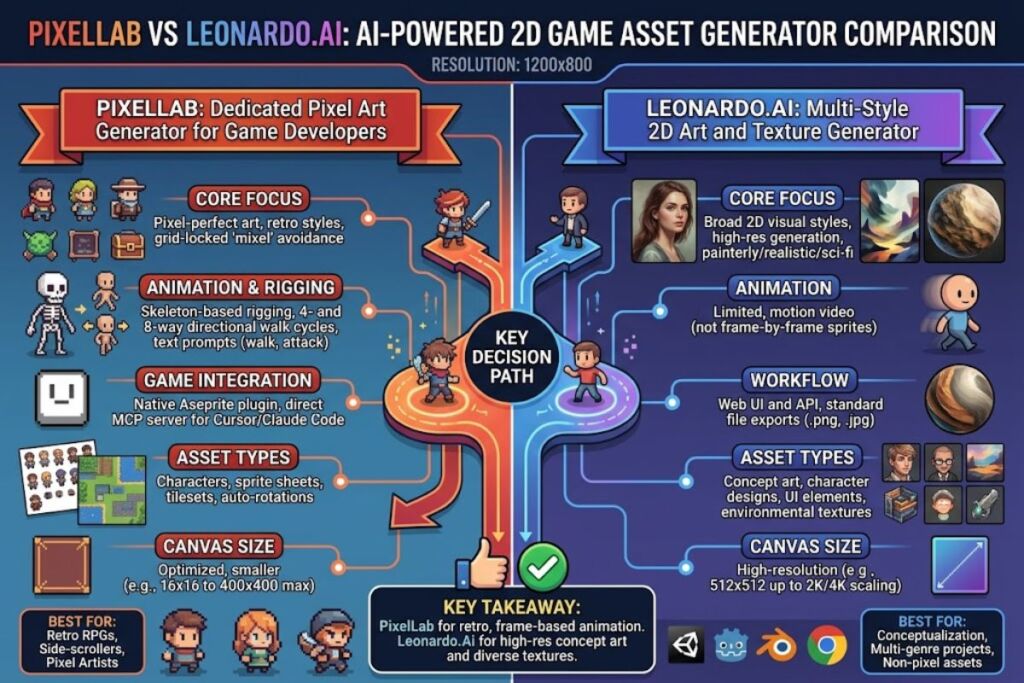
PixelLab is an AI-powered pixel art generator built specifically for game developers. It produces characters, animations, tilesets, and maps from text prompts using a dedicated pixel-art model called PixFlux, and it exports assets ready for use in Unity, Godot, and other game engines.
What Is PixelLab?
PixelLab is a specialized AI image generation platform that creates pixel-art game assets — characters, items, backgrounds, tilesets, and animated sprite sheets — from text prompts and reference images, instead of general-purpose art.
PixelLab separates itself from broad tools like Midjourney or general Stable Diffusion interfaces by training and tuning its output specifically for pixel-perfect art. General image generators frequently produce anti-aliased edges, inconsistent pixel grids, and blended colors — a defect pixel artists call “mixels.” Independent reviewers testing PixelLab against Midjourney and Gemini’s image models report that general tools struggle with transparency and mixels, while PixelLab holds a clean pixel grid. PixelLab runs its generation through PixFlux, an in-house model built for this exact task, and layers game-specific tooling — skeleton-based animation rigs, directional rotation, and tileset generation — on top of it.
| Attribute | Value |
|---|---|
| Category | AI pixel art / 2D game asset generator |
| Core model | PixFlux (proprietary, in-house) |
| Platforms | Web, Windows, macOS, Linux — browser-based, no local GPU required |
| Also ships as | An extension inside Aseprite for in-editor generation |
| Key feature | Skeleton-based character animation with 4- and 8-directional rotation |
| Free tier | 40 fast generations, then 5 slow generations per day, no credit card required |
| Commercial use | Generated assets are cleared for commercial use in shipped games; using outputs to train other AI models is prohibited |
| API access | REST API documented at api.pixellab.ai/v2/docs, priced per endpoint |
| Founding year / company | Not publicly disclosed by the vendor — unable to verify. Check PixelLab’s official “About” page for current details. |
Verified as of September 2026.
What Are PixelLab’s Key Features?
PixelLab covers four core workflows: text-to-sprite generation, skeleton-based animation, directional rotation, and tileset/map creation, plus a code-editor integration for developers who build with AI assistants.
- Generate characters and objects directly from text prompts, with an optional style-reference image to lock a consistent art direction across a project.
- Render backgrounds and standalone illustrations up to 400×400 pixels using the PixFlux model.
- Animate characters by typing an action — prompts like “walk,” “jump,” or “attack” trigger automatic animation generation — or by using skeleton-based controls for precise, custom movement.
- Rotate a single character image into 4-direction or 8-direction walking sprites in one click, suited for command RPGs and top-down action games, with isometric perspective support for tilted top-down titles.
- Chain tileset generation through the MCP server by referencing a previously generated base tile to build terrain transitions on top of it.
- Integrate PixelLab into an AI coding workflow: the MCP connection works with Cursor and Claude Code, so a prompt like “create a walking animation for the protagonist” generates the sprite and the implementation code for Unity or Godot in the same request.
- Edit existing frames without regenerating a full sprite sheet — the object editor can add or change items, like a sword or a hat, across every frame of an animation at once.
How Much Does PixelLab Cost?
PixelLab runs on a freemium subscription model: a $0 free trial with a capped daily generation limit, and paid tiers that unlock higher monthly generation caps, priority processing, and team collaboration.
Public sources report different tier names and generation caps for PixelLab as of 2026, which points to the vendor having adjusted plans since some third-party listings were last updated. The structure below reflects the most detailed published breakdown; confirm exact current numbers on PixelLab’s official pricing page before purchasing.
- Free Trial ($0/month): 40 high-speed generations, followed by 5 slow generations per day. Covers basic image generation, rotation, and editing tools.
- Entry paid tier (reported as “Hobbyist” or “Pixel Apprentice,” roughly $12/month): Character generation, general image generation up to a 128×128 max area, rotation generation, and Discord support, with a monthly generation cap reported between 1,000 and 2,000 images depending on the source. Annual billing carries roughly a 25% discount over monthly billing.
- Mid paid tier (reported as “Pro,” roughly $29–$35/month): All entry-tier benefits, plus a priority generation queue, priority Discord support, early access to experimental models, and access to experimental settings, with a monthly cap reported around 3,000 generations.
- Top paid tier (reported as “Pixel Architect” or “Team,” roughly $50/month): Highest processing priority, up to 20 concurrent jobs, and team collaboration features, plus the ability to vote on the product roadmap alongside the development team.
- API pricing: billed separately from the subscription tiers — low per-generation costs for small sprites, priced per call and scaled to output size, so a high-volume programmatic pipeline costs differently than the subscription plans above.
Pricing verified as of September 2026, cross-referenced across multiple third-party listings. Source figures conflicted on exact tier names and generation caps — confirm final numbers on PixelLab’s official pricing page before subscribing.
What Are the Pros and Cons of PixelLab?
PixelLab’s core advantage is style-consistent, genuinely pixel-perfect output built for game pipelines; its main drawback is a web interface that trails the tool’s own model quality.
Pros:
- Produces genuinely pixel-perfect art without the anti-aliasing artifacts common in general image generators, per side-by-side comparisons against Midjourney and Gemini’s image models.
- Covers the full 2D asset pipeline in one platform — characters, animation, rotation, tilesets, and maps — instead of requiring separate tools for each asset type.
- MCP integration puts asset generation inside the same editor as the game’s code, removing the export-and-import step between an art tool and Cursor, Claude Code, or a game engine.
- Commercial licensing is included on paid tiers, so shipped, for-sale indie games can use generated assets without a separate licensing purchase.
Cons:
- The web interface is reportedly a lower development priority than the underlying models, since PixelLab is built by a small team that prioritizes model quality over web polish. Workaround: the Aseprite extension gives artists a more mature, professional-grade editing surface for the same generation engine.
- Free-tier image generation caps at a 128×128–400×400 pixel working area depending on the tool used, which is restrictive for large single-scene backgrounds. Workaround: upgrade to a paid tier for larger canvas sizes, or generate a scene in tiled sections and assemble it in Aseprite or Tiled.
- The subscription model bills monthly regardless of actual usage, so a low-generation month still costs the full tier price. Workaround: teams with irregular, bursty generation needs can use the pay-per-call API instead of a flat subscription.
- Reported pricing and generation caps are inconsistent across public listings, which makes budget planning harder before signing up. Workaround: confirm the live tier structure on PixelLab’s official pricing page rather than relying on third-party summaries — including this one.
How Does PixelLab Compare to Leonardo.Ai?
PixelLab wins on pixel-art accuracy and game-specific tooling; Leonardo.Ai wins on style breadth and general-purpose 2D texture generation.
| Attribute | PixelLab | Leonardo.Ai |
|---|---|---|
| Primary focus | Pixel art game assets exclusively | General 2D generation plus a texture-generation mode for tileable PBR material maps |
| Animation tooling | Skeleton-based animation with text-prompt triggers (“walk,” “jump,” “attack”) | Not a core focus — primarily static image and texture output |
| Directional sprites | 4- and 8-direction rotation from a single reference image | Not a native feature |
| Code-editor integration | MCP support for Cursor and Claude Code | Not documented as a native feature |
| Best for | Pixel-art specific 2D game projects | Solo devs who need both general 2D art and tileable surface textures from one subscription |
| Reported starting price | ~$12/month (see pricing caveats above) | Free daily tokens, paid plans roughly $12–$60/month |
Read the full breakdown in Leonardo.Ai vs PixelLab: Which AI Art Tool Fits Your Game?
Who Should Use PixelLab?
PixelLab fits teams and individuals building 2D games in a pixel-art style who need animated, style-consistent sprites faster than manual pixel art production allows.
- Solo indie developers shipping a pixel-art RPG or platformer who need character sprite sheets, directional walk cycles, and tilesets without hiring a dedicated pixel artist.
- Small studio art teams using the Aseprite extension to speed up first-pass asset drafts, then hand-finishing the output inside their existing pipeline.
- Developers using AI coding assistants — the Cursor and Claude Code MCP integration fits teams already building gameplay logic with an AI pair-programmer and want asset generation in the same workflow.
- Prototypers and game jam participants who need a full asset set — characters, props, and tiles — inside a 48-to-96-hour development window.
PixelLab is not built for 3D asset pipelines; teams working in 3D should consult Best AI Coding Tools in 2026 for engine-adjacent tooling, or a dedicated 3D generator instead.
What Are the Best Alternatives to PixelLab?
Leonardo.Ai, Scenario, and Retro Diffusion are the three most commonly cited alternatives to PixelLab for AI-generated 2D game art.
- Leonardo.Ai — a general-purpose 2D image generator with a dedicated texture-synthesis mode for tileable PBR materials, better suited to teams that need both concept art and surface textures from one subscription.
- Scenario — a 2D art and asset platform positioned alongside Leonardo.Ai for game-tuned generation, aimed at teams that want custom-trained models on their own art style.
- Retro Diffusion — a pixel-art-focused generator built as a plugin-first alternative for artists working primarily inside Aseprite, aimed at a similar niche to PixelLab’s Aseprite extension.
Compare the full shortlist in Best Free AI Coding Tools for budget-conscious pipelines that mix code and asset generation.
Frequently Asked Questions
Does PixelLab require a credit card to start?
No. The free trial allows 40 fast generations with no credit card required, after which the account drops to a slower daily generation limit.
Can I use PixelLab-generated assets in a commercial game?
Yes. Generated images are cleared for commercial use in games sold by the developer; the only restriction is using the output to train a separate AI model.
Does PixelLab work with Unity and Godot?
PixelLab exports standard sprite sheet formats compatible with both engines, and the MCP integration can generate implementation code for Unity or Godot directly inside Cursor or Claude Code.
Is PixelLab better than using Aseprite manually?
PixelLab is not a replacement for Aseprite — it ships as an extension inside Aseprite, generating a first-pass asset that an artist then edits by hand inside the same editor.
The Bottom Line
PixelLab is the most pixel-accurate AI generator built specifically for 2D game asset production, and its MCP integration with Cursor and Claude Code is not matched by general-purpose competitors like Leonardo.Ai. The free trial’s 40-generation cap is enough to test output quality on a real character sprite before committing to a paid tier — confirm the live pricing page for current tier costs, since third-party sources disagree on exact numbers as of September 2026.