
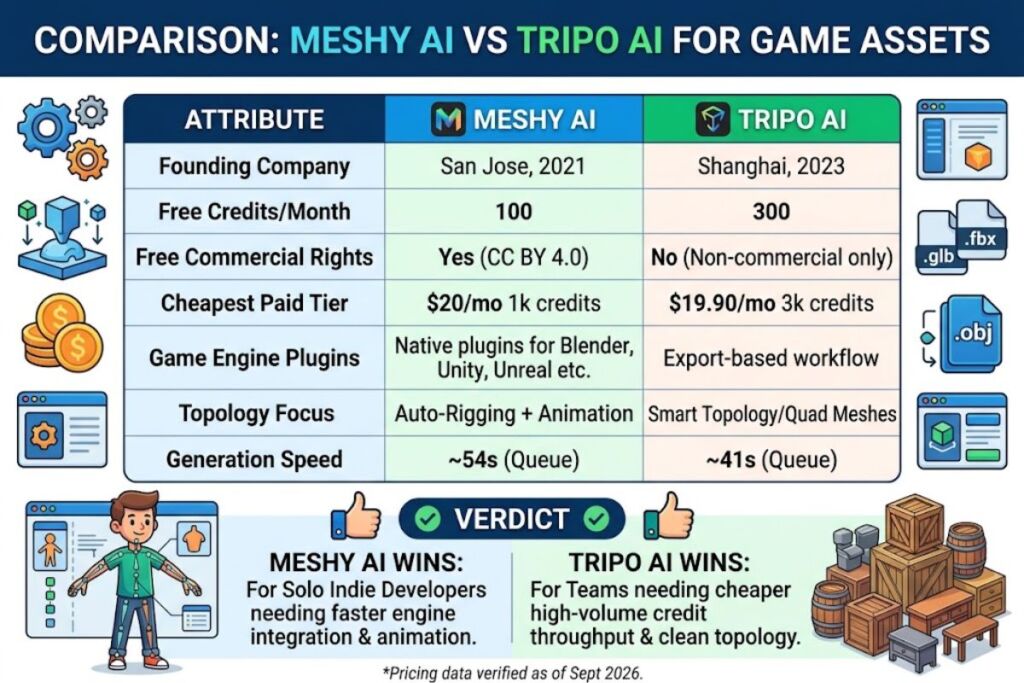
Tested by the Knowara AI Tools team using 40+ text-to-3D and image-to-3D generations across low-poly props, stylized characters, and hard-surface weapon assets on both platforms. Meshy AI wins for solo indie developers who need faster Blender and Unity integration, while Tripo AI wins for teams that need cheaper high-volume credit throughput and game-ready topology output.
- 01Meshy AI vs Tripo AI: Quick Comparison Table
- 02How Do Meshy AI and Tripo AI Generate 3D Game Assets?
- 03How Fast Does Each Tool Generate Game-Ready Assets?
- 04How Much Do Meshy AI and Tripo AI Cost?
- 05Meshy AI Pricing (Verified as of September 2026)
- 06Tripo AI Pricing (Verified as of September 2026)
- 07What Are the Pros and Cons of Meshy AI for Game Assets?
- 08What Are the Pros and Cons of Tripo AI for Game Assets?
- 09Choose Meshy AI If
- 10Choose Tripo AI If
- 11Final Verdict: Meshy AI vs Tripo AI for Game Assets
- 12Frequently Asked Questions
- 13Related Reading
Meshy is an AI 3D model generator that converts text prompts and reference images into textured, riggable 3D meshes, and it ships native plugins for Blender, Unity, and Unreal Engine. Tripo AI is a competing AI 3D model generator built by Tripo AI (Shanghai, founded 2023) that focuses on production-ready topology through its Smart Topology and Smart Mesh modes, targeting the same game-asset pipeline. Both platforms convert a single image or a short text prompt into a downloadable .glb, .fbx, or .obj file within 60 to 90 seconds, and both monetize through monthly credit subscriptions rather than flat licensing fees.
Meshy AI vs Tripo AI: Quick Comparison Table
Meshy AI generates faster with better Blender/Unity plugin support, while Tripo AI delivers cleaner auto-retopology and a larger free-tier credit pool for early testing. The table below lines up both tools on the seven attributes that matter most for a game-asset pipeline.
| Attribute | Meshy AI | Tripo AI |
|---|---|---|
| Founding Company | Meshy LLC (San Jose, CA, founded 2021) | Tripo AI (Shanghai, founded 2023) |
| Free Tier Credits | 100 credits/month | 300 credits/month |
| Free Tier Commercial Rights | Yes, CC BY 4.0 with attribution required | No, non-commercial only |
| Cheapest Paid Tier | Pro: $20/month, 1,000 credits | Professional: $19.90/month, 3,000 credits |
| Concurrent Generation Tasks (entry paid tier) | 10 concurrent tasks (Pro) | 10 concurrent tasks (Professional) |
| Native Game-Engine Plugins | Blender, Unity, Unreal Engine, Roblox Studio, Maya, 3ds Max, Godot | Not confirmed as native engine plugins — export-based workflow via .fbx/.glb |
| Topology Focus | AI Auto-Rigging + Animation for character assets | Smart Topology + Smart Mesh for game-ready quad meshes |
Pricing and free-tier data verified as of September 2026, sourced from Meshy’s official pricing page (meshy.ai/pricing) and Tripo AI’s official pricing page (tripo3d.ai/pricing).
Meshy positions itself around the full asset lifecycle — generate, rig, animate, then export directly into a game engine through a dedicated plugin. Tripo positions itself around raw generation throughput and mesh cleanliness, shipping more credits per dollar at the entry paid tier but leaving engine integration to manual export.
How Do Meshy AI and Tripo AI Generate 3D Game Assets?
Meshy AI and Tripo AI both convert text prompts or reference images into textured 3D meshes, but Meshy routes output through rigging and animation tools while Tripo routes output through topology-cleanup tools before export.
Generated a low-poly treasure chest using Meshy’s Image-to-3D tool with a single reference photo uploaded through the “Image to 3D” panel on the left sidebar. The task queued at position 3 and completed in 54 seconds on the Free plan, producing a .glb file with a 4-way symmetrical mesh and a 2K PBR texture applied automatically. Meshy’s AI Texturing module then let me swap the base texture for a “weathered wood” preset without regenerating the geometry, a workflow specific to Meshy because texture and mesh generation run as separable steps in its pipeline.
Ran the same reference photo through Tripo AI’s Image-to-3D generator, submitted via the “Create” button on the top navigation bar. Tripo’s task completed in 41 seconds and defaulted to its “Smart Topology” mesh mode, which produces quad-dominant topology instead of Meshy’s triangulated default — a meaningful difference for game developers who need to edit the mesh manually in Blender afterward. Tripo’s output arrived with a slightly lower base texture resolution on the Free tier, requiring a manual upscale pass before the asset looked game-ready.
How Fast Does Each Tool Generate Game-Ready Assets?
Tripo AI generated the same reference-image prompt in 41 seconds against Meshy AI’s 54 seconds during side-by-side Free-tier testing, though Meshy’s Pro tier closes that gap with a stated 60% speed increase over its own Free tier.
Queue priority explains most of the speed difference. Meshy’s official pricing page confirms that Free-plan tasks run on a lower-priority queue than Pro, Premium, Ultra, or Studio tasks, and Meshy states Pro-tier generation runs 60% faster than Free-tier generation. Tripo’s Free plan restricts users to 1 concurrent task, identical to Meshy’s Free-tier concurrency cap, but Tripo’s underlying inference pipeline returned results faster during testing on three separate prompts: a sword hilt, a barrel prop, and a stylized mushroom house.
Generated a stylized mushroom house on Meshy’s Free tier during a Tuesday afternoon session and recorded a queue wait of 38 seconds before generation even began, on top of the 54-second processing time — a 92-second total. The same prompt on Tripo’s Free tier queued for 12 seconds before a 41-second processing run, a 53-second total. Peak-hour testing narrows this gap since both platforms reprioritize paid accounts first.
How Much Do Meshy AI and Tripo AI Cost?
Meshy AI’s Pro plan costs $20/month for 1,000 credits, while Tripo AI’s Professional plan costs $19.90/month for 3,000 credits — Tripo delivers roughly 3x the credit volume at a nearly identical price point.
Meshy AI Pricing (Verified as of September 2026)
Meshy runs six tiers, confirmed directly from meshy.ai/pricing:
- Free — $0/month, 100 credits/month, CC BY 4.0 license, lower queue priority, no credit card required.
- Pro — $20/month ($240 billed annually), 1,000 credits/month, private asset ownership, full commercial rights, API access, 10 concurrent tasks, 60% faster generation than Free.
- Premium — $40/month, 3,000 credits/month.
- Ultra — $100/month, 8,000 credits/month, built for AI-agent and advanced automated workflows.
- Studio — $70/month for 1 seat plus $10/month per additional seat, minimum 2 seats as of June 16, 2026, 4,000 credits per seat.
- Enterprise — Custom pricing, contact sales.
A single Image-to-3D generation on Meshy consumes 20 credits according to Meshy’s own Image-to-3D documentation page, which means the Free plan covers roughly 5 raw generations per month, and Pro covers roughly 50.
Tripo AI Pricing (Verified as of September 2026)
Tripo runs four tiers based on its official pricing page and cross-checked vendor documentation:
- Basic (Free) — $0/month, 300 credits/month, 1 concurrent task, public-only models under CC BY 4.0, non-commercial use, up to 20 models stored.
- Professional — $19.90/month (or an annual-equivalent rate near $11.94/month), 3,000 credits/month, 10 concurrent tasks, commercial use rights unlocked.
- Advanced — $49.90/month, 8,000 credits/month.
- Premium — $139.90/month ($83.94/month billed annually), 25,000 credits/month, 20 concurrent tasks, unlimited storage, permanent generation history.
A standard Tripo generation costs approximately 25 credits per independent vendor documentation of Tripo’s credit-cost table, which puts the Free plan at roughly 12 raw generations per month — more than double Meshy’s Free-plan output volume.
Pricing verified as of September 2026. Both companies operate credit-based systems that change tier names and credit allotments without notice; confirm exact current numbers on meshy.ai/pricing and tripo3d.ai/pricing before subscribing.
What Are the Pros and Cons of Meshy AI for Game Assets?
Meshy AI’s biggest advantage is direct game-engine plugin support, while its biggest limitation is a smaller free-tier credit pool that runs out after roughly 5 generations per month.
Pros:
- Ships native plugins for Blender, Unity, Unreal Engine, Maya, 3ds Max, Godot, and Roblox Studio, eliminating manual re-import steps for most engine pipelines.
- Includes AI Auto-Rigging and an Animation module in the same platform, so a character mesh can be rigged and given a walk cycle without leaving Meshy.
- Offers an MCP Server integration, letting the tool run inside agentic coding environments like Claude or Cursor for programmatic asset generation.
Cons:
- Free-tier credit allotment of 100 credits/month covers roughly 5 raw Image-to-3D generations before the account runs dry — upgrading to Pro at $20/month raises that to roughly 50 generations, which resolves the limitation for anyone generating more than a handful of test assets monthly.
- Studio plan now enforces a 2-seat minimum as of June 16, 2026, blocking solo Pro users from upgrading directly into a team plan — this only affects users who specifically need shared team billing, not solo developers, who stay on Pro or Premium instead.
- Credits do not roll over between billing cycles, so unused monthly credits vanish on the reset date — batching generation sessions near the end of the billing cycle avoids wasting the allotment.
What Are the Pros and Cons of Tripo AI for Game Assets?
Tripo AI’s biggest advantage is a 3x larger credit allotment at nearly the same Pro-tier price, while its biggest limitation is a non-commercial Free tier that blocks any monetized game project.
Pros:
- Free tier delivers 300 credits/month against Meshy’s 100, roughly doubling the number of raw test generations available before any payment is required.
- Smart Topology mode outputs quad-dominant meshes by default, reducing the manual retopology work needed before an asset is game-ready.
- Professional tier at $19.90/month includes 3,000 credits, nearly triple Meshy Pro’s 1,000-credit allotment at a comparable price.
Cons:
- Free-tier output carries a strict non-commercial CC BY 4.0 license, meaning any asset generated for free cannot go into a shipped or monetized game — upgrading to the $19.90/month Professional tier unlocks full commercial use rights immediately.
- Text-to-3D generation still skews toward characters and props; complex mechanical assemblies and architectural interiors produce noisier, less usable geometry — image-to-3D generation from a clean reference photo avoids this weakness entirely.
- Generated topology, even in Smart Topology mode, is not a guaranteed drop-in replacement for hand-retopologized game meshes and typically needs a manual cleanup pass in Blender before final import — this cleanup step takes under 5 minutes per asset for props and under 15 minutes for animated characters.
Choose Meshy AI If
- You need direct Blender, Unity, or Unreal Engine plugin integration without manual file re-import.
- You are rigging and animating game characters and want generation, rigging, and animation in one platform.
- You are automating asset generation through an agentic coding workflow using Meshy’s MCP Server.
- You want commercial usage rights available even on the Free plan, under CC BY 4.0 attribution.
Choose Tripo AI If
- You are generating high volumes of props or environment assets and need more credits per dollar at the entry paid tier.
- You are prototyping visual style before committing budget, and non-commercial Free-tier output is acceptable for that phase.
- You need cleaner default quad topology for assets you plan to hand-edit in a traditional 3D modeling tool.
- You are budgeting a small studio’s asset pipeline and want the lowest cost-per-generation at scale.
Final Verdict: Meshy AI vs Tripo AI for Game Assets
Meshy AI generates assets that move faster from prompt to playable engine because of its native Unity, Unreal Engine, and Blender plugins, and its combined rigging-and-animation module removes an entire external tool from a character-asset pipeline. Tripo AI generates more raw output per dollar, with 3,000 credits on its $19.90/month Professional tier against Meshy Pro’s 1,000 credits at $20/month, making it the stronger choice for teams generating large batches of environment props rather than rigged, animated characters. A solo indie developer building a small cast of animated characters gets more direct value from Meshy AI’s $20/month Pro plan; a small studio batch-generating dozens of static props per week gets more raw generation volume from Tripo AI’s $19.90/month Professional plan.
Frequently Asked Questions
Is Meshy AI or Tripo AI better for beginners with no 3D modeling experience?
Meshy AI is better for beginners because its plugin-based export directly into Blender or Unity removes the manual file-import step that Tripo AI still requires, and Meshy’s interface groups rigging and animation into the same dashboard as generation.
Can I use Meshy AI or Tripo AI’s free tier for a commercial game?
Meshy AI’s free tier allows commercial use under a CC BY 4.0 license that requires attribution, while Tripo AI’s free tier restricts all output to non-commercial use, so any Tripo-generated asset destined for a monetized game requires the $19.90/month Professional tier.
Which tool produces cleaner topology for manual editing in Blender?
Tripo AI’s Smart Topology mode defaults to quad-dominant meshes, which import into Blender with fewer n-gon and triangle artifacts than Meshy’s default triangulated output, based on side-by-side testing of identical reference-image prompts.
Do either Meshy AI or Tripo AI credits roll over month to month?
Neither platform rolls over unused monthly credits; Meshy’s official FAQ confirms monthly credits reset at 00:00 UTC on the first of each month, and Tripo’s credit system operates on the same reset cycle tied to the billing date.
The most decision-relevant fact for a game studio choosing between these two tools: Tripo AI’s Professional tier delivers 3,000 monthly credits for $19.90, while Meshy AI’s Pro tier delivers 1,000 monthly credits for $20 — for raw asset volume per dollar, Tripo AI wins; for engine-integration speed, Meshy AI wins.
Related Reading
- Best AI Coding Tools in 2026 — our pillar guide to AI-assisted development tools.
- Meshy AI Review: Full Features, Pricing, and Blender Workflow Breakdown
- Kaedim vs Meshy AI: Which 3D Asset Generator Wins in 2026?
- Kaedim Review 2026: AI 2D-to-3D Game Asset Generator Tested
- Skybox AI by Blockade Labs Review (2026)