
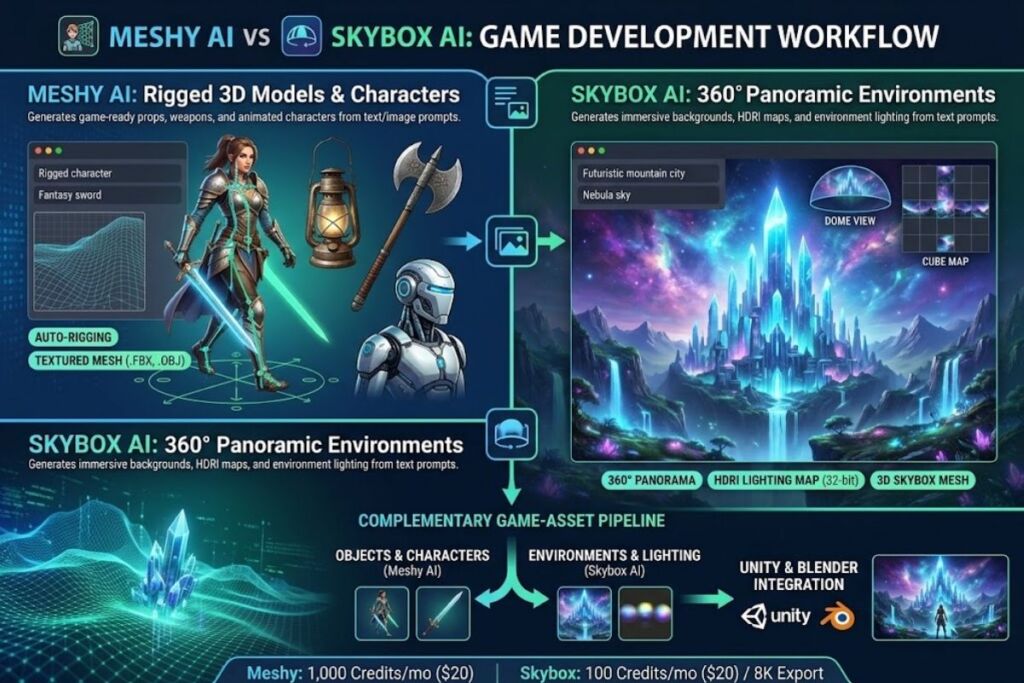
Meshy AI generates rigged, textured 3D models from text or image prompts for game props, characters, and environments. Skybox AI generates 360-degree panoramic skyboxes and HDRI environments from text prompts. The two tools solve different problems inside the same game-asset pipeline.
- 01Meshy AI vs Skybox AI: Quick Comparison Table
- 02What Does Meshy AI Do for Game Development?
- 03What Does Skybox AI Do for Game Development?
- 04How Do Meshy AI and Skybox AI Compare on Free Tier Limits?
- 05Choose Meshy AI If:
- 06Choose Skybox AI If:
- 07What Are the Pros and Cons of Meshy AI?
- 08What Are the Pros and Cons of Skybox AI?
- 09Who Should Use Meshy AI vs Skybox AI?
- 10Frequently Asked Questions
- 11Final Verdict
- 12Related Reading
Meshy AI vs Skybox AI: Quick Comparison Table
Meshy AI produces individual 3D models (props, characters, hard-surface assets); Skybox AI produces 360-degree environment backgrounds. The table below compares both tools on the attributes that determine which one a game studio needs first.
| Attribute | Meshy AI | Skybox AI |
|---|---|---|
| Developer | Meshy LLC (US) | Blockade Labs (US), founded December 2022 |
| Core Output | Textured, riggable 3D meshes (.fbx, .obj, .glb) | Equirectangular 360° panoramas, HDRI, 3D skybox meshes |
| Primary Input | Text prompt or reference image | Text prompt or reference image |
| Free Tier | 100 credits/month (≈5 full generations at 20 credits each) | 5 generations/month, no credit card required |
| Entry Paid Tier | Pro: $20/month (1,000 credits) | Essential: $20/month (100 credits, 8K export) |
| Top Individual Tier | Ultra: $100/month (8,000 credits) | Business: $112/month (500 credits, 16K, full API) |
| Auto-Rigging | Included at 0 credits on all paid plans | Not applicable (no character rigging) |
| Max Export Resolution | Not resolution-based (mesh + texture output) | 8K standard, 16K on Business plan |
| API Access | Available from Pro plan up | Limited on Essential, full access on Business |
| Game Engine Plugins | Blender plugin, Unity plugin | Unity Asset Store integration |
| Commercial License (Free Tier) | CC BY 4.0 (attribution required) | CC BY-NC (non-commercial) |
Pricing table sourced from Meshy’s official pricing page (meshy.ai/pricing) and Help Center, and Blockade Labs’ official Skybox AI plans page (skybox.blockadelabs.com/plans). Verified as of August 2026 — confirm current figures before purchasing, since AI tool pricing changes frequently and several third-party aggregator sites list conflicting numbers for both tools.
What Does Meshy AI Do for Game Development?
Meshy AI converts text prompts or 2D reference images into textured, game-ready 3D meshes, then rigs and animates characters automatically at no extra credit cost. Developers export the output directly into Unity or Blender through Meshy’s official plugins for further refinement.
Meshy runs on a credit system rather than a flat generation cap. According to Meshy’s Help Center, a complete Text-to-3D or Image-to-3D generation — covering both the mesh stage and the texture stage — costs 20 credits. Auto-rigging and animation apply afterward at 0 credits, which matters for character-heavy game pipelines where rigging normally adds separate production time. Credits reset monthly and do not roll over; failed generations are not charged, but re-rolling a successful-but-unsatisfying output spends credits again.
Meshy lists six plans on its official pricing page: Free ($0), Pro ($20/month or $240 billed annually), Premium ($40/month), Ultra ($100/month), Studio ($70/month for one seat, $10/month per additional seat), and Enterprise (custom pricing). Free-tier outputs carry a CC BY 4.0 license, meaning commercial use is permitted with attribution. Paid-plan users own their generated assets outright with no attribution requirement, per Meshy’s Terms of Use.
What Does Skybox AI Do for Game Development?
Skybox AI generates 360-degree panoramic environments and HDRI lighting maps from text prompts, producing game-engine-ready skyboxes without manual environment painting. Blockade Labs built the tool specifically for background and lighting generation, not for individual props or characters.
Skybox AI’s official plans page lists three paid tiers billed per seat: Essential at $20/month (100 generation credits, 8K exports, generation history, standard-speed queue, limited API access), Standard at $48/month (300 credits, everything in Essential plus Projects organization, 32-bit HDRI lighting exports, 3D skybox mesh exports, and priority queue), and Business at $112/month (500 credits, usage-based overage pricing, full API access, 16K resolution, custom rate limits, IP protection, and dedicated support). A free tier allows 5 generations per month without a credit card, licensed under CC BY-NC for non-commercial use only.
Skybox AI supports remixing existing 360° images into more than 30 art styles and exports environments as PNG cube maps, EXR/HDR files, and HD video. The Unity Asset Store lists Blockade Labs as a Verified Solution publisher with more than 1,600 users favoriting the plugin listing, confirming direct engine integration beyond web export.
How Do Meshy AI and Skybox AI Compare on Free Tier Limits?
Meshy’s free tier grants 100 credits monthly, covering roughly 5 full model generations at 20 credits each; Skybox AI’s free tier grants 5 environment generations monthly with no credit card required. Neither free tier includes API access or priority processing.
Meshy’s free-tier license (CC BY 4.0) permits commercial resale of generated models with attribution to Meshy in the product description. Skybox AI’s free-tier license (CC BY-NC) restricts free-tier outputs to non-commercial use, so a solo developer planning to sell a game with AI-generated skyboxes needs at minimum the $20/month Essential plan for commercial rights and full 8K export resolution.
Choose Meshy AI If:
- Build individual 3D props, weapons, or characters that need to be rigged, animated, and dropped directly into a Unity or Blender scene.
- Need auto-rigging without added cost — Meshy applies rigging and animation at 0 credits on every paid plan.
- Require frequent high-volume generation — Ultra’s 8,000 monthly credits at $100/month cover roughly 400 full generations, the highest individual-tier volume of the two tools.
- Want asset ownership without attribution on a paid plan, since Meshy’s premium tiers grant full commercial rights with no credit requirement.
Choose Skybox AI If:
- Build 360-degree game environments, skyboxes, or VR backdrops rather than individual objects.
- Need HDRI lighting data for realistic scene lighting — this feature activates starting at the $48/month Standard tier.
- Export at 16K resolution for high-fidelity architectural visualization or VR production, available only on the $112/month Business tier.
- Test without a credit card — Skybox AI’s free tier requires no payment method to generate 5 environments per month.
What Are the Pros and Cons of Meshy AI?
Meshy AI’s main advantage is combined mesh-and-texture generation with free auto-rigging; its main limitation is that credits do not roll over month to month.
Pros:
- Auto-rigging and animation apply at 0 credits on paid plans, removing a normally separate production step.
- Direct Blender and Unity plugins skip manual file conversion.
- Failed generations are not credit-charged, reducing wasted spend during experimentation.
Cons:
- Unused monthly credits expire on the 1st and do not carry over — a Pro user who generates only 5 models in a light month loses the remaining 900 credits. Workaround: purchase permanent credit packs for overflow capacity, since purchased credits never expire, unlike the monthly allocation.
- Refunds are rare due to GPU processing costs, per Meshy’s official refund policy. Workaround: use the Free tier or a first-month 50% discount to validate output quality before committing to an annual Pro or Premium plan.
- Re-rolling an unsatisfying but technically successful generation still spends credits. Workaround: write detailed prompts with explicit style and geometry constraints on the first attempt to reduce re-roll frequency.
What Are the Pros and Cons of Skybox AI?
Skybox AI’s main advantage is purpose-built 360° environment generation with direct HDRI and 3D mesh export; its main limitation is a narrow scope restricted to skyboxes only.
Pros:
- 32-bit HDRI export on the Standard tier and above provides physically accurate lighting data for game engines, not just a flat panoramic image.
- Free tier requires no credit card, lowering the barrier to first-generation testing.
- Unity Asset Store integration is a Verified Solution, confirming direct plugin support inside Unity projects.
Cons:
- Limited to 360-degree skybox and environment generation only — Skybox AI does not generate individual props, characters, or hard-surface assets. Workaround: pair Skybox AI with a dedicated model generator like Meshy AI for props and characters inside the same scene.
- Free-tier output is licensed CC BY-NC, blocking commercial use until upgrading to a paid plan. Workaround: budget for the $20/month Essential tier before shipping any commercial project that uses free-tier-generated skyboxes.
- HDRI lighting exports and 3D mesh exports are locked behind the $48/month Standard tier, not available on Essential. Workaround: use Essential for concept and background testing, then upgrade only for the specific project that needs lighting-accurate HDRI data.
Who Should Use Meshy AI vs Skybox AI?
Solo indie developers building character-driven games need Meshy AI first; studios building open-world or VR environments need Skybox AI first; teams doing both need both tools in the same pipeline.
- Solo indie developers prototyping playable characters and weapons: Meshy AI’s Pro plan at $20/month.
- VR and XR studios building immersive environments: Skybox AI’s Standard plan at $48/month for HDRI lighting.
- Small game studios shipping a full scene (props + environment): Meshy AI Studio ($70/month base) paired with Skybox AI Essential ($20/month).
- Enterprise game studios with asset pipelines at scale: both tools’ custom Enterprise/Business tiers, since neither publishes fixed enterprise pricing.
Frequently Asked Questions
Can Meshy AI generate 360-degree skyboxes?
No. Meshy AI generates individual 3D meshes with textures, not panoramic environment backgrounds. Skybox AI is the environment-specific tool of the two.
Can Skybox AI generate rigged 3D characters?
No. Skybox AI’s output is limited to 360-degree panoramic images, HDRI lighting maps, and 3D skybox meshes for backgrounds — it does not rig characters or generate props.
Which tool has the cheaper entry-level paid plan?
Both list an entry price of $20/month — Meshy AI’s Pro plan (1,000 credits) and Skybox AI’s Essential plan (100 credits). Credit volume and use case, not sticker price, determine actual value per generation.
Do both tools offer API access?
Yes. Meshy AI includes API access starting on the Pro plan ($20/month). Skybox AI offers limited API access on Essential ($20/month) and full API access only on the Business plan ($112/month).
Final Verdict
Meshy AI and Skybox AI are not competitors — they are complementary tools covering different halves of the same 3D game-asset pipeline, with Meshy AI producing the objects and characters and Skybox AI producing the environments those objects sit inside.