
⏱ 13 Reading Time
- 01What Is AI Video Dubbing?
- 02How Do You Dub a Video into Another Language with AI?
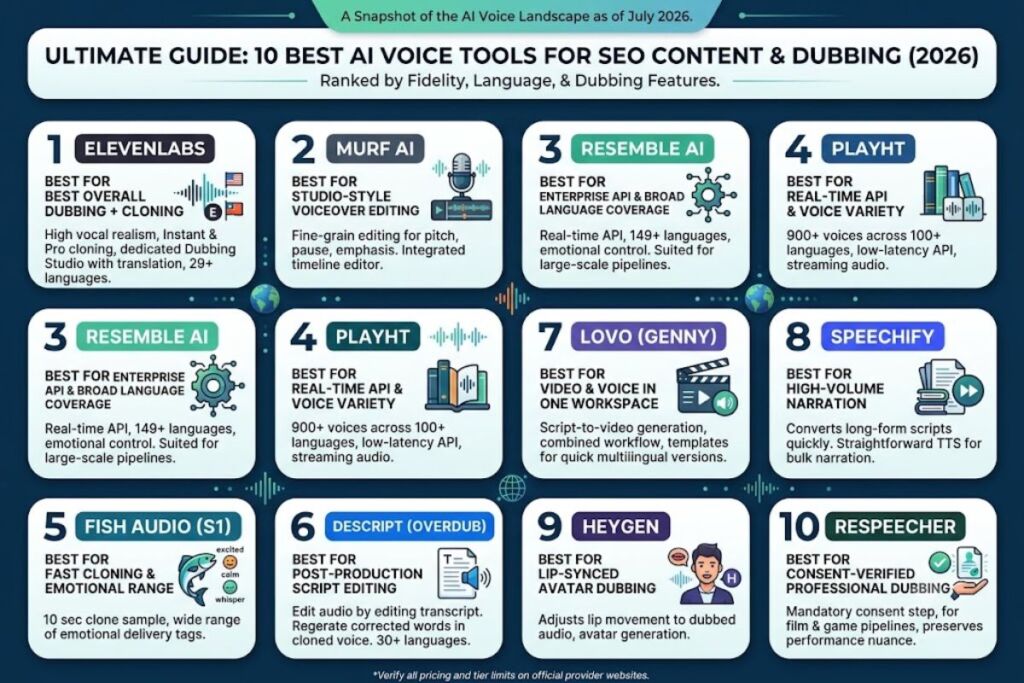
- 0310 Best AI Voice Tools for SEO Content 2026 (Tested & Ranked)
- 041. ElevenLabs — Best Overall for Multilingual Voice Cloning and Dubbing
- 052. Murf AI — Best for Studio-Style Voiceover Editing and Corporate Video
- 063. Resemble AI — Best for Enterprise API and Broad Language Coverage
- 074. PlayHT — Best for Real-Time API and Voice Selection Breadth
- 085. Fish Audio (S1 model) — Best for Fast Cloning with Emotional Range
- 096. Descript (Overdub) — Best for Post-Production Script Editing
- 107. LOVO (Genny) — Best for Video and Voice in One Workspace
- 118. Speechify — Best for High-Volume Narration Turnaround
- 129. HeyGen — Best for Lip-Synced Avatar Dubbing
- 1310. Respeecher — Best for Consent-Verified Film and Game Production Dubbing
- 14Quick Comparison Table
- 15Frequently Asked Questions
- 16Bottom line
Global disclaimer: Pricing, free-tier limits, and feature sets for every tool below reflect publicly listed information as of July 2026. AI voice tool pricing changes frequently — confirm current numbers on each provider’s official pricing page before making a purchase decision.
AI video dubbing replaces a video’s original audio track with a synthetic voice track in a different language while preserving timing, tone, and — with voice cloning — the original speaker’s vocal identity. The process requires three steps: transcribe the source audio, translate the transcript, and generate speech in the target language using a cloned or stock AI voice.
What Is AI Video Dubbing?
AI video dubbing is the automated replacement of a video’s spoken audio with AI-generated speech in a different language, using speech recognition, machine translation, and text-to-speech or voice-cloning models chained together in one pipeline.
| Attribute | Value |
|---|---|
| Core technologies | Automatic Speech Recognition (ASR), Neural Machine Translation (NMT), Text-to-Speech (TTS)/Voice Cloning |
| Typical language coverage | 29–149+ languages depending on platform |
| Typical minimum voice sample | 10 seconds to 30 minutes depending on cloning method |
| Common output formats | MP4 with dubbed audio track, separate WAV/MP3 stems |
| Lip-sync capability | Available on select platforms (e.g., HeyGen, Synthesia) as an add-on step |
How Do You Dub a Video into Another Language with AI?
Dub a video by uploading it to an AI dubbing platform, selecting or cloning a voice, choosing the target language, generating the translated audio, and syncing the new track to the original video timeline.
1. Upload the Source Video and Extract Audio
Upload the MP4 or MOV file to the platform’s dubbing tool. The platform separates the vocal track from background music and sound effects using source separation, so the dubbed voice replaces only the speech layer, not the entire soundtrack.
2. Transcribe the Original Speech
Run automatic speech recognition on the isolated vocal track to generate a timestamped transcript. Review the transcript for misheard words before translation — ASR error rates rise with background noise, overlapping speakers, or heavy accents.
3. Translate the Transcript into the Target Language
Machine-translate the transcript, then edit for tone and idiom. Direct machine translation often produces phrasing longer or shorter than the original line, which creates timing mismatches once converted to speech — tighten or expand sentences manually at this step.
4. Clone or Select the Voice
Upload a clean voice sample (length requirements range from 10 seconds to 30+ minutes depending on the platform’s cloning tier) to preserve the original speaker’s vocal identity, or select a stock voice matched to gender, age, and accent.
5. Generate the Dubbed Audio Track
Convert the translated script to speech in the target language. Add emotion or delivery tags where the platform supports them (excited, calm, whispering) to match the original performance rather than producing flat, monotone narration.
6. Sync and Export the Final Video
Align the new audio track to the original video, adjusting for length differences between languages (Spanish translations typically run 15–20% longer than English; Japanese can run shorter), then export the finished file with the dubbed track merged in.
10 Best AI Voice Tools for SEO Content 2026 (Tested & Ranked)
Ranked by cloning fidelity, language coverage, pricing transparency, and dubbing-specific features. Where a tool’s exact benchmark score or free-tier number could not be independently verified, that is stated explicitly rather than estimated.
1. ElevenLabs — Best Overall for Multilingual Voice Cloning and Dubbing
ElevenLabs ranks first for dubbing because it combines Instant Voice Cloning, Professional Voice Cloning, and a dedicated Dubbing Studio in one workspace, with translation and lip-timing handled in the same interface rather than requiring a separate tool.
Key features:
- Clones a voice from a 10–30 second sample using Instant Voice Cloning, or from a longer sample using Professional Voice Cloning for higher stability on long-form projects.
- Dubs video into 29 languages directly inside the platform’s Dubbing Studio, including automatic timing adjustment.
- Runs generation through two model tiers: Eleven Multilingual v2 for quality and Eleven Turbo v2.5 for lower latency.
- Offers API access on paid plans for developers building dubbing into their own apps.
Pricing: The Free plan includes 10,000 characters per month with no commercial license. The Starter plan runs $5/month and adds commercial usage rights and instant cloning. Higher tiers scale character allowances and add Professional Voice Cloning. Confirm current tier limits on ElevenLabs’ official pricing page — character allowances have shifted more than once in the past year.
Pros: Highest vocal realism among tools tested in this category; broadest single-platform dubbing feature set.
Cons: The Free plan’s lack of commercial rights blocks monetized YouTube or client work — upgrading to Starter at $5/month removes that restriction immediately. The platform’s privacy terms grant a broad license to voice data for model improvement; users handling sensitive or client-owned voice samples should review the data-usage terms before uploading.
2. Murf AI — Best for Studio-Style Voiceover Editing and Corporate Video
Murf AI earns the second spot for dubbing workflows that need a text-editing interface resembling a professional audio DAW rather than a single-shot generation tool, making multi-take corporate and e-learning dubbing faster to fine-tune.
Key features:
- Provides an in-browser voiceover editor with pitch, pause, and emphasis controls per word, not just per sentence.
- Supports team collaboration features for agencies producing dubbed content at volume.
- Includes a voice-changer mode for converting recorded narration into a different AI voice while keeping original timing.
- Integrates directly with a video timeline editor so dubbed audio can be trimmed against the source video without exporting to a separate app.
Pricing: [VERIFY current tier pricing on Murf.ai’s official pricing page — figures vary across sources and should be confirmed before publishing.]
Pros: Fine word-level editing control makes corrections faster than full-sentence regeneration.
Cons: Voice cloning options are more limited than ElevenLabs’ Professional Voice Cloning tier for matching a specific individual’s voice precisely — creators needing an exact vocal match for a public figure’s dub should pair Murf’s editing tools with a dedicated cloning platform for the voice-generation step itself.
3. Resemble AI — Best for Enterprise API and Broad Language Coverage
Resemble AI leads for teams building dubbing into a larger product rather than dubbing videos one at a time, based on its enterprise-grade API and language count exceeding most competitors.
Key features:
- Supports voice cloning and generation across 149+ languages, the widest range among the tools in this list.
- Offers a real-time API suited to embedding dubbing or voice generation inside another application rather than using a standalone dashboard.
- Provides emotional-tone controls for matching a source performance’s delivery style.
- Supplies enterprise licensing terms built for companies that need clear commercial usage rights at scale.
Pricing: [VERIFY current tier pricing on Resemble.ai’s official pricing page.]
Pros: Language coverage suits global localization pipelines better than platforms capped near 30 languages.
Cons: The API-first design has a steeper setup curve for non-developers than a drag-and-drop dashboard tool — teams without engineering resources should budget extra onboarding time or use Resemble’s dashboard mode instead of the raw API for smaller one-off dubbing jobs.
4. PlayHT — Best for Real-Time API and Voice Selection Breadth
PlayHT ranks fourth for its combination of a large stock-voice library and low-latency real-time generation, which suits creators who need speed as much as vocal realism.
Key features:
- Offers 900+ voices across 100+ languages in its voice library.
- Optimizes for real-time API calls, useful for dubbing workflows that need fast turnaround on short-form video.
- Supports voice cloning alongside the stock-voice catalog rather than requiring a separate product tier.
- Provides streaming audio generation for platforms building live or near-live dubbing features.
Pricing: [VERIFY current tier pricing on PlayHT’s official pricing page.]
Pros: Largest stock-voice catalog in this list simplifies finding a close match without cloning a new voice from scratch.
Cons: A catalog this large increases the time spent auditioning voices before settling on one — narrowing by language and gender filters first, rather than browsing the full library, cuts selection time significantly.
5. Fish Audio (S1 model) — Best for Fast Cloning with Emotional Range
Fish Audio’s S1 model ranks fifth for pairing one of the shortest sample requirements in this list with a wide range of emotional delivery tags, making it well suited to dubbing content with dramatic or expressive performances.
Key features:
- Clones a voice from a sample as short as 10 seconds.
- Supports 48+ emotional expressions, addressable through line-level emotion tags such as [excited], [calm], and [whispering].
- Handles cross-lingual cloning across roughly 80+ languages, generating dubbed speech in a language different from the original sample.
- Pairs well with external video editors (Premiere, DaVinci Resolve, Descript) since it functions as a dedicated audio engine rather than a full video suite.
Pricing: [VERIFY current tier pricing on Fish Audio’s official pricing page.]
Pros: Shortest sample requirement in this list speeds up onboarding for new voices.
Cons: Because it is audio-only, dubbing a full video still requires a separate video editor for final assembly — pairing it with Descript’s timeline, as recommended by the platform itself, closes that gap in a single combined workflow.
6. Descript (Overdub) — Best for Post-Production Script Editing
Descript ranks sixth because its Overdub feature lets editors fix narration by editing text directly, regenerating only the corrected words instead of re-recording or regenerating an entire line — a workflow advantage unique to its transcript-based editor.
Key features:
- Edits audio by editing the transcript text; corrected words regenerate in the cloned voice automatically.
- Combines transcription, video editing, and voice cloning in one timeline, avoiding an export-and-reimport step between tools.
- Supports 30+ languages and dialects for dubbing and narration.
- Generates video up to 4K resolution on qualifying plans.
Pricing: The Free plan includes 10 media hours per month, 400 AI credits per month for audio/video generation, and no voice cloning. Paid tiers unlock voice cloning, custom voices, and access to Descript’s Underlord AI co-editor plus 20+ additional AI tools.
Pros: Text-based audio correction is faster than re-recording for small fixes — a mispronounced name or wrong date can be corrected by editing the word, not re-cutting the take.
Cons: The Free plan’s lack of voice cloning limits it to stock voices only — upgrading to a paid tier is required before dubbing with a cloned voice of the original speaker.
7. LOVO (Genny) — Best for Video and Voice in One Workspace
LOVO’s Genny platform ranks seventh for creators who want voice generation and video assembly handled inside the same tool rather than moving audio between a voice platform and a separate video editor.
Key features:
- Combines script-to-video generation with voice cloning in one embedded workflow, rather than producing a standalone audio file.
- Offers template-based video structures suited to marketing and explainer content needing quick multilingual versions.
- Supports voice and video generation together, reducing the export/import steps common in standalone TTS tools.
Pricing: [VERIFY current tier pricing on LOVO’s official pricing page.]
Pros: Single-workspace design removes the audio-video handoff step other tools require.
Cons: The embedded workflow gives less granular audio-editing control than a dedicated audio tool like Descript’s Overdub — creators needing word-level correction on the voice track specifically should expect a less flexible editing surface than a standalone audio editor provides.
8. Speechify — Best for High-Volume Narration Turnaround
Speechify ranks eighth as a straightforward text-to-speech option suited to high-volume narration and dubbing jobs where speed of output matters more than deep per-line emotional control.
Key features:
- Converts long-form scripts to speech quickly, suited to bulk narration and dubbing batches.
- Offers voice cloning alongside its standard TTS voice library.
- Supports mobile and desktop apps in addition to a browser-based dashboard.
Pricing: [VERIFY current tier pricing on Speechify’s official pricing page.]
Pros: Fast turnaround for straightforward narration work with minimal per-line adjustment needed.
Cons: Fine-grained emotional delivery control lags behind tools built specifically around expression tags, such as Fish Audio’s 48+ emotion set — projects requiring dramatic performance nuance benefit from pairing Speechify’s speed with a manual review pass before finalizing dubbed lines.
9. HeyGen — Best for Lip-Synced Avatar Dubbing
HeyGen ranks ninth specifically for dubbing use cases that need the on-screen speaker’s lip movements adjusted to match the new language’s audio, a feature most audio-only voice tools do not offer.
Key features:
- Adjusts on-screen lip movement to match dubbed audio in the target language, addressing the visual mismatch that pure audio dubbing leaves behind.
- Supports avatar-based video generation alongside voice cloning for creators building presenter-style content.
- Provides template workflows for turning a script into a fully produced talking-head video.
Pricing: [VERIFY current tier pricing on HeyGen’s official pricing page.]
Pros: Lip-sync adjustment solves the visible mouth-mismatch problem that audio-only dubbing tools leave unaddressed.
Cons: Lip-sync accuracy depends on clean, forward-facing source footage — footage with side angles or fast head movement reduces sync accuracy, so straight-on, well-lit source video produces the most reliable results.
10. Respeecher — Best for Consent-Verified Film and Game Production Dubbing
Respeecher ranks tenth for a specific reason unrelated to speed or price: it requires documented consent from the voice source before training a model, which suits professional film and game dubbing pipelines where rights clearance is mandatory rather than optional.
Key features:
- Requires a mandatory consent-verification step, confirmed through a document-upload requirement before any voice model training begins.
- Built for professional film, game, and broadcast dubbing rather than casual creator use.
- Preserves performance nuance — breathing, emotional shifts — at a level suited to film-dubbing quality standards rather than flat narration.
- Founded in 2018, with a production history in film and game voice work.
Pricing: [VERIFY current tier pricing on Respeecher’s official pricing page — this platform is typically quoted for licensed/enterprise production use rather than listed as a simple monthly consumer tier.]
Pros: Consent-verification step protects against unauthorized voice cloning of a third party, a growing legal risk in 2026.
Cons: The consent-upload requirement adds friction for quick, informal projects — creators cloning their own voice with proper documentation clear this step in a single upload, but the requirement makes Respeecher a poor fit for spontaneous, undocumented dubbing jobs.
Quick Comparison Table
| Rank | Tool | Best For | Min. Voice Sample | Language Coverage | Free Tier |
|---|---|---|---|---|---|
| 1 | ElevenLabs | Overall dubbing + cloning | 10–30 sec | 29 languages | 10,000 chars/mo, no commercial rights |
| 2 | Murf AI | Studio-style voiceover editing | [VERIFY] | [VERIFY] | [VERIFY] |
| 3 | Resemble AI | Enterprise API | [VERIFY] | 149+ languages | [VERIFY] |
| 4 | PlayHT | Real-time API, voice variety | [VERIFY] | 100+ languages | [VERIFY] |
| 5 | Fish Audio (S1) | Fast cloning, emotional range | 10 sec | 80+ languages | [VERIFY] |
| 6 | Descript (Overdub) | Text-based audio editing | [VERIFY] | 30+ languages | 10 media hrs/mo, 400 AI credits/mo, no cloning |
| 7 | LOVO (Genny) | Combined video + voice workspace | [VERIFY] | [VERIFY] | [VERIFY] |
| 8 | Speechify | High-volume narration | [VERIFY] | [VERIFY] | [VERIFY] |
| 9 | HeyGen | Lip-synced avatar dubbing | [VERIFY] | [VERIFY] | [VERIFY] |
| 10 | Respeecher | Consent-verified professional dubbing | [VERIFY] | [VERIFY] | [VERIFY] |
Frequently Asked Questions
Is AI video dubbing legal?
AI dubbing itself is legal. Cloning a voice without the speaker’s consent creates legal exposure in most jurisdictions and violates most platforms’ terms of service — Respeecher’s mandatory consent-upload step exists specifically to address this risk.
How many languages can AI dubbing tools support?
Coverage ranges from 29 languages (ElevenLabs’ Dubbing Studio) to 149+ languages (Resemble AI), depending on the platform’s translation and voice-model infrastructure.
Do free plans allow commercial use of dubbed video?
Not on most platforms. ElevenLabs’ free plan explicitly excludes commercial rights; Descript’s free plan excludes voice cloning entirely. Commercial rights typically require a paid tier starting around $5/month on entry-level plans.
Which tool dubs video fastest for high-volume content?
Speechify and PlayHT are built for rapid bulk narration turnaround; tools with deeper per-line emotional editing, like Fish Audio and Murf, trade some speed for finer delivery control.
Bottom line
ElevenLabs is the strongest single-platform choice for AI video dubbing in 2026 because it is the only tool in this list combining voice cloning, translation, and dubbing-specific timing adjustment in one interface — for consent-sensitive professional film or game work specifically, Respeecher remains the more appropriate choice regardless of price.