
⏱ 8 Reading Time
- 01What Does “No Watermark” Mean for Free AI Voice Generators?
- 02Why Is TTSMaker One of the Best Free AI Voice Generators With No Watermark?
- 03Why Is Microsoft Edge TTS (edge-tts) One of the Best Free AI Voice Generators With No Watermark?
- 04Why Is Google Cloud Text-to-Speech’s Free Tier One of the Best Free AI Voice Generators With No Watermark?
- 05Why Is Play.ht’s Free Plan One of the Best Free AI Voice Generators With No Watermark?
- 06Which Popular Free AI Voice Generators Still Add a Watermark?
- 07How Do These Tools Compare?
- 08Which Free AI Voice Generator Should You Choose?
- 09What Are the Best Alternatives If You Outgrow the Free Tier?
- 10Frequently Asked Questions
- 11The Bottom Line
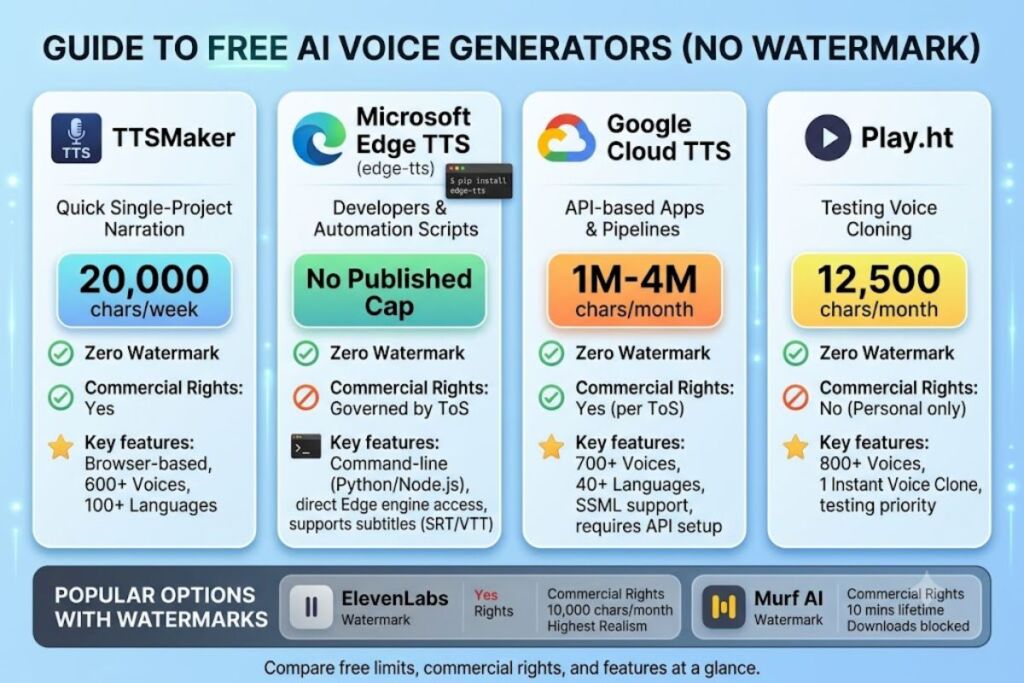
TTSMaker, Microsoft Edge TTS (edge-tts), Google Cloud Text-to-Speech’s free tier, and Play.ht’s free plan produce downloadable audio without a branded watermark at zero cost. Most competing “free” tools — including ElevenLabs and Murf — stamp free-tier output with an audio watermark or block downloads entirely.
What Does “No Watermark” Mean for Free AI Voice Generators?
A watermark-free AI voice generator delivers the raw MP3 or WAV file without an inserted brand tag, audible logo announcement, or forced attribution clause. Many platforms brand free-tier audio in one of three ways: an audible spoken tag (“This audio was generated with [Tool]”), a locked export button that blocks downloads, or a licensing clause that bans commercial use. TTSMaker’s terms of service, for example, permit commercial use of free-tier audio with zero attribution requirement. Murf’s help center confirms the opposite: every free-tier export carries a Murf-branded watermark and cannot be downloaded at all.
Why Is TTSMaker One of the Best Free AI Voice Generators With No Watermark?
TTSMaker converts up to 20,000 characters per week into speech with zero watermark, zero attribution requirement, and full commercial usage rights. It runs entirely in the browser with no account creation required.
- Generates audio across 600+ AI voices and 100+ languages, including English, Spanish, French, German, Arabic, Japanese, Korean, and Vietnamese.
- Caps each single conversion at 3,000 characters on the free tier, so long scripts need to be split into batches.
- Grants full commercial usage rights on every free-tier export, according to TTSMaker’s official terms page.
- Exports audio in MP3 and WAV format with adjustable speech rate, volume, and pitch controls.
- Retains generated files for 30 minutes before deleting them from the server, so creators need to download immediately.
TTSMaker’s paid Pro tier starts at a monthly subscription and raises the cap to 300,000–6,000,000 characters per month depending on the plan, removes the weekly reset, and adds priority processing — but the free tier alone already covers most single-video or single-podcast-episode workloads.
Why Is Microsoft Edge TTS (edge-tts) One of the Best Free AI Voice Generators With No Watermark?
Edge-tts, an open-source Python and Node.js library maintained by developer rany2 on GitHub, taps directly into Microsoft Edge’s cloud text-to-speech engine for unlimited free synthesis with no watermark, no API key, and no account. It requires basic command-line usage.
- Runs as a command-line tool and Python module (
pip install edge-tts), generating audio via the same command-line interface used by tools likeepub2tts-edge. - Accesses Microsoft’s neural voice catalog across dozens of languages without requiring the Edge browser, Windows, or a Microsoft account.
- Exports directly to MP3 or WAV and supports SRT/VTT subtitle generation alongside the audio file in the same command.
- Imposes no published character cap for personal use, though Microsoft’s terms of service govern acceptable usage frequency.
- Requires basic command-line comfort — it has no polished web dashboard, unlike TTSMaker or Play.ht.
Developers who prefer a graphical interface can install the openai-edge-tts wrapper, which exposes edge-tts through an OpenAI-compatible /v1/audio/speech endpoint for direct use in tools like Open WebUI or AnythingLLM.
Why Is Google Cloud Text-to-Speech’s Free Tier One of the Best Free AI Voice Generators With No Watermark?
Google Cloud Text-to-Speech grants 4,000,000 free characters per month for Standard voices and 1,000,000 free characters per month for WaveNet, Neural2, and Chirp 3 HD voices, with zero watermark on any output. It requires a Google Cloud account and billing setup, even though the free quota renews monthly at no charge.
- Provides 700+ voices across 40+ languages and 100+ locales, according to Google Cloud’s official pricing page.
- Resets the free character quota every calendar month, unlike one-time trial credits.
- Adds a separate $300 one-time credit for new Google Cloud accounts, usable across any Google Cloud product for 90 days.
- Supports SSML markup for controlling pitch, rate, pauses, and emphasis at the sentence level.
- Charges $4 per million characters for Standard and WaveNet voices once the free quota is exhausted, and up to $160 per million for Studio voices.
This option fits developers building an app or automated pipeline. It demands API integration, so it is not the right pick for someone who wants to paste text into a browser and download an MP3 in ten seconds.
Why Is Play.ht’s Free Plan One of the Best Free AI Voice Generators With No Watermark?
Play.ht’s free plan includes 12,500 characters per month, access to its full voice library, and one instant voice clone, with unwatermarked output for personal, non-commercial projects. Commercial usage rights require a paid upgrade starting at $39 per month.
- Unlocks access to 800+ AI voices across 140+ languages, matching the library available to paying subscribers.
- Includes one instant voice-cloning credit, built from a 30-second audio sample.
- Caps free usage at 12,500 characters per month, roughly enough for a single 10-minute narration script.
- Excludes commercial usage rights on the free tier — outputs are cleared for testing and personal projects only, according to Play.ht’s plan documentation.
Play.ht suits a creator who wants to test voice-cloning quality before committing to a paid plan, not someone who needs unlimited monthly output.
Which Popular Free AI Voice Generators Still Add a Watermark?
ElevenLabs, Murf, and Speechify all restrict or brand their free-tier audio, disqualifying them from a true “no watermark” list despite ranking among the most searched AI voice tools. Each tool’s own pricing documentation confirms the restriction.
- ElevenLabs grants 10,000 free characters per month but applies an audible ElevenLabs watermark to free-tier output and denies commercial usage rights until the $5-per-month Starter plan, according to ElevenLabs’ official pricing page.
- Murf AI caps its free tier at 10 minutes of lifetime voice generation, brands every export with Murf audio watermarking, and blocks downloads entirely — Murf’s help center confirms the free trial supports preview and embed links only, not file export.
- Speechify limits its free tier to 10 basic robotic voices at a maximum 1.5x playback speed, and its voice-generation Studio product sits behind the paid tier for anyone producing standalone voiceover files rather than reading existing text aloud.
Anyone who has already tested ElevenLabs’ free plan and heard the spoken attribution tag on the exported file has confirmed this limitation firsthand.
How Do These Tools Compare?
| Tool | Free Limit | Watermark on Free Tier | Commercial Use on Free Tier | Best For |
|---|---|---|---|---|
| TTSMaker | 20,000 characters/week | No | Yes | Quick single-project narration |
| Microsoft Edge TTS (edge-tts) | No published cap | No | Governed by Microsoft ToS | Developers and automation scripts |
| Google Cloud TTS | 1M–4M characters/month | No | Yes (per Google Cloud ToS) | API-based apps and pipelines |
| Play.ht | 12,500 characters/month | No | No | Testing voice cloning |
| ElevenLabs | 10,000 characters/month | Yes | No | Highest voice realism (paid) |
| Murf AI | 10 minutes lifetime | Yes | No | Studio-style script editing (paid) |
Which Free AI Voice Generator Should You Choose?
Solo YouTubers and podcast editors producing one narration per week get the most value from TTSMaker’s 20,000-character weekly reset and full commercial rights. Developers building a voice feature into an app get more mileage from edge-tts or Google Cloud TTS, since both scale past casual browser use without hitting a hard monthly wall. Creators evaluating voice cloning before paying for a subscription get a legitimate free preview through Play.ht’s one-clone allowance. Anyone who needs the most natural-sounding voice regardless of cost still ends up on ElevenLabs or Murf’s paid tiers — no free tool in this list matches their voice realism, only their price point.
What Are the Best Alternatives If You Outgrow the Free Tier?
ElevenLabs’ Starter plan costs $5 per month for 30,000 characters, commercial rights, and instant voice cloning — the cheapest entry point into ElevenLabs’ voice quality. Murf’s Creator plan costs $19 per month for roughly 24 hours of annual voice generation, unlimited downloads, and full commercial rights, according to Murf’s official pricing page. Play.ht’s Creator plan starts at $39 per month for 250,000 average monthly characters and full commercial licensing.
Frequently Asked Questions
Is TTSMaker actually free forever, or does it convert to a paid trial?
TTSMaker’s free tier renews its 20,000-character allowance every week indefinitely. It does not expire or downgrade into a paid-only trial.
Does ElevenLabs remove the watermark on any free plan?
No. ElevenLabs applies the watermark and blocks commercial use on every account until the user upgrades to a paid plan starting at $5 per month.
Can I use edge-tts without knowing how to code?
Edge-tts requires running a command-line tool or Python script. Non-technical users get an easier experience from TTSMaker’s browser interface instead.
Is Google Cloud Text-to-Speech’s free tier really free, or does it need a credit card?
Google Cloud requires billing setup to activate any API, including Text-to-Speech, but does not charge until usage exceeds the free monthly character quota.
The Bottom Line
TTSMaker delivers the best balance of accessibility, commercial rights, and zero watermark for a non-technical creator; edge-tts delivers unlimited free synthesis for anyone comfortable with a command line — and neither requires paying ElevenLabs’ or Murf’s subscription fees just to remove a brand tag from a downloaded file.