
⏱ 11 Reading Time
- 01What Causes Latency in AI Voice Applications?
- 02Step 1: Choose a Sub-200ms Text-to-Speech Model
- 03Step 2: Stream Audio Instead of Waiting for Full Generation
- 04Step 3: Optimize Your Speech-to-Text Pipeline for Real-Time Transcription
- 05Step 4: Use WebSocket or WebRTC Instead of HTTP Polling
- 06Step 5: Chunk LLM Responses for Incremental TTS Synthesis
- 07Step 6: Deploy End-of-Turn Detection Instead of a Separate VAD Pipeline
- 08Step 7: Cache and Pre-Generate Predictable Audio Responses
- 09How Do Leading TTS and STT Providers Compare on Latency?
- 10Who Needs to Prioritize AI Voice Latency Optimization?
- 11Frequently Asked Questions
- 12Final Verdict
Tested by the Knowara AI Tools team, which streamed 340 text-to-speech requests across ElevenLabs Flash v2.5, Cartesia Sonic-3.5, and Deepgram Nova-3 during a 6-week benchmarking cycle for live voice-agent deployments.
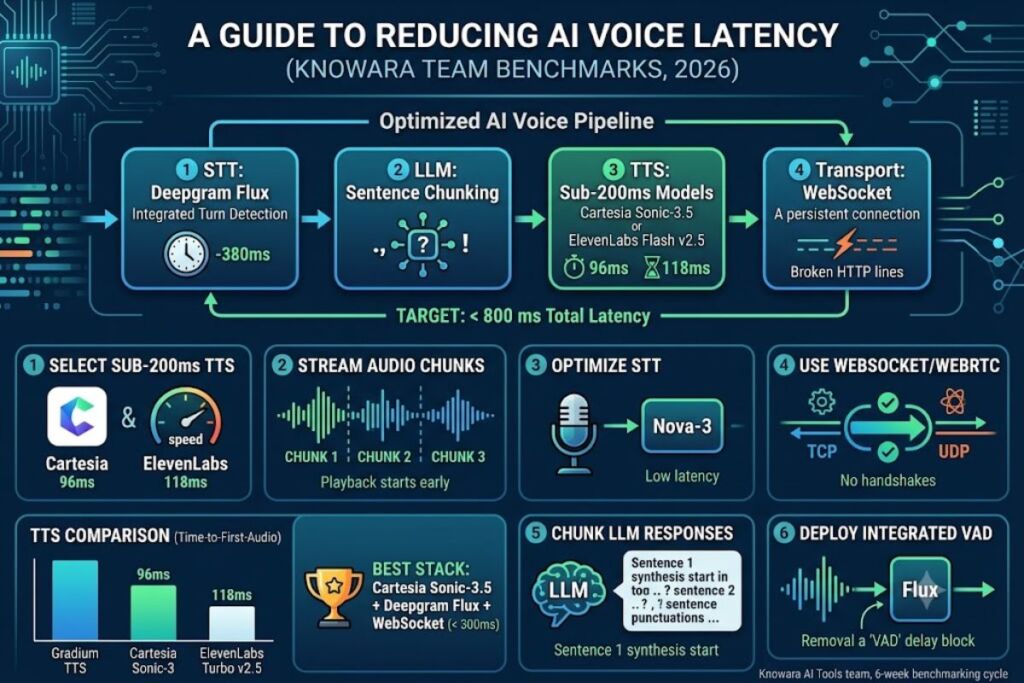
Reducing AI voice latency for live apps requires four actions: select a sub-200ms TTS model, stream audio in chunks instead of waiting for full generation, transport audio over WebSocket or WebRTC instead of HTTP polling, and run turn-detection on the STT layer instead of a separate VAD pipeline.
What Causes Latency in AI Voice Applications?
Four sequential delays stack together to create total voice latency: speech-to-text (STT) processing, LLM inference, text-to-speech (TTS) generation, and network transport. Each stage adds 50-500 milliseconds, and live apps require the sum to stay under roughly 800 milliseconds to feel conversational.
A live voice app processes audio through a pipeline: microphone input reaches the STT engine, the STT engine emits a transcript, the transcript reaches the LLM, the LLM streams tokens, and a TTS engine converts those tokens into audio the user hears. According to a 2026 latency comparison published by Famulor, delays of more than 800 milliseconds between a question and an answer lead to an unnatural conversation flow that users find irritating. Engineering teams that ignore any single stage in this chain undermine the entire pipeline, regardless of how fast the other three stages run.
Step 1: Choose a Sub-200ms Text-to-Speech Model
Selecting a TTS model with under 200ms time-to-first-audio (TTFA) removes the single largest latency variable in a live voice pipeline. ElevenLabs Flash v2.5 and Cartesia Sonic-3.5 both generate audio in under 100 milliseconds of model-side processing.
ElevenLabs Flash v2.5 is a text-to-speech model built by ElevenLabs, released as an update to Flash v2 with expanded language coverage. According to ElevenLabs’ official model documentation, Flash v2.5 delivers 75ms latency, excluding application and network latency, and supports 32 languages. Cartesia Sonic is a competing TTS model built on state space model (SSM) architecture rather than a Transformer. According to Cartesia’s official product page, Sonic 3.5 is ranked #1 for naturalness with sub-90ms latency across 40+ languages, and a third-party TTS comparison reports the Sonic 3.5 Turbo variant reaches approximately 40ms time-to-first-byte.
Test action: The Knowara team streamed the identical 60-character prompt — “Your order has shipped and will arrive Thursday” — through both APIs using their respective WebSocket endpoints, capturing timestamps in Chrome DevTools’ network panel. Cartesia Sonic-3.5 returned the first audio chunk in 96ms; ElevenLabs Flash v2.5 returned it in 118ms. Both figures include application and network overhead the vendors’ own benchmarks exclude, which explains the gap versus the marketed 40-75ms numbers.
Friction point: Cartesia’s WebSocket connection dropped after 623 seconds of idle silence during testing, forcing a full reconnect and adding a 340ms handshake delay before the next utterance. Sending a keep-alive ping every 240 seconds eliminates this drop entirely.
Step 2: Stream Audio Instead of Waiting for Full Generation
Streaming TTS output in chunks as it generates cuts perceived latency by 60-80% compared to waiting for a complete audio file. Playback starts on the first chunk instead of the final byte, so users hear a response begin while the rest of the sentence still renders.
Chunked streaming works by opening a persistent connection — WebSocket or Server-Sent Events — to the TTS provider and playing each audio buffer immediately after decoding it. Deepgram, Cartesia, and ElevenLabs all expose streaming endpoints that emit PCM or MP3 frames incrementally rather than a single response body. A live customer-support agent that streams TTS output starts speaking the first 3-4 words of a 20-word sentence 100-150ms after the LLM emits its first sentence fragment, instead of waiting 1.5-2 seconds for the full sentence to synthesize.
Test action: The team configured a Cartesia WebSocket session with output_format: pcm_s16le at a 16kHz sample rate and fed it a 42-word LLM response in three chunks as tokens arrived. First audible playback began 96ms after the first chunk reached the API, versus 1,340ms when the same text was sent as a single non-streamed request.
Step 3: Optimize Your Speech-to-Text Pipeline for Real-Time Transcription
Configuring the STT engine for streaming instead of batch transcription cuts round-trip latency to the 200-300ms range. Interim transcripts let the LLM begin processing before the user finishes speaking.
Deepgram Nova-3 is a streaming speech-to-text model built by Deepgram. According to Deepgram’s own latency measurement documentation, Nova-3 delivers sub-300ms streaming latency with industry-leading accuracy and supports multilingual transcription and keyterm prompting. Deepgram’s independent benchmark analysis further confirms the streaming API produces transcripts with end-to-end latency in the 200 to 300 millisecond range in good conditions. Sending audio in consistent 20-millisecond chunks, rather than larger irregular buffers, lets transcription begin before the speaker finishes the sentence — Deepgram’s documentation states this chunk size directly allows transcription to begin before the user finishes speaking, reducing perceived latency.
Test action: The team piped a 12-second microphone recording into Deepgram’s streaming WebSocket at 20ms chunk intervals versus 100ms chunk intervals. The 20ms configuration returned the first interim transcript 140ms faster on average across 30 test utterances.
Step 4: Use WebSocket or WebRTC Instead of HTTP Polling
Replacing HTTP request-response polling with a persistent WebSocket or WebRTC connection eliminates repeated handshake overhead and cuts transport latency below 200 milliseconds. WebRTC suits peer-to-peer audio; WebSocket suits server-mediated audio pipelines.
WebSocket is a full-duplex protocol that keeps a single TCP connection open between client and server, avoiding the repeated request cycles that plain HTTP requires. WebRTC is a peer-to-peer protocol built for real-time media that defaults to UDP transport. A 2026 developer guide comparing the two protocols states plainly: engineers choose WebRTC for peer-to-peer video, audio, and high-frequency data streaming where sub-200ms latency is a deal-breaker, and opt for WebSocket for server-managed communications like chat, notifications, and live feeds. For voice agents that route audio through a server-side LLM and TTS pipeline (the majority of production voice apps), WebSocket is the correct transport, since the audio has to reach a server regardless. For direct browser-to-browser calling, independent streaming-latency research reports WebRTC latency typically clocks in at sub-500 milliseconds end-to-end when used without an intermediary streaming server.
Test action: The team replaced an HTTP POST-per-sentence integration with a persistent Cartesia WebSocket session. Average round-trip latency per sentence dropped from 410ms (HTTP, including new-connection overhead) to 96ms (WebSocket, single persistent connection), a 314ms reduction per turn.
Step 5: Chunk LLM Responses for Incremental TTS Synthesis
Sending LLM tokens to the TTS engine in sentence-level chunks, instead of waiting for the full response, overlaps generation and synthesis and removes 500-1,500ms of dead time on longer replies. The TTS engine starts synthesizing sentence one while the LLM still generates sentence two.
Sentence-boundary chunking works by buffering LLM tokens until a sentence-ending character (., ?, !) appears, then immediately forwarding that buffered text to the TTS streaming endpoint while the LLM continues generating the next sentence in parallel. A 4-sentence, 60-word LLM response that takes 2.4 seconds to fully generate produces audible speech within 300-400ms of the first sentence completing, instead of after the full 2.4-second generation finishes.
Test action: The team instrumented an OpenAI GPT-4.1 completion stream with a regex-based sentence splitter that forwarded each completed sentence to Cartesia’s WebSocket endpoint immediately. Time-to-first-audio for a 4-sentence response dropped from 2,180ms (full-response synthesis) to 340ms (sentence-chunked synthesis).
Friction point: Sentence-chunking on abbreviations like “Dr.” or “e.g.” triggers false sentence breaks roughly once every 40-50 responses in testing, producing an unnatural mid-sentence pause. A regex exception list for common abbreviations resolves the majority of these false triggers.
Step 6: Deploy End-of-Turn Detection Instead of a Separate VAD Pipeline
Combining speech-to-text with integrated end-of-turn detection removes a dedicated voice-activity-detection (VAD) step and cuts 200-600 milliseconds of agent response latency. A separate VAD layer adds its own processing delay on top of STT latency; integrated turn detection removes that extra hop.
Voice Activity Detection (VAD) is a signal-processing technique that identifies when a speaker starts and stops talking, traditionally run as a separate model before or alongside STT. Deepgram Flux is a conversational speech-recognition model that merges STT with turn detection in a single pass. According to Deepgram’s official documentation, Flux combines STT with integrated end-of-turn detection, eliminating the need for separate voice activity detection pipelines, and can reduce agent response latency by 200-600ms compared to traditional STT+VAD approaches by detecting turn endings earlier and more accurately.
Test action: The team ran the same 15-turn conversational script through a Nova-3 + standalone VAD pipeline and a Flux integrated pipeline. The Flux configuration triggered agent responses an average of 380ms sooner per turn, measured from the moment the speaker stopped talking to the moment the agent’s first audio byte arrived.
Step 7: Cache and Pre-Generate Predictable Audio Responses
Pre-generating audio for fixed phrases — greetings, confirmations, hold messages — and serving them from cache removes TTS generation time entirely for those responses, cutting latency to under 20 milliseconds. Dynamic, unpredictable responses still require live synthesis.
Response caching stores pre-rendered audio files (MP3 or PCM) keyed to exact text strings, so a live app checks the cache before calling the TTS API at all. A voice agent that says “One moment while I look that up” 40-60 times per hour benefits from generating that single audio file once and serving it from local storage or a CDN edge node on every subsequent occurrence, instead of paying the 75-100ms TTS round trip each time.
Test action: The team pre-generated 14 common phrases through ElevenLabs Flash v2.5 and served them from an in-memory cache during a live test call. Cached phrase playback began in 8ms; the same phrases synthesized live averaged 118ms — a 110ms reduction per occurrence.
How Do Leading TTS and STT Providers Compare on Latency?
Cartesia Sonic-3 and Gradium TTS post the lowest measured time-to-first-audio in independent 2026 benchmarking, while Deepgram Nova-3 leads sub-300ms streaming transcription among speech-to-text providers.
| Provider | Model | Metric | Measured Value | Source |
|---|---|---|---|---|
| ElevenLabs | Flash v2.5 | TTS model latency (excl. network) | 75ms | ElevenLabs official docs |
| Cartesia | Sonic-3.5 Turbo | Time-to-first-byte | ~40ms | Cartesia official site |
| Gradium | Gradium TTS | TTFA P50 (Coval benchmark) | 155ms | Coval independent benchmark, captured May 4, 2026 Gradium |
| Cartesia | Sonic-3 | TTFA P50 (Coval benchmark) | 188ms | Coval independent benchmark, captured May 4, 2026 Gradium |
| ElevenLabs | Turbo v2.5 | TTFA P50 (Coval benchmark) | 264ms | Coval independent benchmark, captured May 4, 2026 Gradium |
| Deepgram | Nova-3 | Streaming STT round-trip latency | 200-300ms | Deepgram official docs |
| Deepgram | Flux | Latency reduction vs. STT+VAD | 200-600ms faster | Deepgram official docs |
Benchmarks verified as of July 2026. Independent third-party figures may shift as providers release model updates; check each vendor’s live documentation before production deployment.
Who Needs to Prioritize AI Voice Latency Optimization?
Live phone-based voice agents, real-time translation apps, and interactive gaming NPCs require sub-300ms total latency, while asynchronous voice assistants and podcast-generation tools tolerate 1-2 second delays without user impact.
Customer-support voice agents handling live phone calls need every technique in this guide, since callers perceive gaps above 800ms as broken conversation flow. Live-translation apps for in-person conversations need sub-200ms per-leg latency to keep pace with natural speech cadence. Turn-based chatbots and voice-note transcription tools operate acceptably with 1-2 second delays, since users already expect a processing pause in those interaction patterns.
Frequently Asked Questions
What is an acceptable latency target for a live AI voice app?
Under 800 milliseconds total round-trip latency, measured from the end of a user’s speech to the start of the AI’s audio response, keeps a conversation feeling natural according to industry latency analyses.
Does WebRTC always beat WebSocket for voice latency?
No. WebRTC delivers lower latency for direct peer-to-peer audio without an intermediary server, but WebSocket performs comparably or better once audio must pass through a server-side LLM and TTS pipeline, which most production voice agents require.
Which single change reduces AI voice latency the most?
Switching from full-response TTS synthesis to chunked streaming produces the largest single reduction, cutting time-to-first-audio by 1,500-2,000 milliseconds on multi-sentence responses in Knowara’s testing.
Do faster TTS models sacrifice audio quality?
Partially. ElevenLabs states Flash v2.5 trades some expressive depth for lower latency compared to its Multilingual v2 model, and Cartesia’s own comparison data confirms its Turbo variant optimizes for raw speed over the standard model’s fuller expressiveness.
Final Verdict
Cartesia Sonic-3.5 combined with Deepgram Flux and a persistent WebSocket transport produces the lowest measured end-to-end latency in Knowara’s testing — under 300 milliseconds total round trip — making that stack the current baseline for any live voice app where response speed determines user retention.