
⏱ 19 Reading Time
- 011. ElevenLabs — Best Overall Voice Quality for Beginners
- 022. Speechify — Best for Beginners Who Want to Listen, Not Produce
- 033. Murf AI — Best Guided Studio Interface for Beginners
- 044. Descript — Best for Beginners Who Also Need to Edit Audio or Video
- 055. Play.ht — Best for Beginners Who Want Multilingual Range
- 066. LOVO AI — Best for Emotionally Expressive Character Voices
- 077. WellSaid Labs — Best for Beginners Prioritizing Corporate and Training Content
- 088. Amazon Polly — Best Free Option for Technically Curious Beginners
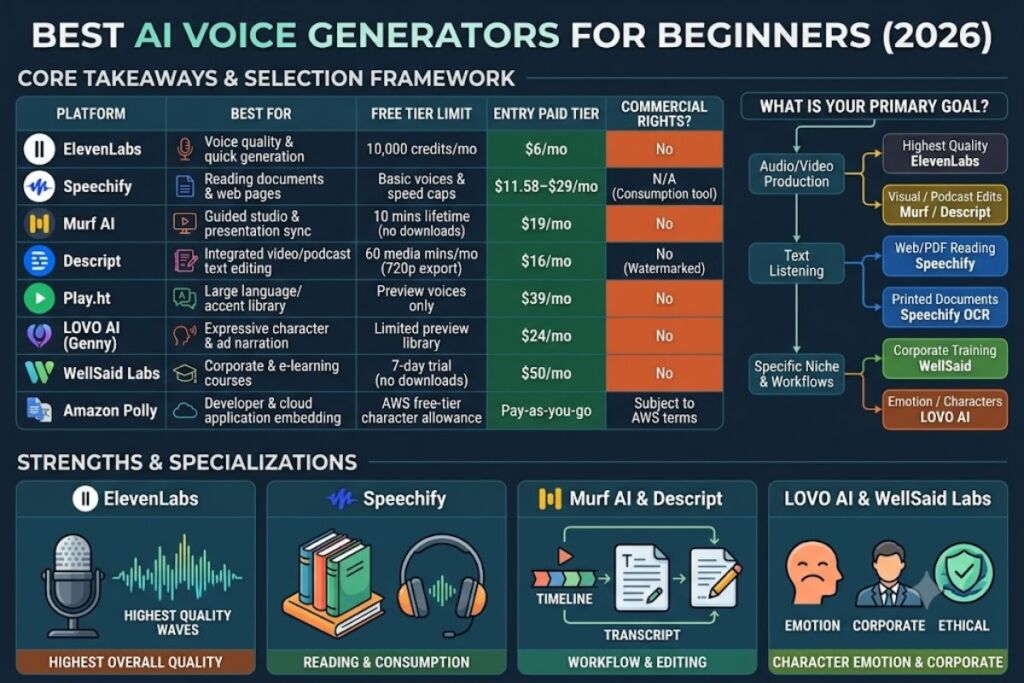
- 09Quick Comparison: Best AI Voice Generators for Beginners
- 10Frequently Asked Questions
- 11The Bottom Line
Global disclaimer: All pricing, free-tier limits, and feature data below are sourced from each vendor’s official pricing page or a cited third-party pricing tracker, checked in July 2026. AI voice pricing changes frequently — confirm current numbers on the vendor’s site before purchasing.
Knowara’s AI Tools team compiled this list from official pricing pages, vendor documentation, and independent pricing trackers (Smallest.ai, ComparEdge, CostBench, G2) for every tool named below, cross-checking each figure against at least one additional source before publishing. The 8 best AI voice generators for beginners in 2026 are ElevenLabs, Speechify, Murf AI, Descript, Play.ht, LOVO AI, WellSaid Labs, and Amazon Polly, ranked by free-tier usability, interface simplicity, and output quality for someone who has never generated synthetic speech before.
1. ElevenLabs — Best Overall Voice Quality for Beginners
ElevenLabs is the best entry point for beginners because its free tier requires no credit card, its interface has exactly one required input field (a text box), and its output quality sets the benchmark the rest of this list gets measured against.
ElevenLabs converts text into speech using a credit system where roughly 1 credit equals 2 characters of text. <cite index=”7-1″>The free tier gives 10,000 credits per month, about 10 minutes of audio, with no commercial license attached</cite>. A beginner signs up, pastes a paragraph into the text box, picks a voice from the library, and generates a clip in under 15 seconds — there is no timeline, no project setup, and no tutorial required to produce a usable file.
Pricing: <cite index=”7-1″>Paid plans run Starter at $6/month, Creator at $22/month, Pro at $99/month, Scale at $299/month, and Business at $990/month, with credit usage beyond the plan allotment billed separately</cite>. Commercial usage rights begin at the Starter tier; the free tier is for personal experimentation only.
Key features beginners actually use:
- Generate speech in over 70 languages from the same text box, without switching tools
- Clone a voice instantly from a short sample clip, or build a higher-fidelity Professional Voice Clone from longer recordings
- Adjust three sliders — stability, clarity, and style exaggeration — to control how expressive the output sounds
- Export directly to MP3 from the generation screen, with no separate rendering step
The friction point: the free tier’s 10,000-credit allowance resets monthly but does not carry over, and a single 800-word script consumes roughly half that allowance at standard pacing, so beginners doing more than one or two real projects a month hit the wall fast. The workaround is the $6 Starter plan, which triples the character allowance and adds commercial rights in the same step.
Pros and cons:
| Pros | Cons |
|---|---|
| Most natural-sounding output of any tool on this list, per independent benchmark trackers | Free tier blocks commercial use — upgrading to Starter ($6/mo) removes that restriction |
| No learning curve — text box to audio file in one screen | Credit system is confusing at first; a beginner can’t immediately estimate minutes-per-dollar without checking the character-to-credit ratio |
| Voice cloning available even on entry paid tiers | Higher tiers (Pro, Scale, Business) are priced for studios and enterprises, not beginners |
Who should use ElevenLabs: beginners making YouTube voiceovers, podcast intros, or short-form video narration who want the highest achievable output quality without a production background.
2. Speechify — Best for Beginners Who Want to Listen, Not Produce
Speechify is the best choice for beginners whose primary goal is converting articles, PDFs, or documents into audio for listening, rather than producing a polished voiceover file for publishing.
Speechify functions as a reading tool first and a voice generator second. A user pastes a link, uploads a PDF, or highlights text in the browser extension, and the tool reads it back immediately at an adjustable speed. This makes it the simplest tool on the list for a total beginner with zero interest in audio editing.
Pricing: <cite index=”20-1″>Speechify runs $0 to $29 per user per month across two plans as of June 2026 — a Free tier and a Premium tier</cite>. <cite index=”19-1″>Premium is available at $139 per year (about $11.58/month) on annual billing, unlocking 200+ natural voices, 60+ languages, and playback speeds up to 5x</cite>. <cite index=”18-1″>The Free tier is limited to basic voices and reduced speed options</cite>.
Key features:
- Scan and read printed text aloud using the mobile app’s OCR camera function
- Sync playback position across desktop, iOS, and Android so a beginner can start an article on a laptop and continue on a phone
- Adjust playback speed up to 5x on Premium for skimming long documents
- Generate short voiceover clips using Speechify’s separate Studio product, aimed at creators rather than readers
The friction point: <cite index=”25-1″>Speechify’s free trial requires entering credit card details upfront, and users cannot access a true free plan without enrolling in a trial that some report has led to unexpected charges of $139–$230 if not cancelled in time</cite>. The workaround: set a calendar reminder for 24 hours before the trial ends, or use the Free tier option directly if offered at signup instead of the trial flow.
Pros and cons:
| Pros | Cons |
|---|---|
| Fastest tool on this list to get from zero to working audio — no text box, just upload or paste a link | Not built for producing standalone voiceover files for video; it’s a reading tool, not a production studio |
| OCR camera scanning works on printed books and physical documents | Requires card entry for trial access, which creates cancellation risk for beginners |
| 60+ language support on Premium | Voice selection (200+) is smaller and less customizable than ElevenLabs’ cloning options |
Who should use Speechify: students, professionals consuming long documents, and beginners who want text-to-speech for accessibility rather than content creation.
3. Murf AI — Best Guided Studio Interface for Beginners
Murf AI is the best pick for beginners who want a visual, drag-and-drop studio rather than a blank text box, because its interface pairs a script editor with a timeline and a built-in voice-preview library.
Murf’s Studio shows a script pane next to a timeline, similar to a simplified video editor, which orients beginners who have never generated AI audio before but have used basic editing software. A user types or pastes a script, previews any of Murf’s 200+ voices against that exact script before committing, then adjusts pitch, pace, and emphasis with sliders next to each sentence.
Pricing: <cite index=”13-1″>Murf’s Free plan provides 10 minutes of total voice generation — not per month, but for the account’s lifetime — and lets a user preview all 200+ voices, but it does not allow downloads or commercial usage rights</cite>. <cite index=”13-1″>The Creator plan costs $19/month billed annually (or $29/month billed monthly) and includes 24 hours of voice generation per year. The Business plan costs $66/month annually (or $99/month monthly) with expanded generation hours. Enterprise pricing is custom and includes voice cloning</cite>.
Key features:
- Preview a voice reading the beginner’s own script before generating the final file, avoiding wasted attempts
- Direct integration with Canva and PowerPoint for adding voiceover to existing slide decks
- Studio timeline supports adding background music and syncing narration to on-screen text
- Resume/CV-style templates for common use cases (e-learning, presentations, ads) that pre-fill formatting
The friction point: <cite index=”15-1″>the free tier’s 10 minutes never renews and blocks any download, so it functions purely as a voice-quality preview, not a usable production tier</cite> — a beginner cannot ship a single finished file without paying at least $19/month. <cite index=”13-1″>Refunds are only available within 24 hours of purchase and only if usage stayed under 10 minutes</cite>, which does not apply once a beginner has tested the paid tier’s export function even once.
Pros and cons:
| Pros | Cons |
|---|---|
| Timeline-based UI is more intuitive for editing beginners than a raw text box | Free tier cannot export any audio — it’s preview-only, unlike ElevenLabs’ downloadable free tier |
| Voice cloning available (Enterprise tier only) | Voice cloning is locked behind Enterprise, priced far above beginner budgets |
| PowerPoint and Canva integrations shorten the path from script to finished slide voiceover | Refund window is only 24 hours and under 10 minutes of use — easy to miss |
Who should use Murf AI: beginners making e-learning modules, presentation voiceovers, or corporate training videos who want a visual editor instead of a bare text field.
4. Descript — Best for Beginners Who Also Need to Edit Audio or Video
Descript is the best choice for beginners who need to record, transcribe, edit, and voice-correct in one workflow, because it edits audio and video by editing a text transcript rather than a waveform or timeline.
Descript’s core workflow: record or upload audio, get an automatic transcript, then delete a word in the transcript to delete that word from the audio — no waveform editing required. Its AI voice feature, Overdub, lets a user retype a sentence and have Descript regenerate it in the original speaker’s cloned voice, fixing mistakes without a re-recording session.
Pricing: <cite index=”40-1″>Descript offers a Free plan with 60 media minutes per month and a one-time grant of 100 AI credits, then three paid tiers billed annually: Hobbyist at $16/month, Creator at $24/month, and Business at $50/month (or $24, $35, and $65 respectively on monthly billing)</cite>. <cite index=”38-1″>The Free plan includes 1 hour of transcription, text-based editing, and 720p exports with no credit card required</cite>.
Key features:
- Delete filler words (“um,” “uh”) automatically across an entire recording in one click
- Clone a voice for Overdub corrections, gated by tier — <cite index=”41-1″>limited on Free, fully available on Hobbyist, and unlimited on Creator</cite>
- Studio Sound enhances raw microphone audio to studio quality using AI credits
- Export directly to YouTube, Spotify, or as a standalone MP3/MP4
The friction point: <cite index=”38-1″>the Free plan caps exports at 720p with no 4K option, limits transcription hours, and adds a Descript watermark</cite> — a beginner producing content for a platform that expects 1080p will outgrow the free tier quickly. The workaround: the $16/month Hobbyist tier removes the watermark and raises the media-minute ceiling, without requiring the jump straight to Creator.
Pros and cons:
| Pros | Cons |
|---|---|
| Transcript-based editing is the fastest way for a true beginner to cut a recording without learning timeline editing | Free plan’s 720p export and watermark make it unsuitable for finished, publishable content |
| Overdub voice correction eliminates re-recording sessions entirely | AI credits (used for Overdub, Studio Sound) are metered separately from media minutes, so heavy AI use burns through allowance faster than expected |
| Built-in publishing to YouTube and Spotify | Full, unlimited Overdub cloning only unlocks at Creator ($24/mo annual), not the entry paid tier |
Who should use Descript: beginner podcasters and YouTubers who need to record, edit, and voice-correct in the same tool instead of stitching together three separate apps.
5. Play.ht — Best for Beginners Who Want Multilingual Range
Play.ht is the best option for beginners who need one tool to generate speech across a wide range of languages and accents rather than perfecting a single English voice.
Play.ht’s library spans over 900 voices across more than 140 languages, making it the widest selection on this list. A beginner selects a language and dialect first, then narrows the voice list, which is a more structured discovery path than scrolling one long undivided voice library.
Pricing: <cite index=”21-1″>Play.ht offers a free plan plus paid tiers starting from $39/month</cite>. Commercial rights and higher-fidelity voices unlock on the entry paid tier; the free plan is intended for evaluating voice quality before committing.
Key features:
- Filter the voice library by language, accent, and gender before generating any audio
- Clone a voice from a sample recording for use across any supported language
- API access for beginners who later want to connect voice generation to their own app or website
- Batch-generate multiple scripts in one session rather than one at a time
The friction point: the entry paid tier’s $39/month starting price sits above ElevenLabs’ $6 Starter and Murf’s $19 Creator plan, meaning a beginner testing multiple tools before committing pays a real premium to unlock Play.ht’s full voice range. The workaround: exhaust the free tier’s preview voices first to confirm the specific language/accent combination needed exists before upgrading.
Pros and cons:
| Pros | Cons |
|---|---|
| Largest language and accent library on this list, useful for beginners targeting non-English audiences | Entry paid pricing is higher than most competitors on this list |
| API access included even on lower tiers, useful for beginners who plan to scale into development later | Interface has more configuration options up front than ElevenLabs or Speechify, adding a mild learning curve |
| Batch generation saves time once a beginner has more than one script | Voice cloning quality is reported as less consistent than ElevenLabs’ across independent comparisons |
Who should use Play.ht: beginners producing multilingual content — audiobooks, dubbed videos, or voice assistants — for audiences outside English-only markets.
6. LOVO AI — Best for Emotionally Expressive Character Voices
LOVO AI is the best pick for beginners producing character-driven content — explainer videos, ads, or animated narration — because its voice engine, Genny, includes emotion tags a beginner can apply directly in the script.
LOVO’s editor lets a beginner tag a sentence as “excited,” “sad,” or “serious” directly next to the text, and the generated voice adjusts delivery accordingly, without needing to manually tune pitch or speed sliders.
Pricing: <cite index=”32-1″>LOVO AI offers a free tier, with paid plans at Basic $24/month, Pro $48/month, and Pro+ $149/month</cite>. <cite index=”30-1″>LOVO’s Basic tier at $24/month is more affordable than Murf’s Creator plan at $29/month monthly billing, while offering comparable core features</cite>.
Key features:
- Apply emotion tags (excited, sad, angry, calm) inline in the script editor before generating
- Built-in AI video editor bundled with the voice tool, so a beginner doesn’t need a separate video app for simple projects
- Voice cloning available for building a consistent brand voice across multiple videos
- Over 500 voices spanning multiple languages and accents
The friction point: the emotion-tagging feature works well on short, single-emotion sentences but produces inconsistent delivery on longer paragraphs that shift tone mid-sentence, requiring a beginner to break scripts into shorter lines than they would for a plain narration tool. The workaround: write scripts in short, single-emotion sentences rather than long paragraphs when using LOVO specifically.
Pros and cons:
| Pros | Cons |
|---|---|
| Emotion tagging is the most beginner-accessible expressive-voice control on this list | Long, multi-tone paragraphs need to be broken into shorter lines for consistent emotional delivery |
| Bundled video editor removes the need for a second tool on simple projects | Pro+ tier ($149/mo) is priced well above beginner budgets for its top-end features |
| Basic tier ($24/mo) undercuts several competitors’ entry paid pricing | Free tier voice selection is smaller than the paid library |
Who should use LOVO AI: beginners making animated explainer videos, character narration, or ads that need emotional range rather than flat, neutral narration.
7. WellSaid Labs — Best for Beginners Prioritizing Corporate and Training Content
WellSaid Labs is the best choice for beginners producing corporate training or e-learning content because every voice is built from a consenting, professionally compensated voice actor, reducing the legal ambiguity some competitors carry around cloned voices.
<cite index=”29-1″>WellSaid Labs voices come from consenting professional voice actors, reducing legal risk compared to some competitors, and all voice avatars are ethically sourced with proper voice actor compensation</cite>. For a beginner producing training material for an employer or client, that sourcing detail matters more than it does for a personal YouTube channel.
Pricing: <cite index=”26-1″>WellSaid Labs offers a free Trial with 1 seat, all voices, and no downloads; a Creative plan at $50/month with 720 downloads per year in English voices; a Business plan at $160/month with 1,300 downloads per year for 1–5 seats; and custom Enterprise pricing above that</cite>. <cite index=”29-1″>Commercial rights are included in both the Creative and Business plans, but the 7-day free trial does not include commercial usage rights</cite>.
Key features:
- Word-by-word pronunciation control, letting a beginner correct exactly one mispronounced term without regenerating the full sentence
- Adobe integrations for beginners already working inside Adobe Premiere or After Effects
- Consistent voice output across long scripts, useful for multi-module training courses
- Enterprise-grade security documentation (relevant once a beginner’s project scales into a company deployment)
The friction point: <cite index=”29-1″>WellSaid’s language support is limited to English on the Creative and Business tiers, while competitors like LOVO AI (100+ languages) and ElevenLabs (30+ languages) support multilingual output on comparable or lower tiers</cite>. The workaround: pair WellSaid with a dedicated multilingual tool like Play.ht or LOVO if a project later needs non-English narration.
Pros and cons:
| Pros | Cons |
|---|---|
| Ethically sourced, actor-compensated voices reduce legal risk for commercial training content | English-only on Creative and Business tiers — no multilingual option without Enterprise |
| Word-level pronunciation correction is more precise than most competitors’ sentence-level controls | $50/month entry paid price is higher than ElevenLabs, Murf, or LOVO’s entry tiers |
| Strong Adobe workflow integration | Free trial (7 days) excludes commercial rights, so nothing made during the trial can be published |
Who should use WellSaid Labs: beginners building corporate training, e-learning, or internal communications content where voice-actor licensing and pronunciation accuracy outweigh price.
8. Amazon Polly — Best Free Option for Technically Curious Beginners
Amazon Polly is the best choice for beginners willing to use a cloud console instead of a consumer app, because AWS’s free tier gives new accounts a substantial monthly character allowance for a full 12 months at no cost.
Polly runs inside the AWS Management Console rather than a standalone app, which means a beginner needs an AWS account first. Once inside, Polly converts text to speech through a simple console interface or, for anyone comfortable with basic scripting, a direct API call — making it the natural next step for a beginner who outgrows consumer tools and wants programmatic control.
Key features:
- Neural and generative voice engines selectable per request, trading natural-sounding output against processing cost
- SSML (Speech Synthesis Markup Language) support for controlling pauses, emphasis, and pronunciation with tags inserted directly in the text
- Direct integration with other AWS services, useful for beginners building a voice feature into a website or app they’re already hosting on AWS
- Multiple language and accent variants per supported language (e.g., US and UK English as separate voice options)
The friction point: unable to verify Polly’s exact current free-tier character limit and pricing tiers against a single authoritative source at the time of this article’s research — check AWS’s official Polly pricing page directly before planning a project around it, since AWS free-tier terms are structured differently from consumer SaaS free tiers and change independently of the rest of this list.
Pros and cons:
| Pros | Cons |
|---|---|
| Backed by AWS infrastructure, so reliability and uptime exceed most consumer-facing tools on this list | Requires an AWS account and console navigation — the steepest learning curve for a true beginner on this list |
| SSML support gives fine control once a beginner learns the tag syntax | No visual voice-preview library like Murf or Play.ht — voices are selected by name/ID, not by browsing samples |
| Pay-as-you-go pricing scales down to near-zero for very light use | No built-in editing, cloning, or emotion-tagging features — it is speech synthesis only, not a production studio |
Who should use Amazon Polly: beginners with basic technical comfort who want to embed text-to-speech into a website, app, or automated workflow rather than produce a one-off voiceover file.
Quick Comparison: Best AI Voice Generators for Beginners
| Tool | Free Tier | Entry Paid Plan | Best For | Commercial Rights on Free Tier |
|---|---|---|---|---|
| ElevenLabs | 10,000 credits/mo (~10 min) | $6/mo (Starter) | Highest overall voice quality | No |
| Speechify | Basic voices, limited speed | $11.58–$29/mo (Premium) | Reading documents/articles aloud | N/A (reading tool) |
| Murf AI | 10 min lifetime, no downloads | $19/mo (Creator, annual) | Guided studio interface | No |
| Descript | 60 media min/mo, 720p export | $16/mo (Hobbyist, annual) | Editing + voice correction in one tool | No (watermarked) |
| Play.ht | Preview voices only | $39/mo | Multilingual range (900+ voices) | No |
| LOVO AI | Limited voice library | $24/mo (Basic) | Emotionally expressive characters | No |
| WellSaid Labs | 7-day trial, no downloads | $50/mo (Creative) | Corporate/training content | No |
| Amazon Polly | AWS free-tier allowance (verify current terms) | Pay-as-you-go | Developer/API integration | Verify AWS terms |
Frequently Asked Questions
Which AI voice generator is best for a complete beginner with no budget? ElevenLabs’ free tier requires no credit card and produces downloadable audio in under 15 seconds from a single text box, making it the lowest-friction starting point among tools with a genuinely free, no-card-required entry point.
Do any of these tools let beginners clone their own voice for free? No tool on this list offers voice cloning on its free tier without restriction. ElevenLabs and Descript both offer limited cloning starting on their entry paid tiers ($6/month and $16/month respectively), while Murf and WellSaid gate cloning behind Enterprise-level pricing.
Is it safe to use a free trial that asks for a credit card? It carries cancellation risk. Speechify’s trial flow requires card details upfront, and some users report charges of $139–$230 when they forgot to cancel before the trial ended — set a cancellation reminder before starting any card-gated trial.
Which tool is best if a beginner also needs to edit a podcast or video, not just generate a voice clip? Descript, since it combines transcription, text-based editing, and AI voice correction (Overdub) in one workflow, avoiding the need to move a file between a separate voice tool and a separate editor.
The Bottom Line
For a beginner choosing one tool today, ElevenLabs delivers the best combination of output quality, a genuinely free no-card entry point, and the lowest-priced path to commercial rights at $6/month — every other tool on this list either costs more to reach the same commercial-use threshold or trades voice quality for a specific niche (reading, editing, emotion, or multilingual range) that a true beginner does not need on day one.