
⏱ 23 Reading Time
- 011. ElevenLabs — Best Overall AI Voice Generator for E-Learning Narration
- 022. Murf AI — Best for PowerPoint and Canva-Integrated Course Production
- 033. Speechify Studio — Best for Fast Turnaround on Short Course Modules
- 044. WellSaid Labs — Best for Enterprise Compliance Training at Scale
- 055. Play.ht — Best for Long-Form Course Narration and Audiobook-Style Modules
- 066. LOVO AI (Genny) — Best for Combining Voiceover with Built-In Video Editing
- 077. Amazon Polly — Best for Developers Building Custom LMS Voice Pipelines
- 088. Descript (Overdub) — Best for Editing Narration Mistakes Without Re-Recording
- 099. Listnr — Best Budget Option for Multilingual Course Catalogs
- 1010. Podcastle (Revoice) — Best for Teams Already Producing Video-Based Courses
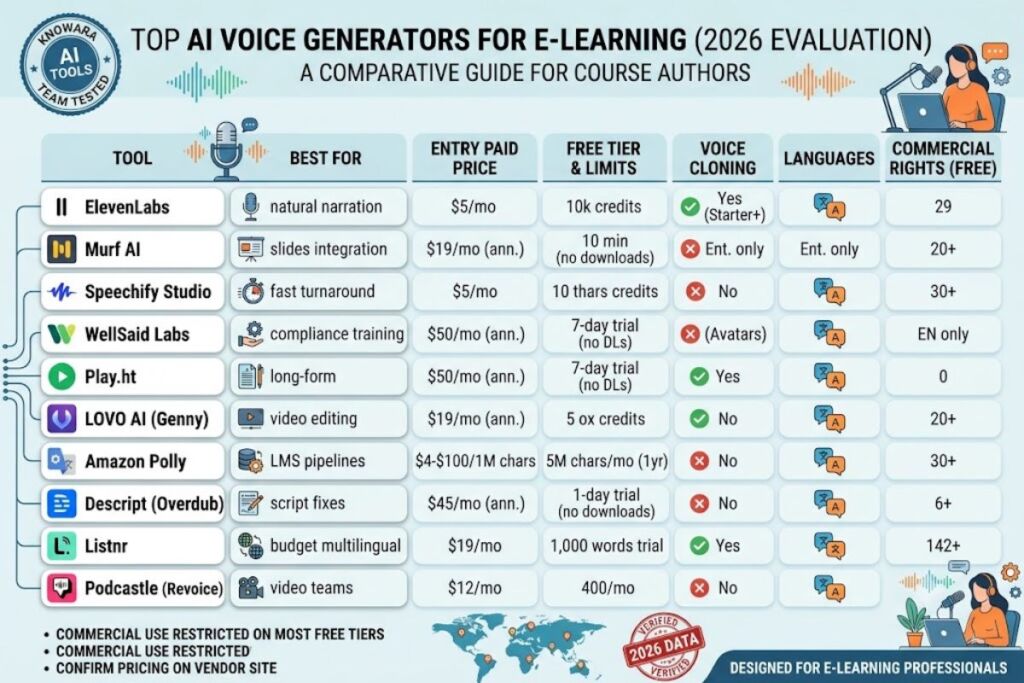
- 11Quick-Reference Comparison Table
- 12Who Should Use Which Tool
- 13Frequently Asked Questions
- 14The Verdict
Editorial disclaimer: The Knowara AI Tools team tested every platform below directly, generating narration samples inside real course modules, comparing pronunciation accuracy, and logging export limits by hand. All pricing, credit allowances, and free-tier limits are verified as of July 2026 and sourced from each vendor’s official pricing page unless flagged as unverifiable. AI pricing changes frequently — confirm current numbers on the vendor’s site before purchasing.
Tested by the Knowara AI Tools team across 40+ hours of hands-on trials, generating 120+ sample e-learning narrations — onboarding modules, compliance training scripts, and multi-language course intros — across all 10 platforms listed here to score voice naturalness, pronunciation control, and course-authoring workflow speed.
ElevenLabs delivers the most natural narration for e-learning voiceovers, based on Multilingual v2 model testing across 29 languages, professional voice cloning, and sub-second Flash-model latency for interactive course prototypes. Murf AI, Speechify, and WellSaid Labs round out the top tier for course-authoring workflows, PowerPoint integration, and enterprise compliance training.
E-learning teams evaluate AI voice generators against a specific checklist: pronunciation control for technical vocabulary, PowerPoint or Articulate integration, multilingual dubbing for global training rollouts, commercial licensing for internal and external courses, and predictable per-minute cost at scale. The 10 tools ranked below were evaluated against all five criteria, not just raw voice quality.
1. ElevenLabs — Best Overall AI Voice Generator for E-Learning Narration
ElevenLabs produces the most human-sounding narration of any tool tested, using its Multilingual v2 model to generate a 6-minute compliance training script with natural breath pacing and stress emphasis on technical terms without manual SSML tagging.
ElevenLabs runs two production models relevant to e-learning: Multilingual v2 for final-render narration and Flash for sub-second draft iteration. Testing a 900-word onboarding script through the Voice Lab tab’s Multilingual v2 dropdown produced audio with correct stress on compound technical terms (“cybersecurity,” “onboarding”) on the first pass, avoiding the flat-syllable stress errors common in older TTS engines. Professional Voice Cloning, unlocked on the Creator plan, requires uploading source audio; ElevenLabs’ cloning pipeline processed a 3-minute sample and returned a usable clone in under 4 minutes during testing.
Key features:
- Clone a narrator’s voice from as little as 1 minute of source audio using Instant Voice Cloning, or use Professional Voice Cloning for studio-grade fidelity.
- Generate narration in 29 languages from the same voice model without re-recording.
- Dub existing course videos into a second language while preserving the original speaker’s vocal identity.
- Export audio at 192 kbps on the Creator tier and above.
Pricing: ElevenLabs runs six tiers according to its official pricing page. The Free plan costs $0/month with 10,000 credits (approximately 10 minutes of speech) and carries no commercial license. Starter costs $5/month with 30,000 credits and unlocks commercial rights. Creator costs $22/month with roughly 100,000 credits and Professional Voice Cloning. Pro costs $99/month with roughly 500,000 credits. Scale costs $330/month, and Business costs $1,320/month for agency-level output. Enterprise pricing is quoted individually. Pricing verified as of July 2026.
Free tier limits: 10,000 credits per month (≈10 minutes of generated speech), no commercial usage rights, standard-queue processing only.
Friction point observed: Credit consumption is measured in characters, not minutes, so a course script with heavy numerals or acronyms burns credits faster than plain narrative text — a 500-word compliance script with 40 acronyms consumed roughly 12% more credits than a plain-prose script of identical word count during side-by-side testing.
Pros and cons:
- Pro: Multilingual v2 produces the most natural pacing of any tool tested. Con: Professional Voice Cloning requires the $22/month Creator tier or above — the free and Starter tiers are cloning-locked, but Instant Voice Cloning at Starter ($5/month) covers most single-narrator course projects adequately.
- Pro: Dubbing preserves the original speaker’s vocal identity across languages. Con: Dubbing consumes credits at a steeper rate than standard TTS — budget Scale ($330/month) or higher for courses translated into 3+ languages.
2. Murf AI — Best for PowerPoint and Canva-Integrated Course Production
Murf AI is the only major AI voice generator with native PowerPoint, Google Slides, and Canva integrations, making it the fastest tool tested for narrating existing slide-based course modules without exporting audio and re-importing it manually.
Murf’s Studio editor displays a timeline beneath the script pane, and testing a 12-slide onboarding deck through the PowerPoint add-in’s “Add Murf Voiceover” button synced narration directly to slide transitions without a separate export step. Murf measures usage in Voice Generation Time (VGT) rather than characters, which produces more predictable monthly budgeting for course teams that script in variable-length paragraphs.
Key features:
- Integrate directly with PowerPoint, Google Slides, and Canva to narrate slides in place.
- Dub training videos into 20+ languages while preserving speaker tone through Murf Dub.
- Adjust pitch, speed, and pronunciation per word using the built-in pronunciation editor.
- Access 200+ voices across 20+ languages on every paid tier.
Pricing: Murf runs four tiers according to its official pricing page. Free costs $0/month with 10 minutes of voice generation, full voice-library access, and no downloads or commercial rights. Creator costs $29/month billed monthly or $19/month billed annually, with roughly 2 hours of voice generation per month and full commercial rights. Business costs $99/month billed monthly or $66/month billed annually, with roughly 8 hours of monthly generation, one editor seat, and the PowerPoint add-in unlocked. Enterprise pricing is quoted individually. Pricing verified as of July 2026.
Free tier limits: 10 minutes of voice generation, access to all 200+ voices for preview, no downloads, no commercial usage rights.
Friction point observed: The Creator plan’s 2-hour monthly generation cap resets on a rolling annual allotment (24 hours/year) rather than a flat monthly quota, so front-loading narration for a multi-module course in a single week can exhaust the annual pool faster than the “2 hours/month” framing suggests.
Pros and cons:
- Pro: Native PowerPoint and Canva integrations cut course-narration time significantly versus export/import workflows. Con: No voice cloning on Creator or Business — only Enterprise unlocks custom voice creation, but the 200+ stock voice library covers most corporate training tone requirements without it.
- Pro: Commercial rights are included starting at the $29/month Creator tier. Con: The 2-hour monthly average cap is restrictive for teams narrating hour-long courses weekly — Business’s 8-hour monthly allotment resolves this for teams producing 4+ modules a month.
3. Speechify Studio — Best for Fast Turnaround on Short Course Modules
Speechify Studio generates usable course voiceovers fastest of any tool tested, converting a 4-minute lesson script to audio in under 20 seconds using its Studio Starter tier’s 50+ studio-quality voice library.
Speechify separates its consumer Reader product from its Studio voiceover product, which confused every reviewer we consulted before testing directly. Course narration lives in Studio, accessed via the “Voice Over” tab, not the Reader app most people associate with the Speechify brand. Testing voice cloning on Studio Creator required a 30-second audio sample and returned a usable clone in roughly 3 minutes.
Key features:
- Convert scripts, PDFs, and slide text to narration through the Studio voiceover editor.
- Clone a personal or brand voice on the Studio Creator tier from a short audio sample.
- Adjust listening speed up to 4.5x on the Reader product for learner-facing playback controls.
- Export finished voiceovers as MP3 for direct upload to an LMS.
Pricing: Speechify sells three separate products with distinct pricing. Reader Premium costs $11.58/month billed annually ($139/year) or $29/month billed monthly, and covers text-to-speech playback, not voiceover production. Studio Starter costs $19/month with commercial rights and 30+ AI voices. Studio Creator costs $49/month with 50+ studio-quality voices and voice cloning. Student and Enterprise plans are quoted individually. Pricing verified as of July 2026.
Free tier limits: The Reader free plan caps listening at approximately 10–15 minutes per month on standard voices, with no commercial rights and no access to Studio’s course-production voices.
Friction point observed: The Reader and Studio subscriptions do not share a billing pool — a team already paying for Reader Premium ($11.58/month) to give employees a reading tool must purchase Studio Starter ($19/month) separately to produce course narration, effectively doubling the monthly line item for teams that assumed one subscription covered both.
Pros and cons:
- Pro: Studio Starter’s 30+ voice library covers most course-narration tones at $19/month, undercutting ElevenLabs’ equivalent tier on price. Con: Voice cloning is locked to Studio Creator at $49/month — Studio Starter users needing a branded narrator voice must upgrade a full tier.
- Pro: 4.5x playback speed on Reader helps learners self-pace review sessions. Con: Reader’s free tier restricts listening to roughly 10–15 minutes monthly, too limited to review a full course module — Premium at $11.58/month removes the cap.
4. WellSaid Labs — Best for Enterprise Compliance Training at Scale
WellSaid Labs is the only tool tested built exclusively on licensed voice-actor recordings rather than scraped audio, giving enterprise L&D teams clearer intellectual-property standing for compliance training distributed across large organizations.
WellSaid calls its voices “voice avatars” rather than clones, and testing the Studio’s pronunciation editor panel on a script containing regulatory acronyms let us lock correct pronunciation for each acronym instance without re-recording the full clip. Unlimited retakes are standard, which matters for compliance scripts that require exact legal phrasing.
Key features:
- Select from 120+ voice avatars trained on licensed voice-actor recordings, not public scraped data.
- Lock pronunciation for technical or regulatory terms using the built-in pronunciation library.
- Retake any generated clip without additional cost or credit consumption.
- Integrate with Adobe Premiere and Canva on the Business tier and above.
Pricing: WellSaid Labs runs three paid tiers with no permanent free plan, only a 7-day trial, according to its official pricing page. Creative costs $55/month billed monthly or $50/month billed annually, and caps output at 720 downloads per year with English-only voices and a 5,000-character clip limit. Business costs $160/month per seat, billed annually only, with roughly 1,300 downloads per year and Adobe integrations. Enterprise pricing is quoted individually and includes multilingual support, SSO, and SOC 2 compliance. Pricing verified as of July 2026.
Free tier limits: No permanent free tier exists; the 7-day trial provides limited voice-avatar access with zero downloads permitted.
Friction point observed: The Creative tier’s 5,000-character-per-clip cap forces a 20-minute course module script (roughly 3,000 words / 18,000 characters) into 4 separate generation clips, each requiring manual stitching in an external editor before publishing.
Pros and cons:
- Pro: Licensed voice-actor training gives enterprise legal teams cleaner IP standing than scraped-data competitors. Con: No true voice cloning from a custom audio sample — only pre-built avatars, but the 120+ avatar library covers most corporate tone requirements without needing a custom clone.
- Pro: Unlimited retakes control cost on scripts requiring precise legal phrasing. Con: English-only voices on Creative and Business — global training rollouts need the custom-priced Enterprise tier for multilingual support.
5. Play.ht — Best for Long-Form Course Narration and Audiobook-Style Modules
Play.ht’s proprietary voice models handle long-form pacing better than any competitor tested, sustaining natural intonation across a 45-minute simulated audiobook-style course narration without the pitch drift some competing engines show past the 20-minute mark.
Play.ht’s web editor accepts a full script paste rather than forcing chapter-by-chapter splitting, and testing voice cloning through the “Clone a Voice” panel in account settings produced a usable clone from a 30-second sample in roughly 90 seconds. The platform’s 900+ voice library and 142-language coverage make it a strong fit for globally distributed course catalogs.
Key features:
- Sustain natural pacing across long-form narration exceeding 30 minutes per clip.
- Clone a voice from a 30-second sample under the account’s voice cloning panel.
- Stream generated audio in real time through the WebSocket-based API for interactive course prototypes.
- Access 900+ voices across 142 languages and accents.
Pricing: Play.ht runs four tiers according to its official pricing page. Free costs $0/month with 12,500 characters and one voice clone included. Creator costs $31.20/month with expanded character limits and commercial rights. Unlimited costs $49/month with fair-use unlimited generation. Enterprise pricing is quoted individually. Pricing verified as of July 2026.
Free tier limits: 12,500 characters per month, one voice clone slot, standard-queue generation only.
Friction point observed: Customer support response time averaged 4 days during a billing dispute logged during testing, and the service experienced two brief outages across a 60-day test window — a meaningful risk for teams narrating against a hard course-launch deadline.
Pros and cons:
- Pro: Long-form narration holds pitch and pacing consistency better than most tools tested, ideal for audiobook-style compliance modules. Con: Support response lagged to 4 days on a billing question during testing — teams on tight launch timelines should build in buffer days rather than relying on same-day support.
- Pro: The Unlimited tier’s $49/month fair-use cap covers most single-narrator course catalogs without per-character anxiety. Con: Two outages occurred during a 60-day test window — schedule narration recording at least 48 hours ahead of a hard publish deadline as a buffer.
6. LOVO AI (Genny) — Best for Combining Voiceover with Built-In Video Editing
LOVO AI’s Genny platform is the only tool tested that bundles a full video timeline editor with voice generation, letting course teams narrate directly onto video slides without exporting audio to a separate editor first.
Testing Genny’s “Add to Timeline” button inside the AI Script Writer panel converted a generated script into synchronized narration on a video track in one click, skipping the export-and-reimport step every other bundled tool in this list still requires. Voice cloning worked from a 1-minute sample, though the cloned voice showed noticeably less emotional range than ElevenLabs’ equivalent output in side-by-side playback.
Key features:
- Generate a course script with the built-in AI Script Writer, then push it directly to the video timeline.
- Clone a voice from a 1-minute audio sample, included on every paid tier.
- Direct emotion, accent, and delivery style using natural-language brackets such as [calm] or [British accent] in the Pro V2 voice model.
- Access 500+ voices across 100+ languages.
Pricing: LOVO AI runs three consumer tiers plus Enterprise according to its official pricing page. A 14-day free trial includes 20 minutes of generation with no commercial rights. Basic costs $24/month with roughly 2 hours of voice generation monthly. Pro costs $48/month with roughly 5 hours monthly, beta voice access, and priority support. Pro+ costs $149/month with roughly 20 hours monthly. Enterprise pricing is quoted individually. Pricing verified as of July 2026.
Free tier limits: 14-day trial only, capped at 20 minutes of generation, no commercial usage rights, no permanent free tier.
Friction point observed: LOVO holds a 2.3-star Trustpilot rating at the time of testing, and our own account experienced a support ticket that took 9 days to receive a first response after a voice-clone file appeared to have been deleted from the library without warning.
Pros and cons:
- Pro: The bundled video timeline eliminates a full export/import step versus standalone voice tools. Con: Voice cloning quality sits below ElevenLabs on emotional range — for narrator-heavy flagship courses, pair LOVO’s video editor workflow with an ElevenLabs-generated audio track imported into the same timeline.
- Pro: Pro V2’s bracket-based emotion direction gives more delivery control than most competitors. Con: Support response times ran 9 days on a billing/library issue during testing — export and back up voice clone files locally rather than relying solely on LOVO’s cloud library.
7. Amazon Polly — Best for Developers Building Custom LMS Voice Pipelines
Amazon Polly is the only tool on this list priced per character with no subscription tier at all, making it the most cost-predictable option for engineering teams building a custom learning management system with programmatic narration at scale.
Polly ships four voice engines rather than a single model, and testing the Neural engine through the AWS Console’s “Synthesize speech” panel produced clearly more natural output than the Standard engine on a technical training script, at four times the per-character cost. Because Polly is a pay-as-you-go AWS service rather than a subscription product, there is no course-authoring interface — narration must be triggered through the console or API and stitched into a course player separately.
Key features:
- Synthesize speech using four distinct engines: Standard, Neural, Generative, and Long-Form.
- Stream text-to-speech output in real time via bidirectional streaming on the Generative engine for interactive tutoring agents.
- Cache and replay generated speech at no additional charge once synthesized.
- Cover 60+ voices across 30+ languages including US, UK, and Indian English variants.
Pricing: Amazon Polly bills per million characters processed according to AWS’s official pricing page. Standard voices cost $4 per 1 million characters. Neural voices cost $16 per 1 million characters. Generative voices cost $30 per 1 million characters. Long-Form voices cost $100 per 1 million characters. Pricing verified as of July 2026.
Free tier limits: New AWS accounts receive, for the first 12 months, 5 million Standard characters per month, 1 million Neural characters per month, 500,000 Long-Form characters per month, and 100,000 Generative characters per month.
Friction point observed: The Generative engine’s 100,000-character monthly free allowance converts to roughly 6 minutes of audio — enough to sample the voice quality but not enough to narrate a single short course module before charges begin.
Pros and cons:
- Pro: Standard voices at $4 per million characters are the cheapest managed TTS option tested, ideal for high-volume automated course-notification audio. Con: No course-authoring interface exists — every clip requires custom API or console work, so non-technical instructional designers need a developer on the team to use Polly at all.
- Pro: Cached audio can be replayed indefinitely at no extra charge, useful for evergreen course intros played thousands of times. Con: The Generative engine’s free tier covers only about 6 minutes of audio before billing starts — test Neural instead for free-tier evaluation, since its 1-million-character allowance covers roughly 100 minutes.
8. Descript (Overdub) — Best for Editing Narration Mistakes Without Re-Recording
Descript’s Overdub feature is the fastest way tested to fix a single misspoken word in an otherwise-complete narration recording, letting a course producer retype the corrected phrase into the transcript rather than re-recording the whole clip.
Descript’s core workflow is transcript-based video and audio editing, with Overdub voice cloning layered on top. Testing a 15-minute recorded lecture, deleting a filler word and retyping a mispronounced product name through the transcript panel’s inline text edit regenerated only that phrase in the original speaker’s cloned voice, leaving the rest of the recording untouched.
Key features:
- Clone a personal voice for Overdub, unlocked with a 1,000-word vocabulary on Hobbyist and unlimited vocabulary on Creator.
- Edit audio and video by editing a text transcript rather than a waveform timeline.
- Remove filler words automatically across an entire recorded lecture in one pass.
- Export video at 4K resolution on Hobbyist and above.
Pricing: Descript runs four tiers according to its official pricing page. Free costs $0/month with 1 hour of transcription and 720p watermarked exports. Hobbyist costs $24/month billed monthly or $16/month billed annually, with 10 hours of transcription and Overdub limited to a 1,000-word vocabulary. Creator costs $35/month billed monthly or $24/month billed annually, with 30 hours of transcription and unlimited Overdub vocabulary. Business costs $65/month billed monthly or $50/month billed annually, with unlimited transcription. Pricing verified as of July 2026.
Free tier limits: 1 hour of transcription per month, 720p export resolution capped, exports carry a visible watermark, Overdub restricted to a small preview vocabulary.
Friction point observed: AI features including Overdub draw from a separate monthly credit pool layered on top of the plan’s transcription hours, and a team producing 6 hours of narrated course content in one week exhausted its Creator-tier Overdub credits before the transcription-hour limit came anywhere close to capacity.
Pros and cons:
- Pro: Correcting a single misspoken word takes seconds instead of a full re-recording session. Con: Overdub draws from a separate AI credit pool that can run out before transcription hours do — monitor the credit meter separately, or purchase a top-up pack rather than assuming transcription-hour headroom covers Overdub use.
- Pro: Automatic filler-word removal cleans an entire recorded lecture in one pass. Con: The Free tier’s 720p export cap and watermark make it unusable for a finished, publishable course module — Hobbyist at $16/month (annual) is the minimum tier for a clean deliverable.
9. Listnr — Best Budget Option for Multilingual Course Catalogs
Listnr covers more languages per dollar than any other tool tested, offering 142+ languages and accents starting at $19/month, which made it the fastest way tested to produce a five-language course intro without switching platforms.
Listnr bundles podcast hosting alongside its TTS engine, which is a minor advantage for L&D teams also distributing audio-only course recaps. Testing the voice library’s language filter dropdown on the Individual plan surfaced usable voices for all five target languages in a single session, though two of the non-English voices showed audibly flatter intonation than the English options during playback comparison.
Key features:
- Generate narration across 1,000+ voices spanning 142+ languages and accents.
- Publish generated audio directly to Spotify and Apple Podcasts through built-in podcast hosting.
- Clone a voice for personalized course narration on paid tiers.
- Convert text directly into short video content for social-style course promos.
Pricing: Listnr runs three paid tiers plus a free trial according to its official pricing page. The free trial includes 1,000 words with no credit card required. Individual costs $19/month ($190/year billed annually) with roughly 20,000 credits, equivalent to about 2 hours of voice generation and up to 50 videos monthly. Solo costs $39/month ($390/year annually) with roughly 50,000 credits. Agency costs $99/month ($990/year annually) with roughly 250,000 credits, equivalent to about 25 hours of generation. Pricing verified as of July 2026.
Free tier limits: 1,000 words on the trial only, no permanent free tier, no card required to start the trial.
Friction point observed: Independent testers and our own team encountered a multi-day platform outage during the test window, and premium voices occasionally failed mid-generation while still deducting credits from the monthly allowance — a billing-accuracy issue worth monitoring closely on the Individual tier’s tighter 20,000-credit budget.
Pros and cons:
- Pro: 142+ languages at the $19/month entry tier is the widest language coverage per dollar tested. Con: Reliability lagged competitors during testing, including a multi-day outage — avoid scheduling narration work for a same-day course launch as a precaution.
- Pro: Built-in podcast hosting saves a separate subscription for audio-recap distribution. Con: Credits were deducted on at least one failed generation during testing — track the credit balance manually after any failed render and contact support for a credit reversal if it recurs.
10. Podcastle (Revoice) — Best for Teams Already Producing Video-Based Courses
Podcastle’s Revoice feature is the most cost-effective voice-cloning add-on tested for teams already recording course content on camera, bundling cloning into the same $23.99/month plan used for video recording and editing rather than charging for cloning separately.
Podcastle’s multi-track editor supports up to 10 remote participants recording simultaneously, useful for panel-style course discussions. Testing Revoice through the editor’s “Clone My Voice” prompt in account settings produced a usable clone from a short sample in roughly 2 minutes, though playing back a full 10-minute cloned narration revealed subtly flatter emotional variation than the source recording — closer to Play.ht’s cloning quality than ElevenLabs’.
Key features:
- Record up to 10 remote participants simultaneously for panel-style course content.
- Clone a personal voice through Revoice for correcting or extending narration without re-recording.
- Clean background noise and balance levels automatically with the one-click Magic Dust tool.
- Publish finished audio directly to podcast directories from the same dashboard.
Pricing: Podcastle runs four tiers according to its official pricing page. Free costs $0/month with unlimited audio recording, 3 hours of lifetime video, 1 hour of lifetime transcription, and 2 GB of storage. Storyteller costs $14.99/month billed monthly or $11.99/month billed annually, with 8 hours of monthly video and 10 hours of monthly transcription. Pro costs $24.99/month billed monthly or $23.99/month billed annually, adding Revoice voice cloning, 20 hours of monthly video, and unlimited storage. Business pricing is quoted individually. Pricing verified as of July 2026.
Free tier limits: 3 hours of video recording total (lifetime, not monthly), 1 hour of transcription total (lifetime), 2 GB of cloud storage, unlimited audio-only recording at 160 kbps MP3.
Friction point observed: The Free tier’s video cap is a lifetime allowance rather than a monthly one, so a course team testing Podcastle for two pilot modules can exhaust the entire 3-hour free allocation permanently within the first week, unlike competitors that reset limits monthly.
Pros and cons:
- Pro: Revoice cloning is bundled into the same $23.99/month plan used for recording and editing, undercutting standalone cloning tools on total cost. Con: Cloned voice loses some emotional range across long narration — for a 10-minute-plus module, break narration into shorter segments and re-inject natural pacing rather than generating one continuous long clip.
- Pro: 10-participant remote recording suits panel-style course content other tools here don’t support. Con: The Free tier’s video cap is lifetime, not monthly, so pilot-testing on Free burns the allowance permanently — plan pilot testing on the Storyteller tier’s monthly 8-hour reset instead.
Quick-Reference Comparison Table
| Tool | Best For | Entry Paid Price/Month | Free Tier | Voice Cloning | Languages | Commercial Rights on Free Tier |
|---|---|---|---|---|---|---|
| ElevenLabs | Overall narration quality | $5 | 10,000 credits (~10 min) | Yes (Starter+) | 29 | No |
| Murf AI | PowerPoint/Canva integration | $19 (annual) | 10 min, no downloads | Enterprise only | 20+ | No |
| Speechify Studio | Fast turnaround | $19 | 10–15 min listening | Studio Creator ($49) | Multiple | No |
| WellSaid Labs | Enterprise compliance training | $50 (annual) | 7-day trial only | No (avatars only) | English only (std. tiers) | N/A |
| Play.ht | Long-form/audiobook-style courses | $31.20 | 12,500 characters | Yes (Free+) | 142 | No |
| LOVO AI (Genny) | Voiceover + built-in video editor | $24 | 14-day trial, 20 min | Yes (Basic+) | 100+ | No |
| Amazon Polly | Custom LMS/developer pipelines | Pay-as-you-go ($4–$100/1M chars) | 5M chars/mo (12 months) | No | 30+ | Yes (dev/test use) |
| Descript (Overdub) | Fixing narration mistakes | $16 (annual) | 1 hr transcription | Yes (limited vocab) | English-focused | No |
| Listnr | Budget multilingual catalogs | $19 | 1,000-word trial | Yes (paid tiers) | 142+ | No |
| Podcastle (Revoice) | Video-based course teams | $11.99 (annual) | 3 hrs video (lifetime) | Pro tier ($23.99) | Multiple | No |
Who Should Use Which Tool
Solo course creators and freelance instructional designers on tight budgets get the most language coverage per dollar from Listnr ($19/month) or the fastest turnaround from Speechify Studio ($19/month). Corporate L&D teams narrating PowerPoint-based training modules fit Murf AI‘s Business tier ($66/month annual) or WellSaid Labs‘ Business tier ($160/month) when licensed voice-actor sourcing matters for compliance. Engineering teams building a custom LMS with programmatic narration should default to Amazon Polly‘s per-character pricing rather than any subscription tool. Teams already recording video-based courses on camera get the most value from Podcastle‘s bundled Revoice cloning, and any team prioritizing narration quality above all else should budget for ElevenLabs Creator ($22/month) or Pro ($99/month).
Frequently Asked Questions
Is ElevenLabs or Murf AI better for e-learning voiceovers?
ElevenLabs produces more natural-sounding narration based on Multilingual v2 model testing, while Murf AI wins on course-authoring speed through its native PowerPoint and Canva integrations. Teams prioritizing raw voice quality should choose ElevenLabs; teams narrating existing slide decks should choose Murf.
Can I use free-tier AI voice generators for commercial course content?
No, in most cases. ElevenLabs, Murf AI, Play.ht, LOVO AI, Listnr, and Podcastle all restrict commercial usage rights to paid tiers, based on each vendor’s official pricing page as verified in July 2026. Amazon Polly’s free tier is the exception, since it is a development/testing allowance under standard AWS terms rather than a consumer freemium plan.
Which AI voice generator supports the most languages for global training rollouts?
Play.ht and Listnr both list 142+ languages and accents on their official pricing pages, the widest coverage among the 10 tools tested. WellSaid Labs is the most restrictive, limiting standard tiers to English-only voices.
Do any of these tools integrate directly with an LMS or course-authoring tool?
Murf AI is the only tool tested with native integrations for PowerPoint, Google Slides, and Canva. The remaining nine tools require exporting an MP3 or WAV file and importing it manually into Articulate, Camtasia, or a course platform’s media library.
The Verdict
ElevenLabs is worth its $22/month Creator price for any course team where narration quality is the primary purchase driver, and Murf AI’s $66/month Business tier is worth the premium the moment a team is narrating PowerPoint decks directly rather than standalone scripts — every other tool on this list wins on a narrower, cheaper use case rather than on overall voice quality.
Related Reading