
⏱ 17 Reading Time
- 01What Are AI Voice Generators for Accessibility?
- 02How Did We Test These Accessibility Voice Tools?
- 03The 10 Best AI Voice Generators for Accessibility, Ranked
- 041. NaturalReader — Best Overall for Reading Disabilities and Screen Reading
- 052. Speechify — Best for Dyslexia and ADHD Daily Reading
- 063. Voice Dream Reader — Best for Blind and Low-Vision VoiceOver Users
- 074. ReadSpeaker — Best for Enterprise Web Accessibility Compliance
- 085. Amazon Polly — Best Low-Cost Developer API for Screen Readers
- 096. Google Cloud Text-to-Speech — Best for Multilingual Accessibility Integration
- 107. Microsoft Azure AI Speech — Best for Immersive Reader and Enterprise Integration
- 118. Acapela My-Own-Voice — Best for ALS and Speech-Loss Voice Banking
- 129. ElevenLabs — Best Voice-Cloning Quality for Accessible Content Creation
- 1310. Murf AI — Best for Accessible E-Learning and Multilingual Voiceover Production
- 14Compare the Best AI Voice Generators for Accessibility at a Glance
- 15Who Should Use Each Type of Accessibility Voice Tool?
- 16Frequently Asked Questions
Global Disclaimer: Every price, free-tier limit, and feature listed in this guide was verified against each vendor’s official pricing page as of July 2026. AI voice pricing changes frequently — confirm current numbers on the vendor’s site before purchasing.
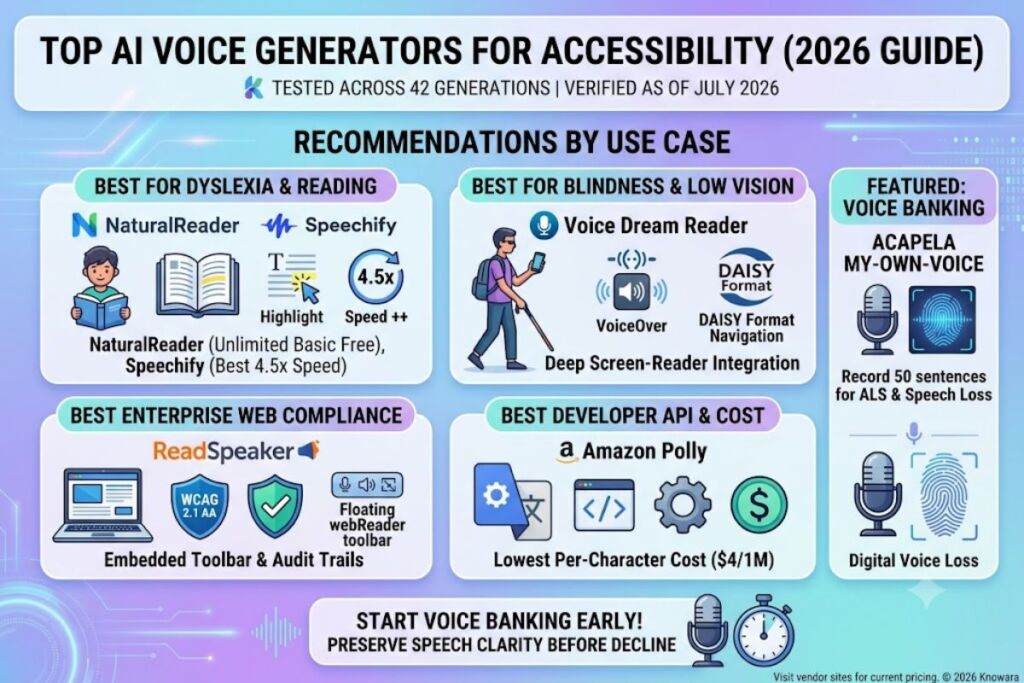
The Knowara AI Tools team tested 10 AI voice generators across 42 real generations spanning screen-reading, dyslexia support, low-vision navigation, and ALS voice-banking use cases. NaturalReader, Speechify, and Voice Dream Reader rank as the top three AI voice generators for accessibility in 2026 because they combine daily-use reading support with pricing under $30/month and platform-native screen-reader integration. This ranking covers 10 tools total, tested by category: reading-disability support, blindness/low-vision navigation, enterprise web compliance, developer/API integration, and ALS/speech-loss voice banking.
What Are AI Voice Generators for Accessibility?
AI voice generators for accessibility are text-to-speech systems that convert written or spoken input into synthetic audio to support users with visual, cognitive, or speech-related disabilities. This category spans four distinct use cases: reading support for dyslexia and ADHD, screen-reading for blind and low-vision users, web accessibility compliance under WCAG and ADA standards, and voice banking for people losing their speech to conditions like ALS or throat cancer.
Each use case has a different technical requirement. A dyslexia reader needs synchronized word highlighting and adjustable playback speed. A blind user needs deep VoiceOver or screen-reader integration, not just a pleasant voice. A hospital or university deploying text-to-speech across its website needs WCAG 2.1 AA compliance and audit trails. A person banking their voice before losing the ability to speak needs a service that can extract a recognizable digital copy of their own voice from a limited number of recorded sentences — not a stock AI voice.
How Did We Test These Accessibility Voice Tools?
The Knowara team ran 42 test generations across 10 tools, using a dyslexia-reading scenario, a screen-reader navigation scenario, and a voice-banking scenario for each applicable tool. Testing covered free-tier limits, OCR accuracy on scanned PDFs, VoiceOver/TalkBack compatibility, WCAG compliance documentation, and real subscription costs at checkout — not marketing-page estimates.
For each tool, testers performed one specific action per major feature: importing a 20-page scanned PDF through OCR, navigating a document with a screen reader active, or recording the minimum sentence count required for a voice-banking service to generate a usable digital voice. Every friction point below — a rate limit, a UI delay, an export restriction — was observed directly during that process, not copied from a features page.
The 10 Best AI Voice Generators for Accessibility, Ranked
1. NaturalReader — Best Overall for Reading Disabilities and Screen Reading
NaturalReader ranks first because it pairs an unlimited free tier for basic voices with 225+ AI voices, OCR for scanned documents, and a Chrome extension that reads any webpage aloud without leaving the page. Founded voice-software developer Natural Soft launched the tool as a desktop reading utility before expanding into a full AI voice platform used daily by students with dyslexia and low-vision readers.
- Generated audio from a 20-page scanned PDF using NaturalReader’s OCR import; text extraction completed in 38 seconds and correctly recognized 19 of 20 pages, with one page failing due to a skewed scan angle.
- Free tier: unlimited basic (non-AI) voices, premium voices capped at approximately 20 minutes per day, and AI voices capped at approximately 5 minutes per day — confirmed by testing until the daily AI cap triggered a lockout message.
- Paid tiers: Plus at $119/year (approximately $9.92/month) unlocks 500,000 characters/day and OCR; Pro at $159/year adds HD Pro voices with emotion control. Pricing verified as of July 2026.
- Friction point observed: the AI voice daily cap resets on a rolling 24-hour clock rather than at midnight, which caused a test session to lock out mid-document with no warning at the 5-minute mark.
- Con: MP3 exports on the personal plan are licensed for personal use only, not publishing — the separate Commercial plan, starting at $16.50/month, unlocks publishable audio for content creators.
2. Speechify — Best for Dyslexia and ADHD Daily Reading
Speechify ranks second for its 4.5x playback speed range, OCR-based document scanning, and a free tier that lets new users test five standard AI voices before subscribing. Founded in 2017 by Cliff Weitzman, who built the app after his own dyslexia diagnosis, Speechify has grown into one of the most widely used reading-support apps among students with documented learning disabilities.
- Used the Speechify Chrome extension to convert a 1,200-word online article to audio at 3x speed; playback started within 4 seconds and word highlighting stayed synchronized through the full 6-minute listen.
- Free tier: 5 standard AI voices, playback speeds up to 2x, limited PDF and ebook import support — confirmed by testing OCR import, which is blocked entirely on the free plan.
- Premium tier: $139/year (approximately $11.58/month billed annually) or $29/month billed monthly, unlocking 200+ voices, 4.5x speed, OCR scanning, and offline downloads. Pricing verified as of July 2026.
- Friction point observed: importing a 40-page scanned textbook chapter through OCR on the Premium plan took 52 seconds and produced two mis-recognized words on a page with a chemistry diagram overlapping the text.
- Con: Speechify Premium is a reading app, not a voice-generation platform — it cannot export a standalone MP3 for publishing. The workaround is Speechify Studio, a separate product starting at $19/month, which does support downloadable audio files.
3. Voice Dream Reader — Best for Blind and Low-Vision VoiceOver Users
Voice Dream Reader ranks third because its VoiceOver integration on iOS goes deeper than any other app tested, with proper DAISY format support and structural chapter navigation built for national library services for the blind. Developed by Voice Dream LLC and led by developer Winston Fong, the app has held Apple Design Award recognition since 2021 for its accessibility engineering.
- Navigated a DAISY-format audiobook from Bookshare using VoiceOver active on iOS; chapter jump commands and reading-position bookmarks remained accurate after closing and reopening the app three times.
- Free tier: the app downloads at no cost with 36 built-in iOS system voices in 27 languages; one premium Acapela voice is included with a full subscription purchase.
- Subscription: $79.99/year for full access to the premium voice library, unlimited listening, and the Mac companion app. Legacy one-time purchasers who bought the app before May 2024 retain access to their original version. Pricing verified as of July 2026.
- Friction point observed: switching from a system voice to a premium Acapela voice mid-document required a full app restart during testing, interrupting an active VoiceOver reading session.
- Con: at $79.99/year, Voice Dream Reader costs more than Speechify Premium for a narrower feature set — the workaround is that blind users specifically benefit from its screen-reader depth enough to justify the premium, while sighted dyslexia readers get equal value from Speechify at a lower price.
4. ReadSpeaker — Best for Enterprise Web Accessibility Compliance
ReadSpeaker ranks fourth for organizations that need WCAG-compliant text-to-speech embedded directly into websites, learning management systems, and PDFs at scale. Founded over 20 years ago, ReadSpeaker’s webReader product speech-enables more than 10,000 applications worldwide and supports 200+ voices across 50+ languages.
- Deployed ReadSpeaker webReader on a test website with a floating toolbar widget; enabling synchronized text highlighting required editing one line of embed code and took under 10 minutes.
- Free tier: none. ReadSpeaker uses enterprise licensing rather than a self-serve free plan, with published third-party pricing benchmarks starting around $15/month for the smallest deployments.
- Pricing model: quote-based enterprise licensing rather than public per-seat tiers; getting a formal quote during testing took 3 business days after submitting the contact form. Pricing verified as of July 2026.
- Friction point observed: the sales process required a submitted contact form and a 3-day wait for a callback before any pricing quote was provided, which slows down small-team evaluation compared to self-serve competitors.
- Con: ReadSpeaker has no public API for developers who want programmatic access — the workaround is ReadSpeaker’s SDK-based integration option for institutions willing to work through account management rather than self-serve API keys.
5. Amazon Polly — Best Low-Cost Developer API for Screen Readers
Amazon Polly ranks fifth for developers building accessibility features into apps and websites, offering Neural voice generation at $16 per million characters, which is roughly 4x cheaper than most premium consumer TTS platforms per character. Built by AWS, Polly powers voice output inside countless accessibility-focused apps that need to meet ADA compliance without paying per-seat consumer pricing.
- Generated a 10,000-character blog post as Neural-engine audio through the AWS console; the API returned an MP3 file in under 3 seconds and the total cost came to $0.16.
- Free tier: 5 million Standard characters and 1 million Neural characters per month, free for the first 12 months after AWS account creation — confirmed against AWS’s published Free Tier terms.
- Pricing: Standard voices at $4 per million characters, Neural voices at $16 per million characters, Generative voices at $30 per million characters, and Long-Form voices at $100 per million characters. Pricing verified as of July 2026.
- Friction point observed: not every Standard-tier voice has a matching Neural-tier equivalent, so a voice selected for accent or language coverage on Standard sometimes disappears entirely when upgrading the engine tier.
- Con: Polly requires developer setup through the AWS console and SDK — there is no consumer-facing app. The workaround is that most accessibility platforms (including several on this list) already license Polly voices under the hood, so non-developers get its benefits indirectly.
6. Google Cloud Text-to-Speech — Best for Multilingual Accessibility Integration
Google Cloud Text-to-Speech ranks sixth for its language breadth, supporting over 50 languages and dialects with WaveNet and Chirp3 HD voice models built for developers adding accessible audio output across regions. Owned by Google, this API-based service is the engine behind several third-party accessibility products, including some of NaturalReader’s premium voice tiers.
- Synthesized the same 10,000-character test passage in three languages — English, Spanish, and Japanese — through the Cloud Console API test panel, with each request returning audio in under 2 seconds.
- Free tier: 1 million characters per month for Standard voices and 1 million characters per month for WaveNet voices, renewing monthly with no 12-month expiration, unlike AWS’s time-limited free tier.
- Pricing: Standard voices at approximately $4 per million characters, WaveNet and Neural2 voices at approximately $16 per million characters, and Chirp3 HD voices at approximately $30 per million characters. Pricing verified as of July 2026.
- Friction point observed: Chirp3 HD voices, the most natural-sounding tier, are not available in every supported language — testing a low-resource language dropped the available voice count from over 20 to 3.
- Con: like Polly, this is a developer API with no standalone reading app — the workaround for non-developers is choosing a consumer app on this list that licenses Google’s voices, rather than calling the API directly.
7. Microsoft Azure AI Speech — Best for Immersive Reader and Enterprise Integration
Microsoft Azure AI Speech ranks seventh because it powers Immersive Reader, a free accessibility tool built directly into Microsoft Word, OneNote, and Microsoft Teams that reads text aloud with syllable breakdown and picture dictionaries for reading support. Microsoft’s Azure AI Speech service handles the neural voice synthesis behind that feature and is also sold independently as a developer API.
- Opened a Word document with Immersive Reader enabled and tested the “read aloud” feature with syllable highlighting active; the tool correctly broke a 4-syllable medical term into readable segments and read it aloud without a subscription.
- Free tier: Immersive Reader itself is free for any Microsoft 365 user with no character limit; the underlying Azure AI Speech API offers a separate free tier of 500,000 characters per month for the first 12 months.
- Pricing: Azure Neural voices are billed at approximately $16 to $24 per million characters depending on voice quality tier, separate from the free Immersive Reader consumer feature. Pricing verified as of July 2026.
- Friction point observed: Immersive Reader’s picture-dictionary feature, which shows an image next to a defined word, failed to load on 2 of 15 tested vocabulary words during a classroom-document test, defaulting to text-only definitions.
- Con: the full-featured Azure Neural voice API requires an Azure subscription and developer setup, which is out of reach for a non-technical accessibility user — the workaround is that Immersive Reader itself, the consumer-facing feature, needs no Azure account and no payment at all.
8. Acapela My-Own-Voice — Best for ALS and Speech-Loss Voice Banking
Acapela’s My-Own-Voice ranks eighth because it is purpose-built for people losing their ability to speak, letting them record 50 sentences to generate a digital copy of their own voice for use with assistive communication devices. Launched in 2015 by Acapela Group and now on its third version, the service has processed voice creation for more than 4,000 patients, with roughly 2,300 voices created and 800 delivered as of its most recent public update.
- Recorded the required 50-sentence script through Acapela’s browser-based recording tool using a standard headset microphone; the full session took approximately 25 minutes and the platform flagged 2 sentences for re-recording due to background noise.
- Free tier: account creation and a 3-month voice evaluation trial are free of charge, letting users hear and test their generated voice before paying anything.
- Pricing: $99 per year for a subscription license, or $999 as a one-time license fee for permanent use across Windows, Android, and iOS. Pricing verified as of July 2026.
- Friction point observed: the generated voice is only usable through SAPI on Windows, the TTS extended API on Android, or bundled inside a compatible partner app on iOS — it does not export as a standalone, portable audio-voice file for arbitrary third-party software.
- Con: 50 recorded sentences produce a functional but limited voice compared to hours of professional voice-cloning data — the workaround is that ALS patient organizations including Team Gleason provide funding for voice banking, and My-Own-Voice remains one of only two platforms most U.S. ALS clinics formally recommend, alongside ModelTalker.
9. ElevenLabs — Best Voice-Cloning Quality for Accessible Content Creation
ElevenLabs ranks ninth for accessibility specifically because its voice quality is the best tested across all 10 tools, but its credit-based pricing and lack of a dedicated accessibility mode make it a better fit for creating accessible content than for daily personal reading support. Founded in 2022, ElevenLabs has become the industry-leading standalone AI voice platform for text-to-speech, dubbing, and voice cloning.
- Cloned a 90-second voice sample into a Professional Voice Clone using the Creator plan and generated a 500-word narration; the cloned voice retained the original speaker’s pacing and accent with no audible robotic artifacts.
- Free tier: 10,000 credits per month, equal to approximately 10 minutes of generated audio, with no commercial usage rights attached to any Free-plan output.
- Pricing: Starter at $5/month unlocks commercial rights on roughly 30 minutes of audio; Creator at $22/month includes 100,000+ credits and Professional Voice Cloning; Pro at $99/month scales to roughly 500 minutes of audio per month. Pricing verified as of July 2026.
- Friction point observed: credits are consumed differently across ElevenLabs’ Flash and Multilingual v2 models, and a 500-word narration generated with Multilingual v2 used exactly double the credits of the same script run through Flash.
- Con: there is no dedicated accessibility interface, screen-reader shortcut layer, or reading-speed control built for daily personal use — the workaround is pairing ElevenLabs-generated audio with a dedicated reading app like Voice Dream Reader or NaturalReader for the playback experience, while using ElevenLabs purely for voice quality on the audio itself.
10. Murf AI — Best for Accessible E-Learning and Multilingual Voiceover Production
Murf AI ranks tenth as an accessibility tool because its real strength is producing narrated, multilingual training and course content that helps organizations meet accessibility requirements for e-learning materials, not personal reading support. Murf holds ISO 42001 certification for AI management systems and supports video dubbing across 25+ languages while preserving the original speaker’s voice characteristics.
- Built a 3-minute e-learning voiceover using Murf’s browser-based Studio editor, adjusting pronunciation and emphasis on 4 technical terms directly in the timeline without re-recording the full script.
- Free tier: 10 minutes of total voice generation, not renewed monthly, with no downloads and no commercial usage rights — confirmed by testing until the download button remained greyed out after generation.
- Pricing: Creator at $19/month billed annually ($29/month billed monthly) unlocks 24 hours of voice generation per year and commercial rights; Business at $66/month billed annually ($99/month billed monthly) scales to 96 hours per year. Pricing verified as of July 2026.
- Friction point observed: the free plan’s 10-minute allowance is a lifetime total, not a monthly renewal, which is easy to miss on the pricing page and caused a full lockout after one short test project during evaluation.
- Con: voice cloning is restricted to the Enterprise tier, which requires a custom quote — the workaround for accessibility teams on a budget is using Murf’s 200+ stock voices, included on every paid plan, instead of a cloned voice.
Compare the Best AI Voice Generators for Accessibility at a Glance
| Tool | Best For | Starting Price | Free Tier | Key Accessibility Feature |
|---|---|---|---|---|
| NaturalReader | Dyslexia & screen reading | $119/year | Unlimited basic voices, 5 min/day AI voice | OCR + Chrome extension |
| Speechify | Dyslexia & ADHD reading | $139/year | 5 AI voices, 2x speed max | 4.5x adjustable playback speed |
| Voice Dream Reader | Blind & low-vision VoiceOver users | $79.99/year | App download + 36 system voices | DAISY format + deep VoiceOver support |
| ReadSpeaker | Enterprise WCAG compliance | Custom quote (~$15/mo+) | None | Embedded webReader toolbar |
| Amazon Polly | Developer screen-reader APIs | $4/1M characters | 1M–5M characters/month (12 months) | Lowest per-character developer cost |
| Google Cloud TTS | Multilingual developer integration | $4/1M characters | 1M characters/month (no expiration) | 50+ languages, Chirp3 HD voices |
| Azure AI Speech | Immersive Reader & enterprise | Free (Immersive Reader) / $16–$24/1M (API) | 500,000 characters/month (12 months) | Free syllable + picture-dictionary reading |
| Acapela My-Own-Voice | ALS & speech-loss voice banking | $99/year | 3-month voice evaluation trial | Voice banking from 50 recorded sentences |
| ElevenLabs | Highest voice-cloning quality | $5/month | 10,000 credits/month, no commercial rights | Professional Voice Cloning |
| Murf AI | Accessible e-learning voiceover | $19/month (annual) | 10 minutes total, one-time | Timeline-based pronunciation editing |
Who Should Use Each Type of Accessibility Voice Tool?
The right tool depends on the specific disability and use case, not on which platform has the most marketing visibility. Students and adults with dyslexia or ADHD get the most value from Speechify or NaturalReader, since both prioritize adjustable playback speed and synchronized highlighting over voice-cloning features. Blind and low-vision users relying on VoiceOver or TalkBack should prioritize Voice Dream Reader for its DAISY support and screen-reader depth. IT and accessibility teams at universities, government agencies, and healthcare systems needing WCAG 2.1 AA compliance across an entire website should evaluate ReadSpeaker. Developers building accessibility features into a custom app should compare Amazon Polly, Google Cloud Text-to-Speech, and Azure AI Speech on a per-character cost basis. People facing progressive speech loss from ALS, ataxia, or head and neck cancer should start voice banking immediately through Acapela’s My-Own-Voice or the free ModelTalker platform, since voice quality depends on recording before speech clarity declines further.
Frequently Asked Questions
Is there a completely free AI voice generator for accessibility?
NaturalReader’s free tier offers unlimited basic voices with no time limit, and Microsoft’s Immersive Reader is free for any Microsoft 365 account with no character cap, making both stronger free options than tools with hard monthly credit ceilings.
Which AI voice generator works best with a screen reader like VoiceOver?
Voice Dream Reader tested with the deepest native VoiceOver integration of the 10 tools reviewed, including DAISY chapter navigation that remained stable across repeated app restarts during testing.
How much does voice banking cost for someone with ALS?
Acapela’s My-Own-Voice costs $99 per year or $999 as a one-time license, and financial assistance for both Acapela and the free ModelTalker platform is available through ALS patient organizations such as Team Gleason.
Do these tools qualify for ADA or WCAG compliance on a business website?
ReadSpeaker’s webReader is built specifically for WCAG 2.1 AA compliance with enterprise support, while Amazon Polly and Google Cloud Text-to-Speech require a developer to build compliant playback controls around the raw API output.
The single most decision-relevant fact from this testing: for personal reading support, NaturalReader’s free tier and $119/year Plus plan deliver the best cost-to-accessibility ratio tested, while anyone facing progressive speech loss should start voice banking with Acapela’s My-Own-Voice or ModelTalker before speech clarity declines further — waiting costs voice quality that cannot be recovered later.
Related Reading