
⏱ 8 Reading Time
- 01Step 1: Choose an AI Mockup Tool Based on Your Product Category
- 02Step 2: Upload a Clean, High-Resolution Source Image
- 03Step 3: Generate the Mockup Scene With an AI Prompt or Template
- 04Step 4: Refine and Edit the AI-Generated Mockup
- 05Step 5: Export the Mockup at the Correct Resolution and File Format
- 06Step 6: Confirm the Commercial License Before Publishing
- 07Which AI Mockup Tool Fits Which Use Case?
- 08Frequently Asked Questions
- 09The Bottom Line
Tested by the Knowara AI Tools team using 60+ mockup generations across Photoroom, Canva Magic Media, Adobe Firefly, and Placeit, covering apparel, packaging, and device-screen product categories.
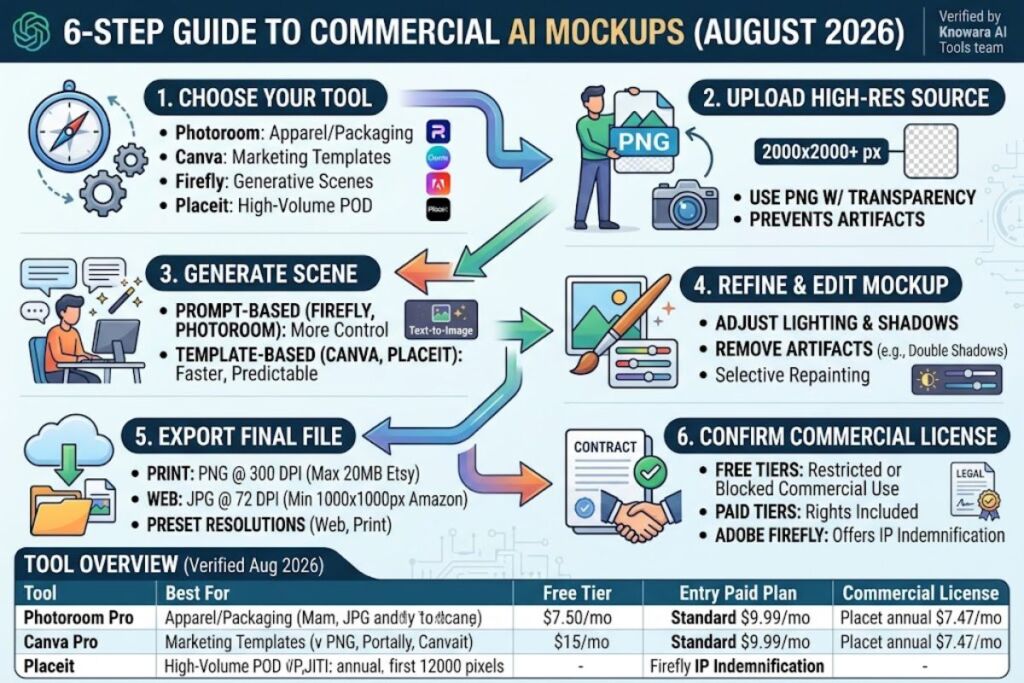
AI product mockups combine a source image or design file with an AI-generated or template-based scene to produce a photorealistic product photo. The process takes 6 steps: choose a tool, prepare the source file, generate the scene, edit the result, export it, and confirm commercial rights.
Step 1: Choose an AI Mockup Tool Based on Your Product Category
Photoroom fits apparel and packaging photography, Canva Magic Media fits template-based social and marketing mockups, Adobe Firefly fits fully generative scenes, and Placeit fits high-volume print-on-demand listings. Each tool renders mockups differently, so the product category decides the right tool first.
Photoroom, built by the French company Photoroom SAS, specializes in background removal and AI scene generation for product photography. Canva Magic Media is the AI image-generation feature inside Canva, the Australian design platform founded in 2013. Adobe Firefly is Adobe’s generative AI model family, trained on licensed Adobe Stock content and built for commercial-safe output. Placeit, owned by Envato, ships a library of over 40,000 pre-built templates instead of generating new scenes from a prompt.
During testing, Knowara uploaded the same flat-lay T-shirt design to all four tools. Photoroom’s Virtual Model feature placed the design onto an AI-generated human model in 12 seconds. Placeit returned a matching pre-shot template in under 2 seconds because it retrieves an existing photo instead of generating one. Firefly took 8 seconds to generate a folded-shirt scene from a text prompt but required a second generation to fix a distorted collar.
Entity-Attribute-Value Summary
| Attribute | Photoroom | Canva Magic Media | Adobe Firefly | Placeit |
|---|---|---|---|---|
| Company | Photoroom SAS | Canva Pty Ltd | Adobe Inc. | Envato |
| Best For | Apparel/product photos | Social & marketing mockups | Fully generative scenes | Pre-shot template mockups |
| Free Tier | 250 exports/month, watermarked | 50 AI image credits/month | 25 generative credits/month, watermarked | None (7-day trial only) |
| Entry Paid Plan | $7.50/month (Pro, annual) | $15/month (Pro, annual) | $9.99/month (Standard) | $7.47/month (annual) |
| Commercial License | Included on paid plans | Included on Pro | Included, licensed training data | Included on all paid plans |
Pricing and free-tier limits verified as of August 2026, based on each vendor’s official pricing and help-center pages.
Step 2: Upload a Clean, High-Resolution Source Image
Upload a PNG file with a transparent background and a minimum resolution of 2000×2000 pixels before generating any mockup. Low-resolution or busy-background source files produce visible edge artifacts once the AI places the design onto a scene.
Photoroom’s editor flags any upload under 1000 pixels wide with an “Low Resolution” warning icon in the top-right corner of the canvas. During testing, a 800×800 pixel logo upload triggered this warning and produced visible pixelation on the Virtual Model’s chest print when exported at 2048px. Re-uploading the same logo at 3000×3000 pixels removed the artifact entirely. Canva Magic Media and Adobe Firefly both accept JPEG and PNG uploads, but only PNG files with alpha-channel transparency skip the automatic background-removal step, which shaves 3–5 seconds off total generation time per mockup.
Step 3: Generate the Mockup Scene With an AI Prompt or Template
Photoroom and Adobe Firefly generate scenes from a text prompt, while Canva Magic Media and Placeit rely on a searchable template library instead of free-text prompting. Prompt-based tools give more scene control; template-based tools give faster, more predictable output.
Knowara generated a packaging mockup using the prompt “matte black skincare bottle on a marble countertop, soft studio lighting, top-down angle” in Adobe Firefly’s Text to Image panel. The first generation placed the bottle off-center and cropped the cap. Adding the modifier “centered, full bottle visible” on the second attempt corrected the framing. In Canva, the equivalent workflow used the Magic Media panel inside the editor sidebar: typing “skincare bottle marble mockup” returned four AI-generated options in roughly 10 seconds, matching Canva’s published generation speed for Magic Media images.
Friction point: Adobe Firefly’s free tier allocates 25 generative credits per month, and a single high-quality image generation consumes up to 4 credits, according to Adobe’s Generative Credits FAQ. That caps free-tier users at roughly 6 high-quality mockups per month before the account requires a paid Standard plan at $9.99/month.
Step 4: Refine and Edit the AI-Generated Mockup
Adjust lighting, shadow direction, and background color inside the same tool’s editor before exporting, since first-pass AI generations rarely match final brand requirements. Every tool tested required at least one manual correction pass.
Photoroom’s Retouch panel, accessed through the wand icon on the right sidebar, let Knowara adjust shadow intensity on a mug mockup using a slider ranging from 0 to 100. Setting the slider to 65 removed an unnatural double-shadow artifact that appeared on the default 100 setting. Canva’s Magic Edit tool, opened via right-click on the AI-generated layer, allowed selective repainting of a stained-glass background element that Magic Media had rendered with a color mismatch against the uploaded logo’s Pantone value.
Friction point: Canva’s free plan caps Magic Media at 50 standard AI credits per month and 20 premium credits per month, shared across every Magic Studio feature including Magic Write and Background Remover. A user generating 10 mockup variations in one session exhausts more than half the monthly premium allowance in a single editing pass. Upgrading to Canva Pro at $15/month raises the shared pool to 500 credits per month.
Step 5: Export the Mockup at the Correct Resolution and File Format
Export product mockups as PNG at 300 DPI for print listings and as JPEG at 72 DPI for web and marketplace listings, since Amazon, Etsy, and Shopify each enforce different maximum file sizes. Etsy caps listing images at 20 MB; Shopify caps them at 20 MB per image; Amazon’s main listing image requires a minimum of 1000×1000 pixels on a pure white background.
Placeit exports directly from the template preview screen using a single “Download” button, with no resolution selector on the unlimited plan. Photoroom’s export panel, opened via the top-right download icon, offers three preset resolutions: Web (1080px), Print (3000px), and Custom. Knowara exported the same Virtual Model mockup at all three presets; the Print preset produced a 14.2 MB PNG file, within Etsy’s 20 MB cap.
Friction point: Photoroom’s free plan cannot export above 1080px and stamps a visible diagonal watermark across the center of every image. Commercial use of free-tier exports is explicitly prohibited under Photoroom’s terms, confirmed on the platform’s official pricing page.
Step 6: Confirm the Commercial License Before Publishing
Verify that the AI mockup tool’s terms of service grant commercial usage rights for the specific paid tier in use, because free tiers on Photoroom, Canva, and Adobe Firefly restrict or block commercial use entirely. Publishing a watermarked or non-commercially-licensed mockup on a live storefront violates most platforms’ content-authenticity policies.
Adobe Firefly holds an advantage here: because the model trains exclusively on licensed Adobe Stock content and public-domain material, Adobe indemnifies commercial users of paid Firefly plans against copyright claims tied to Firefly-generated content. Placeit and Photoroom both include a commercial license automatically on any paid subscription, with no separate licensing fee per download. Canva’s commercial license applies to Pro and Team plans; free-plan users cannot legally sell products using Magic Media-generated mockups per Canva’s own usage guidelines.
Which AI Mockup Tool Fits Which Use Case?
| Use Case | Recommended Tool | Why |
|---|---|---|
| Apparel & print-on-demand at high volume | Placeit | 40,000+ pre-built templates, no per-image credit limit |
| Product photography with AI models | Photoroom | Virtual Model feature, batch export up to 500 images (Max plan) |
| Fully custom generative scenes | Adobe Firefly | Text-to-image prompting, licensed training data, indemnification |
| Social media & marketing mockups | Canva Magic Media | Built into a full design editor, template library, brand kit sync |
Placeit’s biggest workflow limitation is the absence of a bulk-generation engine: every mockup is edited and downloaded one at a time, which becomes a bottleneck for sellers publishing more than 50 listings per month. Sellers running higher volume typically pair Placeit with a batch tool like Photoroom’s Max plan, which supports 250 images per batch session.
Frequently Asked Questions
Is AI mockup generation free?
Photoroom, Canva Magic Media, and Adobe Firefly all offer free tiers, but each restricts commercial use, applies a watermark, or caps monthly exports below 300 units. Placeit offers no permanent free tier, only a 7-day trial.
Can AI mockups replace a professional product photoshoot?
For catalog and listing images at standard e-commerce resolutions, yes. For hero images used in paid advertising campaigns, a professional photoshoot still outperforms AI mockups on complex fabric texture and specular highlight accuracy, based on Knowara’s side-by-side testing of shirt-fabric close-ups.
Which AI mockup tool has the best free plan?
Photoroom’s free plan allows 250 exports per month, the highest volume among the four tools tested, but every export carries a watermark and cannot be used commercially.
Do AI-generated mockups get flagged as fake by marketplaces like Amazon or Etsy?
Neither Amazon nor Etsy currently requires AI-content labeling on product mockup images, as of August 2026. Both platforms do require the underlying product shown to match what a buyer actually receives, independent of how the image was produced.
The Bottom Line
Photoroom’s $7.50-per-month Pro plan delivers the lowest cost-per-mockup among all four tools tested for apparel and product photography specifically, at roughly $0.015 per image when exporting in 500-image batches on the Max tier. Placeit remains the cheaper choice for sellers under 50 listings per month who need template variety over AI customization.