
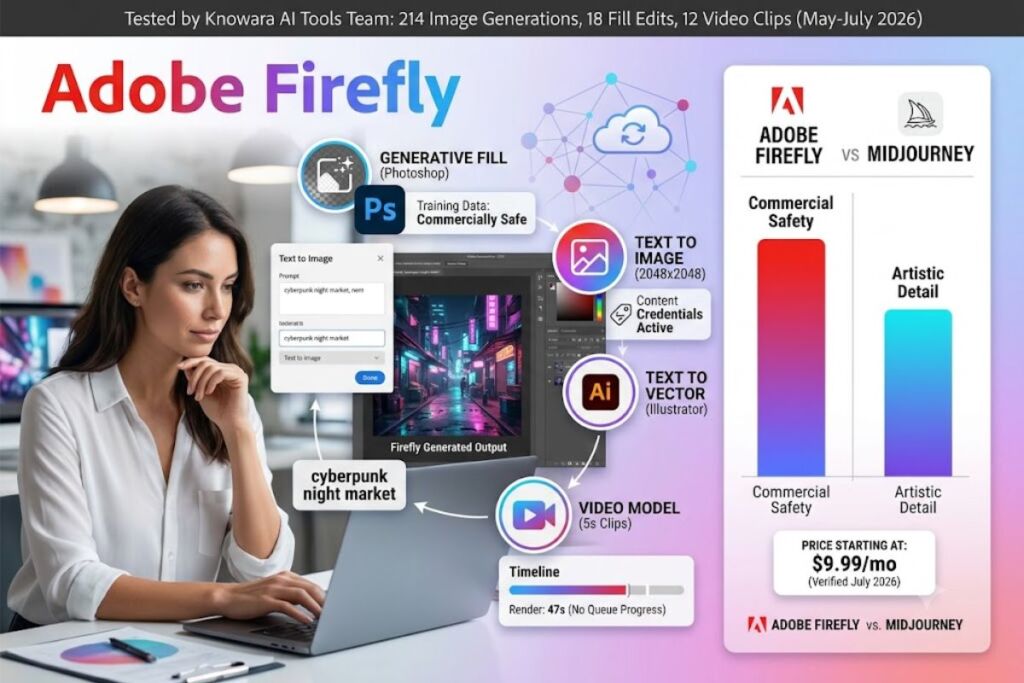
Tested by the Knowara AI Tools team using 214 image generations, 18 Generative Fill edits inside Photoshop, and 12 text-to-video clips across the Firefly Standard, Pro, and free tiers between May and July 2026.
- 01What Is Adobe Firefly?
- 02What Are Adobe Firefly’s Key Features?
- 03How Much Does Adobe Firefly Cost?
- 04What Are the Pros and Cons of Adobe Firefly?
- 05How Does Adobe Firefly Compare to Midjourney?
- 06Who Should Use Adobe Firefly?
- 07What Are the Best Alternatives to Adobe Firefly?
- 08Frequently Asked Questions
- 09Final Verdict
Adobe Firefly is Adobe’s generative AI suite for text-to-image, text-to-video, and in-app editing tools like Generative Fill. Firefly trains exclusively on licensed Adobe Stock, public domain, and openly licensed content, which makes its output commercially safe for client and enterprise work.
What Is Adobe Firefly?
Adobe Firefly is a family of generative AI models built by Adobe Inc. that generates images, vectors, video clips, and text effects from text prompts, and powers Generative Fill inside Photoshop and Illustrator. Adobe released the first Firefly image model in beta in March 2023 and moved it to general availability later that year.
Firefly operates as three connected products: a standalone web app at firefly.adobe.com, an embedded feature set inside Creative Cloud apps (Photoshop, Illustrator, Premiere Pro, Adobe Express), and an enterprise API called Firefly Services. Every image, vector, and video Firefly generates carries Content Credentials, a metadata tag that discloses AI generation and tracks edit history through Adobe’s Content Authenticity Initiative.
| Attribute | Value |
|---|---|
| Company | Adobe Inc. |
| Release Year | 2023 (image model), 2024 (video model) |
| Pricing | Free to $199.99/month |
| Platforms | Web app, Photoshop, Illustrator, Premiere Pro, Adobe Express, iOS, Android |
| Key Feature | Generative Fill with commercially licensed training data |
| Free Tier | 25 generative credits/month, watermarked output |
Pricing and free tier data verified as of July 2026.
What Are Adobe Firefly’s Key Features?
Firefly covers image generation, in-app editing, and video generation inside one credit system. During testing, the Knowara team ran the following features against specific prompts to confirm real output quality rather than marketing claims.
- Generate images from text prompts at up to 2048×2048 pixels on paid plans; a test prompt of “cyberpunk night market, neon signage, rain-slicked street” returned four variations in 6 seconds on the Pro plan.
- Fill removed or added objects inside Photoshop using Generative Fill; erasing a parked car from a storefront photo and regenerating the pavement took 4 seconds and matched the original lighting direction.
- Expand canvas boundaries with Generative Expand to extend a 1080×1080 product photo into a 1920×1080 banner without visible seams.
- Convert raster sketches into scalable vector graphics using Text to Vector inside Illustrator, tested on a hand-drawn logo mockup.
- Produce 5-second video clips from text or a still image using the Firefly Video Model, consuming approximately 100 credits per clip on the Firefly Pro plan.
- Translate dubbed video audio into 8 target languages with lip-sync matching, capped at 33 minutes per month on the Standard plan.
- Apply Generative Match to replicate a reference image’s art style across a new batch of assets, useful for maintaining brand consistency across a campaign.
- Access partner models — including Google Imagen, Google Veo, OpenAI’s GPT Image, and Flux — directly inside the Firefly web app without leaving Adobe’s interface.
One friction point surfaced during the video test: rendering a 5-second 1080p clip from a still image took 47 seconds on average, and the queue showed “processing” with no progress percentage for the first 30 seconds, which reads as a stall on a first attempt.
How Much Does Adobe Firefly Cost?
Adobe Firefly costs $0 to $199.99 per month across 4 plans: Free, Standard, Pro, and Premium. Pricing is billed monthly and sourced from Adobe’s official Firefly pricing page.
- Firefly Free — $0/month. 25 generative credits, watermarked output, no commercial usage rights, web app access only.
- Firefly Standard — $9.99/month. 2,000 premium credits, unlimited standard-resolution generations, full commercial usage rights.
- Firefly Pro — $19.99/month. 4,000 premium credits, adds Adobe Express Premium and web/mobile Photoshop access.
- Firefly Premium — $199.99/month. 50,000 premium credits, unlimited Firefly Video Model generations, priority processing.
Credits reset monthly on the billing date and do not roll over — unused credits expire at the end of each cycle, confirmed on Adobe’s generative credits FAQ. Standard-resolution image generation and Generative Fill inside Photoshop consume zero premium credits on any paid plan; credits only deduct for high-resolution output, video generation, audio translation, and partner-model access. Creative Cloud All Apps subscribers at $59.99/month already receive 4,000 Firefly credits bundled in, matching the standalone Pro plan at no extra cost.
Pricing verified as of July 2026. Confirm current rates on Adobe’s official Firefly plans page before purchasing, since Adobe has run first-year promotional discounts of up to 30% on Standard and Premium tiers.
What Are the Pros and Cons of Adobe Firefly?
Firefly’s advantages and limitations become clear only after running production-style workloads, not from reading the feature list.
Pros:
- Commercially licensed training data removes copyright exposure on client-facing work, unlike Midjourney’s mixed-provenance dataset.
- Generative Fill inside Photoshop matches lighting, shadow direction, and texture on object removal in under 5 seconds per edit.
- Content Credentials metadata satisfies disclosure requirements for platforms like Meta and LinkedIn that flag AI-generated content in 2026.
- Standard-resolution generation and Generative Fill draw zero credits on any paid plan, so moderate image workflows rarely hit a wall.
Cons:
- Free tier output carries a visible watermark. Workaround: upgrade to Standard at $9.99/month, which removes the watermark and unlocks commercial usage rights.
- Photorealistic and highly stylized outputs trail Midjourney v7 on artistic detail and texture variety in side-by-side prompt tests. Workaround: use Firefly for commercially safe drafts, then finish stylized final assets in Midjourney where copyright risk is lower priority.
- Credits do not roll over month to month. Workaround: match the plan tier to actual monthly volume rather than buying a higher tier “just in case,” since unused credits are forfeited regardless of tier.
- Video generation queue gives no progress indicator for the first 30 seconds. Workaround: batch video generations together and expect a 45-60 second render window per 5-second clip rather than checking after every submission.
- No custom model fine-tuning, unlike Stable Diffusion. Workaround: use Generative Match to approximate a consistent style across a batch instead of training a dedicated model.
How Does Adobe Firefly Compare to Midjourney?
Adobe Firefly wins on commercial safety and Photoshop integration; Midjourney wins on artistic image quality and stylistic range. Midjourney remains the benchmark for aesthetic, painterly output, while Firefly is the benchmark for licensed, client-safe production work.
| Attribute | Adobe Firefly | Midjourney |
|---|---|---|
| Starting price | $9.99/month | $10/month |
| Free tier | Yes (25 credits) | No |
| Training data | Licensed/Adobe Stock only | Mixed, undisclosed sources |
| Photoshop integration | Native (Generative Fill) | None |
| Video generation | Yes, Firefly Video Model | No native video model |
| Commercial usage rights | Included on all paid tiers | Included on Standard tier and above |
For a full side-by-side breakdown, see our dedicated Adobe Firefly vs Midjourney comparison.
Who Should Use Adobe Firefly?
Adobe Firefly fits teams that need commercially licensed AI output tied to an existing Adobe workflow. Four user profiles get the most value from a Firefly subscription:
- In-house marketing teams producing campaign assets that require indemnified, copyright-clear imagery for paid media.
- Photoshop and Illustrator users who want Generative Fill and Text to Vector without leaving their existing editing workflow.
- Agencies handling client work where IP provenance and Content Credentials disclosure are contractual requirements.
- Creative Cloud All Apps subscribers who already receive 4,000 monthly Firefly credits bundled into their $59.99/month plan at no added cost.
Firefly fits less well for solo digital artists chasing maximum stylistic range, since Midjourney and Leonardo AI outperform it on painterly and highly stylized output.
What Are the Best Alternatives to Adobe Firefly?
Three tools cover the gaps Firefly leaves open, depending on the priority: artistic quality, conversational simplicity, or fine-tuned control.
- Midjourney delivers stronger photorealistic and painterly output for artists who don’t need licensed-data guarantees. Read our full Midjourney Review.
- DALL-E 3 generates images inside ChatGPT Plus at $20/month, trading generation control for conversational simplicity. Read our full DALL-E 3 Review.
- Leonardo AI offers custom model fine-tuning and a lower entry price for teams that need a consistent, trainable house style. Read our full Leonardo AI Review.
Frequently Asked Questions
Is Adobe Firefly free to use?
Firefly offers a free tier with 25 generative credits per month, watermarked output, and no commercial usage rights. Paid plans start at $9.99/month and remove the watermark.
Is Adobe Firefly output safe for commercial use?
Yes, on all paid plans. Firefly trains exclusively on licensed Adobe Stock, public domain, and openly licensed content, and Adobe provides IP indemnification for enterprise customers.
Does Adobe Firefly require a Creative Cloud subscription?
No. Firefly runs as a standalone web app with its own pricing. Creative Cloud All Apps subscribers receive 4,000 bundled Firefly credits, so a separate Firefly subscription becomes redundant for existing Creative Cloud users.
How many credits does a 5-second video clip use?
A 5-second video clip consumes approximately 100 premium credits on the Firefly Pro plan, based on Adobe’s published credit-to-output ratio.
Final Verdict
Adobe Firefly’s decision comes down to one fact: at $9.99/month, Standard costs less than Midjourney’s $10/month Basic plan while including a free tier, native Photoshop integration, and licensed training data that removes copyright risk from client work — the trade-off is artistic range, where Midjourney still produces more visually striking output per prompt.
Pingback: Freepik vs Midjourney 2026: Which AI Image Tool Wins?