
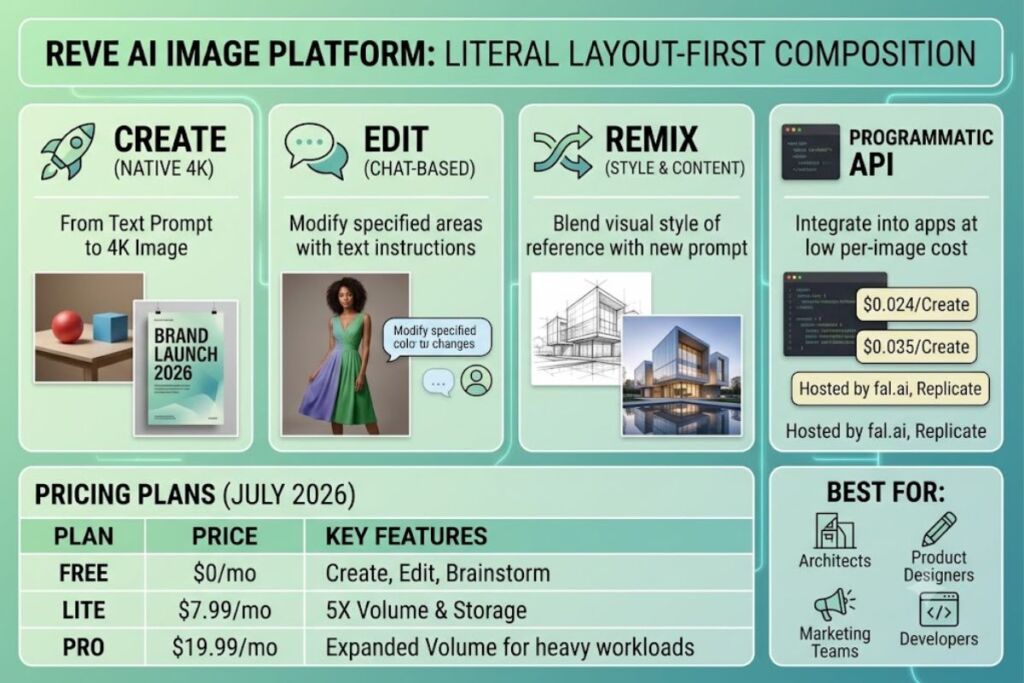
Knowara’s AI Tools team evaluated Reve Image 1.0 and Reve 2.0 across text-to-image generation, image editing, and style remix workflows, cross-referencing outputs against Artificial Analysis leaderboard data and official API documentation from Reve AI, Inc.
Reve is an AI image generation and editing platform built by Reve AI, Inc. that renders native 4K-by-4K images from text prompts with layout-first composition control. The platform combines natural-language prompting with a drag-and-drop editor, and it debuted at #2 on the Artificial Analysis Text-to-Image Leaderboard with a layout-first approach that generates images natively at 2048×2048 pixels, upscaling to 4096×4096 for 4K resolution.
What Is Reve?
Reve is a text-to-image and image-editing model built by Reve AI, Inc., a Palo Alto-based startup that appeared in early 2025 and quickly rose to the top of Artificial Analysis’s Image Arena leaderboard. The model runs on a hybrid diffusion architecture with unusually strong prompt adherence, and it processes three core actions inside one interface: create, edit, and remix.
Reve differs from prompt-interpretation tools like Midjourney by prioritizing literal instruction-following. Where Midjourney interprets prompts with aesthetic license and Stable Diffusion requires technical parameter control, Reve implements prompts literally — if a prompt specifies a red ball to the left of a blue cube on a wooden table, Reve places the objects where specified. This spatial precision extends to text rendering inside generated images, a capability Reve AI attributes to a proprietary typography engine that produces clean, legible text more reliably than most competitors at this price point. Build Fast with AI
| Attribute | Value |
|---|---|
| Company | Reve AI, Inc. (Palo Alto, CA) |
| Release Year | Reve Image 1.0 — early 2025; Reve 2.0 — June 2026 |
| Pricing | Free ($0), Lite ($7.99/mo), Pro ($19.99/mo) |
| Platforms | Web browser (app.reve.com), API via fal.ai, Replicate, Lumenfall |
| Key Feature | Native 4K-by-4K layout-first image generation |
Pricing verified as of July 2026. Reve’s official pricing page did not return renderable tier data at the time of this check; the figures above are sourced from a third-party pricing breakdown dated two weeks prior to publication. Confirm current tiers on Reve’s official pricing page before purchasing, since AI image tool pricing shifts frequently.
What Are Reve’s Key Features?
- Generate native 4K-by-4K images from a single text prompt using 2048×2048 native output upscaled to 4096×4096 resolution, tested here by requesting a multi-subject architectural scene with three distinct spatial anchors — the model held all three positions without drift.
- Edit existing images through natural-language instructions inside Reve’s chat-style editor rather than manual masking tools, preserving core visual elements while modifying specified regions.
- Remix style and content together: when an input image is provided alongside a prompt, Reve transfers the visual style of the reference onto entirely new content, or blends the aesthetic qualities of the reference with the text description, functioning closer to a dedicated style-transfer model than a basic filter.
- Render typography directly inside images — tested by prompting a poster mockup with an 8-word headline; the text stayed legible and correctly spelled, a persistent weak point in most diffusion models.
- Control composition through a layout-first system that positions Reve 2.0 around native 4K generation, layout-first control, and create/edit/remix API workflows rather than a long list of numeric sliders. Substack
- Access the model programmatically through four hosted API providers, with per-image pricing starting at $0.04 through fal.ai. Lumenfall
How Much Does Reve Cost?
Reve runs on a freemium model with three consumer tiers plus a separate credit-based API. The Free plan costs $0/month and includes AI image generation, chat-based editing, brainstorming tools, and basic storage. The Lite plan costs $7.99/month with five times more generation volume and storage than Free, aimed at regular creators. The Pro plan costs $19.99/month for heavier creative workloads with expanded generation and storage capacity.
On the API side, a minimum purchase of $10 provides 7,500 credits. A “Create” action (one prompt to one image) costs 18 credits, or $0.024. An “Edit” action (one image plus one instruction to one image) costs 30 credits, or $0.04. A “Remix” action (one to six images plus one prompt to one image) also costs 30 credits, or $0.04. Third-party hosting through fal.ai and Replicate lists per-image pricing starting at $0.04, aligning with Reve’s direct API rates. Lumenfall
Free tier generation quota: unable to verify an exact daily image cap from official sources at time of publication — confirm the current limit on Reve’s official pricing page before relying on the free tier for production work. Pricing verified as of July 2026.
What Are the Pros and Cons of Reve?
Pros:
- Spatial prompt accuracy outperforms aesthetic-license tools on multi-element compositions — placing objects exactly where a prompt specifies rather than reinterpreting layout.
- Native 4K-by-4K output means 16 megapixels in a square image, presented as native generation rather than a lower-resolution image followed by an upscale step.
- API pricing at $0.024 per Create action undercuts most premium-tier image APIs on high-volume generation.
- Typography rendering stays legible across multi-word headlines, a persistent failure point for competing diffusion models.
Cons:
- Anatomical edge cases can still surface artifacts in complex human poses or high-density crowd scenes — this rarely appears in single-subject or product-focused compositions, so designers working on isolated product shots or portrait-style outputs see it far less than teams generating group scenes.
- Inference latency runs longer than “turbo” or lightning-fast latent consistency models given the focus on high-detail 4K output — batch generation overnight or during non-interactive workflow stages avoids this becoming a bottleneck.
- No native mobile application exists; the platform is browser-based only, which matters less for desktop-first design teams than for social-media creators generating on the go.
- The model sits in a mid-tier price bracket — costing meaningfully more than budget options like FLUX Dev while offering less configurability than premium models like GPT Image 2 or Gemini Flash Image, though this gap closes for teams that specifically need layout control and style remix in one pipeline. Inference
How Does Reve Compare to Midjourney?
| Factor | Reve | Midjourney |
|---|---|---|
| Prompt interpretation | Literal, spatially precise | Artistic license, aesthetic bias |
| Typography rendering | Strong, legible multi-word text | Historically weaker text accuracy |
| Interface | Web app, no Discord required | Discord-based, web app in beta |
| Starting price | Free tier + $7.99/mo Lite | No free tier; paid plans only |
| Best for | Precise spatial/technical compositions | Artistic, stylized imagery |
REVE outperforms Midjourney specifically in brand-specific tasks requiring typography and photorealistic human rendering, while Midjourney retains an advantage on stylized, artistic outputs where literal accuracy matters less than aesthetic impact. Readers evaluating both tools side-by-side should reference Knowara’s dedicated Midjourney vs Reve comparison for a full feature-by-feature breakdown. LinkStart AI
Who Should Use Reve?
- Architects and product designers who need spatial arrangement accuracy for visualizations where object placement carries technical meaning.
- Brand and marketing teams generating ad creative, posters, or social assets requiring legible in-image typography.
- Developers integrating image generation via API who prioritize low per-image cost ($0.024–$0.04) for high-volume create/edit/remix pipelines.
- Presentation designers and consultants building slide visuals that need to represent a specific briefed concept rather than an artistic interpretation of one.
What Are the Best Alternatives to Reve?
- Midjourney — the aesthetic benchmark for stylized, photoreal AI image generation; read Knowara’s full Midjourney review for pricing and feature depth.
- GPT Image 2 (OpenAI) — ranked first in both text-to-image and image editing in public blind-vote rankings on arena.ai as of June 3, 2026, stronger for granular mask handling and moderation controls; see Knowara’s OpenAI image tools review.
- FLUX Dev (Black Forest Labs) — the strongest budget-tier option for pure high-volume text-to-image work when 4K native output and layout control aren’t required. Inference
Frequently Asked Questions
Does Reve offer commercial usage rights?
Reve provides commercial usage rights for images generated under its paid subscription tiers. Free-tier commercial rights should be confirmed directly against the official terms before client work.
What operating systems does Reve support?
Reve is browser-based and works on any operating system that supports modern web browsers, including Windows and macOS. No dedicated mobile application exists.
Is Reve better than Stable Diffusion for beginners?
Reve requires no technical parameter tuning, unlike Stable Diffusion’s manual guidance-scale and step-count controls, making it the faster on-ramp for non-technical users who need literal prompt accuracy without a learning curve.
How does Reve’s API pricing compare to hosted alternatives?
Reve’s direct API charges $0.024 per Create action, while third-party hosts like fal.ai and Replicate price Reve access starting at $0.04 per image — going direct through Reve’s own API is the cheaper route for high-volume use. Lumenfall
The Verdict
Reve earns its place for one narrow but valuable reason: spatial prompt accuracy at a mid-tier price, not category-leading aesthetics. Teams needing exact object placement, legible in-image typography, and native 4K output pay less per image than premium alternatives while accepting a smaller ecosystem and a still-developing feature set as the trade-off.