
⏱ 7 Reading Time
- 01What Is Kittl?
- 02What Are Kittl’s Key Features?
- 03How Much Does Kittl Cost?
- 04What Are the Pros and Cons of Kittl?
- 05How Does Kittl Compare to Canva?
- 06Who Should Use Kittl?
- 07What Are the Best Alternatives to Kittl?
- 08Frequently Asked Questions
- 09Does Kittl have a free plan?
- 10Can I export a logo as SVG on Kittl’s free plan?
- 11Does Kittl offer a mobile app?
- 12How many AI tokens does the Kittl AI Logo Maker use per generation?
- 13The Bottom Line
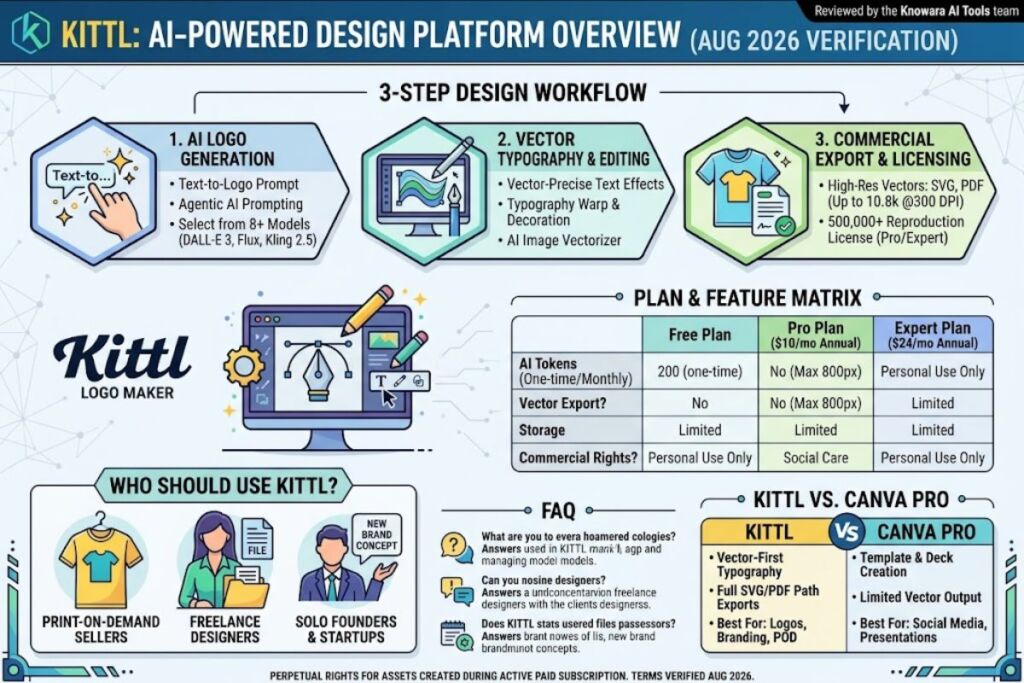
Kittl is a browser-based, AI-powered graphic design platform built for typography-heavy work, with an AI Logo Maker as its core branding feature. Kittl exports logos as SVG, PDF, and PNG, integrates 8+ AI generation models, and starts at $0 per month.
What Is Kittl?
Kittl is a browser-based graphic design platform that combines vector editing, an AI logo generator, and 10,000+ templates for creators, small businesses, and print-on-demand sellers. Kittl was founded in Berlin in 2020 as a lettering tool called Heritage Type, built by Nicolas Heymann and Tobias Saul, and rebranded to Kittl in 2022. The platform integrates AI models from OpenAI, Google, Black Forest Labs, Ideogram, and ByteDance into one workspace and serves over 10 million registered users, according to Kittl’s own product pages.
Kittl differs from Canva by prioritizing vector-precise typography over drag-and-drop templates, and it differs from Adobe Illustrator by running entirely in the browser with no local installation. Every design element in Kittl — logos, labels, mockups, and posters — starts as an editable vector object, not a flattened raster image.
| Attribute | Value |
|---|---|
| Company | Kittl GmbH |
| Headquarters | Berlin, Germany |
| Founded | 2020 (as Heritage Type; rebranded Kittl in 2022) |
| Founders | Nicolas Heymann, Tobias Saul |
| Total Funding | $47.8 million, including a $36 million Series B led by IVP (January 2024) |
| Pricing | Free, Pro ($10–$15/month), Expert ($24–$30/month), custom Business tier |
| Platforms | Web browser (Chrome, Safari, Edge, Firefox) — no desktop or mobile app |
| Key Feature | AI Logo Maker with vector export and 10,000+ premium templates |
| Free Plan Limit | 5 projects, 200 one-time AI tokens, exports capped at 800px / 72 DPI |
What Are Kittl’s Key Features?
Kittl’s core features center on AI-assisted logo generation, vector typography, and print-ready export — all inside a single browser tab. The platform packages seven feature groups into every paid plan.
- Generate logo concepts from a text prompt using Kittl’s AI Logo Maker, which issues 200 free tokens on signup and charges 10 tokens per generation.
- Vectorize raster images and hand-drawn sketches into editable SVG paths with the built-in AI vectorizer tool.
- Apply typography effects — text warp, shadow, and decoration effects — to logo wordmarks without manual path manipulation.
- Remove image backgrounds automatically using Kittl’s integrated background remover.
- Access image, vector, and video generation models including Flux, DALL-E 3, Ideogram, and Kling 2.5 from a single model-selection dropdown.
- Export finished logos as SVG, PDF, or transparent PNG for packaging, signage, and merchandise.
- Browse a library of 10,000+ premium templates and mockups created by independent designers spanning logos, labels, and social posts.
Kittl’s Agentic AI feature writes detailed image-generation prompts automatically and selects the correct underlying model for the task, removing the manual model-selection step that competing tools require.
How Much Does Kittl Cost?
Kittl costs $0 per month on the Free plan, $10 to $15 per month on Pro, and $24 to $30 per month on Expert, based on Kittl’s official pricing page. Annual billing cuts the monthly rate by 33% on Pro and 20% on Expert.
| Plan | Monthly Price | Annual Price | AI Tokens | Storage | Commercial License |
|---|---|---|---|---|---|
| Free | $0 | $0 | 200 (one-time) | Limited | No — personal use only |
| Pro | $15/mo | $10/mo ($120/yr) | 2,000/month | 10GB | Yes — up to 500,000 reproductions |
| Expert | $30/mo | $24/mo ($288/yr) | 6,000/month + daily top-up | 100GB | Yes — up to 500,000 reproductions |
| Business/Plus | Custom quote | Custom quote | Custom | Custom | Yes — enhanced terms |
The Free plan caps exports at 800 pixels and 72 DPI and blocks vector downloads, which rules it out for print-on-demand or packaging work. Pro and Expert plans include a commercial license permitting up to 500,000 reproductions of each design across packaging, marketing, digital media, or print. Designs created during an active Pro or Expert subscription retain commercial rights even after cancellation.
What Are the Pros and Cons of Kittl?
Kittl’s strengths are its typography engine and multi-model AI generation; its limitations are the restrictive free tier and the lack of a desktop or mobile app.
Pros:
- Ships with 8+ integrated AI models for image, vector, and video generation inside one editor.
- Exports vector files up to 10,800 pixels at 300 DPI on paid plans, meeting large-format print specifications.
- Holds a Trustpilot rating of 4.8 out of 5 across roughly 1,150 to 1,200 reviews, according to fritz.ai’s published audit.
- Retains perpetual commercial rights on designs created during an active subscription, even after cancellation.
- Undercuts Adobe Creative Cloud’s $839.88 annual list price by more than 85% at the Pro tier.
Cons:
- Caps Free-tier exports at 800 pixels and 72 DPI, unsuitable for professional or print use.
- Limits AI generations through a token system that consumes budget quickly on Expert-tier bulk workflows.
- Offers no native desktop or mobile application — the editor runs in-browser only.
- Requires a browser tab open with an active internet connection; no offline editing mode exists.
How Does Kittl Compare to Canva?
Kittl beats Canva on vector precision and typography control; Canva beats Kittl on template breadth and non-designer accessibility.
| Attribute | Kittl | Canva Pro |
|---|---|---|
| Starting Paid Price | $10/month (annual) | $12.99/month |
| Vector Export | Yes (SVG, PDF) | Limited |
| AI Logo Generator | Yes, token-based | Yes, via Canva AI apps |
| Template Count | 10,000+ | 610,000+ |
| Commercial License | Up to 500,000 reproductions | Included |
| Best For | Typography-heavy logos, POD merch | Social media, presentations, marketing decks |
Canva’s template library dwarfs Kittl’s by volume, but Kittl’s vector-first editor produces cleaner logo paths for laser engraving, embroidery digitizing, and large-format signage. For a deeper feature-by-feature breakdown, see our dedicated Canva vs Kittl: Which AI Design Tool Is Better? comparison.
Who Should Use Kittl?
Kittl fits print-on-demand sellers, small-business founders designing their own logos, and freelance designers who need vector output without an Adobe subscription.
- Print-on-demand sellers creating t-shirt and merch graphics that need vector-precision text effects and POD export presets.
- Solo founders and small-business owners who need a commercially licensed logo without hiring an agency or freelancer.
- Freelance designers who deliver client-ready vector files but cannot justify Adobe Creative Cloud’s $839.88 annual cost.
- Marketing teams producing branded social graphics, packaging mockups, and product labels at volume on the Expert plan.
Kittl does not fit teams needing an offline desktop editor, users requiring pixel-level raster photo retouching, or agencies managing more than five concurrent seats without the custom Business tier.
What Are the Best Alternatives to Kittl?
Canva, Looka, and Adobe Express serve as the three closest alternatives to Kittl, each trading vector precision for broader templates or a lower entry price.
- Canva offers 610,000+ templates and a $12.99/month Pro plan, better suited to non-designers building marketing decks and social posts than to vector logo work. Read our full Canva Review for pricing and feature details.
- Looka charges a one-time fee — $20 for a Basic PNG logo or $65 for a Premium package with vector files — instead of a recurring subscription, making it cheaper for a single logo project. See our Looka Review for the complete breakdown.
- Adobe Express starts at $9.99/month and integrates with the broader Adobe ecosystem, trading Kittl’s typography depth for tighter Photoshop and Illustrator interoperability.
Frequently Asked Questions
Does Kittl have a free plan?
Yes. Kittl’s Free plan includes 5 projects, 200 one-time AI tokens, and basic templates, but exports are capped at 800 pixels and 72 DPI with no commercial license.
Can I export a logo as SVG on Kittl’s free plan?
No. Vector export (SVG and PDF) requires the Pro plan at $10/month billed annually, or $15/month billed monthly.
Does Kittl offer a mobile app?
No. Kittl runs exclusively as a browser-based editor and has no native iOS, Android, or desktop application as of August 2026.
How many AI tokens does the Kittl AI Logo Maker use per generation?
Each logo generation costs 10 tokens. New accounts receive 200 free tokens on signup, covering approximately 20 generations before requiring a paid plan or token top-up.
The Bottom Line
Kittl’s Pro plan, at $120 per year, delivers vector logo export and a 500,000-reproduction commercial license for less than one-seventh the annual cost of Adobe Creative Cloud, making it the lower-cost option for any founder or freelancer whose primary deliverable is a print-ready logo rather than a full illustration suite.
Related reading from Knowara.com’s AI Tools hub: see the pillar guide, Best AI Coding Tools in 2026, for our full coverage of the AI tools category, plus our Best AI Logo Maker Tools in 2026 and Best Free AI Image Generators in 2026 roundups.