
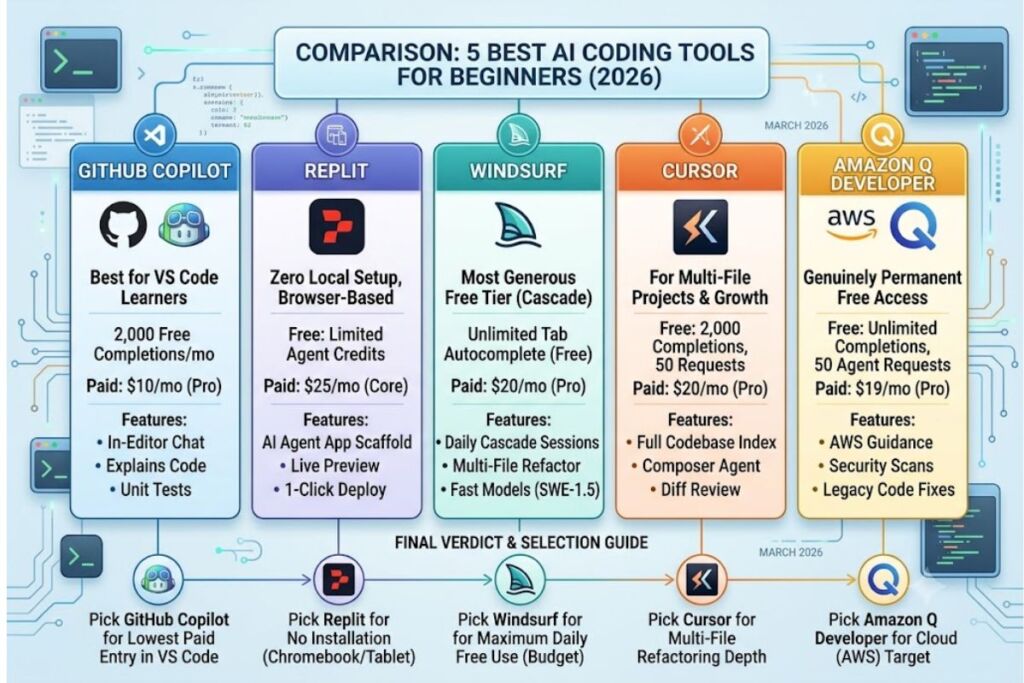
GitHub Copilot, Replit, Windsurf, Cursor, and Amazon Q Developer rank as the 5 best AI coding tools for beginners in 2026. Each tool pairs a free tier with plain-language prompting, so a new coder writes working code before learning full syntax rules.
- 01What Makes an AI Coding Tool Good for Beginners?
- 02Why Is GitHub Copilot One of the Best AI Coding Tools for Beginners?
- 03Why Is Replit One of the Best AI Coding Tools for Absolute Beginners?
- 04Why Is Windsurf One of the Best AI Coding Tools for Beginners on a Budget?
- 05Why Is Cursor One of the Best AI Coding Tools for Beginners Who Want to Grow?
- 06Why Is Amazon Q Developer One of the Best Free AI Coding Tools for Beginners?
- 07How Do These AI Coding Tools Compare for Beginners?
- 08Which AI Coding Tool Should Beginners Choose?
- 09Frequently Asked Questions
- 10Final verdict
What Makes an AI Coding Tool Good for Beginners?
A beginner-friendly AI coding tool combines 3 traits: a free or low-cost entry tier, plain-English chat instead of command memorization, and inline error explanations. Tools that meet all 3 criteria remove the two biggest early blockers: environment setup and syntax anxiety.
A beginner does not need the largest context window or the highest SWE-bench score. A beginner needs a tool that explains why code failed, not just that it failed. Cursor, Windsurf, and GitHub Copilot all attach natural-language explanations to inline suggestions. Replit and Amazon Q Developer go one step further and index the entire project automatically, so a first-time coder never configures a build environment manually. Each tool reviewed below satisfies this bar: a working free tier, chat-based debugging, and a paid tier under $25 per month for graduation into daily use.
Why Is GitHub Copilot One of the Best AI Coding Tools for Beginners?
GitHub Copilot ranks first for beginners because it installs directly into Visual Studio Code, the most-used free code editor, and its Free tier includes 2,000 code completions per month with no credit card required. New coders learn one tool instead of two.
Microsoft’s GitHub built Copilot on models developed with OpenAI, and the tool integrates natively into GitHub, Visual Studio, JetBrains IDEs, and Neovim. A beginner who installs VS Code and adds the Copilot extension gets inline autocomplete, a chat sidebar, and an agent mode without switching applications. According to GitHub’s official plans documentation, Copilot Free includes 2,000 code completions and a limited allowance of chat and agent requests per month, while Copilot Pro at $10 per month unlocks unlimited completions plus $15 in monthly AI credits for premium models such as Claude and GPT-5.
Key features beginners use most:
- Autocomplete full lines or functions as you type, directly in the editor.
- Chat with Copilot in a sidebar to ask “why did this function fail?”
- Explain highlighted code in plain English before you run it.
- Generate unit tests for a function with a single command.
- Debug runtime errors by pasting the stack trace into chat.
Verified students, teachers, and open-source maintainers qualify for unlimited completions at no cost through GitHub Copilot Student, based on GitHub’s individual plans page. Copilot’s main limitation for beginners is depth: it edits one file at a time by default, so multi-file refactors require more manual guidance than Cursor or Windsurf provide.
Why Is Replit One of the Best AI Coding Tools for Absolute Beginners?
Replit ranks best for total beginners because it removes local setup entirely — coding, running, and deploying all happen inside one browser tab, with no installation required. A beginner on a Chromebook or tablet can build and publish a working app the same day.
Replit Inc. launched its browser-based IDE in 2016 and added the autonomous Replit Agent in 2024. The Agent reads a plain-English description (“build me a to-do list app with a login page”) and writes, tests, and deploys the code independently. Replit’s Starter plan is free and includes limited daily Agent credits, 1,200 development minutes per month, and the ability to publish one app, according to Replit’s official pricing page. Replit Core costs $25 per month ($20 per month billed annually) and adds $25 in monthly usage credits, private projects, and up to 5 collaborators.
Key features that make Replit approachable:
- Describe the app you want in a single sentence and let Agent scaffold it.
- Run the code instantly in a live preview pane beside the editor.
- Deploy to a public URL with one click, no server configuration needed.
- Collaborate in real time with a mentor or classmate inside the same file.
- Store data in a built-in PostgreSQL database without external setup.
Replit’s credit system consumes usage per Agent action, not per hour, so a beginner running many small experiments spends credits faster than one running a single large build. Budget the $25 Core credit allowance for roughly 3-4 weeks of moderate daily use before expecting overage charges.
Why Is Windsurf One of the Best AI Coding Tools for Beginners on a Budget?
Windsurf offers the most generous free tier among beginner-friendly code editors: unlimited Tab autocomplete on every plan, including Free, plus a daily quota for its Cascade AI agent. A beginner writes code all day on autocomplete alone without touching a paid quota.
Cognition AI, the company behind the autonomous coding agent Devin, acquired Windsurf’s parent company Codeium in 2025. Windsurf ships as a standalone VS Code fork and as plugins for more than 40 IDEs, including JetBrains, Vim, and Xcode. Windsurf’s Cascade agent reads a codebase, plans a multi-file change, and executes it with less manual approval than Cursor’s diff-by-diff workflow, based on Windsurf’s official pricing documentation. As of the March 2026 pricing update, Windsurf Pro costs $20 per month and replaces the old monthly credit pool with quotas that refresh daily and weekly, preventing a beginner from draining an entire month’s usage in one weekend project.
Key features beginners rely on:
- Autocomplete with Tab, unlimited on every tier, including Free.
- Chat with Cascade to plan a feature before any code is written.
- Refactor across multiple files in one agent session.
- Preview a running app inside the editor before deploying it.
- Switch between Windsurf’s proprietary SWE-1.5 model and third-party models like Claude Sonnet.
Windsurf’s free tier caps Cascade sessions at 5 per day, which limits how many agent-driven builds a beginner runs without upgrading. Tab autocomplete, the feature beginners use most for learning syntax, carries no such cap.
Why Is Cursor One of the Best AI Coding Tools for Beginners Who Want to Grow?
Cursor suits beginners who plan to move quickly from tutorials to real projects, because its Composer agent handles multi-file edits and full codebase indexing that GitHub Copilot’s free tier does not offer. The tradeoff is a $20 monthly Pro plan, double GitHub Copilot’s entry price.
Anysphere released Cursor in 2023 as a fork of VS Code built specifically around AI-native workflows. Cursor’s Hobby plan is free and includes 2,000 completions plus 50 slow premium requests per month, according to Cursor’s official pricing page. Cursor Pro costs $20 per month and includes unlimited standard completions, faster premium model access, and Composer, Cursor’s agent for planning and executing changes across multiple files at once. Cursor indexes an entire codebase locally, so its chat and agent features answer questions about files the beginner has not opened.
Key features that reward the learning curve:
- Index the full project automatically so chat answers reference every file.
- Plan a multi-step change with Composer before any code is edited.
- Review every agent-proposed diff before accepting it into the codebase.
- Select among Claude, GPT, and Gemini models for the same prompt.
- Enable Privacy Mode so code is never used to train outside models.
Cursor’s steeper price and credit-based billing make it a stronger second tool than a first one. A beginner who starts on GitHub Copilot or Windsurf and later needs deeper multi-file refactoring finds Cursor Pro a natural upgrade.
Why Is Amazon Q Developer One of the Best Free AI Coding Tools for Beginners?
Amazon Q Developer’s Free Tier is permanent, not a trial, and includes unlimited code completions plus 50 agentic requests per month at no cost — one of the most durable free allowances in the category. A beginner never hits an expiration date on the free plan.
AWS rebranded its earlier CodeWhisperer tool as Amazon Q Developer in 2024, expanding it from simple autocomplete into a chat-based and agentic assistant. Amazon Q Developer’s official AWS pricing page confirms the Free Tier includes code suggestions, chat, and 1,000 lines of code per month for automated Java version upgrades. Amazon Q Developer Pro costs $19 per user per month and adds unlimited agentic requests, enterprise identity management, and IP indemnity for organizations.
Key features beginners find useful:
- Complete code inline across 15+ supported languages, including Python and JavaScript.
- Chat about AWS services directly from the IDE or the AWS Console.
- Scan code for security vulnerabilities and hardcoded secrets automatically.
- Fix flagged vulnerabilities with a one-click suggested patch.
- Transform legacy Java code to newer versions automatically.
Amazon Q Developer’s deepest strength is AWS-specific guidance, which matters less to a beginner building a first Python script and more to one deploying that script to the cloud. General-purpose beginners get a genuinely free long-term tool; beginners targeting AWS careers get a tool that doubles as cloud-service training.
How Do These AI Coding Tools Compare for Beginners?
GitHub Copilot wins on editor integration and price, Replit wins on zero-setup accessibility, Windsurf wins on free-tier generosity, Cursor wins on multi-file agent depth, and Amazon Q Developer wins on permanent free access. No single tool wins every category, which is why beginners often pair one editor-based tool with one browser-based tool.
| Tool | Free Tier | Entry Paid Plan | Best For | Setup Required |
|---|---|---|---|---|
| GitHub Copilot | 2,000 completions/month | $10/month (Pro) | VS Code beginners | Install extension |
| Replit | Limited daily Agent credits | $25/month (Core) | Zero local setup | None — browser only |
| Windsurf | Unlimited Tab, 5 Cascade sessions/day | $20/month (Pro) | Budget agent access | Install editor or plugin |
| Cursor | 2,000 completions, 50 slow requests | $20/month (Pro) | Multi-file projects | Install standalone editor |
| Amazon Q Developer | Unlimited completions, 50 agent requests | $19/user/month (Pro) | Permanent free use | Install extension |
For a deeper side-by-side breakdown of agent behavior and benchmark scores, see our Cursor vs GitHub Copilot comparison.
Which AI Coding Tool Should Beginners Choose?
Choose GitHub Copilot if learning inside Visual Studio Code with the lowest paid entry cost matters most. Choose Replit if avoiding local installation entirely matters most. Choose Windsurf if maximizing free daily usage matters most.
- Pick GitHub Copilot when the goal is learning a standard, industry-common workflow inside VS Code.
- Pick Replit when the device is a Chromebook, tablet, or shared computer without admin rights to install software.
- Pick Windsurf when daily coding volume is high and a $20/month budget cap matters.
- Pick Cursor when the first project already spans multiple files and needs coordinated multi-file edits.
- Pick Amazon Q Developer when the end goal includes deploying projects to AWS.
Beginners rarely need more than one paid subscription at a time. Start on a free tier, log which limits are hit first — completions, agent requests, or deployment minutes — and upgrade only the tool that hits its ceiling.
Frequently Asked Questions
Is GitHub Copilot free for beginners?
Yes. GitHub Copilot Free includes 2,000 code completions and a limited allowance of chat and agent requests per month with no credit card required, based on GitHub’s official pricing page. Verified students receive unlimited completions through Copilot Student.
Can a complete beginner use Replit without knowing how to code?
Replit’s Agent accepts plain-English descriptions and writes the code independently, so a user with zero coding background can produce a working app. Understanding basic programming logic still improves the ability to debug what the Agent generates.
Which AI coding tool has the most generous free tier in 2026?
Amazon Q Developer’s Free Tier is permanent and includes unlimited code completions plus 50 agentic requests per month. Windsurf’s Free tier offers unlimited Tab autocomplete but caps its Cascade agent at 5 sessions per day.
Do beginners need Cursor, or is GitHub Copilot enough?
GitHub Copilot covers single-file autocomplete and chat, which is sufficient for tutorials and small scripts. Cursor becomes worth the higher $20/month price once a beginner starts multi-file projects that need coordinated edits across a codebase.
For the full ranked list of tools across all experience levels, see our pillar guide: Best AI Coding Tools in 2026.
Final verdict
GitHub Copilot delivers the lowest-cost, most standard entry point for beginners at $10 per month after a 2,000-completion free tier, while Amazon Q Developer is the only tool on this list with a genuinely permanent free plan. Beginners on a zero-install device get more immediate value from Replit’s Core plan at $25 per month than from any editor-based tool.