
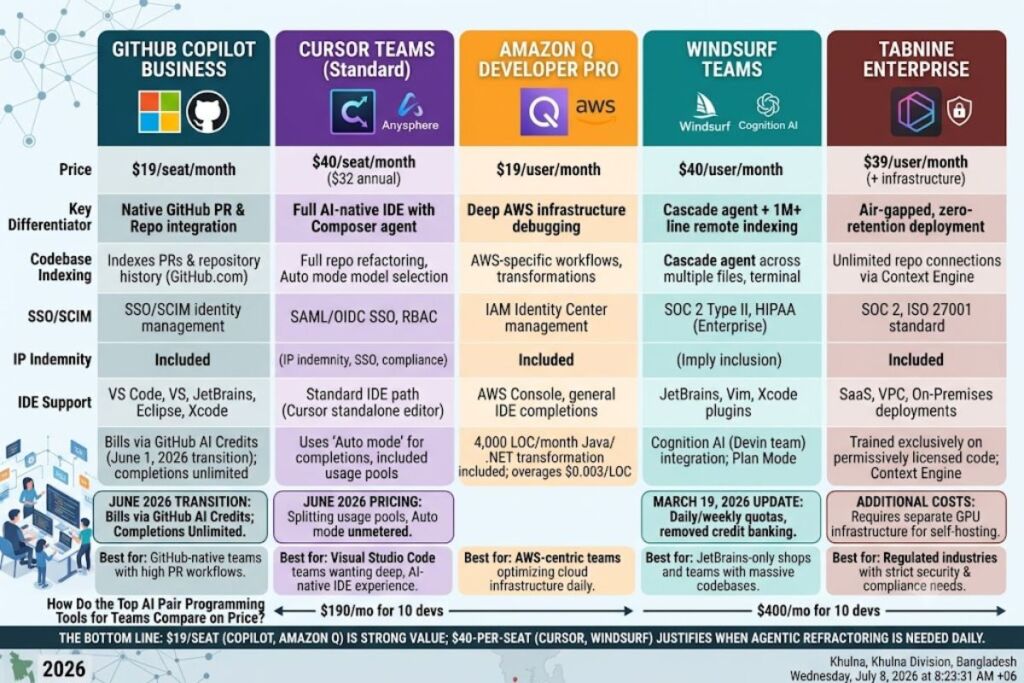
GitHub Copilot Business, Cursor Teams, Amazon Q Developer Pro, Windsurf Teams, and Tabnine Enterprise are the 5 best AI pair programming tools for teams in 2026. Each ships codebase indexing, multi-file editing, and admin-level policy controls that solo-developer plans lack.
- 01What Makes an AI Pair Programming Tool Right for a Team?
- 02Why Is GitHub Copilot Business One of the Best AI Pair Programming Tools for Teams?
- 03Why Is Cursor Teams One of the Best AI Pair Programming Tools for Teams?
- 04Why Is Amazon Q Developer Pro One of the Best AI Pair Programming Tools for Teams?
- 05Why Is Windsurf Teams One of the Best AI Pair Programming Tools for Teams?
- 06Why Is Tabnine Enterprise One of the Best AI Pair Programming Tools for Teams?
- 07How Do the Top AI Pair Programming Tools for Teams Compare on Price?
- 08Who Should Use Which AI Pair Programming Tool?
- 09Frequently Asked Questions
- 10The Bottom Line
What Makes an AI Pair Programming Tool Right for a Team?
A team-ready AI pair programming tool requires 4 non-negotiable capabilities: centralized billing, SSO/SCIM identity management, codebase-wide context indexing, and IP indemnity. Individual-tier tools like a personal ChatGPT subscription or a solo Cursor Pro account skip all 4. Engineering leads evaluating tools for a team of 10 or more developers filter first on admin controls, then on model quality, because a tool without centralized policy management creates shadow-IT risk the moment a second developer installs it.
Every tool in this list is evaluated against 5 criteria: pricing per seat, codebase indexing depth, supported IDEs, IP indemnification terms, and SSO/compliance certifications. Teams migrating from solo licenses to a managed rollout should start with the pillar guide, Best AI Coding Tools in 2026, for the full evaluation framework before committing to a per-seat contract.
Why Is GitHub Copilot Business One of the Best AI Pair Programming Tools for Teams?
GitHub Copilot Business costs $19 per user per month, includes $19 in monthly GitHub AI Credits, and adds IP indemnity plus organization-wide policy management that the individual Pro plan does not offer. For teams already living inside GitHub repositories and pull requests, Copilot Business integrates without a workflow change.
- Indexes pull requests and repository history directly inside GitHub.com, generating PR summaries and code review comments without leaving the platform.
- Supports Visual Studio Code, Visual Studio, the full JetBrains IDE suite, Eclipse, and Xcode, covering nearly every language stack a mixed team runs.
- Bills usage through GitHub AI Credits since June 1, 2026, when GitHub replaced its Premium Request Units model with token-based metering; inline code completions and Next Edit suggestions stay unlimited and consume zero credits on every paid plan.
- Excludes annual discounts on the Business tier — pricing is flat at $19/seat/month with no long-term commitment required, which lowers the switching cost for a pilot rollout.
- Escalates to Copilot Enterprise at $39 per seat per month for teams that need GitHub.com chat, deeper codebase indexing, and priority model access on top of everything in Business.
According to GitHub’s own June 2026 billing announcement, Copilot Business and Enterprise seat pricing stayed flat through the AI Credits transition, which removes a common cost-forecasting headache for teams sizing a rollout budget. Read the full breakdown in our dedicated GitHub Copilot Business Review.
Why Is Cursor Teams One of the Best AI Pair Programming Tools for Teams?
Cursor Teams costs $40 per seat per month on Standard seats (billed monthly) or $32 per seat per month billed annually, and it is the strongest choice for teams that want a full AI-native IDE rather than a plugin layered onto an existing editor. Cursor forked Visual Studio Code and rebuilt the editing loop around agentic, multi-file changes.
- Refactors across an entire repository using Composer, Cursor’s multi-file agent, instead of limiting suggestions to the open file.
- Routes requests through Auto mode, which selects a cost-efficient model automatically and does not draw from the seat’s included credit pool, keeping day-to-day completions effectively unmetered.
- Offers a Premium seat at $120 per seat per month ($96 annually) with 5 times the usage of a Standard seat, sized for developers who run agents continuously throughout the day.
- Enforces organization-wide privacy mode, SAML/OIDC SSO, role-based access control, and centralized billing on every Teams seat as of Cursor’s June 2026 pricing update.
- Mixes seat types freely inside one organization, so admins assign Standard seats to most developers and reserve Premium seats for the heaviest agent users based on the admin dashboard’s usage recommendations.
Cursor’s June 2026 pricing update split included usage into two separate pools per seat: a generous allowance for first-party Composer and Auto usage, and a second pool metered against third-party API rates for manually selected models like Claude or GPT. Compare this directly against GitHub’s model in our Cursor vs GitHub Copilot breakdown.
Why Is Amazon Q Developer Pro One of the Best AI Pair Programming Tools for Teams?
Amazon Q Developer Pro costs $19 per user per month, matches GitHub Copilot Business on price, and is the strongest pick for teams whose codebase runs primarily on AWS infrastructure. AWS built Q Developer on top of its earlier CodeWhisperer product and layered in IAM Identity Center for centralized user management.
- Debugs AWS-specific workflows directly, including CloudFormation template generation, Lambda function troubleshooting, and DynamoDB query optimization, a category no general-purpose competitor matches.
- Grants IP indemnity on the Pro tier, protecting a team legally if Amazon Q-generated code triggers a licensing claim.
- Transforms legacy Java and .NET applications automatically, with the Pro tier including a 4,000-lines-of-code monthly allowance per user pooled at the AWS payer-account level; overages bill at $0.003 per line of code.
- Includes a genuinely usable Free tier with 50 agentic requests per month and unlimited inline completions, letting a team pilot the tool before committing to Pro seats.
- Manages users and policies through AWS IAM Identity Center rather than a separate admin console, which removes a tool for teams already standardized on AWS identity management.
Amazon’s own pricing documentation confirms the Pro tier runs without hard monthly limits on general chat and completion interactions, distinguishing it from the harder caps GitHub Copilot Business applies through its AI Credits pool. See the full feature breakdown in our Amazon Q Developer Review.
Why Is Windsurf Teams One of the Best AI Pair Programming Tools for Teams?
Windsurf Teams costs $40 per user per month, matches Cursor’s Standard seat price exactly, and stands out for its Cascade agent, which indexes and edits repositories beyond 1 million lines of code through remote indexing rather than local scanning alone. Cognition AI, the company behind the autonomous coding agent Devin, acquired Windsurf in 2025 and folded Devin’s engineering team into the product.
- Executes multi-step agent sessions through Cascade, which reads the codebase, edits multiple files, runs terminal commands, and iterates on its own output without a developer approving each individual step.
- Drafts an implementation plan before writing code through Plan Mode, a 2026 feature that lets a developer review the agent’s approach before execution starts.
- Runs SWE-1.5, Windsurf’s proprietary coding model, at what the company reports as roughly 13 times faster inference than comparable frontier models, and usage of SWE-1.5 does not draw from a seat’s metered quota.
- Switched from monthly credit pools to daily and weekly usage quotas on March 19, 2026, a change that removed the option to bank unused capacity across a full month.
- Certifies compliance up to SOC 2 Type II, HIPAA, and FedRAMP High on the Enterprise tier, which starts around $60 per user per month for organizations that need government-grade certifications beyond what Teams provides.
Windsurf and Cursor now price their Teams tiers identically at $40 per seat per month, so the decision between them comes down to IDE preference and whether a team’s codebase benefits more from Windsurf’s remote indexing or Cursor’s more mature semantic search. JetBrains-only teams have no Cursor equivalent, which makes Windsurf’s plugin the practical default for that stack.
Why Is Tabnine Enterprise One of the Best AI Pair Programming Tools for Teams?
Tabnine Enterprise costs $39 per user per month and is the only tool on this list built around zero code retention and fully air-gapped, on-premises deployment, which makes it the default choice for regulated industries like finance, healthcare, and government contracting. Tabnine launched in 2018, predating GitHub Copilot by 3 years, and built its reputation on privacy-first architecture.
- Deploys through SaaS, VPC, on-premises, or a fully air-gapped environment, giving security teams a deployment option no other tool on this list offers at the standard Enterprise tier.
- Trains its proprietary models exclusively on permissively licensed code such as MIT and Apache 2.0, reducing the licensing-exposure risk that models trained on unknown-license public repositories carry.
- Connects to unlimited codebase repositories across Bitbucket, GitHub, GitLab, and Perforce P4 through its Context Engine, which grounds suggestions in a team’s actual architecture rather than generic training data.
- Requires separate GPU infrastructure for self-hosted deployments, typically adding $500 to $2,000 or more per month in cloud or on-premises compute on top of the per-seat license fee.
- Certifies compliance with GDPR, SOC 2, and ISO 27001 as standard inclusions on the Enterprise tier, with IP indemnification included subject to contract terms.
Tabnine’s Enterprise tier trades raw model performance for a compliance story none of the other 4 tools can fully replicate, which is why security-first organizations accept the $39/seat price point despite the additional infrastructure cost.
How Do the Top AI Pair Programming Tools for Teams Compare on Price?
GitHub Copilot Business and Amazon Q Developer Pro tie for the lowest team price at $19 per seat per month, while Cursor Teams and Windsurf Teams both charge $40 per seat per month, and Tabnine Enterprise sits at $39 per seat per month before infrastructure costs.
| Tool | Team Plan Price | Founding Company | Release Year | Key Differentiator |
|---|---|---|---|---|
| GitHub Copilot Business | $19/seat/month | GitHub (Microsoft) | 2021 | Native GitHub PR and repo integration |
| Amazon Q Developer Pro | $19/user/month | AWS (Amazon) | 2023 (as CodeWhisperer) | Deep AWS infrastructure debugging |
| Tabnine Enterprise | $39/user/month | Tabnine | 2018 | Air-gapped, zero-retention deployment |
| Windsurf Teams | $40/user/month | Cognition AI | 2024 (as Codeium) | Cascade agent + 1M+ line remote indexing |
| Cursor Teams (Standard) | $40/seat/month ($32 annual) | Anysphere | 2023 | Full AI-native IDE with Composer agent |
A 10-developer team budgets $190/month on GitHub Copilot Business or Amazon Q Developer Pro, versus $400/month on Cursor Teams or Windsurf Teams at monthly billing. The gap reflects architecture, not just markup: Copilot and Q Developer are plugins layered onto existing editors, while Cursor and Windsurf are full IDEs with proprietary agent stacks that carry higher infrastructure costs to run.
Who Should Use Which AI Pair Programming Tool?
Teams already standardized on GitHub choose Copilot Business; AWS-heavy teams choose Amazon Q Developer Pro; teams wanting the deepest agentic multi-file editing choose Cursor or Windsurf Teams; and regulated industries choose Tabnine Enterprise.
- GitHub-native engineering teams running most of their workflow through pull requests and GitHub Actions get the fastest rollout with GitHub Copilot Business.
- AWS-centric platform teams managing Lambda, CloudFormation, and DynamoDB workloads daily get the most task-specific value from Amazon Q Developer Pro.
- Startups and mid-size engineering teams doing heavy greenfield feature work and large refactors get the strongest agent performance from Cursor Teams or Windsurf Teams.
- JetBrains-only development shops without a Visual Studio Code path in their toolchain default to Windsurf Teams, since Cursor has no JetBrains equivalent.
- Fintech, healthcare, defense, and government-adjacent teams with strict data-residency and zero-retention requirements need Tabnine Enterprise‘s air-gapped deployment option.
Teams still deciding between a paid rollout and a pilot phase should start with our Best Free AI Coding Tools guide to test agent quality on a smaller budget before signing a per-seat contract.
Frequently Asked Questions
What is the cheapest AI pair programming tool for a team of 10 developers?
GitHub Copilot Business and Amazon Q Developer Pro are tied as the cheapest options at $19 per seat per month, putting a 10-developer team at $190 per month before any usage overages.
Can a team mix multiple AI pair programming tools across different developers?
Yes. Engineering teams commonly run Cursor or Windsurf for feature development and GitHub Copilot for code review inside pull requests, since GitHub’s code review capability can be licensed per-review without a full seat for every reviewer.
Does GitHub Copilot Business include IP indemnity?
Yes. Copilot Business includes IP indemnity, meaning GitHub defends the organization if Copilot-generated code triggers a copyright claim; the individual Pro plan does not include this protection.
Which AI pair programming tool works best for JetBrains IDEs?
Windsurf and GitHub Copilot both support the full JetBrains suite through dedicated plugins. Cursor has no JetBrains equivalent since it is a fork of Visual Studio Code, making it unsuitable for JetBrains-only teams.
The Bottom Line
At $19 per seat per month, GitHub Copilot Business and Amazon Q Developer Pro deliver the strongest price-to-value ratio for teams that already run on GitHub or AWS, while the $40-per-seat tier from Cursor and Windsurf pays for itself only when a team’s workload genuinely requires agentic, multi-file refactoring on a daily basis.