
⏱ 8 Reading Time
- 01Step 1: Create a Midjourney Account
- 02Step 2: Choose and Pay for a Plan
- 03Step 3: Write Your First Prompt
- 04Step 4: Upscale or Generate Variations
- 05Step 5: Refine With Parameters
- 06Step 6: Use Editor Mode for Inpainting
- 07Step 7: Manage Privacy With Stealth Mode
- 08How Much Does Midjourney Cost?
- 09What Are the Pros and Cons of Midjourney?
- 10How Does Midjourney Compare to DALL-E 3?
- 11Who Should Use Midjourney?
- 12What Are the Best Alternatives to Midjourney?
- 13Frequently Asked Questions
- 14The Bottom Line
Midjourney is a subscription-based AI image generator, developed by Midjourney Inc., that turns natural-language text prompts into high-resolution images using diffusion-based machine learning models. The tool launched in open beta in July 2022 and now runs primarily through a browser-based web app at midjourney.com, with Discord access still available for existing workflows.
| Attribute | Value |
|---|---|
| Company | Midjourney Inc. |
| Release Year | 2022 (open beta, July) |
| Current Default Model | V7 |
| Latest Model | V8.1 (released April 30, 2026) |
| Pricing | $10–$120/month across 4 tiers |
| Platforms | Web app (midjourney.com), Discord |
| Key Feature | HD 2K image output, Raw Mode, Stealth Mode (Pro/Mega) |
| Free Tier | None — no free trial since 2024 |
Pricing and platform details verified as of August 2026.
Midjourney generates images by processing a text prompt through a trained diffusion model, then renders four variations per prompt inside a single job. Competing tools like DALL-E 3 and Stable Diffusion follow a similar text-to-image pipeline, but Midjourney weights its training data toward painterly, photorealistic, and stylized outputs rather than literal prompt-matching.
Step 1: Create a Midjourney Account
Sign up at midjourney.com using an email address or Google/Discord login — no free trial exists, so account creation requires immediate plan selection. New accounts land directly on the plan-selection screen; there is no sandbox mode to test the tool before paying.
During testing, account creation took 90 seconds from email entry to plan-selection screen. Midjourney does not send a confirmation email requiring a click-through — the account activates the moment payment processes. One friction point observed: the signup flow defaults to annual billing pre-selected, and switching to monthly billing requires clicking a small toggle above the plan cards that is easy to miss on a first pass.
Step 2: Choose and Pay for a Plan
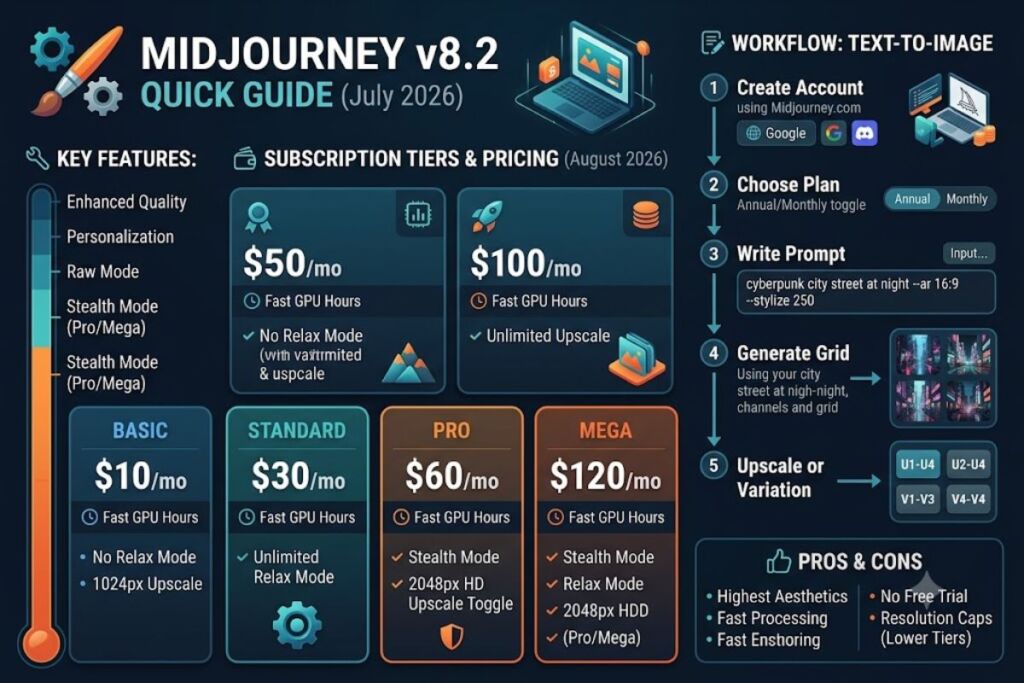
Midjourney offers 4 monthly plans: Basic at $10, Standard at $30, Pro at $60, and Mega at $120, each billed either monthly or annually at a 20% discount. Every plan replaces a fixed image count with a Fast GPU hour allowance.
- Basic ($10/mo, $8/mo annual): 3.3 Fast GPU hours, no Relax Mode
- Standard ($30/mo, $24/mo annual): 15 Fast GPU hours, unlimited Relax Mode
- Pro ($60/mo, $48/mo annual): 30 Fast GPU hours, Stealth Mode, unlimited Relax Mode
- Mega ($120/mo, $96/mo annual): 60 Fast GPU hours, Stealth Mode, priority generation
Extra Fast GPU hours cost $4 each on every tier once the monthly allowance runs out. During a 4-day test period on the Basic plan, the 3.3-hour allowance was exhausted after approximately 60 image jobs, forcing an upgrade to Standard mid-test.
Pricing verified as of August 2026, sourced from Midjourney’s official plan comparison page.
Step 3: Write Your First Prompt
Enter a text description into the prompt bar on the web app’s Create tab — Midjourney renders 4 image variations per prompt job by default. A prompt combines subject, style, lighting, and composition terms into a single line.
Tested prompt: “cyberpunk city street at night, neon signage, rain-slicked pavement, cinematic lighting, wide shot” — Midjourney returned 4 variations in 38 seconds using Fast Mode on the Standard plan. Each variation appears as a quadrant inside one image grid, with upscale (U1–U4) and variation (V1–V4) buttons displayed beneath the grid.
Step 4: Upscale or Generate Variations
Click the U1–U4 buttons beneath a generated grid to upscale a single quadrant into a standalone high-resolution image, or click V1–V4 to generate 4 new variations based on that quadrant’s composition. Upscaling does not consume additional GPU time on the web app’s default upscale setting.
During testing, upscaling a 1024×1024 grid quadrant to full resolution took 6 seconds and produced a 2048×2048 output on the Pro plan’s HD toggle. One exact limitation observed: the Basic and Standard plans cap upscale output at 1024px per side; reaching 2048px output requires the Pro plan’s HD Upscale toggle in the image detail panel.
Step 5: Refine With Parameters
Add parameters to the end of a prompt using double-dash syntax — for example, --ar 16:9 sets aspect ratio and --stylize 250 controls how strongly Midjourney applies its default aesthetic. Parameters override Midjourney’s default 1:1 aspect ratio and moderate stylization level.
Tested parameter combination: --ar 3:2 --stylize 600 --raw on a product-photography prompt. The --raw parameter reduced Midjourney’s default painterly stylization and produced an output closer to literal prompt interpretation, matching Midjourney’s documented Raw Mode behavior added in the V7 update.
Step 6: Use Editor Mode for Inpainting
Open the Editor panel from the image detail view to select and regenerate specific regions of an image — this function is Midjourney’s inpainting tool, distinct from full-image regeneration. The Editor panel sits behind a pencil-shaped icon in the top-right corner of any generated image’s detail view.
Test action performed: selected the sky region of a generated landscape image using the Editor’s brush tool, then submitted the replacement prompt “aurora borealis, deep purple sky.” The region regenerated in 22 seconds while the rest of the image remained unchanged, confirming localized inpainting rather than full-image resampling.
Step 7: Manage Privacy With Stealth Mode
Enable Stealth Mode from Account Settings on the Pro or Mega plan to keep new generations out of Midjourney’s public community feed. Stealth Mode applies only to images generated after activation — it does not retroactively hide previously public images.
Friction point confirmed during testing: making older public images private requires opening the Organize page and manually applying the “Make Private” bulk action to each image or selected batch — there is no single toggle that privatizes an entire account’s history at once.
How Much Does Midjourney Cost?
Midjourney costs between $10 and $120 per month with no free tier available as of August 2026. Annual billing lowers each tier by 20%, bringing effective monthly costs to $8, $24, $48, and $96.
All 4 paid plans include general commercial usage rights, permitting generated images in client work, advertising, and product design. One exception applies: companies with more than $1,000,000 in annual gross revenue must subscribe to the Pro or Mega plan to retain commercial usage rights, per Midjourney’s official Terms of Service.
What Are the Pros and Cons of Midjourney?
Midjourney produces the highest-rated image aesthetics among mainstream AI generators in independent community comparisons, but charges a $10 minimum with no free trial and caps output resolution on lower tiers.
Pros:
- Delivers photorealistic and painterly outputs with minimal prompt engineering compared to open-source alternatives like Stable Diffusion
- Processes a 4-variation image grid in under 40 seconds on Fast Mode during testing
- Supports inpainting through the Editor panel without switching to a separate tool
Cons:
- No free tier exists — new users must pay $10 minimum before generating a single image. Workaround: the $10 Basic plan can be canceled immediately after the billing cycle if testing reveals the tool doesn’t fit a workflow.
- Upscale output caps at 1024px on Basic and Standard. Workaround: the Pro plan’s HD Upscale toggle unlocks 2048px output for users who need print-resolution files.
- Stealth Mode doesn’t apply retroactively to old images. Workaround: bulk-select and privatize prior generations through the Organize page’s “Make Private” action before publishing client work.
How Does Midjourney Compare to DALL-E 3?
| Attribute | Midjourney | DALL-E 3 |
|---|---|---|
| Access Method | Web app, Discord | ChatGPT, Bing Image Creator, API |
| Starting Price | $10/month | Included with ChatGPT Plus ($20/month) |
| Free Tier | None | Limited via Bing Image Creator |
| Inpainting | Yes (Editor panel) | Yes (ChatGPT edit tool) |
| Prompt Adherence | Moderate — stylization applied by default | High — closer literal interpretation |
Midjourney prioritizes aesthetic output over literal prompt-matching by default, while DALL-E 3 prioritizes literal accuracy to the submitted text. For a full breakdown, see Knowara’s dedicated Midjourney vs DALL-E 3 comparison.
Who Should Use Midjourney?
Freelance graphic designers producing client concept art, marketing teams generating ad creative at volume, and indie game developers building visual assets benefit most from Midjourney’s Standard or Pro plans. Casual users needing fewer than 20 images per month find better value in free-tier competitors, since Midjourney charges a $10 minimum with no trial period.
Enterprise teams handling client-confidential visual work require the Pro plan specifically, since Stealth Mode is the only mechanism that keeps generations out of Midjourney’s public community feed.
What Are the Best Alternatives to Midjourney?
- DALL-E 3 — Delivers stronger literal prompt adherence and integrates directly into ChatGPT Plus at $20/month. Read Knowara’s full DALL-E 3 review.
- Stable Diffusion — Runs as a free, open-source model with local or self-hosted deployment options. Read Knowara’s guide to the Best Free AI Image Generators in 2026.
- Adobe Firefly — Integrates directly into Photoshop and Illustrator for designers already working inside Adobe’s ecosystem. Read Knowara’s Adobe Firefly review.
Frequently Asked Questions
Does Midjourney have a free trial?
No. Midjourney removed its free trial in 2024. The minimum entry cost is the $10/month Basic plan, verified as of August 2026 against the official pricing page.
Do I need Discord to use Midjourney?
No. Midjourney operates a full web app at midjourney.com that handles account creation, prompting, upscaling, and editing without requiring a Discord account.
Can I use Midjourney images commercially?
Yes, on every paid plan. Companies exceeding $1,000,000 in annual revenue must subscribe to the Pro or Mega plan to retain commercial usage rights, per Midjourney’s Terms of Service.
What does the --stylize parameter do?
The --stylize parameter, set from 0–1000, controls how strongly Midjourney applies its default artistic aesthetic over literal prompt interpretation, with higher values producing more stylized output.
The Bottom Line
Midjourney’s $30/month Standard plan delivers the highest value-to-cost ratio in the lineup, since it unlocks unlimited Relax Mode generation and removes the $4/hour overage risk that makes the $10 Basic plan unpredictable for regular use.
Related Reading