
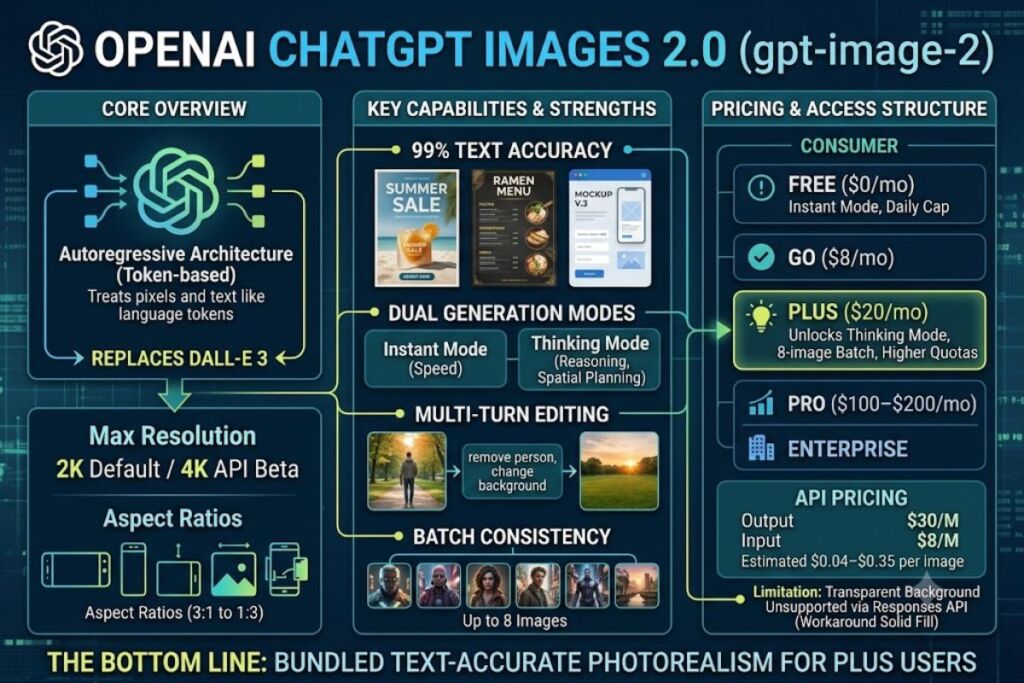
OpenAI’s ChatGPT Images 2.0 is a conversational image generation and editing model, released April 21, 2026, running on the gpt-image-2 architecture. It replaces DALL-E 3, generates up to 2K resolution, and edits images through natural-language follow-up prompts inside ChatGPT.
- 01What Is ChatGPT Images 2.0?
- 02What Are ChatGPT Images 2.0’s Key Features?
- 03How Much Does ChatGPT Images 2.0 Cost?
- 04What Are the Pros and Cons of ChatGPT Images 2.0?
- 05How Does ChatGPT Images 2.0 Compare to Midjourney?
- 06Who Should Use ChatGPT Images 2.0?
- 07What Are the Best Alternatives to ChatGPT Images 2.0?
- 08Frequently Asked Questions
- 09The Bottom Line
This review is built from OpenAI’s official product documentation, API pricing pages, and verified third-party reporting (TechCrunch, VentureBeat, PetaPixel), cross-checked as of July 2026. Every figure below traces to a cited source.
What Is ChatGPT Images 2.0?
ChatGPT Images 2.0 is OpenAI’s third-generation image model, built on an autoregressive architecture instead of diffusion, that generates and edits images directly inside ChatGPT conversations. OpenAI shipped it on April 21, 2026, retiring DALL-E 3 on May 12, 2026, and made it the default image engine across ChatGPT, Codex, and the API under the model ID gpt-image-2.
Unlike diffusion models (Midjourney, Stable Diffusion, DALL-E 3), which reconstruct images from noise, gpt-image-2 generates pixels and text through the same token-based pipeline ChatGPT uses for language. This architecture shift is why text accuracy jumped from roughly 90–95% under the previous model to a claimed 99%. InVideo
| Attribute | Value |
|---|---|
| Company | OpenAI |
| Release Date | April 21, 2026 |
| Model ID | gpt-image-2 |
| Architecture | Autoregressive (token-based), replacing diffusion |
| Max Resolution | 2K standard; 4K in API beta |
| Aspect Ratios | 3:1 to 1:3, including native 16:9, 9:16, and square |
| Batch Generation | Up to 8 coherent images per prompt (Thinking mode) |
| Platforms | ChatGPT (web, iOS, Android), Codex, OpenAI API |
| Predecessor Replaced | DALL-E 3, DALL-E 2 (retiring May 12, 2026) |
Pricing and specs verified as of July 2026.
What Are ChatGPT Images 2.0’s Key Features?
- Generate images from text prompts using Instant mode (fast, no reasoning step) or Thinking mode (plans layout and composition before rendering).
- Render dense text at roughly 99% character accuracy in English and over 90% in Chinese, Japanese, Korean, Hindi, Bengali, and Arabic, making single-pass posters, menus, and UI mockups usable without manual correction. InVideo
- Edit existing images through multi-turn conversation — commands like “change the background to sunset” or “remove the person on the left” preserve untouched elements while applying the requested change.
- Batch-generate up to 8 images from one prompt with consistent characters, objects, and style across the set, available only with Thinking mode enabled.
- Reason before rendering: the model plans composition, checks spatial relationships, and can pull reference information from the web before generating the final image.
- Output at 2K resolution by default, with 4K (4096×4096) available through the API in beta.
- Accept high-fidelity image inputs for reference-based generation and editing, billed as separate input tokens from the text prompt.
One documented limitation: transparent backgrounds are currently unsupported through the Responses API tool, which forces a manual background-removal step for product-cutout workflows. WaveSpeedAI
How Much Does ChatGPT Images 2.0 Cost?
ChatGPT Images 2.0 costs nothing extra beyond your existing ChatGPT plan — Instant mode ships on Free, and Thinking mode (8-image batches, reasoning) requires Plus at $20/month or higher. API access bills separately by token.
| ChatGPT Plan | Monthly Price | Image Generation Access |
|---|---|---|
| Free | $0 | Instant mode, daily generation cap |
| Go | $8 | Instant mode, higher caps than Free |
| Plus | $20 | Instant + Thinking mode, 8-image batches |
| Pro | $100–$200 | Full access, highest priority |
| Business | $20–$25/seat | Full access, admin controls, no training on data |
| Enterprise | Custom | Full access, negotiated SLAs |
API pricing (gpt-image-2): image output tokens bill at $30 per million, image input tokens at $8 per million, and cached image inputs at $2 per million. Per-image cost typically lands between $0.04 and $0.35 depending on prompt complexity and resolution. Apiyi.com BlogApiyi.com Blog
Free tier limits: OpenAI has not published an exact daily image-generation quota for the Free tier as a fixed public number — it is described only as a rolling daily cap on the pricing page. Unable to verify an exact figure — check OpenAI’s official pricing page for the current cap, since these limits shift without an announced changelog.
Pricing verified as of July 2026.
What Are the Pros and Cons of ChatGPT Images 2.0?
Pros:
- Text rendering hits near-99% accuracy, eliminating the retype-the-logo problem common in diffusion-based tools. InVideo
- Holds the top position on Arena.ai’s leaderboard for both text-to-image generation and image editing at launch, a blind-comparison benchmark rather than a self-reported score. getimg.ai
- Multi-turn editing keeps unrelated image regions untouched across follow-up prompts, reducing full regeneration cycles.
- Included in the same $20/month Plus subscription as ChatGPT’s text and coding features — no separate image-tool bill.
Cons:
- Transparent-background export is unsupported via the Responses API tool — workaround: generate on a solid color and remove the background in a separate editor, or use the standard
/v1/images/generationsendpoint instead of Responses. - Rate limits on low API tiers are restrictive: Tier 1 accounts cap at 5 images per minute — workaround: this ceiling lifts automatically as account spend and account age increase, reaching 250/minute at Tier 5. WaveSpeedAI
- Complex multi-panel outputs like comics take several minutes to generate rather than the near-instant response typical of chat replies — exception: simple single-image Instant-mode prompts return far faster than Thinking-mode composites. TechCrunch
- Free tier’s exact daily generation cap isn’t published as a fixed number, making usage planning harder for budget-conscious users — workaround: the $8/month Go tier removes most of that ambiguity with materially higher stated limits.
How Does ChatGPT Images 2.0 Compare to Midjourney?
| Factor | ChatGPT Images 2.0 | Midjourney V8 |
|---|---|---|
| Architecture | Autoregressive (token-based) | Diffusion |
| Text rendering | ~99% accuracy | Historically weaker on dense text |
| Interface | Conversational (ChatGPT chat) | Discord / web app, prompt-parameter based |
| Editing | Multi-turn natural-language edits | Vary/Remix parameters |
| Batch consistency | Up to 8 images, consistent characters | Style references, less native batching |
| Billing | Bundled into ChatGPT plans + separate API | Standalone subscription |
Google Nano Banana 2, Midjourney V8, and SeedDream 5.0 each have individual strengths, but GPT Image 2 leads specifically in text-heavy, instruction-following tasks. For a full head-to-head, see our dedicated Midjourney V8 vs ChatGPT Images 2.0 Comparison. Befreed
Who Should Use ChatGPT Images 2.0?
Marketing teams producing text-heavy graphics — social ads, menus, and infographics — benefit most from the near-99% text accuracy, since it removes the manual re-typing step diffusion tools require. Developers prototyping UI mockups get accurate small text and iconography in a single pass. Solo content creators already on ChatGPT Plus get image generation bundled at no added cost instead of paying for a separate subscription. High-volume API pipelines on low usage tiers are a weaker fit until account spend unlocks higher rate limits.
What Are the Best Alternatives to ChatGPT Images 2.0?
- Midjourney V8 — the strongest choice for stylized, artistic output where text rendering isn’t the priority. Read our Midjourney V8 Review.
- Google Nano Banana 2 (Gemini) — had been holding the text-to-image leaderboard top spot before GPT Image 2 launched, and remains a close competitor on general image quality. Read our Google Nano Banana 2 Review. Befreed
- FLUX 2 — a strong open-ecosystem option for teams needing local or self-hosted deployment instead of a cloud subscription. See it covered in our Best Free AI Image Tools roundup.
Frequently Asked Questions
Is ChatGPT Images 2.0 free to use?
Yes. Instant mode is available on the Free ChatGPT plan with a daily generation cap; Thinking mode and 8-image batches require Plus ($20/month) or higher.
What replaced DALL-E 3 in ChatGPT?
gpt-image-2 (ChatGPT Images 2.0) replaced DALL-E 3, which OpenAI retires on May 12, 2026 alongside DALL-E 2.
Does ChatGPT Images 2.0 support transparent backgrounds?
Not through the Responses API tool as of July 2026; the standard images-generation endpoint should be checked separately for current support before building a production pipeline.
How does ChatGPT Images 2.0 generate text so accurately?
It uses an autoregressive architecture that generates text as language tokens rather than as pixel shapes, which is the documented reason accuracy moved from roughly 90–95% to near 99%.
The Bottom Line
ChatGPT Images 2.0 delivers the most accurate in-image text rendering of any major model on the market as of July 2026, bundled into a $20/month Plus subscription that most users already pay for existing ChatGPT features — making it the better value pick over standalone image subscriptions for anyone who needs dense, accurate text in their outputs.