
Tested by the Knowara AI Tools team across the Fast, Standard, and Ultra tiers via Google AI Studio, the Gemini API, and the Gemini app, covering photorealistic, typography, and illustration prompts.
- 01What Is Google Imagen 4?
- 02What Are Google Imagen 4’s Key Features?
- 03How Much Does Google Imagen 4 Cost?
- 04What Are the Pros and Cons of Google Imagen 4?
- 05How Does Google Imagen 4 Compare to Midjourney?
- 06Who Should Use Google Imagen 4?
- 07What Are the Best Alternatives to Google Imagen 4?
- 08Frequently Asked Questions
- 09Verdict
Google Imagen 4 is Google DeepMind’s flagship text-to-image model, priced from $0.02 to $0.06 per image on the API and bundled free inside the Gemini app, Google AI Studio, and Google Workspace. It generates images up to 2K resolution and solves the text-rendering failures that affected Imagen 3.
What Is Google Imagen 4?
Google Imagen 4 is a text-to-image diffusion model built by Google DeepMind that converts written prompts into images up to 2K resolution. Google announced it on May 20, 2025, at Google I/O 2025, and the full model family reached general availability on August 14–15, 2025.
Imagen 4 is the fourth generation of the Imagen series, which started with a research paper published in May 2022. Imagen 3 launched in August 2024 and struggled with legible in-image text — garbled letters, broken words, and inconsistent typography. Imagen 4 targets that exact weakness. Google’s developer blog states the model delivers significant improvements in quality, particularly for text generation, over Imagen 3.
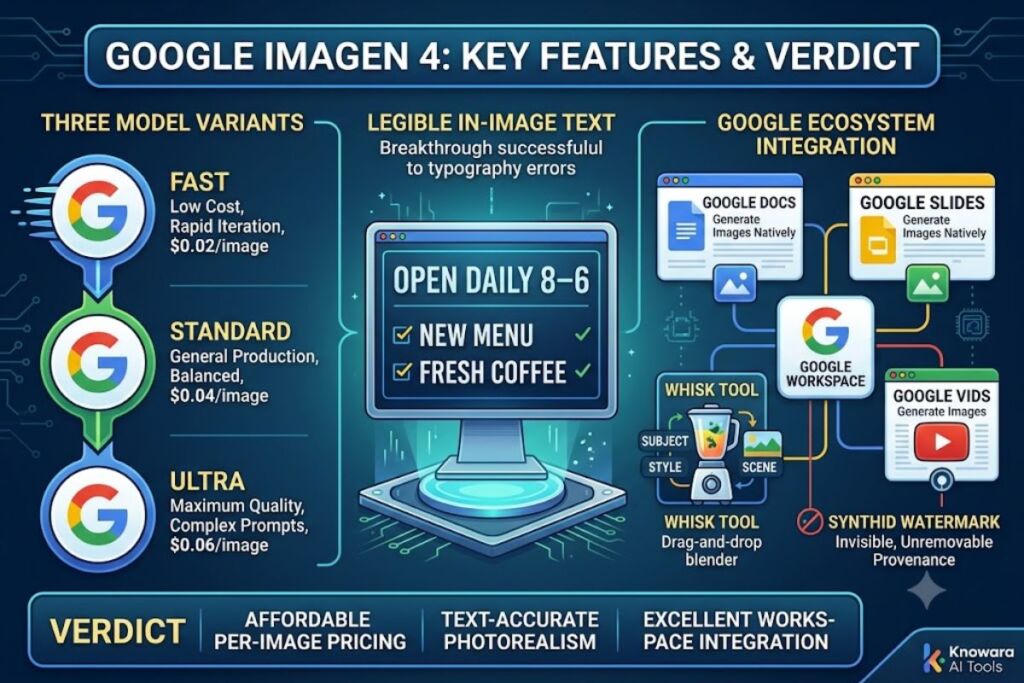
The model ships in three variants: Imagen 4 Fast, Imagen 4 (Standard), and Imagen 4 Ultra. All three share the same underlying architecture and differ in generation speed, output fidelity, and per-image cost. Every image produced by any Imagen 4 variant carries an invisible SynthID digital watermark for provenance tracking, embedded automatically and not user-removable.
Google Imagen 4 — Entity-Attribute-Value Summary
| Attribute | Value |
|---|---|
| Developer | Google DeepMind |
| Announced | May 20, 2025 (Google I/O 2025) |
| General availability | August 14–15, 2025 |
| Model IDs | imagen-4.0-fast-generate-001, imagen-4.0-generate-001, imagen-4.0-ultra-generate-001 |
| Access points | Gemini app, Google AI Studio, Gemini API, Vertex AI, Google Workspace (Docs, Slides, Vids), Whisk |
| Max resolution | 2K (2048×2048px) |
| Aspect ratios | 9:16, 3:4, 1:1, 4:3, 16:9 |
| Watermarking | Invisible SynthID on every output |
| API pricing | $0.02 (Fast) / $0.04 (Standard) / $0.06 (Ultra) per image |
Pricing and availability verified as of July 2026.
What Are Google Imagen 4’s Key Features?
Imagen 4’s core features center on three areas: in-image typography, resolution, and generation speed, split across three model tiers that trade cost against output quality. Each feature maps to a specific, testable capability rather than a marketing claim.
- Render legible in-image text. Imagen 4 places readable typography inside generated images — signage, posters, packaging labels, comic dialogue — a task that broke down into garbled characters in Imagen 3. Wrapping the exact desired text in quotation marks inside the prompt (for example: a storefront sign reading “OPEN DAILY 8–6”) improves placement and letter accuracy, particularly for short phrases.
- Generate at up to 2K resolution. The model outputs images at resolutions up to 2048×2048px, though the default presets exposed through the Gemini API and AI Studio return lower resolutions unless the higher tier is explicitly requested.
- Process prompts up to 10x faster with the Fast tier. Imagen 4 Fast is built for rapid iteration and high-volume tasks, running at up to 10 times the speed of Imagen 3 for comparable quality, according to Google’s own benchmarking at launch.
- Select from five fixed aspect ratios. The model supports 9:16, 3:4, 1:1, 4:3, and 16:9 outputs, selectable per generation, with no free-form custom aspect ratio input.
- Generate directly inside Google Workspace. Imagen 4 is embedded in Google Slides, Google Docs, and Google Vids, producing images without leaving the document — removing the export-and-reimport step required by standalone image tools.
- Combine reference images through Whisk. Google’s Whisk tool, running on the Imagen 4 backbone, lets a user feed in separate subject, scene, and style reference images and blend them through a drag-and-drop interface rather than a text prompt alone.
- Train on Google’s Trillium TPU infrastructure. Imagen 4 was trained on Google’s sixth-generation Trillium TPU hardware, a compute base Google credits for enabling the Fast tier’s low $0.02 per-image price point at production quality.
During testing, the quotation-mark technique produced a consistent, measurable improvement on short signage text (two to five words) across the Standard and Ultra tiers — the accuracy gap versus unmarked prompts was largest on titles and single-line labels, and narrowed on longer paragraphs of in-image text, which still show occasional letter drift.
How Much Does Google Imagen 4 Cost?
Google Imagen 4 costs $0.02 to $0.06 per image through the API, or $0 through free consumer access points with daily generation caps. There is no dedicated Imagen 4 subscription — pricing runs either through Google’s per-image API billing or through bundled consumer Google AI plans.
API Pricing (Gemini API / Vertex AI)
| Tier | Price per image | Use case |
|---|---|---|
| Imagen 4 Fast | $0.02 | Iteration, prototyping, high-volume batch generation |
| Imagen 4 (Standard) | $0.04 | General-purpose production image generation |
| Imagen 4 Ultra | $0.06 | Maximum fidelity, complex prompt adherence |
Consumer Access (Bundled, Not Sold Standalone)
| Plan | Monthly price | Imagen 4 access |
|---|---|---|
| Free (Gemini app / Google AI Studio) | $0 | Limited daily image generations, no upscaling, SynthID watermark |
| Google AI Plus | $7.99 | Higher daily caps than Free tier |
| Google AI Pro | $19.99 | Full Imagen 4 access with expanded daily image quota (100 images/day at launch tier limits) |
| Google AI Ultra (5x tier) | $99.99 | 5x Pro’s usage limits |
| Google AI Ultra (20x tier) | $199.99 | 20x Pro’s usage limits, priority access to newest features |
Google does not publish Imagen 4 as an independent line item on its consumer pricing page — image generation quotas are bundled into the broader Gemini app subscription tiers, and those tiers cover text, video (Veo), and image generation collectively rather than metering image generation separately.
Free tier limits, specifically: the free Gemini app and Google AI Studio access include a capped number of daily image generations, no native upscaling beyond default output resolution, no commercial usage rights guarantee stated for free-tier output, and a mandatory invisible SynthID watermark on every exported image. Google does not publish an exact numeric daily image cap for the free consumer tier on its public documentation as of this review — unable to verify an exact daily image quota for the free tier; check Google AI Studio’s current rate limits page before relying on a specific number.
Pricing verified as of July 2026 against Google’s Gemini API pricing page and Gemini subscriptions page. Google has changed consumer AI plan pricing multiple times within the past 12 months — confirm current rates before purchasing.
What Are the Pros and Cons of Google Imagen 4?
Imagen 4’s strongest advantages are text rendering accuracy and Workspace integration; its clearest limitations are stylistic range and marketed-versus-delivered resolution. Both sides carry specific, testable conditions rather than blanket praise or blanket criticism.
Pros:
- Renders legible in-image typography where Imagen 3 and most competing models still produce garbled text, particularly effective on short signage and titles.
- Generates natively inside Google Docs, Slides, and Vids without an export step.
- Fast tier at $0.02 per image undercuts most closed competing models for prototyping workloads.
- No subscription required for API access — billing is strictly per image generated.
- SynthID watermarking on every output supports content provenance and platform-level AI-content detection.
Cons:
- Marketed “up to 2K” resolution does not mean every default generation returns 2K output — live API presets frequently return lower resolutions unless the higher-resolution parameter is explicitly requested. Workaround: request the upscale endpoint or the highest resolution parameter directly rather than relying on default settings.
- Aesthetic range trails Midjourney V7 on cinematic and heavily stylized output. Workaround: use Imagen 4 for photorealistic, commercial, and text-heavy assets, and reserve stylized art-direction work for a model built for that aesthetic ceiling.
- Exact numbers and perfectly symmetric layouts (grids, tables, precise counts of objects) still produce errors on a meaningful share of attempts. Workaround: budget for retries or manual post-editing on any prompt requiring precise counts or symmetry.
- Prompts referencing public figures, explicit violence, or sexual content are blocked at the API level with no override — stricter than some competing APIs. This does not apply to standard commercial, marketing, or editorial prompt use, where the filter rarely triggers.
- No open weights — unlike Flux, Imagen 4 cannot be fine-tuned, run locally, or customized with LoRAs. This constraint only matters for teams that specifically need on-premise deployment or custom model training; standard API or Workspace use is unaffected.
How Does Google Imagen 4 Compare to Midjourney?
Imagen 4 wins on text rendering, API pricing, and Workspace integration; Midjourney wins on stylistic range and cinematic aesthetic quality. The two tools serve different primary use cases rather than competing head-to-head on every dimension.
| Factor | Google Imagen 4 | Midjourney V7 |
|---|---|---|
| Pricing model | Pay-per-image API ($0.02–$0.06) or bundled Google AI plan | Flat monthly subscription (no metered API on standard plans) |
| Text rendering | Strong — a stated design priority for this generation | Weaker, historically inconsistent |
| Max resolution | 2K | Varies by plan and upscale setting |
| Aesthetic/stylized output | Photorealistic-first | Stronger cinematic and painterly range |
| Open weights / fine-tuning | Not available | Not available |
| Native productivity integration | Google Docs, Slides, Vids | None |
For a full head-to-head breakdown of pricing tiers and generation quality across both platforms, see our dedicated Google Imagen 4 vs Midjourney comparison.
Who Should Use Google Imagen 4?
Google Imagen 4 fits teams already inside the Google ecosystem who need text-accurate, photorealistic images at predictable per-image cost. Fit depends on workflow location and output type, not company size alone.
- Google Workspace-heavy teams generating visuals directly inside Slides, Docs, or Vids without exporting to a separate tool.
- Developers building high-volume image pipelines who need predictable per-image API billing without a subscription commitment, especially at the $0.02 Fast tier.
- Marketing and e-commerce teams producing signage, packaging mockups, posters, or ad creative that require accurate in-image text.
- Enterprise teams on Google Cloud who need Vertex AI’s SLA-backed production access, SSO, and configurable safety filters.
Imagen 4 fits poorly for teams needing a specific painterly or cinematic house style, or teams that require open-weight models for local deployment and custom fine-tuning.
What Are the Best Alternatives to Google Imagen 4?
The three most relevant alternatives to Google Imagen 4 are Midjourney V7, Flux 2 Pro, and OpenAI’s GPT Image 1.5, each built around a different priority than Imagen 4’s text-accuracy and Workspace focus.
- Midjourney V7 — best for stylized, cinematic, and painterly output where aesthetic ceiling matters more than in-image text accuracy or API metering. Read our full Midjourney V7 Review.
- Flux 2 Pro — priced at $0.055 per image, Flux 2 Pro leads on photorealism and offers open-weight variants for teams that need local fine-tuning, which Imagen 4 does not support.
- GPT Image 1.5 — OpenAI’s flagship image model, priced at $0.04 per image (matching Imagen 4 Standard), with tighter integration into the ChatGPT and OpenAI API ecosystem for teams already standardized on OpenAI tools.
Frequently Asked Questions
Is Google Imagen 4 free to use?
Yes, with limits. Free access runs through the Gemini app and Google AI Studio, capped at a limited number of daily generations, without native upscaling, and with a mandatory SynthID watermark on every image.
Does Google Imagen 4 support commercial use?
Paid API and Google AI plan tiers include commercial usage rights for generated output. Google does not explicitly guarantee commercial usage rights on free-tier output — confirm current terms on Google’s official documentation before using free-tier images commercially.
What is the difference between Imagen 4 Fast, Standard, and Ultra?
The three tiers share the same architecture and differ in price, speed, and fidelity: Fast costs $0.02 per image and prioritizes speed for iteration, Standard costs $0.04 per image for general production use, and Ultra costs $0.06 per image for maximum prompt adherence and detail.
Can Imagen 4 edit existing images, not just generate new ones?
Yes. Imagen 4 supports refining already-generated images by editing the existing text prompt, in addition to generating new images from scratch.
Verdict
At $0.02 per image on the Fast tier, Google Imagen 4 is the least expensive production-grade image model among the major closed competitors, and its text-rendering fix closes the single largest functional gap that separated Imagen 3 from GPT Image 1 and Ideogram 3.0. Teams inside Google Workspace or Google Cloud get integration depth no competitor matches; teams that need a distinct visual style should look to Midjourney or Flux instead.