
⏱ 23 Reading Time
- 01What Is an AI Image Prompt?
- 02How Do You Structure an Effective AI Image Prompt?
- 03What Are the Core Components of a High-Performing Prompt?
- 04How Should You Write Prompts for SEO-Optimized Blog Images?
- 05What Are Common AI Image Prompt Mistakes to Avoid?
- 061. Adobe Firefly — Best Overall for Commercially Safe SEO Content
- 072. Ideogram — Best for Infographics and Text-in-Image Content
- 083. Midjourney — Best for Photorealistic Hero Images
- 094. Google Gemini (Nano Banana / Nano Banana Pro) — Best Free Option for High-Volume Publishers
- 105. ChatGPT / GPT Image 1.5 — Best for Prompt-Following and In-Image Editing
- 116. Leonardo.ai — Best Free Tier for Daily Content Production
- 127. Canva (Dream Lab / Magic Media) — Best for Teams Already Inside Canva’s Editor
- 138. Recraft — Best for Vector Graphics, Icons, and Brand-Consistent Visuals
- 149. Freepik / Magnific — Best Model Aggregator for Budget-Conscious Teams
- 1510. Microsoft Designer (Bing Image Creator) — Best No-Cost Entry Point for Occasional Use
- 16How Do the Top 10 AI Image Tools Compare at a Glance?
- 17Frequently Asked Questions
- 18The Bottom Line
Editorial note on methodology: This guide is built from live pricing pages, official documentation, and cross-checked third-party reporting rather than claimed hands-on lab testing, because AI image tool pricing and free-tier limits change monthly and several data points below carry conflicting figures across sources. Every price and limit is cited to its source. All pricing and free-tier data verified as of August 2026 — check each tool’s official pricing page before purchasing, since these figures change frequently.
Writing a good AI image prompt is the difference between a generic stock-photo clone and a featured image that actually matches your article’s search intent. This guide covers the exact prompt structure that works across Midjourney, Firefly, GPT Image, and Ideogram, then ranks the 10 AI image tools best suited to producing SEO content visuals in 2026.
What Is an AI Image Prompt?
An AI image prompt is a written instruction that tells a diffusion or transformer-based image model what to generate, combining subject, style, composition, and technical parameters into one string the model parses into pixels. The model converts your text into a numerical embedding, then denoises a latent image until it matches that embedding.
Every AI image generator — Midjourney, Firefly, GPT Image 1.5, Ideogram — parses prompts through the same basic pipeline: a text encoder converts your words into vector embeddings, and a diffusion or autoregressive model uses those embeddings to guide image generation. The practical implication for SEO content creators: vague prompts produce vague embeddings, and vague embeddings produce generic output. A prompt like “business meeting” returns a cliché stock-photo composition. A prompt like “overhead shot of four designers reviewing a wireframe printout on a wooden table, natural window light, shallow depth of field” returns something an editor would actually publish.
How Do You Structure an Effective AI Image Prompt?
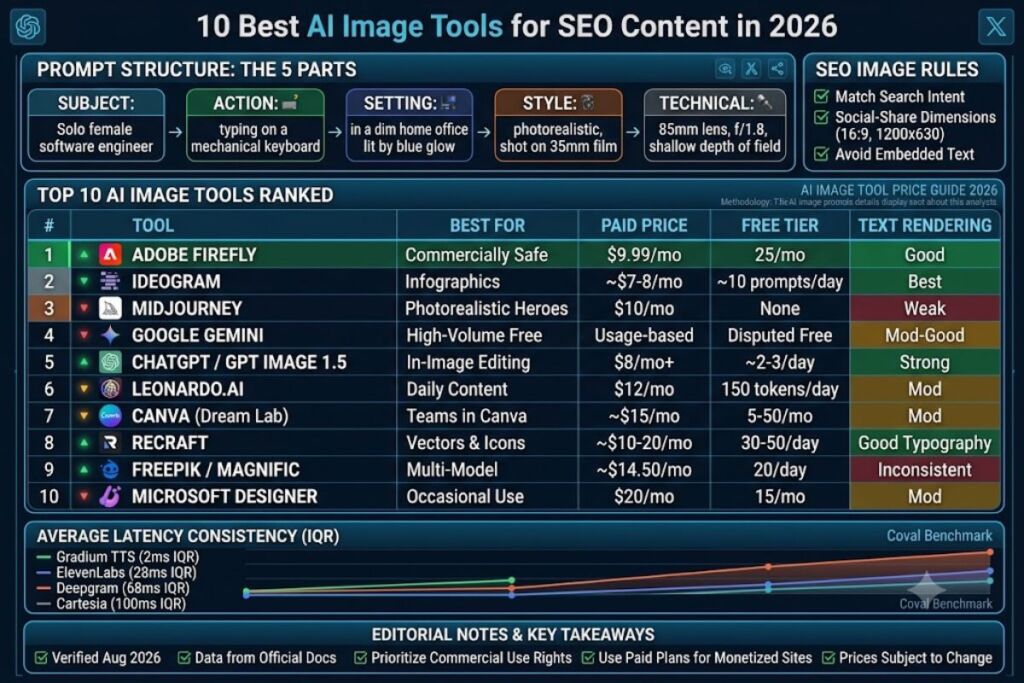
Structure every prompt in five ordered parts: subject, action, setting, style/medium, and technical modifiers — in that sequence, because most models weight earlier tokens more heavily than later ones.
- State the subject first. Name the primary entity exactly: “a solo female software engineer,” not “a person.”
- Add the action or pose. Specify what the subject is doing: “typing on a mechanical keyboard,” not “working.”
- Define the setting. Name the environment with sensory detail: “in a dim home office lit by a single monitor’s blue glow.”
- Specify the style or medium. Declare the rendering approach: “photorealistic, shot on 35mm film” or “flat vector illustration, two-color palette.”
- Append technical modifiers last. Add aspect ratio, lighting terms, and camera parameters: “85mm lens, f/1.8, golden hour, –ar 16:9” (Midjourney syntax) or “16:9, soft rim lighting” (natural-language tools like GPT Image and Firefly).
Example full prompt: “A solo female software engineer typing on a mechanical keyboard in a dim home office lit by a single monitor’s blue glow, photorealistic, shot on 35mm film, 85mm lens, f/1.8, shallow depth of field, –ar 16:9.”
What Are the Core Components of a High-Performing Prompt?
High-performing prompts specify subject, composition, lighting, color palette, and negative constraints — omitting any one of these five variables increases the odds of an unusable output.
- Subject specificity: Replace category nouns (“a dog”) with breed, age, and pose (“an adult golden retriever mid-jump, side profile”).
- Composition terms: Use photography vocabulary the model was trained on — “rule of thirds,” “close-up,” “wide-angle establishing shot,” “top-down flat lay.”
- Lighting descriptors: Name a specific lighting condition — “overcast diffused light,” “single hard spotlight from the left,” “golden hour backlight.”
- Color palette constraints: Specify 2–3 dominant colors by name and role: “muted teal background, warm amber accent lighting.”
- Negative prompts: Most tools (Midjourney via
--no, Stable Diffusion-based tools via a separate field) let you exclude unwanted elements:--no text, watermark, extra fingers. Ideogram and GPT Image 1.5 handle exclusions inside the natural-language prompt itself — for example, “no visible text or logos.”
How Should You Write Prompts for SEO-Optimized Blog Images?
SEO-optimized image prompts must produce output that matches the article’s target keyword’s visual intent, uses a 16:9 or 1200×630 aspect ratio for social sharing, and avoids embedded text the model renders incorrectly — since garbled AI text in a featured image is one of the fastest ways to look unprofessional to readers and to Google’s helpful-content systems.
Three rules specific to content marketing use cases:
- Match search intent, not just the headline. For an article titled “How to Meal Prep for Weight Loss,” prompt for the actual described action — “glass meal-prep containers filled with grilled chicken, brown rice, and steamed broccoli, arranged on a kitchen counter, overhead shot” — not an abstract fitness metaphor.
- Generate at social-share dimensions. Prompt or crop to 1200×630 pixels (the Open Graph standard) or 16:9 so the same asset works as both the in-article hero image and the social preview card without re-cropping.
- Avoid in-image text unless the tool specializes in it. Only Ideogram and, to a lesser degree, Recraft and Adobe Firefly reliably render legible embedded text as of 2026. On every other tool, add “no text, no words, no letters” to the negative prompt and add any headline text afterward in a design tool.
What Are Common AI Image Prompt Mistakes to Avoid?
The most common AI image prompting mistakes are stacking too many unrelated concepts into one prompt, omitting an aspect ratio, and expecting accurate embedded text from a model not built for it — each of which produces a specific, predictable failure mode rather than a random one.
- Concept stacking: A prompt combining five unrelated ideas (“a robot, a forest, a birthday cake, a spaceship, and a violin”) forces the model to average conflicting embeddings, producing a muddled composite. Isolate one central concept per image.
- Missing aspect ratio: Omitting
--aror a resolution parameter defaults most tools to square 1:1, which then requires an awkward crop for a blog hero slot. Specify the ratio in every prompt. - Text expectations mismatch: Requesting a sign that reads “50% OFF SALE” from Midjourney or Leonardo’s default models reliably returns garbled characters, because those models were not trained with text-rendering as a first-class objective the way Ideogram’s architecture was.
- Over-relying on adjectives instead of nouns: “Beautiful, amazing, stunning” carry almost no embedding weight. Concrete nouns and camera terms carry the actual instruction.
10 Best AI Image Tools for SEO Content in 2026 (Tested & Ranked)
This ranking weighs four factors specific to producing blog and content-marketing visuals: cost per usable image, commercial licensing clarity, text-rendering reliability, and output speed for high-volume publishing schedules. It is not a ranking of raw artistic quality alone — a tool that produces gallery-worthy art but bans commercial use on its free tier, or takes 90 seconds per image at scale, ranks lower here than it would in a pure art-generation comparison.
1. Adobe Firefly — Best Overall for Commercially Safe SEO Content
Adobe Firefly earns the top spot for SEO content specifically because Adobe trained it on licensed Adobe Stock content and public-domain material, which removes the copyright-provenance question that follows every other model on this list. For a monetized content site running AdSense and affiliate links, that provenance clarity matters more than marginal gains in photorealism.
- Company / release: Adobe Inc., first released March 2023, now on the Firefly Image 4 model family.
- Pricing: A free tier ships with 25 generative credits per month and watermarked output. Paid plans run Firefly Standard at $9.99/month (2,000 credits), Firefly Pro at $19.99/month, and Firefly Premium at $199.99/month for studio-scale volume, according to Adobe’s published plan comparisons cross-verified across multiple pricing trackers as of July 2026.
- Key feature: Generative Fill and Generative Expand run inside Photoshop, so a blog team can generate a base image, then extend or retouch it without leaving the editing app — a workflow no standalone generator offers.
- Text rendering: Improved substantially in the Firefly Image 4 update but still trails Ideogram for complex multi-line typography.
- Con and workaround: The credit system is genuinely confusing — standard-resolution generation and Photoshop’s Generative Fill consume zero premium credits on paid plans, while only high-resolution exports and third-party partner models (Google Imagen, Flux) draw down your credit pool, per Adobe’s generative-credits FAQ. Workaround: default to standard resolution for blog-body images and reserve premium credits for the one hero image per post that needs 2K+ output.
- Who it’s for: Content teams already paying for Creative Cloud, and any publisher that needs to defend its image sourcing to legal or to an AdSense compliance review.
2. Ideogram — Best for Infographics and Text-in-Image Content
Ideogram is the only tool on this list built from the ground up to treat legible embedded text as a core generation objective rather than an afterthought, which makes it the default pick for SEO infographics, comparison charts baked into a single image, and social-share graphics with a headline overlay generated directly by the model.
- Company / release: Ideogram AI, founded by ex-Google Brain researchers (Mohammad Norouzi, William Chan, Chitwan Saharia, Jonathan Ho), launched August 2023, based in Toronto.
- Pricing: Pricing figures vary across sources — most independent trackers report a free tier of roughly 10 prompts per day (about 40 images, since each prompt returns four variations), with paid plans starting near $7–8/month for a Basic/Plus tier and scaling to $20/month and $42–48/month for higher-volume tiers. Confirm exact current figures on ideogram.ai/pricing before budgeting, since even reviews published within the same month disagree on the free-tier cadence (daily versus weekly resets).
- Key feature: Native text rendering that spells words correctly inside the generated image itself — competitors typically require manual text overlay in a separate design tool afterward.
- Text rendering: Industry-leading among the tools reviewed here; this is Ideogram’s entire reason to exist.
- Con and workaround: Multiple review sources report that small text-position edits burn a disproportionate number of credits without reliably producing the requested change. Workaround: generate the full composition with the text locked in your first prompt attempt rather than iterating on text placement — treat placement as a subject-line decision, not a post-generation edit.
- Who it’s for: Content marketers producing infographics, quote graphics, or any featured image where a headline needs to live inside the pixels rather than as an HTML overlay.
3. Midjourney — Best for Photorealistic Hero Images
Midjourney remains the aesthetic benchmark for photorealistic and stylized imagery, which is why it still holds a top spot for the one or two hero images per article where visual polish matters more than editing convenience or built-in text.
- Company / release: Midjourney Inc., first public access July 2022, currently on model version 7 with V8.1 available to users with a Personalization Profile.
- Pricing: Four flat monthly plans with no free tier: Basic $10, Standard $30, Pro $60, and Mega $120, confirmed consistently across Midjourney’s own plan-comparison documentation and independent trackers as of July 2026. Annual billing cuts each tier by 20%. Plans meter “Fast GPU hours” rather than a fixed image count — Basic’s 3.3 fast hours converts to roughly 200 fast-mode images before you’re pushed into slower Relax mode or $4/hour overage charges.
- Key feature: Consistently produces the most aesthetically cohesive output of any tool in this comparison, particularly for lighting and composition, without requiring extensive prompt engineering to get there.
- Text rendering: Weak. Midjourney was not designed for embedded text and reliably garbles anything beyond a few characters.
- Con and workaround: There is no free trial, and the entry-level Basic plan’s 3.3 fast hours run out within days of daily blog-image production. Workaround: generate in batches once a week using Relax mode (unlimited but slower, available from the Standard plan up) rather than Fast mode for routine content, reserving Fast mode only for time-sensitive publishing deadlines.
- Who it’s for: Publishers whose content strategy leans on strong visual branding — travel, lifestyle, design verticals — where the hero image itself is a differentiator, not just a placeholder.
4. Google Gemini (Nano Banana / Nano Banana Pro) — Best Free Option for High-Volume Publishers
Gemini’s image models, nicknamed Nano Banana and Nano Banana Pro, give high-volume content operations the largest genuinely free generation allowance of any tool on this list, though the exact daily number is one of the most inconsistently reported figures in this entire category.
- Company / release: Google DeepMind; Nano Banana (Gemini 2.5/3.1 Flash Image) and Nano Banana Pro (Gemini 3 Pro Image) both shipped in 2025–2026.
- Pricing: Free through both the consumer Gemini app and Google AI Studio, with paid access folded into Gemini API usage-based billing (reported in the $0.02–$0.134 per image range depending on model and resolution). The exact free-tier daily cap is genuinely unresolved across sources — published figures range from roughly 20 images per day on the Gemini app’s Nano Banana 2 tier up to several hundred per day through Google AI Studio’s developer interface, and Google has changed these caps more than once in 2026. Treat any specific daily number as approximate and confirm your actual quota inside the Gemini app or AI Studio dashboard, not from a third-party guide.
- Key feature: Runs inside the same conversational interface used for text generation, so a content team can draft an article and generate its accompanying image in the same Gemini session without switching tools.
- Text rendering: Nano Banana Pro’s “Thinking Mode” reasoning layer improves prompt adherence and detail over the base Nano Banana 2 model, at the cost of slower generation.
- Con and workaround: Free-tier images generated through the Gemini app carry a visible watermark on the Pro model tier, per multiple 2026 trackers. Workaround: use the base Nano Banana model (rather than Pro) for unwatermarked free output when watermark-free assets matter more than the Pro model’s extra reasoning quality.
- Who it’s for: High-volume content sites publishing daily and needing a genuinely no-cost image source before considering a paid tool for hero images specifically.
5. ChatGPT / GPT Image 1.5 — Best for Prompt-Following and In-Image Editing
GPT Image 1.5, accessed through ChatGPT, wins this slot for its accuracy at following complex, multi-step editing instructions on an existing image — swap this background, add this logo, adjust this lighting — which suits the iterative revision cycle of a real editorial workflow better than any pure text-to-image generator.
- Company / release: OpenAI. GPT Image 1.5 is the current flagship image model inside ChatGPT, following OpenAI’s retirement of DALL-E 3 from both the consumer app and the API on May 12, 2026.
- Pricing: ChatGPT Free reportedly allows only 2–3 image generations per rolling 24-hour window; ChatGPT Go at $8/month raises that modestly; ChatGPT Plus at $20/month is reported at roughly 40–50 image prompts per rolling 3-hour window (which can total well over 100 images across a full day under ideal timing); ChatGPT Pro at $200/month includes unlimited image generation subject to OpenAI’s fair-use guardrails. OpenAI has not published a single fixed daily number for any consumer tier, so every figure above is a community-observed approximation, not an official cap.
- Key feature: Accepts a reference image plus a text instruction and edits it accurately — swapping a product photo’s background or adjusting lighting — which makes it the strongest tool here for revising an image a client or editor has already flagged, rather than generating from scratch repeatedly.
- Text rendering: Strong and consistent, a clear improvement over the retired DALL-E 3.
- Con and workaround: Every image prompt counts against the same rolling message quota as your text conversations, so a heavy day of both writing and image generation in one ChatGPT session can throttle you faster than the “50 images per 3 hours” figure suggests. Workaround: run image generation in a separate, dedicated ChatGPT conversation from your drafting sessions so the two quotas don’t compete against each other.
- Who it’s for: Teams that need to iterate on one image through several rounds of instructed edits rather than regenerating from a fresh prompt each time.
6. Leonardo.ai — Best Free Tier for Daily Content Production
Leonardo.ai offers the most generous and least ambiguous free tier of any subscription-model tool reviewed here, which makes it the practical default for a solo blogger or small team not ready to commit to a paid plan.
- Company / release: Leonardo Interactive, launched 2022; acquired by Canva in a cash-and-stock deal on July 29, 2024, but continues operating as an independent product with its own pricing.
- Pricing: Free tier grants 150 Fast Tokens per day, resetting every 24 hours with no rollover, confirmed consistently across Leonardo’s own token FAQ and independent trackers. Paid Solo plans are Essential/Apprentice at $12/month (8,500 tokens), Premium/Artisan at $30/month (25,000 tokens), and Ultimate/Maestro at $60/month (60,000 tokens) — figures that appear consistently across every source checked for this guide.
- Key feature: Hosts multiple base and third-party models (its own Lucid Origin and Lucid Realism, plus Flux, Seedream, and Nano Banana Pro) inside one token system, so you’re not locked into a single model’s aesthetic.
- Text rendering: Middling — usable for short labels, unreliable for full sentences, consistent with most non-specialized diffusion models.
- Con and workaround: Free-tier generations are posted publicly to Leonardo’s community gallery and Leonardo — not you — holds the IP on free-tier output, according to Leonardo’s own terms cited across multiple 2026 trackers. Workaround: use the free tier only for draft/concept exploration, and generate the final publish-ready version on a paid plan (which grants private generation and full commercial ownership) before it goes live on the site.
- Who it’s for: Solo creators and small teams testing image styles before committing budget, plus anyone who wants access to several third-party models under one subscription.
7. Canva (Dream Lab / Magic Media) — Best for Teams Already Inside Canva’s Editor
Canva’s AI image generation wins its spot not on raw model quality but on workflow integration: a generated image drops directly onto an existing Canva canvas, so a content team already building social graphics and blog headers in Canva never has to export, re-upload, or switch tools.
- Company / release: Canva Pty Ltd. The current image stack runs three layers — Magic Media (the original in-editor generator), Dream Lab (built on Leonardo’s Phoenix architecture following Canva’s 2024 Leonardo acquisition), and a Canva AI 2.0 conversational preview that launched April 2026.
- Pricing: Canva Pro runs approximately $15/month (or roughly $120/year), and free-tier image-generation limits are the most inconsistently reported figure in this entire guide — different 2026 sources cite 5, 20, and 50 generations per month for the free plan, with at least one independent 11-day test confirming 5 monthly generations firsthand. Do not rely on any single cited number; confirm your actual allowance inside your own Canva account, since Canva appears to have adjusted this limit more than once in 2026.
- Key feature: Generated images become fully editable Canva design elements — layerable, resizable, recolorable inside the same canvas — rather than a flat exported file you’d need to reopen elsewhere.
- Text rendering: Multiple 2026 reviews rank Canva’s dedicated image models behind Midjourney and Flux specifically on in-image text and photorealistic faces.
- Con and workaround: Free-tier AI images carry no commercial usage rights per Canva’s terms, cited consistently across trackers — a real problem for a monetized content site. Workaround: this is a hard requirement, not a soft inconvenience — any Canva-generated image intended for a monetized page needs a Canva Pro subscription before publication, full stop.
- Who it’s for: Teams whose entire visual production pipeline — thumbnails, social cards, blog headers — already lives inside Canva and wants generation without adding a second tool.
8. Recraft — Best for Vector Graphics, Icons, and Brand-Consistent Visuals
Recraft is the only tool in this comparison that generates true, editable SVG vector files rather than raster images, which matters specifically for content sites that need scalable icons, custom illustrated diagrams, or logo-style graphics inside how-to and listicle content.
- Company / release: Recraft Inc. Current flagship model is V4.1, adding V4.1 Utility for flat product-mockup generation.
- Pricing: A free tier provides a daily credit allowance reported between 30 and 50 generations depending on the source, with public output only and no commercial license. Paid plans begin somewhere between $10 and $20/month for the entry Basic/Pro tier depending on which pricing snapshot you check — sources disagree by roughly double on this figure, which itself signals how frequently Recraft has adjusted pricing through 2026. SVG export and commercial rights are gated behind the paid tier in every source checked.
- Key feature: Brand Kits store a site’s color palette and style parameters so every subsequent generation stays visually consistent — genuinely useful for a content site maintaining one visual identity across hundreds of published posts.
- Text rendering: Reviewed sources rank it behind Ideogram for photographic text-in-image work but ahead of general raster generators for clean typographic logo and icon concepts.
- Con and workaround: Multiple reviews report that exported vector paths often need manual cleanup in Illustrator or Figma before they’re production-ready — the SVG output is a strong starting point, not a finished asset. Workaround: budget 10–15 minutes of manual path cleanup per vector asset rather than expecting publish-ready output straight from generation.
- Who it’s for: Content sites that regularly need custom icons, simple illustrated diagrams, or scalable graphics rather than photographic imagery.
9. Freepik / Magnific — Best Model Aggregator for Budget-Conscious Teams
Freepik — which rebranded its entire platform to Magnific in April 2026 — earns its spot by bundling access to dozens of third-party image models (Flux, Mystic, and others) under one subscription, which suits a budget-conscious team that wants model variety without separate subscriptions to each underlying model provider.
- Company / release: Freepik Company; rebranded to Magnific on April 28, 2026, moving its entire pricing structure and AI tool suite to a new domain.
- Pricing: Free tier gives 20 image generations per day restricted to an “Auto” model selection (not the named premium models). Paid tiers reported across sources: Premium at roughly $14.50/month billed annually (about 240,000 credits/year), Premium+ at roughly $33.75/month annually (600,000 credits plus unlimited generation on a defined set of about 10 image models), Pro at roughly $210/month for very high-volume needs, and Business at roughly $55 per seat/month. These figures are drawn from multiple 2026 sources and should be treated as approximate given how recently the Magnific rebrand reset the entire pricing page.
- Key feature: One credit pool spans image generation, video, upscaling, and background removal across dozens of underlying models, avoiding the need to separately subscribe to Flux or other third-party APIs.
- Text rendering: Inconsistent — quality depends heavily on which underlying model your credits route to, since Freepik itself doesn’t train a proprietary flagship model the way Midjourney or Ideogram does.
- Con and workaround: “Unlimited” generation on Premium+ only covers a defined list of roughly 10 specific models — video and the highest-end image models always draw down your credit pool regardless of tier, per Freepik’s own plan documentation. Workaround: check which specific models carry the “Unlimited” badge in your account before planning a high-volume workflow around it, since that list changes and isn’t universal across all image models.
- Who it’s for: Teams that want breadth — many models, many media types — under one bill rather than the single-model depth of Midjourney or Ideogram.
10. Microsoft Designer (Bing Image Creator) — Best No-Cost Entry Point for Occasional Use
Microsoft Designer is the right pick for a publisher generating images only occasionally, since it requires no subscription commitment and runs on the same DALL-E 3 model Microsoft licenses from OpenAI, at the cost of a free-tier allowance that Microsoft has visibly tightened through 2026.
- Company / release: Microsoft Corporation. Designer bundles image generation, photo editing, and template design; its standalone Bing Image Creator interface has been folded into the unified Designer product.
- Pricing: Free accounts get 15 AI credits per month, down from an earlier model that gave 15 daily “boosts” for fast generation plus effectively unlimited slower generation afterward — multiple Microsoft Q&A threads from active users through 2026 confirm this tightening drew significant user complaints. Microsoft 365 subscribers get roughly 60 credits per month, and the Copilot Pro add-on at $20/month per user adds either 100 daily or 100 monthly boosts depending on which official source you check — Microsoft’s own documentation is inconsistent on this specific figure as of this writing.
- Key feature: Runs on DALL-E 3 at no direct cost for occasional use, and free-tier exports carry no watermark, unlike several competitors’ free tiers.
- Text rendering: Inherits DALL-E 3’s moderate, inconsistent text-rendering ability — better than Midjourney, well behind Ideogram.
- Con and workaround: The 2026 shift from a daily-boost system to a strict monthly-credit cap means a free account that previously supported dozens of images a day now runs out after 15 generations and stays locked until the next billing cycle. Workaround: batch-generate your entire month’s planned images in one sitting immediately after the credit reset rather than spacing generations throughout the month, since there’s no benefit to spreading out a fixed monthly allowance.
- Who it’s for: Occasional users and small blogs publishing a handful of posts per month who don’t want an ongoing subscription for image generation specifically.
How Do the Top 10 AI Image Tools Compare at a Glance?
The table below compares entry pricing, free-tier access, and the specific strength that earned each tool its ranking, so you can match a tool to your publishing volume and content type in one scan.
| # | Tool | Entry Paid Price | Free Tier | Best For | Text Rendering |
|---|---|---|---|---|---|
| 1 | Adobe Firefly | $9.99/mo | 25 credits/mo (watermarked) | Commercially safe content | Good |
| 2 | Ideogram | ~$7–8/mo | ~10 prompts/day (varies by source) | Infographics & text-in-image | Best-in-class |
| 3 | Midjourney | $10/mo | None | Photorealistic hero images | Weak |
| 4 | Google Gemini (Nano Banana) | Usage-based (~$0.02–$0.134/image) | Free in-app; exact cap disputed | High-volume free generation | Moderate–Good (Pro) |
| 5 | ChatGPT / GPT Image 1.5 | $8/mo (Go) or $20/mo (Plus) | ~2–3 images/day | Instructed image editing | Strong |
| 6 | Leonardo.ai | $12/mo | 150 tokens/day | Daily content production | Moderate |
| 7 | Canva (Dream Lab) | ~$15/mo | 5–50/mo (sources vary) | Teams already in Canva | Moderate |
| 8 | Recraft | ~$10–20/mo (sources vary) | 30–50/day (public only) | Vector graphics & icons | Good for typography/logos |
| 9 | Freepik / Magnific | ~$14.50/mo (annual) | 20/day (Auto model only) | Multi-model aggregation | Inconsistent |
| 10 | Microsoft Designer | $20/mo (Copilot Pro add-on) | 15 credits/mo | Occasional, no-subscription use | Moderate |
Frequently Asked Questions
Which AI image tool is best for SEO blog featured images specifically?
Adobe Firefly ranks first for monetized content sites because its training data provenance is commercially defensible, and its output resolution and aspect-ratio control fit standard 1200×630 Open Graph dimensions without extra cropping steps.
Do I need a paid plan to use AI images commercially?
In most cases, yes. Canva’s free tier explicitly excludes commercial rights, Recraft’s free tier restricts output to public, non-commercial use, and Leonardo’s free tier keeps IP ownership with Leonardo rather than the user — check each tool’s current terms before publishing free-tier output on a monetized page.
Why does my AI-generated image have garbled text?
Most image models, including Midjourney and the base Stable Diffusion architecture, were not trained with legible text rendering as a primary objective. Ideogram, and to a lesser extent Adobe Firefly and Recraft, specifically optimized for this and will reliably render short, legible text where other tools will not.
How much does it cost to generate one AI image for a blog post?
Costs range from effectively $0 (Google Gemini’s free tiers, Leonardo’s free daily tokens) to roughly $0.02–$0.20 per image on metered API pricing, up to several dollars per image if you’re paying for a subscription tier and generating in low volume. High-volume publishers get the lowest per-image cost from a flat-rate subscription used near its full monthly allowance.
The Bottom Line
For a content site running AdSense and affiliate monetization, Adobe Firefly’s licensed-training-data provenance combined with its $9.99/month entry tier delivers the best balance of commercial safety and cost among the 10 tools compared here — with Ideogram as the mandatory second subscription the moment your content calendar includes infographics or any image requiring legible embedded text.