
⏱ 35 Reading Time
- 011. Jasper AI
- 02Key features
- 03Pros and cons
- 04Who should use it
- 052. Copy.ai
- 06A pricing note worth flagging directly
- 07Key features
- 08Pros and cons
- 09Who should use it
- 103. Writesonic
- 11Key features
- 12Pros and cons
- 13Who should use it
- 144. ClosersCopy
- 15Key features
- 16Pros and cons
- 17Who should use it
- 185. Writer
- 19Key features
- 20Pros and cons
- 21Who should use it
- 226. Rytr
- 23Key features
- 24Pros and cons
- 25Who should use it
- 267. Anyword
- 27Key features
- 28Pros and cons
- 29Who should use it
- 308. Grammarly
- 31Key features
- 32Pros and cons
- 33Who should use it
- 349. ProWritingAid
- 35Key features
- 36Pros and cons
- 37Who should use it
- 3810. Hemingway Editor
- 39Key features
- 40Pros and cons
- 41Who should use it
- 4211. QuillBot
- 43Key features
- 44Pros and cons
- 45Who should use it
- 4612. Wordtune
- 47Key features
- 48Pros and cons
- 49Who should use it
- 5013. Surfer SEO
- 51Key features
- 52Pros and cons
- 53Who should use it
- 5414. Frase
- 55Key features
- 56Pros and cons
- 57Who should use it
- 5815. Koala AI
- 59Key features
- 60Pros and cons
- 61Who should use it
- 6216. Scalenut
- 63Key features
- 64Pros and cons
- 65Who should use it
- 6617. NeuronWriter
- 67Key features
- 68Pros and cons
- 69Who should use it
- 7018. Outranking
- 71Key features
- 72Pros and cons
- 73Who should use it
- 7419. Sudowrite
- 75Key features
- 76Pros and cons
- 77Who should use it
- 7820. Notion AI
- 79Key features
- 80Pros and cons
- 81Who should use it
- 82Quick-Reference Comparison for 20 AI Tools
- 83${item.name}
- 84How to Choose Between These 20 Tools
- 85Frequently Asked Questions
Editorial note: This guide is compiled and fact-checked by the Knowara AI Tools team from official pricing pages, vendor documentation, and public user reports, cross-referenced in July 2026. Pricing changes often in this category — several vendors in this list restructured their plans at least once in the past twelve months — so treat every figure below as verified as of July 2026 and confirm current numbers on the vendor’s own pricing page before you buy. Where a vendor’s public pricing was inconsistent across sources at the time of writing, that inconsistency is flagged directly rather than smoothed over.
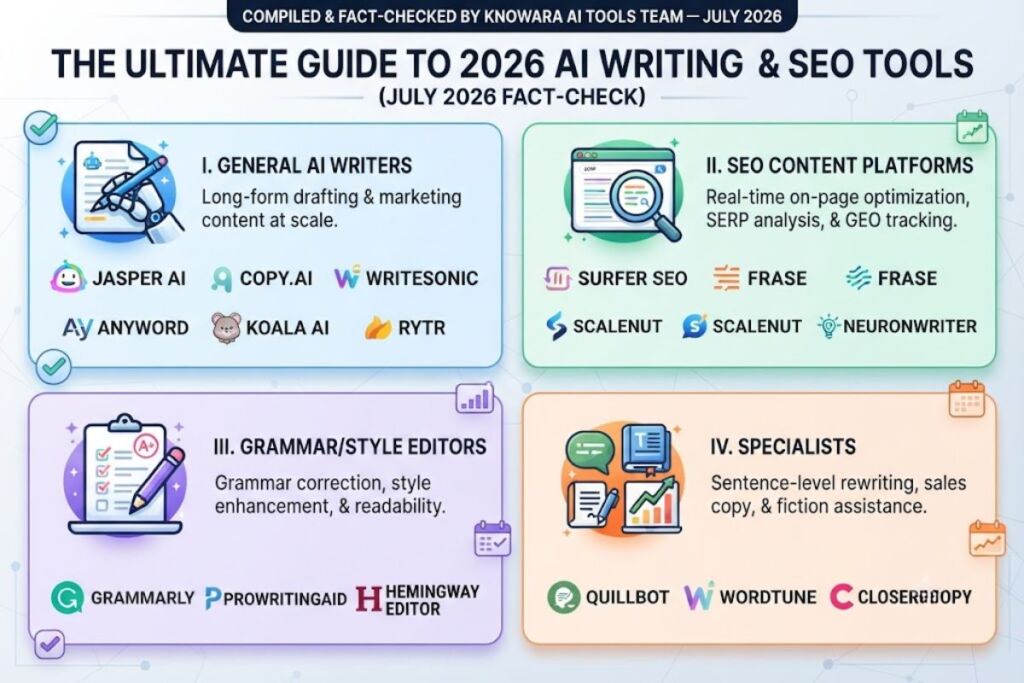
Twenty tools made this list because each one does a specific job better than its category average: long-form drafting, sentence-level rewriting, SEO content briefs, grammar and style correction, or fiction assistance. They are ranked within four practical groups — general AI writers, grammar/style editors, SEO content platforms, and specialists — because “best” depends heavily on which job you’re hiring the tool for.
1. Jasper AI
Jasper is built for marketing teams that need AI-generated content to stay on-brand across dozens of writers, not just produce a single good draft.
Jasper’s Pro plan costs $69/month billed monthly, or $59/month billed annually. There is no permanent free plan — only a 7-day trial. Jasper’s Business plan is custom-quoted; third-party procurement data (Vendr) puts typical Business deployments between roughly $900 and $6,000+ per month depending on seats and usage, though Jasper does not publish this figure directly. Some third-party sites still list an entry-level “Creator” plan around $39–$49/month, but this tier does not consistently appear on Jasper’s own live pricing page, so treat it as unconfirmed until you see it at checkout.
Key features
- Brand Voice training that locks tone and vocabulary across every generated piece
- Canvas, a long-form document workspace built around Jasper’s content templates
- Knowledge assets and Audiences for grounding output in company-specific facts
- API access and SSO on the Business tier for large-team governance
Pros and cons
Jasper’s biggest strength is brand consistency at scale — multiple writers using the same Brand Voice produce noticeably more uniform output than with a generic prompt-based tool. The tradeoff is price: at $69/month per seat with no permanent free tier, a five-person team can run past $300/month before add-ons. Workaround: annual billing cuts the per-seat cost by roughly 15%, and the 7-day trial is long enough to test Brand Voice accuracy against your own style guide before committing.
Who should use it
Marketing teams and agencies producing on-brand content across multiple writers and channels — not solo bloggers or occasional writers, who will find the price hard to justify against free-tier alternatives.
2. Copy.ai
Copy.ai has moved decisively away from being a simple copywriting tool toward workflow automation for sales and marketing teams — a shift that changed its pricing shape substantially in the past 18 months.
A pricing note worth flagging directly
sources checked in mid-2026 disagree on Copy.ai’s current structure. Several show a $49/month “Pro” plan with unlimited words and 5 seats; the platform’s own live pricing page, per the most recently verified source, instead shows Chat at $29/month ($24/month annual) with no workflow credits, then a large jump to Growth at $1,000/month (annual, 75 seats, 20,000 workflow credits), Expansion at $2,000/month, and Scale at $3,000/month. This is unusually inconsistent even for a fast-moving category, which suggests Copy.ai is mid-restructuring. Verify directly at copy.ai/pricing before budgeting — the gap between the cheapest and second-cheapest published tier is currently one of the largest in this list.
Key features
- Workflow builder for multi-step content and outreach automation (research → draft → personalize → send)
- Chat by Copy.ai, a ChatGPT-style interface trained on marketing use cases
- Brand Voice training to keep generated copy on-tone
- Over 90 templates spanning ads, product descriptions, and email sequences
Pros and cons
The workflow automation is genuinely differentiated — teams running repetitive sequences (e.g., SDR outreach at volume) get real time savings once a workflow is built. The con: workflow credits burn faster than the sticker price suggests, since a single multi-step run (research → draft → personalize → send) can consume 50–200 credits, and a high-volume team can exhaust a monthly allotment well before the billing cycle resets. Workaround: start on the cheapest available seat-based tier to validate a workflow’s credit cost per run before committing to a higher tier.
Who should use it
Go-to-market teams building repeatable, multi-step content or outreach workflows — not individuals who just want a chat-style copywriting assistant, given the current entry-to-team pricing gap.
3. Writesonic
Writesonic has repositioned itself as a GEO (generative engine optimization) platform: it tracks how a brand shows up inside ChatGPT, Gemini, and Google AI Overviews, and then generates content and fixes to improve that visibility, alongside its original AI article writer.
Writesonic’s 2026 “For Brands” tiers run Starter at $79/month, Basic at $199/month, Growth at $399/month (most popular, per the vendor), and a custom-quoted Enterprise tier, all shown as per-month prices billed annually. A separate “For Agencies” pricing track starts around $200/month. A limited free tier exists for basic SEO and content tools, but the full article writer and GEO tracking are locked behind paid tiers.
Key features
- AI Search Visibility tracking, starting with ChatGPT-only coverage on Starter and expanding to Gemini and Google AI Overviews on Basic and above
- Article writer with configurable output quality tiers (labeled Premium, Good, Average, Economy)
- Site audits — Basic includes 40 SEO audits and 1,200 crawled pages per audit
- Action Center for prioritized, AI-suggested visibility fixes
Pros and cons
The AI-visibility tracking is a real differentiator most pure AI writers don’t offer at any price. The friction point: article quotas don’t roll over month to month, and Starter’s 15-article cap is easy to exhaust mid-launch for anyone publishing more than a few times a week. Workaround: the Growth tier’s 50-article allotment with a larger crawl-page audit limit is a better fit than stacking add-on articles at $100 per 20-article top-up on Starter.
Who should use it
Teams whose job includes tracking and improving visibility in AI answer engines, not just producing traditional SEO drafts — a narrower, newer use case than most other tools on this list.
4. ClosersCopy
ClosersCopy runs on three proprietary AI models built specifically for direct-response and sales copy, rather than being a thin wrapper around a single third-party model — a genuine architectural difference from most tools on this list.
Current published subscription pricing runs three tiers by character allowance: roughly $29/month for 50,000 characters, $50/month for 200,000 characters, and $80/month for unlimited characters, with a reported 30% discount on annual billing. ClosersCopy has historically also sold one-time lifetime-access deals (Solo, Hero, Squad tiers), though availability of new lifetime deals has narrowed in 2026 — check the vendor site directly, since third-party lifetime-deal listings for this tool are not always current.
Key features
- Three custom-trained models (including a “SalesAI” framework) built for conversion-focused copy, not general drafting
- 120+ supported languages, including Google Translate and DeepL integration
- Reusable content frameworks for repeatable campaign structures
- Sentiment and emotion analysis on generated output
Pros and cons
For copywriters who’ve hit the ceiling of generic GPT-wrapper tools, the proprietary models genuinely produce different (often more conversion-focused) output — a real differentiator. The friction point: lower tiers are capped by characters rather than words, which is more restrictive than Jasper’s word-based limits at a comparable price, and several reviewers note a steep learning curve navigating the framework-heavy interface. Workaround: start on the mid ($50/month, 200,000-character) tier rather than entry-level, since 50,000 characters is consumed quickly on anything beyond short-form ad copy.
Who should use it
Direct-response copywriters and sales-page specialists who want deeper architectural control than a generic AI writer offers, and who are comfortable with a steeper learning curve.
5. Writer
Writer (writer.com) targets large organizations that need AI content generation paired with strict brand and compliance controls, built around its own Palmyra family of language models rather than reselling a third-party model.
The self-serve Starter plan costs $39/month per user billed monthly, or $29/month per user billed annually, capped at 5 Pro seats. Enterprise pricing is entirely custom and sales-quoted, with no published figures; procurement data suggests deals are negotiated with 10–35% discounts off initial quotes depending on contract length. There is no permanent free plan — only a 14-day trial.
Key features
- Knowledge Graph that grounds generated content in a company’s own verified documents and data
- WRITER Agent and Playbooks for building governed, repeatable content workflows
- Palmyra, Writer’s proprietary large language model family, offered alongside general-purpose models
- Billing groups that map users to internal department budgets (Enterprise tier)
Pros and cons
For compliance-heavy industries (financial services, healthcare), the Knowledge Graph and governance controls address a real gap most consumer-facing AI writers ignore entirely. The friction point: the self-serve Starter plan hard-caps at 5 seats with no mid-tier above it, which functions as a deliberate funnel into a sales conversation the moment a team outgrows five people. Workaround: budget for an Enterprise sales conversation early if you expect to scale past a small pilot team, rather than assuming Starter will grow with you.
Who should use it
Mid-market and enterprise teams in regulated industries that need brand and factual governance built into the writing tool itself — overkill for solo users or small unregulated teams.
6. Rytr
Rytr is priced for volume, short-form content — social captions, ad copy, product descriptions — rather than long-form articles, and it says so plainly in its own positioning.
The Free plan includes 10,000 characters per month (roughly 1,500–2,000 words), one language, and no plagiarism checking. The Unlimited plan costs $9/month billed monthly or $7.50/month billed annually and removes character limits entirely. The Premium plan costs $29/month billed monthly or roughly $24.16/month billed annually, adding 35+ languages, custom use cases, and up to 100 monthly plagiarism checks.
Key features
- 40+ built-in use-case templates (blog outlines, email subject lines, AIDA and PAS copywriting frameworks)
- Built-in plagiarism checker powered by Copyscape, included even on the Free plan
- Chrome extension with 20+ preset tones of voice
- 30+ supported languages on paid tiers
Pros and cons
At $7.50–$9/month for unlimited generation, Rytr is genuinely one of the cheapest usable AI writers in this list — Jasper’s cheapest plan costs roughly six to seven times as much. The friction point: Rytr runs on an earlier-generation model than most competitors here, and output for long-form content (full blog posts, not outlines) tends to need noticeably more manual editing than Jasper or Writesonic output at 2x-plus the price. Workaround: use Rytr specifically for the short-form use cases it’s built for — captions, subject lines, outlines — and pair it with a dedicated long-form tool rather than asking it to carry full articles.
Who should use it
Freelancers, students, and budget-conscious solo creators who need high-volume short-form copy and are prepared to edit long-form output more heavily than they would with a premium tool.
7. Anyword
Anyword’s differentiator is a predictive performance score attached to every piece of generated copy, trained on the advertiser’s own historical campaign data rather than generic benchmarks.
The Starter plan costs $49/month billed monthly or $39/month billed annually, for one seat and up to 50 historical data rows. The Data-Driven plan costs $99/month, adding more seats (extra seats cost $59/month monthly or $49/month annual, capped at 10 total) and a higher volume of predictive scores. Business and Enterprise tiers are custom-quoted, unlocking up to 5,000 and 10,000+ data rows respectively. A 7-day free trial is available; there is no permanent free plan.
Key features
- Predictive performance scoring (Anyword reports roughly 82% accuracy against real campaign outcomes) for every copy variant generated
- Unlimited word/copy generation on every paid tier — the plan differences are about intelligence and seats, not word caps
- Ingests historical campaign metrics from connected ad channels to improve prediction accuracy over time
- Brand voice personalization layered on top of performance scoring
Pros and cons
The predictive scoring genuinely differentiates Anyword from tools that just generate copy without any signal on what’s likely to convert — G2 reviewers cite meaningful time savings from not having to manually A/B test every variant. The friction point: both Starter and Data-Driven cap out at just 50 historical data rows, meaning the AI has a fairly shallow well of your own performance history to learn from until you upgrade to Business. Workaround: connect your ad accounts immediately on signup so the data-row allowance starts filling with real performance history from day one, rather than starting the clock later.
Who should use it
Performance marketers running paid ad copy, landing pages, and email subject lines who want a data-backed prediction layer, not writers who need long-form content.
8. Grammarly
Grammarly remains the most widely used AI writing assistant for the simple reason that it works everywhere you already write — browser, desktop, Gmail, Google Docs — rather than requiring a dedicated editor tab.
Grammarly’s Free plan costs $0 and covers basic grammar and spelling checks. Grammarly Pro (formerly “Premium”) costs $12/month billed annually, or $30/month billed monthly — a notably steep gap that makes annual billing close to mandatory for anyone using it regularly. A quarterly option exists at $60 per 3 months (averaging $20/month). Grammarly retired its separate “Business” plan name in 2026; team and enterprise needs are now handled through a custom-quoted Enterprise tier, commonly cited around $15/member/month on annual billing for teams that need brand style guides.
Key features
- Real-time grammar, clarity, and tone suggestions across virtually any text field in the browser
- GrammarlyGO / AI writing prompts, capped at roughly 1,000–2,000 prompts per month on Pro
- Brand style guides and custom tone profiles (Enterprise-tier only)
- Plagiarism and originality checking on paid tiers
Pros and cons
The cross-platform reach is Grammarly’s real advantage — it works inside tools you’re already using rather than asking you to paste text into a separate app. The friction point: the monthly-vs-annual pricing gap is unusually large at $30 vs. $12 per month, and AI writing prompts are capped even on the paid plan, not unlimited. Workaround: commit to annual billing from the start if you expect to use it beyond a trial month — the break-even point versus monthly billing arrives in under two months of use.
Who should use it
Anyone who writes professionally across email, docs, and social platforms and wants continuous grammar and tone checking rather than a standalone drafting tool — pair it with a dedicated AI writer for first drafts.
9. ProWritingAid
ProWritingAid goes deeper than grammar checking with more than 20 analytical reports — pacing, sentence-length variety, dialogue tag distribution, overused words — aimed specifically at long-form fiction and narrative nonfiction.
Pricing restructured meaningfully in 2026. The Premium plan now costs $30/month billed monthly or $10/month billed annually ($120/year). Premium Pro costs $36/month billed monthly or $12/month billed annually ($144/year), adding higher daily limits on the AI “Sparks” rewrite tool and Chapter Critique feature. A free plan exists but caps each check at 500 words, which limits it to spot-checking rather than full-manuscript editing. One-time Lifetime licenses are also available, at $399 (Premium) or $699 (Premium Pro).
Key features
- 20+ writing reports covering grammar, style, readability, pacing, and dialogue — a materially deeper report set than Grammarly’s
- Direct Scrivener integration, useful for novelists managing 80,000+ word manuscripts inside that app
- Sparks AI for tone-, length-, and formality-adjusted sentence rewrites
- Story Credits for manuscript- and beta-reader-style analysis, sold separately from the subscription
Pros and cons
The 20+ report depth is genuinely unmatched among tools on this list for authors focused on craft, not just correctness — pacing and dialogue-tag analysis have no real equivalent in Grammarly or Hemingway. The friction point: Story Credits, the deepest manuscript-level analysis tools, sit outside every subscription tier and must be purchased separately, even on Premium Pro. Workaround: the $399 lifetime Premium license breaks even against the $120/year annual plan in a little over three years, and remains the better long-term buy for anyone certain they’ll keep using the tool.
Who should use it
Novelists, memoirists, and long-form nonfiction writers who want craft-level feedback beyond grammar overkill for marketing copy or short-form content.
10. Hemingway Editor
Hemingway Editor does one job — flagging overly complex sentences, adverbs, and passive voice and charges a one-time fee instead of a subscription, which sets it apart from every other tool on this list.
The web version is free to use, with no account required, and includes the full readability grading, color-coded highlighting, and grade-level assessment. The desktop app costs a one-time $19.99 for either Mac or Windows, with no recurring subscription and free upgrades included with purchase.
Key features
- Automated Readability Index grading, flagging any sentence pushing above roughly an 8th-grade reading level for typical business content
- Color-coded highlighting for adverbs, passive voice, and “hard to read” sentences directly in the editor
- Desktop-only features: offline use, direct publishing to WordPress and Medium, and HTML/Markdown export
- No AI generation — Hemingway edits existing text; it does not draft new content
Pros and cons
The one-time $19.99 price with no subscription is a genuine rarity in this category, and the readability grading turns a vague “make this clearer” instinct into a measurable target. The friction point: because Hemingway pushes uniformly toward short, simple sentences, it can flatten a distinctive authorial voice if followed too literally — several reviewers note it nudges all writing toward the same choppy register regardless of genre. Workaround: use Hemingway’s suggestions as a diagnostic pass rather than an instruction to accept every flag, especially for literary or narrative writing where sentence-length variety is a feature, not a bug.
Who should use it
Business writers, bloggers, and anyone producing web copy where clarity and skimmability matter more than stylistic flourish — skip it for literary fiction.
11. QuillBot
QuillBot’s core product is its Paraphraser, not a blank-page generator — it’s built to take text you’ve already written (or pasted from elsewhere) and restate it in a different register.
The Free plan caps the Paraphraser at 125 words per rewrite and the Summarizer at roughly 1,200–2,500 words, with only two paraphrasing modes and no plagiarism checker. QuillBot Premium costs $8.33/month billed annually ($99.95/year), or $19.95/month billed monthly — one of the steepest monthly-to-annual ratios in this list. A Team plan starts around $7.50/user/month for 2–10 seats, and a discounted Student plan runs $6.25/month annually.
Key features
- Seven distinct paraphrasing modes (Standard, Fluency, Formal, and others) versus Wordtune’s more limited mode set
- Unlimited-length paraphrasing and unlimited “freeze words” (terms exempted from rewriting) on Premium
- Built-in plagiarism checker with up to 20 pages of monthly checking on paid tiers
- Grammar checking bundled alongside the paraphrasing tools
Pros and cons
The seven paraphrasing modes give more granular control over output register than most rewriting-focused competitors — useful for adapting one piece of writing across formal and casual contexts. The friction point: the Premium monthly rate ($19.95) is more than double the effective annual rate ($8.33), and the free plan’s 125-word-per-rewrite cap makes it unworkable for anything beyond a single paragraph. Workaround: commit to annual billing immediately if you plan to use QuillBot regularly — the monthly plan exists mainly for one-off, short-term use.
Who should use it
Writers who start from an existing draft and need to restate, simplify, or formalize it students paraphrasing research notes, non-native English writers refining phrasing rather than anyone starting from a blank page.
12. Wordtune
Wordtune is built for speed inside the tools you already use — Gmail, Google Docs, Slack — offering quick alternate phrasings for a highlighted sentence rather than a dedicated writing workspace.
The Basic (free) plan includes 10 rewrites per day and 3 AI summaries per month. The Advanced plan costs $4.89/month billed annually or $6.99/month billed monthly, raising the cap to 30 rewrites and 15 summaries. The Unlimited plan costs $6.99/month billed annually or $9.99/month billed monthly, removing rewrite and summary caps entirely. A Teams plan runs $7.99/seat/month billed annually.
Key features
- In-line rewrite suggestions triggered directly inside Gmail, Google Docs, and other browser text fields via extension
- Unlimited spelling and grammar corrections included even on the free Basic tier
- AI-powered summarization of long documents, capped by plan tier
- Vocabulary and fluency enhancement suggestions on paid tiers
Pros and cons
For quick, reactive editing inside an email or Slack message, Wordtune’s in-line suggestion model removes friction that a separate-tab tool like QuillBot doesn’t. The friction point: that same reactive model creates drag for anyone drafting across multiple tabs and tools under time pressure, since it requires pasting text in and reviewing suggestions rather than writing continuously. Workaround: if your bottleneck is drafting speed rather than sentence-level polish, pair Wordtune with a dedicated generation tool instead of expecting it to replace one.
Who should use it
Non-native English writers and anyone who wants quick, in-context rewrite suggestions without leaving their existing email or docs workflow not a fit for teams that draft primarily in a CRM or dedicated writing app.
13. Surfer SEO
Surfer SEO’s Content Editor scores a draft in real time against the pages currently ranking on page one for a target keyword, making it one of the more established tools in the on-page SEO optimization category.
The Essential plan costs $99/month billed monthly or $79/month billed annually (saving $240/year). The Scale plan costs $219/month billed monthly or $175/month billed annually (saving roughly $528/year). Enterprise pricing starts around $999/month and adds SSO, white-labeling, and API access. Surfer offers a 7-day money-back guarantee rather than a free trial. Add-ons matter here: the AI Tracker for monitoring brand visibility in AI search costs an extra $95/month for 25 tracked prompts, on top of any base plan.
Key features
- Real-time Content Editor scoring drafts against live SERP data and NLP-derived keyword/entity recommendations
- Surfer AI, an add-on AI article writer generating drafts pre-optimized to the Content Editor’s own scoring
- SERP Analyzer for competitive on-page research before writing begins
- Google Docs and WordPress integrations for scoring content without leaving your existing workflow
Pros and cons
Surfer’s NLP-driven scoring is specific and actionable in a way generic “add more keywords” advice isn’t — it names exact entities and terms competitors use that a draft is missing. The friction point: monthly-plan credits (Content Editor articles, AI-generated articles) expire at the end of each billing cycle and don’t roll over, while annual-plan credits are issued for the full year up front — a meaningful difference for uneven publishing schedules. Workaround: if your content output varies month to month, annual billing’s lump-sum credit allocation is more forgiving than monthly billing’s use-it-or-lose-it cycle.
Who should use it
SEO professionals and content teams who already have writers and need a scoring layer to optimize drafts against real SERP competition — not a fit for someone who also needs the AI to generate the first draft from scratch at this price point without add-ons.
14. Frase
Frase restructured its pricing in 2025–2026 around a single idea: every tier, including the cheapest, includes the full toolset — AI Agent, SEO and GEO optimization, AI-visibility tracking across ChatGPT and Perplexity, site audits, and API access — with tiers differing only in volume, not features.
The Starter plan costs $49/month billed monthly or $39/month billed annually, for one user and one domain. Professional costs $129/month billed monthly or $103/month billed annually, raising seat, domain, and article caps. Scale costs $299/month billed monthly or $239/month billed annually. Enterprise is custom-quoted. There is no permanent free plan, but a 7-day free trial gives Professional-level features at capped volumes.
Key features
- AI visibility tracking across ChatGPT, Perplexity, and Claude included on every tier, not gated to higher plans
- Frase AI Agent handling research, outlining, drafting, and optimization in one workflow
- Site audits with crawl-page limits scaling by tier (Professional and above)
- SERP-based brief-building before drafting begins, similar in spirit to Surfer’s Content Editor
Pros and cons
Giving every tier the full feature set — rather than gating AI-visibility tracking or the AI Agent behind the top plan, as most competitors do — is a genuinely unusual and buyer-friendly structure. The friction point: the entry tier’s low article-per-month cap is easy to outgrow the moment content output ramps up, and add-on articles, audit pages, or visibility prompts are billed separately rather than bundled. Workaround: Frase’s add-on system means you don’t have to jump a full tier just to cover a temporary spike — buying extra article credits for one heavy month is usually cheaper than upgrading and downgrading tiers.
Who should use it
Solo SEO practitioners and small content teams who want SEO optimization and AI-search-visibility tracking without paying for a top-tier plan just to unlock those features.
15. Koala AI
Koala AI is built specifically for high-volume, budget-conscious content production — SEO blog posts, Amazon affiliate roundups — rather than premium brand-voice marketing copy.
Entry pricing starts around $9/month for the Essentials tier, running on a word-credit system rather than a flat unlimited-word model; higher tiers scale up through Professional and multiple Scale tiers, with some sources citing plans reaching into the hundreds of dollars per month for the largest volume needs. Annual billing saves roughly 20%. A meaningful pricing detail: word counts are metered against GPT-5 Mini usage — content generated with more capable models like GPT-5.2 or Claude 4.5 Sonnet consumes word credits at roughly double the rate, so the effective cost per article varies by which model you select.
Key features
- KoalaWriter for long-form, SEO-structured articles and Amazon affiliate content specifically
- KoalaChat, a research-capable chatbot with real-time internet data access, bundled into the same subscription
- KoalaLinks for automated internal linking and schema markup generation
- Built-in AI image generation (KoalaImages) included in the platform rather than sold separately
Pros and cons
At roughly $9/month entry pricing, Koala AI is meaningfully cheaper per article than Jasper or Copy.ai for straightforward SEO blog content, especially at the Essentials tier using the base model. The friction point: the credit system is genuinely confusing at first — different article types and models consume credits at different, non-obvious rates, and users report running out of credits faster than the sticker price suggests. Workaround: stick to the default GPT-5 Mini model for routine content and reserve the 2x-cost premium models for pieces where the quality difference clearly matters.
Who should use it
Affiliate marketers and bloggers producing high volumes of SEO content on a tight budget who are comfortable editing AI output before publishing — not a fit for anyone who needs brand-voice consistency across a marketing team.
16. Scalenut
Scalenut positions itself as a replacement for running Surfer, Jasper, and a separate keyword-research tool simultaneously, bundling AI writing, an SEO content editor, and keyword clustering into one subscription.
As of Scalenut’s live 2026 pricing page, the Starter plan lists at $59/month on monthly billing, Plus at $89/month, and Professional at $199/month; a limited-offer annual pricing display showed lower rates (around $30, $45, and $100/month respectively) at the time of checking. Because the promotional annual pricing and standard monthly pricing differ this much, and because older third-party listings still show different, lower legacy figures, confirm the live number directly on Scalenut’s pricing page before subscribing. A 7-day free trial is available.
Key features
- Cruise Mode for generating a full blog draft from a keyword in a single pass
- SEO Assistant with real-time optimization scoring and competitor NLP-term analysis
- Keyword planner that clusters semantically related terms into content groups
- “Detect and Humanize” feature aimed at reducing common AI-content tells
Pros and cons
If a team is genuinely paying for Surfer, a separate AI writer, and a keyword tool today, consolidating into Scalenut can produce a real net cost saving even at the higher published price. The friction point, confirmed by multiple reviewers independently, is that AI-generated output still leans on a handful of recognizable stock phrases (“nestled in,” “breathtaking”) despite the “Detect and Humanize” feature — it reduces, not eliminates, the tell. Workaround: run every Scalenut draft through a final human editing pass focused specifically on stock phrasing before publishing, rather than trusting the humanizer as a final step.
Who should use it
Teams currently paying for multiple separate SEO and writing tools who want to consolidate into one subscription — less compelling for anyone who only needs one piece of that stack.
17. NeuronWriter
NeuronWriter offers NLP-based content scoring and SERP competitor analysis functionally similar to Surfer SEO, at roughly a quarter of Surfer’s entry price.
The Bronze plan costs $23/month billed monthly or $19/month billed annually, including 25 content analyses per month. Silver costs $45/month billed monthly or $37/month billed annually (50 analyses). Gold costs $69/month billed monthly or $57/month billed annually, adding Google Search Console integration and WordPress/Shopify publishing integrations. Platinum and Diamond tiers extend further, up to roughly $93 and $117/month respectively. A minimal free tier exists (reported as 1 project and 3 content analyses per month), positioned closer to a trial than a usable ongoing plan.
Key features
- NLP-driven content scoring and competitor SERP benchmarking, comparable in approach to Surfer’s Content Editor
- Google Search Console integration (Gold tier and above) for identifying quick-win optimization targets on existing content
- Content Designer for building article outlines directly from SERP research
- Plagiarism checking bundled in, with checks-per-month scaling by tier (75 on Gold)
Pros and cons
At $19/month for Bronze versus Surfer’s $79/month Essential plan, NeuronWriter delivers the same core job — NLP scoring and SERP benchmarking — at roughly a quarter of the cost, which is a genuinely large gap for comparable functionality. The friction point: the interface has a steeper learning curve than Surfer’s more polished UI, according to multiple independent reviews, and the AI writing assistant bundled in is noticeably more basic than Surfer AI or a dedicated writer. Workaround: use NeuronWriter for the scoring and research layer specifically, and pair it with a separate dedicated AI writer if the bundled drafting tool doesn’t meet your quality bar.
Who should use it
Freelancers and small businesses that want Surfer-style content scoring without Surfer’s price tag, and who already have (or don’t need) a separate drafting tool.
18. Outranking
Outranking builds content briefs and optimization guidance directly from live SERP data, with a workflow oriented around auditing and improving existing content via Google Search Console as much as writing new pieces.
A pricing note worth flagging directly, as with Copy.ai above:
sources disagree meaningfully here. Some show a low entry point around $19–$39/month; others, including a source that checked the live pricing page most recently, show the current published range running from $79/month (Solo, 10 documents) up to $219/month (organization tier), with one source noting the vendor’s own site was intermittently showing a hosting placeholder rather than a working pricing page during the check. This spread is wide enough, and the underlying page unstable enough, that published third-party figures for this tool should be treated as unreliable until confirmed directly at outranking.io at the time you’re ready to buy.
Key features
- Google Search Console integration for identifying and fixing underperforming existing content, not just planning new articles
- SERP-based content briefs generated from real-time ranking-page analysis
- Pay-as-you-go add-ons for extra features without a full tier upgrade — an unusual flexibility for this category
- AI writing assistance layered on top of the brief and audit workflow
Pros and cons
The Search Console integration for auditing existing content is a genuinely useful angle most pure content-brief tools skip entirely, and the à la carte add-on system avoids forcing an upgrade for one extra feature. The friction point, beyond the pricing instability noted above, is a steeper-than-average learning curve — several reviewers describe needing a few days to get comfortable with the full feature set, and describe the interface as dated next to Surfer’s. Workaround: use the 30-day money-back guarantee, where available, as a real evaluation window given how much the published pricing has varied across sources.
Who should use it
SEO practitioners who specifically want to audit and improve existing underperforming content via Search Console data, not just generate new briefs — but confirm current pricing directly before committing, given the inconsistency noted above.
19. Sudowrite
Sudowrite is purpose-built for fiction authors — character development, plot expansion, dialogue enhancement — using a custom “Muse” model tuned for creative narrative rather than marketing or SEO copy.
All plans unlock the identical feature set; the only difference between tiers is monthly credit allocation. Hobby & Student costs $19/month billed monthly or roughly $10/month billed annually. Professional costs $29/month billed monthly, with a lower annual-equivalent rate. Max costs $59/month billed monthly or roughly $44/month billed annually, and is the only tier offering 12-month credit rollover instead of a strict monthly reset. Enterprise pricing is custom for publishing houses and writing programs. A one-time free trial provides roughly 10,000 credits with no credit card required — there is no ongoing free tier.
Key features
- Story Engine tools for character, plot, and world-building brainstorming, not just prose generation
- Credit-based usage rather than word caps — different features (Brainstorm vs. full-scene Expand) consume credits at different rates
- 12-month credit rollover, but only on the Max tier — lower tiers lose unused credits at each billing reset
- Multiple underlying AI model options selectable per generation
Pros and cons
The fiction-specific tools — character brainstorming, plot expansion, dialogue polishing — genuinely outperform general-purpose AI writers for creative narrative work, which is the tool’s whole reason to exist. The friction point: the credit system is opaque in practice — heavy users report burning through a full monthly allocation in days rather than weeks, since scene-generation features consume credits far faster than brainstorming ones, and only the priciest Max tier lets unused credits roll over. Workaround: start on Hobby & Student specifically to learn your own credit-burn rate on the features you actually use before committing to a higher tier.
Who should use it
Novelists and screenwriters who want AI assistance with specific creative bottlenecks — writer’s block, dialogue, plot expansion — not a tool that drafts an entire manuscript unattended.
20. Notion AI
Notion AI isn’t a standalone product — it’s an AI layer built into the Notion workspace itself, and its pricing changed substantially in the past year in a way that matters a lot if you’re evaluating it today.
As of 2026, the standalone $10/month AI add-on that used to sit on top of any Notion plan has been retired for new users. Full Notion AI — including Notion Agent, AI search, and AI Meeting Notes — is now bundled exclusively into the Business plan, at $20 per user per month billed annually ($24/month billed monthly). The Free and Plus plans ($0 and $10/user/month annually, respectively) retain only a limited, basic AI writing trial, not the full feature set. On top of the Business or Enterprise plan price, Notion’s newer Custom Agents feature is billed separately through “Notion credits” at $10 per 1,000 credits, with no rollover.
Key features
- Notion Agent and AI search operating across a team’s entire connected workspace, not a single document
- AI Meeting Notes for automatic summarization, available at the Business tier
- Custom Agents — autonomous workflows triggered by database changes or schedules, metered separately via credits
- Q&A across the workspace, surfacing answers from existing pages rather than requiring a fresh prompt each time
Pros and cons
For a team already committed to Notion as its knowledge base, having AI search and drafting live inside the same workspace — rather than copy-pasting between a separate AI tool and Notion — is a real workflow advantage. The friction point: the 2026 restructuring means a solo user who only wants AI features, without needing Notion’s full workspace, now has to pay for the $20/month Business tier at minimum — roughly double what the old standalone add-on cost. Workaround: if you specifically want AI-assisted writing without buying into the Business tier’s workspace features, a dedicated tool elsewhere on this list (Rytr, Wordtune, or QuillBot, depending on the job) is meaningfully cheaper.
Who should use it
Teams already using Notion as their primary workspace who want AI features layered on top — not a fit for anyone evaluating AI writing tools independently of an existing Notion habit.
Quick-Reference Comparison for 20 AI Tools
Tap or hover any tile for the best-fit use case and free-plan details, or click straight through to the full review. Filter by category to narrow the list. Pricing verified July 2026 — two tools are flagged where published pricing conflicted across sources.
Note: pricing changes often in this category. Figures reflect the most recently verified vendor pricing as of July 2026 — confirm current numbers directly on each tool's pricing page before buying, especially the two flagged "disputed" entries.
How to Choose Between These 20 Tools
The right pick depends less on which tool has the most features and more on which job you’re hiring it for:
- Drafting brand-consistent marketing content across a team: Jasper or Writer, depending on whether governance/compliance (Writer) or template breadth (Jasper) matters more.
- SEO content specifically: Surfer SEO or Frase for established, feature-complete platforms; NeuronWriter if budget is the deciding factor; Koala AI or Scalenut if you want AI drafting bundled with the optimization layer.
- Editing your own writing rather than generating new text: Grammarly for everyday correctness, ProWritingAid for deep manuscript-level craft feedback, Hemingway for readability, QuillBot or Wordtune for rewriting.
- High-volume, budget-constrained content: Rytr for short-form, Koala AI for SEO blog volume.
- Fiction specifically: Sudowrite, not a general-purpose tool — none of the other 19 tools on this list are built for narrative craft the way Sudowrite is.
Frequently Asked Questions
Is there a genuinely free AI writing tool on this list?
Several offer real, ongoing free tiers rather than time-limited trials: Grammarly, Rytr, QuillBot, Wordtune, ProWritingAid (capped), NeuronWriter (minimal), and Hemingway Editor’s web version. Jasper, Writer, Surfer SEO, Frase, and Sudowrite do not offer a permanent free plan, only time- or credit-limited trials.
Why do some of the prices in this article carry a “verify directly” warning?
Two tools — Copy.ai and Outranking — showed materially different published pricing across independent sources checked within the same month in 2026, a pattern consistent with an in-progress pricing restructure. Rather than picking one figure and presenting it as settled, this guide flags the inconsistency directly so you check the live pricing page before budgeting.
Which of these tools is cheapest for a solo blogger?
For short-form and outline-level work, Rytr’s $7.50–$9/month Unlimited plan is the cheapest usable option in this list. For long-form SEO blog content specifically, Koala AI’s roughly $9/month entry tier is the lowest-cost option, though its credit system requires some management to avoid overspending on premium-model generations.
Do any of these tools replace human editing entirely?
No. Every tool in this list, including the higher-priced platforms, produces output that benefits from human review before publishing — for factual accuracy, brand voice fit, and the kind of stock phrasing several tools here (Scalenut, Koala AI, Jasper) are documented to produce without a final editorial pass.
Twenty tools, four distinct jobs. The tool that’s “best” is the one that matches the specific job in front of you this month — a brand-governance platform like Writer is a poor fit for a solo blogger’s budget, and a $9/month volume tool like Rytr is a poor fit for a compliance-heavy enterprise team. Match the tool to the job, not the other way around.