
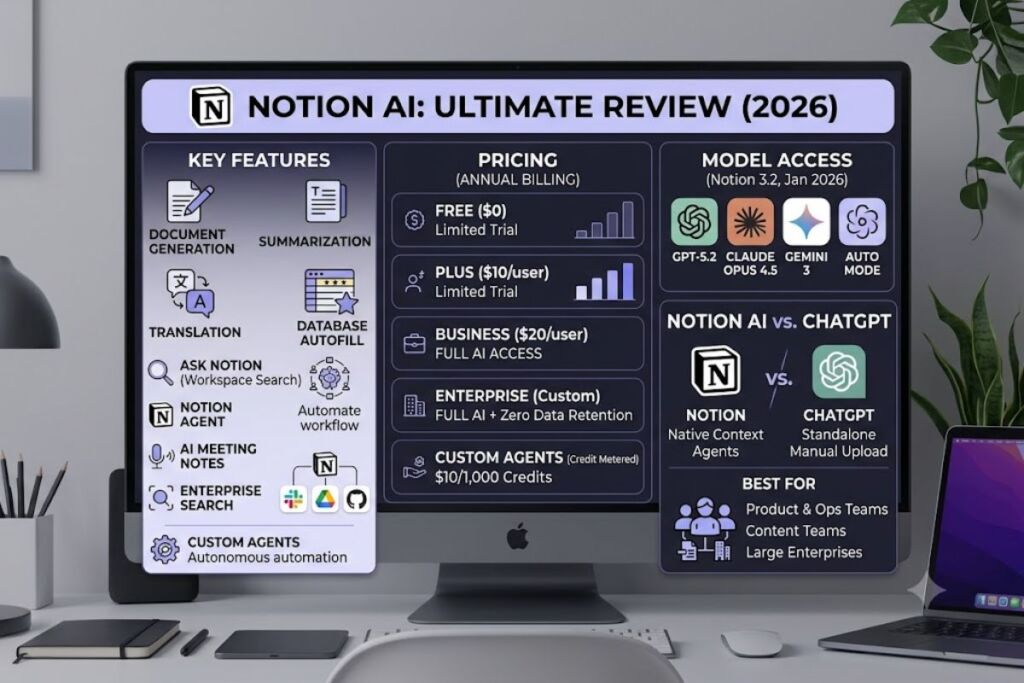
Notion AI combines a native writing assistant, an autonomous agent layer, and cross-workspace search inside the Notion productivity platform. Notion AI costs $0 as a limited trial on Free and Plus, and requires the $20-per-user Business plan for full access. This review tests every core feature against Notion’s official documentation and current release notes.
What Is Notion AI?
Notion AI is an embedded writing and automation layer built into Notion’s workspace platform, generating text, summarizing pages, and running multi-step agent tasks directly inside documents and databases. Notion Labs Inc. shipped the original AI writing tools in February 2023, then expanded the product into a full agent platform through 2025 and 2026.
Notion itself is a connected workspace application. Notion AI is the intelligence layer running on top of that workspace, not a separate product. The assistant reads page content, database properties, and connected apps to generate context-aware output, rather than operating as a standalone chatbot with no access to the user’s files.
| Attribute | Value |
|---|---|
| Company | Notion Labs Inc. |
| AI Feature Launch | February 2023 (writing tools); September 2025 (autonomous Agents); February 2026 (Custom Agents) |
| Full AI Pricing | Bundled into Business plan at $20/user/month (annual billing) |
| Platforms | Web, macOS, Windows, iOS, Android |
| Key Feature | Notion Agent — completes multi-step tasks such as drafting documents, querying databases, and updating pages from one prompt |
| Model Access | GPT-5.2, Claude Opus 4.5, Gemini 3, or Auto mode (as of Notion 3.2, January 20, 2026) |
Source: Notion’s official pricing page (notion.com/pricing) and Notion 3.2 release notes.
What Are Notion AI’s Key Features?
Notion AI runs four distinct feature groups inside the workspace. Each one targets a different stage of document creation or workspace management.
- Generate drafts, outlines, and full pages from a single prompt inside any Notion block.
- Summarize long pages, meeting transcripts, or entire databases into a condensed brief in seconds.
- Translate page content into 10+ languages without leaving the editor.
- Autofill database properties automatically, extracting values like status, priority, or category from linked page content.
- Query the entire workspace through Ask Notion, returning answers sourced from a team’s own pages instead of the open web.
- Execute multi-step workflows through Notion Agent, which drafts documents, updates records, and triggers downstream actions from one instruction.
- Transcribe meetings automatically through AI Meeting Notes, generating summaries and action items from recorded calls.
- Search connected external apps through Enterprise Search, pulling context from Slack, Google Drive, and GitHub into a single query.
- Build Custom Agents, introduced February 24, 2026, that run scheduled or triggered workflows without manual prompting.
Notion’s model-agnostic architecture lets teams switch the underlying model for any workflow — GPT-5.2, Claude Opus 4.5, or Gemini 3 — without losing document context, according to Notion’s 3.2 release notes.
How Much Does Notion AI Cost?
Notion AI has four pricing tiers tied to the base Notion plan: Free at $0, Plus at $10/user/month, Business at $20/user/month, and Enterprise at custom pricing, with full AI features bundled only into Business and Enterprise.
Notion retired its standalone $10-per-member AI add-on in May 2025. Free and Plus workspaces now receive a limited AI trial only; the full feature set — Notion Agent, Ask Notion, AI Meeting Notes, and Enterprise Search — requires an upgrade to Business.
| Plan | Monthly Price (billed annually) | AI Access |
|---|---|---|
| Free | $0 | Limited AI trial |
| Plus | $10/user | Limited AI trial |
| Business | $20/user ($24 billed monthly) | Full AI: Notion Agent, Ask Notion, Meeting Notes, Enterprise Search |
| Enterprise | Custom | Full AI + zero data retention with LLM providers |
Custom Agents bill separately from the seat price. Notion introduced Notion Credits on May 4, 2026, at $10 per 1,000 credits, pooled across the workspace and reset monthly. Standard Notion Agent use inside the editor and chat does not consume credits; only Custom Agents that run autonomous, scheduled workflows draw from the credit pool, per Notion’s Custom Agents pricing page.
A 10-person team on Business pays $200/month before any Custom Agent credit usage. Solo users who want the full AI feature set pay $20/month minimum, since the AI add-on option for lower tiers no longer exists.
What Are the Pros and Cons of Notion AI?
Notion AI’s core advantage is native workspace context — it drafts and edits directly inside existing pages and databases without exporting content to a separate tool. Its main limitation is cost: full AI access forces an upgrade to the $20/user Business tier.
Pros:
- Generates content directly inside the page being edited, preserving formatting and links.
- Autofills database properties from unstructured page text, cutting manual data entry.
- Supports three frontier models (GPT-5.2, Claude Opus 4.5, Gemini 3) plus an Auto-select mode as of Notion 3.2.
- Ask Notion grounds answers in a team’s actual documents, reducing hallucinated citations compared to open-web chat tools.
- Custom Agents automate recurring workflows, such as weekly status summaries, without manual triggering.
Cons:
- Full AI access costs $20/user/month minimum, with no standalone AI add-on for Free or Plus users since May 2025.
- Custom Agents consume metered credits at $10 per 1,000, creating variable monthly costs on top of seat fees.
- Notion AI does not manage email or calendar natively, unlike integrated suites such as Google Workspace.
- Enterprise Search and AI Meeting Notes remain in beta status as of early 2026, per Notion’s own product documentation.
How Does Notion AI Compare to ChatGPT?
Notion AI edits inside an existing workspace and database structure; ChatGPT operates as a standalone chat interface with no native document or database layer. Teams already running projects in Notion get more workflow value from Notion AI; teams needing a general-purpose assistant across many external tools get more flexibility from ChatGPT.
| Factor | Notion AI | ChatGPT (Plus) |
|---|---|---|
| Base Price | $20/user/month (Business, bundled) | $20/month (individual) |
| Workspace Context | Native — reads pages, databases, connected apps | None — requires manual file upload per session |
| Autonomous Agents | Custom Agents (credit-metered) | Tasks and GPTs (usage-limited) |
| Model Choice | GPT-5.2, Claude Opus 4.5, Gemini 3, Auto | GPT-5.2 family only |
Full feature-by-feature breakdown available in Knowara’s dedicated Notion AI vs ChatGPT: Which Writing Assistant Wins in 2026 comparison.
Who Should Use Notion AI?
Notion AI fits teams already managing projects, wikis, or databases inside Notion who want AI generation and automation layered on existing content, rather than solo users seeking a low-cost, standalone writing tool.
- Product and operations teams running roadmaps and specs in Notion databases benefit from Autofill and Ask Notion queries across linked pages.
- Content and marketing teams drafting long-form pages inside a shared wiki use Generate and Summarize without exporting drafts elsewhere.
- Solo consultants on Free or Plus plans get limited AI value, since full features require the $20/user Business upgrade.
- Enterprise IT and compliance teams needing SCIM provisioning, audit logs, and zero data retention with LLM providers require the Enterprise tier specifically.
What Are the Best Alternatives to Notion AI?
Three tools cover the gaps Notion AI leaves for solo writers, email-heavy workflows, and lower-cost teams.
- Coda AI — targets teams that need workspace AI similar to Notion but with usage-based credit pricing instead of a flat per-seat AI bundle. Full breakdown in Knowara’s Coda AI Review.
- ClickUp AI — bundles AI generation into project management boards at a lower entry price than Notion Business. See Knowara’s ClickUp AI Review.
- Google Workspace AI (Gemini) — extends AI into Gmail and Calendar, which Notion AI does not manage natively. Compared in Knowara’s Google Workspace AI vs Notion AI breakdown.
Frequently Asked Questions
Does Notion AI require a paid plan?
Free and Plus workspaces get a limited AI trial only. Full Notion AI features require the Business plan at $20/user/month, billed annually, according to Notion’s official pricing page.
What AI models power Notion AI?
Notion AI runs on GPT-5.2, Claude Opus 4.5, and Gemini 3, plus an Auto mode that selects the best model per task, as introduced in Notion 3.2 on January 20, 2026.
Do Custom Agents cost extra on top of the Business plan?
Yes. Custom Agents bill separately at $10 per 1,000 Notion credits since May 4, 2026, pooled across the workspace and reset monthly, per Notion’s Custom Agents pricing documentation.
Can Notion AI manage email or calendar tasks?
No. Notion AI generates and automates content inside Notion pages and databases; it does not natively triage email or manage calendar scheduling.
Final Verdict
Notion AI delivers its strongest value to teams already running project data inside Notion databases, at a fixed cost of $20/user/month for full access — a price that undercuts stacking a separate document AI tool plus a separate workspace subscription for teams above five seats.