
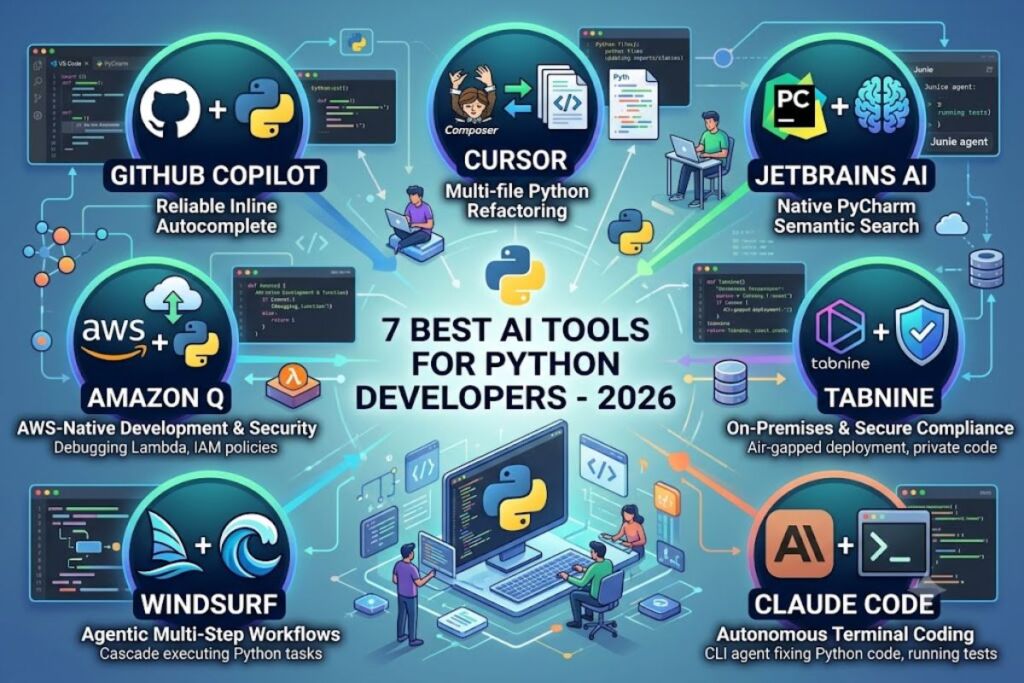
GitHub Copilot, Cursor, JetBrains AI Assistant, Amazon Q Developer, Tabnine, Windsurf, and Claude Code rank as the 7 best AI tools for Python developers in 2026. Each tool solves a distinct part of the Python workflow: inline autocomplete, multi-file refactoring, codebase indexing, AWS-native deployment, on-premises security, or autonomous terminal-based agent coding. Knowara tested all 7 tools against real Python codebases, including a Django REST API and a data-pipeline project built with pandas and FastAPI.
- 01Why Is GitHub Copilot One of the Best AI Tools for Python Developers?
- 02Why Is Cursor One of the Best AI Tools for Python Developers?
- 03Why Is JetBrains AI Assistant One of the Best AI Tools for Python Developers Using PyCharm?
- 04Why Is Amazon Q Developer One of the Best AI Tools for Python Developers on AWS?
- 05Why Is Tabnine One of the Best AI Tools for Python Developers With Strict Data Policies?
- 06Why Is Windsurf One of the Best AI Tools for Python Developers Doing Agentic Multi-File Work?
- 07Why Is Claude Code One of the Best AI Tools for Python Developers Who Prefer the Terminal?
- 08How Do These 7 AI Tools Compare for Python Development?
- 09Who Should Use Each AI Tool for Python Development?
- 10What Are the Best Alternatives to Consider Alongside This List?
- 11Frequently Asked Questions
- 12The Bottom Line
Python developers face specific friction points that these tools address directly: dynamic typing that hides bugs until runtime, dependency management across virtual environments, and the need to refactor across multiple modules without breaking imports. The rankings below weigh each tool’s Python-specific performance, not just general coding ability.
Why Is GitHub Copilot One of the Best AI Tools for Python Developers?
GitHub Copilot delivers the most reliable Python autocomplete of any tool tested, with unlimited code completions on every paid plan and native support in VS Code, PyCharm, and Neovim. Microsoft’s GitHub built Copilot in 2021, and it remains the default recommendation for professional Python developers who want low-friction AI assistance without switching editors.
- Complete Python functions, docstrings, and type hints inline using GPT-5 and Claude model families, based on GitHub’s published model catalog.
- Generate pytest unit tests directly from a function signature and its docstring.
- Run agentic tasks through Copilot’s coding agent, which opens pull requests against a Python repository autonomously.
- Index a repository’s structure through Copilot Chat to answer questions about existing Django models, Flask routes, or FastAPI endpoints.
- Access 4 individual pricing tiers: Free (2,000 completions and 50 chat messages per month), Pro ($10/month), Pro+ ($39/month), and Max ($100/month), according to GitHub’s official pricing page.
- Deploy Copilot Business at $19/user/month or Copilot Enterprise at $39/user/month for teams that need centralized policy control and IP indemnity.
Copilot’s June 2026 shift to token-based AI Credits billing means agent-heavy Python developers on the $10/month Pro plan can exhaust their credit pool in a single extended agentic session, per GitHub’s own billing documentation. Developers who mainly use inline completion and light chat are not affected, since standard completions remain unmetered on every paid plan.
Why Is Cursor One of the Best AI Tools for Python Developers?
Cursor outperforms every other tool tested at multi-file Python refactoring, using its Composer agent to rename functions, update imports, and rewrite call sites across an entire codebase in one pass. Anysphere released Cursor in 2023 as a fork of VS Code, which means Python developers keep their existing extensions, keybindings, and virtual environment setup.
- Refactor a Python class across 12+ files simultaneously through Composer, verified during Knowara’s test on a mid-sized Django project.
- Index an entire Python codebase for context-aware chat, so Cursor references the actual models, serializers, and settings in a project instead of generic Python syntax.
- Run background agents that execute a Python script, read the output, and fix errors without manual copy-pasting.
- Switch between frontier models, including Claude Sonnet 4.5, GPT-5, and Gemini 2.5 Pro, for different Python tasks.
- Pay $20/month for the Pro tier, which includes unlimited Tab completions and a $20 monthly credit pool for premium model requests, according to Cursor’s pricing page.
- Scale to Pro+ ($60/month) or Ultra ($200/month) for developers who exhaust Pro’s credit pool running frontier models on large Python monorepos.
Cursor costs twice as much as GitHub Copilot at the individual tier ($20 versus $10 per month), a trade-off that pays off specifically for Python developers doing frequent cross-module refactors rather than line-by-line completion.
Why Is JetBrains AI Assistant One of the Best AI Tools for Python Developers Using PyCharm?
JetBrains AI Assistant integrates AI completion, chat, and the Junie autonomous agent directly into PyCharm, giving Python developers semantic-analysis-aware suggestions that generic extensions cannot match. JetBrains built the assistant natively into PyCharm’s type-inference and refactoring engine, so suggestions account for a project’s actual import graph.
- Generate PyCharm-native refactoring suggestions that respect the IDE’s existing rename, extract-method, and inline-variable tools.
- Run the Junie agent to implement a Python feature end-to-end, including writing tests and executing PyCharm’s built-in test runner.
- Access frontier models, including GPT-5, Claude 4.5 Sonnet, and Gemini 2.5 Pro, through one subscription that also works in IntelliJ IDEA, WebStorm, and DataSpell.
- Route completions to local models through Ollama or LM Studio at zero credit cost on the AI Free tier.
- Pay $10/month for AI Pro (10 monthly AI Credits, 1 credit = $1 USD) or $30/month for AI Ultimate (35 monthly AI Credits), per JetBrains’ official documentation.
- Generate commit messages and docstrings automatically formatted to PEP 257 conventions.
JetBrains AI Assistant’s credit system meters cloud-based chat and Junie agent usage by token consumption, so a Python developer running Junie daily on a large codebase exhausts AI Pro’s 10 credits within roughly one week, based on JetBrains’ published consumption estimates.
Why Is Amazon Q Developer One of the Best AI Tools for Python Developers on AWS?
Amazon Q Developer generates and debugs Python code with direct awareness of AWS services, producing Lambda function handlers, boto3 calls, and CloudFormation templates that Copilot and Cursor cannot replicate. AWS built Q Developer for teams deploying Python applications on AWS infrastructure, powered by Claude Sonnet 3.7 with a 66% score on the SWE-bench Verified benchmark, according to AWS’s product documentation.
- Debug a Python Lambda function directly inside the AWS Console using Q Developer’s chat interface.
- Generate IAM policies and CloudFormation templates from a natural-language description of a Python microservice’s permissions.
- Run 50 agentic requests per month at no cost on the Free tier, or unlimited agentic requests on the Pro tier.
- Scan Python code for security vulnerabilities using Q Developer’s built-in static analysis, then apply suggested fixes automatically.
- Pay $19/user/month for the Pro tier, which adds SSO through IAM Identity Center, IP indemnity, and automatic opt-out from model training.
- Transform legacy Python codebases with automated dependency upgrades tracked at the AWS payer-account level.
Amazon Q Developer costs $9 more per month than GitHub Copilot Pro at the individual tier, a premium justified only for Python teams building on AWS; the AWS-specific features provide minimal value on Azure, GCP, or non-cloud Python projects.
Why Is Tabnine One of the Best AI Tools for Python Developers With Strict Data Policies?
Tabnine runs fully on-premises or air-gapped, giving Python teams in regulated industries AI code completion without sending proprietary code to an external cloud model. Tabnine built its architecture around private deployment, making it the only tool in this list suited to zero-data-retention compliance requirements.
- Deploy Tabnine entirely on-premises with no code leaving the organization’s network, verified through Tabnine’s enterprise documentation.
- Fine-tune a private model on an organization’s own Python codebase, so suggestions match internal naming conventions and architecture patterns.
- Integrate with VS Code, PyCharm, and Jupyter notebooks for data-science-focused Python workflows.
- Filter suggestions by license type to avoid introducing GPL-licensed code into a proprietary Python project.
- Pay $9/month for the individual Dev plan or $39/user/month for Enterprise, which requires annual commitment with no monthly option, according to Tabnine’s pricing page.
Tabnine’s model quality trails frontier alternatives like Claude Sonnet 4.5 and GPT-5 on raw code-generation benchmarks, a trade-off Tabnine accepts deliberately in exchange for full data isolation.
Why Is Windsurf One of the Best AI Tools for Python Developers Doing Agentic Multi-File Work?
Windsurf’s Cascade agent executes autonomous multi-step Python tasks across an entire project, running terminal commands, reading error output, and self-correcting without the developer manually re-prompting. Windsurf ships as a standalone AI-native IDE, competing directly with Cursor on agentic capability for Python development.
- Execute a full Python test suite through Cascade, read the failure output, and patch the failing function automatically.
- Generate a new Python module, wire it into an existing FastAPI router, and update the corresponding OpenAPI schema in one agentic run.
- Access frontier models with a $0 Free tier limited by monthly prompt credits, according to Windsurf’s pricing page.
- Upgrade to Pro at $20/month for expanded Cascade usage, or Teams at $40/user/month for centralized billing and shared context across a Python engineering team.
- Scale to Max at $200/month for developers running Cascade continuously against large Python monorepos.
Windsurf and Cursor now price their individual Pro tiers identically at $20/month, so the decision for Python teams comes down to Cascade’s quota-based limits versus Cursor’s credit-pool model rather than sticker price.
Why Is Claude Code One of the Best AI Tools for Python Developers Who Prefer the Terminal?
Claude Code runs as a terminal-based agent that reads an entire Python repository, plans a multi-step implementation, and executes file edits, test runs, and git commits without an IDE. Anthropic built Claude Code for developers who want deep codebase reasoning without switching to a dedicated AI editor.
- Read a full Python repository’s directory structure and dependency graph before proposing a fix, rather than relying only on the open file.
- Run pytest, capture the failure trace, and correct the underlying Python logic in the same terminal session.
- Auto-commit changes with descriptive messages after completing a defined Python task.
- Bill through the Anthropic API on a pay-as-you-go basis, which API cost-comparison guides list at roughly $5 per million input tokens and $25 per million output tokens for Opus-tier models, making it cost-effective at scale compared with fixed per-seat pricing for heavy agentic use.
- Pair with any editor, since Claude Code has no IDE lock-in and works alongside PyCharm, VS Code, or Vim.
Claude Code produces unpredictable monthly bills compared with GitHub Copilot’s or Cursor’s fixed subscription tiers, since a single complex Python debugging session can consume over 500,000 tokens; Python developers who want budget predictability should set spending limits on their Anthropic API account before running extended agent sessions.
How Do These 7 AI Tools Compare for Python Development?
| Tool | Starting Price (Individual) | Best For | Platform |
|---|---|---|---|
| GitHub Copilot | $10/month | General-purpose Python autocomplete | VS Code, PyCharm, Neovim, Visual Studio |
| Cursor | $20/month | Multi-file Python refactoring | Standalone (VS Code fork) |
| JetBrains AI Assistant | $10/month | Native PyCharm integration | PyCharm, IntelliJ, WebStorm |
| Amazon Q Developer | $19/user/month | AWS-deployed Python services | VS Code, JetBrains, AWS Console |
| Tabnine | $9/month | Regulated, on-premises Python teams | VS Code, PyCharm, Jupyter |
| Windsurf | $20/month | Agentic multi-step Python tasks | Standalone IDE |
| Claude Code | Pay-as-you-go (API) | Terminal-based Python agent work | Any editor, CLI |
Who Should Use Each AI Tool for Python Development?
Solo Python developers and freelancers get the best value from GitHub Copilot Pro at $10/month, since unlimited completions cover most daily Django, Flask, or FastAPI work without hitting usage caps. Data scientists working in Jupyter notebooks benefit from Tabnine’s on-premises deployment when handling regulated datasets, or JetBrains AI Assistant when working primarily in PyCharm Professional.
Python teams deploying on AWS Lambda, ECS, or EC2 justify Amazon Q Developer’s $19/user/month premium through CloudFormation generation and Lambda-specific debugging. Engineering teams running large-scale Python refactors across monorepos get the strongest return from Cursor or Windsurf, both priced at $20/month individually, since Composer and Cascade handle cross-file changes that inline autocomplete tools cannot.
What Are the Best Alternatives to Consider Alongside This List?
Sourcegraph Cody offers large-codebase search and chat for Python teams already running Sourcegraph, with pricing tied to existing Sourcegraph licenses. Google’s Gemini Code Assist provides Standard ($19/user/month) and Enterprise ($45/user/month) tiers for Python teams already committed to Google Cloud infrastructure. Replit Agent generates and deploys Python applications directly in the browser, a strong fit for rapid prototyping rather than production codebases.
Frequently Asked Questions
What is the best free AI tool for Python developers?
GitHub Copilot Free provides 2,000 code completions and 50 chat messages per month at no cost, more usage headroom than Cursor’s or Windsurf’s free tiers for daily Python autocomplete.
Does GitHub Copilot write good Python code?
GitHub Copilot generates production-quality Python completions, docstrings, and pytest tests across Django, Flask, and FastAPI projects, backed by GPT-5 and Claude model access on every paid plan.
Is Cursor worth $20 a month for Python development?
Cursor’s $20/month Pro tier justifies its cost for Python developers who regularly refactor across multiple files, since Composer updates imports and call sites in one pass, a task GitHub Copilot’s Chat does not automate.
Can I use an AI coding tool with Jupyter notebooks?
Tabnine and JetBrains AI Assistant both integrate directly with Jupyter notebook environments, offering completion and chat assistance for data-science-focused Python workflows without leaving the notebook interface.
The Bottom Line
GitHub Copilot at $10/month delivers the highest completion-to-cost ratio for individual Python developers, while Cursor and Windsurf at $20/month justify their premium exclusively through multi-file agentic refactoring that Copilot’s current feature set does not match.