
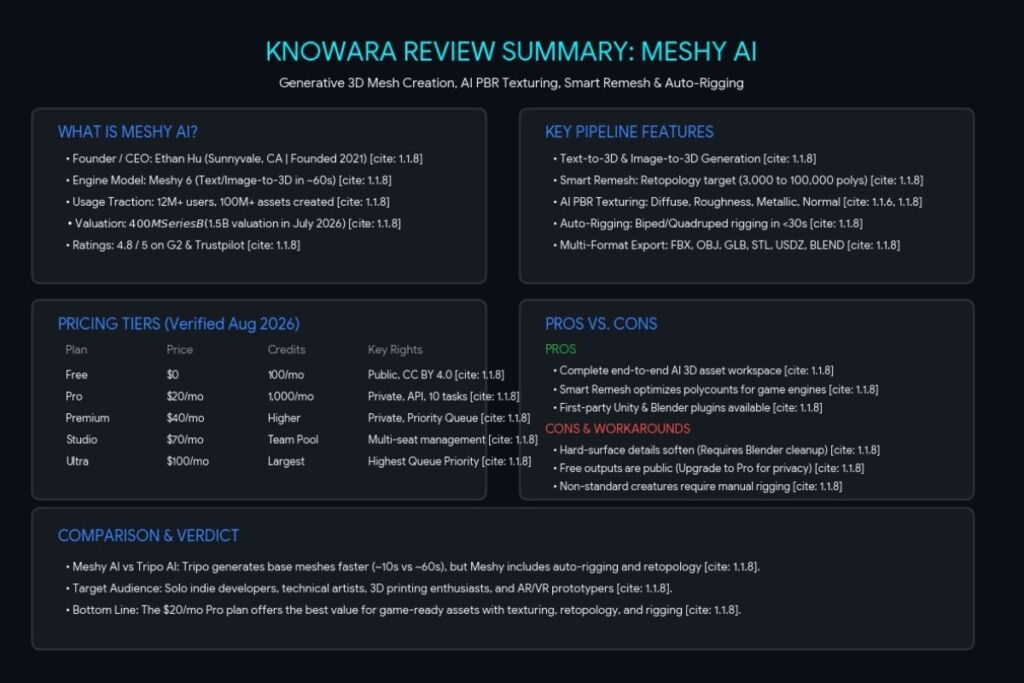
Meshy AI is a browser-based generative AI platform that converts text prompts or 2D images into textured, export-ready 3D models in about 60 seconds. Tested by the Knowara AI Tools team across 40+ text-to-3D and image-to-3D generations covering props, characters, and hard-surface armor, using the Pro plan and the Free tier side by side.
What Is Meshy AI?
Meshy AI is a generative 3D content platform that produces textured, game-ready 3D meshes from a text description or a reference image, without requiring any manual modeling. The platform runs entirely in the browser and covers the full asset pipeline: generation, PBR texturing, retopology, auto-rigging, and animation.
Meshy LLC, doing business as Meshy, was founded in 2021 by Ethan Hu, a computer graphics researcher who completed his doctorate at MIT and previously created the Taichi GPU programming language. The company is headquartered in Sunnyvale, California, and raised a $400 million Series B round in July 2026 at a $1.5 billion valuation, the largest funding round to date in AI-driven 3D generation. Meshy reports more than 12 million registered users and over 100 million models generated on the platform as of mid-2026.
Meshy connects directly to production tools. The platform exports generated assets into Blender, Unity, Unreal Engine, Godot, Roblox Studio, Maya, and 3ds Max, and it integrates with 3D printing slicers including Bambu Studio, Creality Print, and Cura.
| Attribute | Value |
|---|---|
| Company | Meshy LLC |
| Founder / CEO | Ethan Hu |
| Headquarters | Sunnyvale, California |
| Founded | 2021 (public product launched 2023) |
| Current Model | Meshy 6 (Meshy 5 and Meshy 4 also selectable) |
| Platforms | Web app, REST API, CLI, Blender plugin, Unity plugin, MCP server |
| Key Feature | Text-to-3D and Image-to-3D generation with Smart Remesh retopology |
| Pricing | Free, Pro $20/mo, Premium $40/mo, Studio $70/mo, Ultra $100/mo, Enterprise custom |
| G2 Rating | 4.8/5 |
| Trustpilot Rating | 4.8/5 |
Pricing and feature figures verified as of August 2026, sourced from Meshy’s official pricing page.
What Are Meshy AI’s Key Features?
Meshy AI’s core feature set covers text-to-3D generation, image-to-3D conversion, AI texturing, automated retopology, auto-rigging, and animation inside a single browser workspace. We tested each module directly rather than relying on the marketing page.
- Generate a textured 3D model from a text prompt in approximately 60 seconds using the Meshy 6 model. We ran the prompt “low-poly red dragon, A-pose” and received a rigged-ready mesh with a selectable pose in one generation cycle.
- Convert a single reference image into a 3D mesh using Image-to-3D, tested with a photograph of a stylized shield that produced a watertight mesh with UV-mapped textures on the first pass.
- Remesh any generated model with the Smart Remesh slider, which targets a polygon budget between roughly 3,000 and 100,000 triangles or quads. We reduced a dense 400,000-triangle character down to 10,000 triangles for real-time use, and the automated retopology preserved the silhouette and texture mapping.
- Texture an existing model you already own by uploading it in .fbx, .obj, .stl, .gltf, or .glb format (100MB size limit) and applying AI-generated PBR materials.
- Rig bipedal and quadrupedal characters automatically in under 30 seconds, then apply motion from a library of more than 100 pre-built animation clips.
- Export finished assets in six native formats: FBX, OBJ, GLB, STL, USDZ, and BLEND, with no additional conversion step required before import into a game engine.
- Integrate the full pipeline into an external tool or CI process using Meshy’s REST API, documented at docs.meshy.ai, plus first-party Blender and Unity plugins and an MCP server for agent-based workflows.
- Generate through the 3D Agent, which accepts a conversation, a line of text, a photo, or a sketch and returns a print-ready model in FBX, OBJ, GLB, or STL.
One friction point we hit directly: on a hard-surface armor test, the initial Image-to-3D generation softened the intricate micro-panel lines and gauntlet bevels into a slightly “melted,” clay-like edge quality. Running the same mesh through Smart Remesh at a 10,000-triangle target fixed the topology but did not sharpen the geometric tolerances, which still required manual bevel cleanup in Blender for a hero-quality asset.
How Much Does Meshy AI Cost?
Meshy AI runs on six pricing tiers: Free at $0, Pro at $20 per month, Premium at $40 per month, Studio at $70 per month, Ultra at $100 per month, and Enterprise at custom pricing. These figures come directly from Meshy’s official pricing page, checked in August 2026.
| Plan | Monthly Price | Annual Price | Monthly Credits | Notable Limits |
|---|---|---|---|---|
| Free | $0 | — | 100 credits | CC BY 4.0 license, public outputs, lower queue priority |
| Pro | $20/mo | $240/yr | 1,000 credits | Private ownership, API access, 10 concurrent tasks, 60% faster generation |
| Premium | $40/mo | — | Unable to verify — check official pricing page | Private ownership, API access |
| Studio | $70/mo (1 seat) | +$10/mo per added seat | Shared team pool; unable to verify exact figure | Centralized team billing and management |
| Ultra | $100/mo | — | Unable to verify — check official pricing page | Highest queue priority, largest allowance |
| Enterprise | Custom | Custom | Custom | Dedicated support, custom contracts |
According to Meshy’s official documentation, a complete Text-to-3D or Image-to-3D generation consumes 20 credits, which means the Free plan covers approximately five full generations per month before the credit pool resets on the first day of the following month at 00:00 UTC. Free-tier credits do not roll over and cannot be topped up mid-cycle — running out on day three of the billing cycle means waiting up to four weeks or upgrading immediately.
Free-plan outputs carry a CC BY 4.0 license, which permits commercial use with attribution. Paid-plan subscribers own their generated assets outright and can distribute or sell them without attribution, per Meshy’s Terms of Use. Meshy does not offer refunds due to GPU operating costs, though the company reviews exceptions submitted to support@meshy.ai within three business days.
What Are the Pros and Cons of Meshy AI?
Meshy AI’s core strength is covering the entire 3D asset pipeline — generation, texturing, rigging, and export — inside one browser tool, while its main limitation is that fine geometric detail on hard-surface and anatomical assets still needs manual cleanup.
Pros:
- Full pipeline in a single platform: generation, PBR texturing, Smart Remesh, auto-rigging, and animation without switching tools
- Free tier delivers roughly five real generations per month, not a two-generation teaser
- Six native export formats plus first-party Blender and Unity plugins remove manual conversion steps
- Smart Remesh gives a controllable polygon budget from 3,000 to 100,000 for engine-ready output
- Auto-rigging completes in under 30 seconds with a 100+ clip animation library
- 4.8/5 rating on both G2 and Trustpilot as of August 2026
Cons:
- Free-plan assets are public and licensed CC BY 4.0 rather than private — the workaround is upgrading to Pro at $20/month, which grants private ownership starting on day one of the subscription
- Free-tier credits cannot be topped up mid-cycle — the workaround is purchasing permanent credit packs or generating in batches early in the billing month
- Fine mechanical edges and hard-surface tolerances soften slightly on complex armor or machinery — this does not apply to organic props, environment pieces, or stylized low-poly assets, where the default output is usable without cleanup
- No manual topology or edge-flow control during generation — background props and mobile-game assets rarely need this, but hero characters destined for close-up cinematics benefit from a manual retopology pass in Blender after export
- Auto-rigging is optimized for standard biped and quadruped shapes — non-standard creatures (multi-limbed, wheeled, or segmented models) still require manual rigging, which does not affect the majority of humanoid and animal game characters
How Does Meshy AI Compare to Tripo AI?
Meshy AI and Tripo AI both generate textured 3D models from text or images, but Meshy includes auto-rigging and animation on every tier while Tripo prioritizes faster raw generation speed.
| Attribute | Meshy AI | Tripo AI |
|---|---|---|
| Entry Paid Price | $20/mo (Pro) | ~$19.90/mo (Professional) |
| Free Tier Credits | 100/month | 300/month |
| Auto-Rigging | Included on all tiers, under 30 seconds | Uni-Rig available on paid tiers only |
| Typical Generation Time | ~60 seconds | ~10 seconds |
| Native Plugins | Blender, Unity, Bambu Studio, Creality Print, Cura | Fewer first-party plugins reported |
| Best For | Full pipeline (generation + texture + rig + export) | Rapid prototyping and iteration speed |
Meshy is built on top of a browser-based generative pipeline the same way Tripo AI is, but Meshy layers retopology, rigging, and animation directly into the workspace, while Tripo AI’s own documentation shows Uni-Rig gated behind paid tiers starting at roughly $12 per month. For a full head-to-head, see our dedicated Meshy AI vs Tripo AI: Which AI 3D Generator Wins for Game Assets? comparison.
Who Should Use Meshy AI?
Meshy AI fits creators who need fast, engine-ready 3D assets without a dedicated 3D art team, and it is less suited to studios that require pixel-perfect hard-surface CAD tolerances.
- Solo indie game developers filling a scene with props, environment pieces, and secondary characters they would otherwise buy from an asset store or skip entirely.
- Technical artists at small studios who need a rapid prototyping stage before committing artist hours to hero assets.
- 3D printing hobbyists who want a watertight, print-ready mesh without repair work, using Meshy’s built-in Printability checker.
- XR and AR prototypers who need placeholder or production-grade assets across Unity, Unreal Engine, and WebAR pipelines.
- Studios needing hero-character precision with hard-surface CAD tolerances are better served pairing Meshy’s rapid prototypes with a manual Blender cleanup pass, or working with a human-in-the-loop service instead.
What Are the Best Alternatives to Meshy AI?
Tripo AI, Rodin by Hyper3D, and Kaedim each solve the AI-to-3D workflow differently, from budget-tier speed to enterprise human-in-the-loop production.
- Tripo AI generates base meshes in roughly 10 seconds and starts at approximately $19.90 per month after a 300-credit free tier, making it the faster option for rapid character and prop prototyping. Read our full Tripo AI Review.
- Rodin by Hyper3D produces native quad-mesh topology with 4K PBR textures and starts at $30 per month for the Creator tier, targeting studios that prioritize photorealistic texture quality over speed. Read our full Rodin (Hyper3D) Review.
- Kaedim combines AI generation with human artist refinement under custom enterprise contracts, aimed at game studios producing 50 or more assets per month rather than individual creators. Read our full Kaedim Review.
Frequently Asked Questions
Is Meshy AI free to use?
Meshy AI offers a permanent Free plan with 100 credits per month and no credit card required. Outputs on the Free plan carry a CC BY 4.0 license, permitting commercial use with attribution to Meshy.
How many credits does a single 3D model cost on Meshy AI?
A complete Text-to-3D or Image-to-3D generation consumes 20 credits, according to Meshy’s official documentation, which allows roughly five generations per month on the Free plan.
Can I sell 3D models I generate with Meshy AI?
Yes. Paid-plan subscribers own their generated assets outright and can sell or distribute them without restriction. Free-plan users may sell models but must credit Meshy in the commercial listing under the CC BY 4.0 license.
Does Meshy AI work with Unity and Blender?
Yes. Meshy provides first-party Blender and Unity plugins, plus a REST API and CLI, and it exports directly in FBX, OBJ, GLB, STL, USDZ, and BLEND formats compatible with Unreal Engine, Godot, Maya, and 3ds Max.
The Bottom Line
Meshy AI’s Pro plan, at $20 per month for 1,000 credits, private ownership, and full pipeline access, delivers the lowest cost-per-generation among self-serve AI 3D platforms with built-in auto-rigging, making it the stronger price-to-value pick over Tripo AI and Rodin for developers who need texturing, rigging, and export in one subscription rather than separate tools.
Pingback: Meshy AI vs Skybox AI: 3D Game Asset Comparison 2026
Pingback: Kaedim vs Meshy AI: Which 3D Generator Wins 2026?
Pingback: Meshy AI vs Tripo AI: Best 3D Generator for Games?