
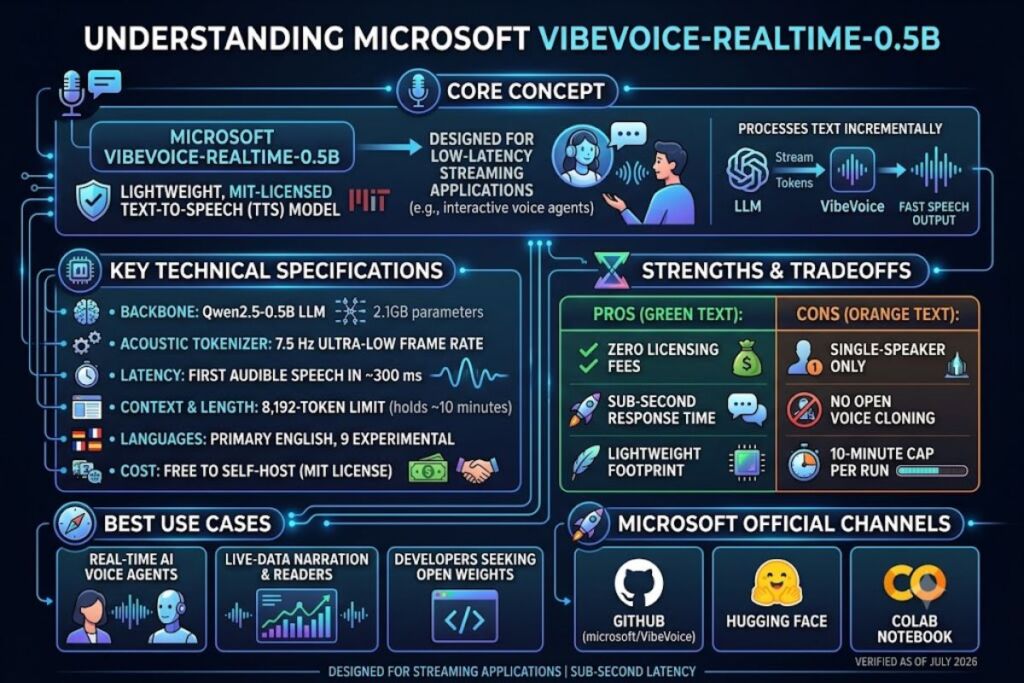
VibeVoice-Realtime-0.5B is Microsoft’s open-source, 0.5-billion-parameter text-to-speech model built for streaming applications. It generates the first audible speech in roughly 300 milliseconds and runs under an MIT license. Microsoft released it on December 3, 2025.
- 01What Is VibeVoice?
- 02What Are VibeVoice’s Key Features?
- 03How Much Does VibeVoice Cost?
- 04What Are the Pros and Cons of VibeVoice?
- 05How Does VibeVoice Compare to Other Open-Source TTS Models?
- 06Who Should Use VibeVoice?
- 07What Are the Best Alternatives to VibeVoice?
- 08Frequently Asked Questions
- 09The Bottom Line
What Is VibeVoice?
VibeVoice-Realtime-0.5B is Microsoft’s low-latency, single-speaker TTS model designed to speak while an LLM is still generating text, rather than waiting for a full response. It is the streaming branch of the larger VibeVoice research family.
VibeVoice began as a long-form, multi-speaker TTS system. Microsoft open-sourced the original VibeVoice-TTS model on August 25, 2025, capable of generating up to 90 minutes of audio with 4 distinct speakers in a single pass. On September 5, 2025, Microsoft removed the VibeVoice-TTS code from GitHub after identifying use cases inconsistent with the model’s stated research purpose. The company cited responsible-AI concerns as the reason for the takedown.
VibeVoice-Realtime-0.5B is a separate, later release. It launched on December 3, 2025, and remains available on GitHub and Hugging Face as of this writing. It strips out the multi-speaker and long-form architecture of the original model in exchange for speed: a compact Qwen2.5-0.5B LLM backbone paired with an acoustic tokenizer running at an ultra-low 7.5 Hz frame rate.
| Attribute | Value |
|---|---|
| Developer | Microsoft |
| Release Date | December 3, 2025 |
| Model Type | Streaming, single-speaker text-to-speech |
| Parameters | ~0.5B LLM backbone + ~340M acoustic decoder + ~40M diffusion head |
| License | MIT (open source) |
| Context Length | 8,192 tokens |
| Max Generation Length | ~10 minutes per run, single speaker |
| First-Audio Latency | ~300 ms (hardware dependent) |
| Primary Language | English (9 additional languages added experimentally: German, French, Italian, Japanese, Korean, Dutch, Polish, Portuguese, Spanish) |
| Distribution | Hugging Face, GitHub (microsoft/VibeVoice), Colab notebook |
Verified as of July 2026 against Microsoft’s official GitHub repository and Hugging Face model card.
What Are VibeVoice’s Key Features?
- Streams text input incrementally. The model consumes text chunks as they arrive from an LLM instead of waiting for a complete sentence, using what Microsoft’s documentation calls an “interleaved, windowed design.”
- Produces first audio in ~300 milliseconds. Microsoft’s model card lists this as hardware-dependent; independent write-ups of the release report the same figure under standard GPU inference.
- Runs on a 0.5B-parameter backbone. The LLM component is built on Qwen2.5-0.5B, small enough for edge and single-GPU deployment compared to larger TTS stacks.
- Compresses audio at a 7.5 Hz acoustic frame rate. The tokenizer performs 3200x downsampling from 24 kHz source audio, which is the architectural reason the model achieves low latency.
- Sustains up to 10 minutes of continuous single-speaker audio. The 8,192-token context window caps generation length per run; longer output requires chaining runs.
- Supports 9 experimental non-English voices plus 11 English style voices, added December 16, 2025, on top of the original English-only release.
- Restricts voice prompts to an embedded format. Microsoft’s documentation states this is a deliberate deepfake-mitigation measure; the model does not expose open voice-cloning from arbitrary audio samples the way some competing tools do.
How Much Does VibeVoice Cost?
VibeVoice-Realtime-0.5B is free to download and self-host under the MIT license, since Microsoft distributes the weights on Hugging Face with no usage fee.
Two ways to run it exist, according to Microsoft’s official channels:
- Self-hosted (free): Download the weights from Hugging Face and run them via Microsoft’s GitHub repository or the provided Colab notebook. You supply your own GPU compute; Microsoft charges nothing for the model itself.
- Hosted inference via third-party platforms: Replicate lists the broader VibeVoice model at approximately $0.033 per run (roughly 30 runs per $1) on Nvidia L40S GPU hardware, with typical prediction times cited at 35 seconds. This pricing applies to Replicate’s hosted VibeVoice endpoint, not a Microsoft-operated service — check Replicate’s live pricing page before budgeting, since third-party GPU pricing changes independently of Microsoft’s releases.
Pricing verified as of July 2026. No official Microsoft-hosted paid tier exists for VibeVoice as of this date — unable to verify any commercial SaaS pricing from Microsoft directly, since the company distributes it as a research artifact rather than a product.
What Are the Pros and Cons of VibeVoice?
Pros:
- Zero licensing cost for self-hosted use under MIT.
- Sub-second latency (~300 ms) suits live voice agents and narration pipelines where waiting for a full LLM response is unacceptable.
- Small footprint (0.5B parameter backbone) lowers GPU requirements versus larger TTS models.
- Open weights allow inspection, fine-tuning, and integration into custom pipelines via Hugging Face Transformers.
Cons:
- Single-speaker only. The Realtime variant dropped multi-speaker support to hit its latency target — for multi-speaker dialogue, Microsoft directs users to the separate long-form VibeVoice models, which is a different tool with different tradeoffs, not a setting inside this one.
- No open voice cloning. Voice prompts ship in an embedded format rather than accepting arbitrary reference audio; Microsoft’s docs state users who need custom voice cloning must contact its team directly — this is a deliberate restriction, not a bug, and it does not apply to the pre-built voice set, which remains fully usable.
- Research-license restrictions. The model card limits use to research purposes and explicitly excludes voice impersonation, disinformation, and authentication-bypass scenarios — this does not block standard narration, accessibility, or agent-voice use cases that stay within the stated research scope.
- 10-minute generation cap per run. The 8,192-token context window limits a single pass — workable for live agent responses and short narration; longer-form content requires chaining multiple runs, which the long-form VibeVoice-TTS variant (when available) was built to avoid.
- English-primary. The 9 added languages are labeled experimental by Microsoft, not production-grade — for guaranteed multilingual quality, a dedicated multilingual TTS model is the better fit.
How Does VibeVoice Compare to Other Open-Source TTS Models?
| Model | Parameters | Latency Focus | Speaker Support | License |
|---|---|---|---|---|
| VibeVoice-Realtime-0.5B | ~0.5B | ~300 ms first audio | Single speaker | MIT |
| Kokoro | 82M | Fast, cost-efficient inference | Single speaker | Apache 2.0 |
| CosyVoice2 | Larger multi-component stack | Not latency-optimized | Multi-speaker | Apache 2.0 |
On Microsoft’s own benchmark table, VibeVoice-Realtime-0.5B posts a 2.05% word error rate (WER) and 0.633 speaker similarity, positioning it between SparkTTS (1.98% WER, 0.584 similarity) and CosyVoice2 (2.57% WER, 0.652 similarity) — lower WER than CosyVoice2, but not the top scorer on either metric among the three.
For a full breakdown of Kokoro’s parameter efficiency and pricing, see our Kokoro TTS Review.
Who Should Use VibeVoice?
- Voice-agent developers building spoken LLM interfaces that need the agent to start talking before text generation finishes.
- Live-data narrators who need short, continuous audio output tied to streaming data feeds rather than pre-scripted long-form content.
- Researchers and ML engineers who want open weights to inspect, benchmark, or fine-tune rather than a black-box commercial API.
- Self-hosting teams with GPU infrastructure already in place, since the model itself is free but compute is the user’s responsibility.
VibeVoice-Realtime-0.5B is not built for podcast-style multi-speaker production or long-form audiobook narration — those use cases fall under the separate long-form VibeVoice models, when available, or a dedicated multi-speaker TTS tool.
What Are the Best Alternatives to VibeVoice?
- Kokoro — An 82-million-parameter open-source TTS model that trades some flexibility for speed and cost-efficiency on modest hardware. Read our Kokoro TTS Review.
- CosyVoice2 — An open-source multi-speaker TTS stack better suited to conversational, non-latency-critical audio than VibeVoice-Realtime. See our CosyVoice2 Review.
- ElevenLabs — A commercial, hosted TTS platform with paid voice-cloning tiers, positioned as the proprietary alternative for teams that want a managed API instead of self-hosted open weights. Read our ElevenLabs Review.
Frequently Asked Questions
Is VibeVoice free to use?
The Realtime-0.5B model is free to download and self-host under the MIT license. Hosted inference through third-party platforms like Replicate carries per-run compute charges, currently around $0.033 per run.
Does VibeVoice support multiple speakers?
No. VibeVoice-Realtime-0.5B supports one speaker per session. Microsoft’s separate long-form VibeVoice models were built for up to 4 speakers, but the original VibeVoice-TTS code was removed from GitHub in September 2025.
Can I clone a custom voice with VibeVoice?
Not directly. Voice prompts are embedded rather than accepting arbitrary reference audio, a restriction Microsoft states is intended to reduce deepfake risk. Users needing custom voice cloning must contact Microsoft’s team.
What languages does VibeVoice support?
English is the primary, fully supported language. Microsoft added 9 experimental non-English voices (German, French, Italian, Japanese, Korean, Dutch, Polish, Portuguese, Spanish) on December 16, 2025, labeled experimental rather than production-ready.
The Bottom Line
VibeVoice-Realtime-0.5B delivers sub-second latency and MIT-licensed open weights at zero licensing cost, making it a viable choice for developers building streaming voice agents on their own GPU infrastructure — but its single-speaker limit, embedded-only voice prompts, and research-purpose license rule it out for commercial multi-speaker production work, where the compute cost and infrastructure burden sit entirely on the self-hosting team.