
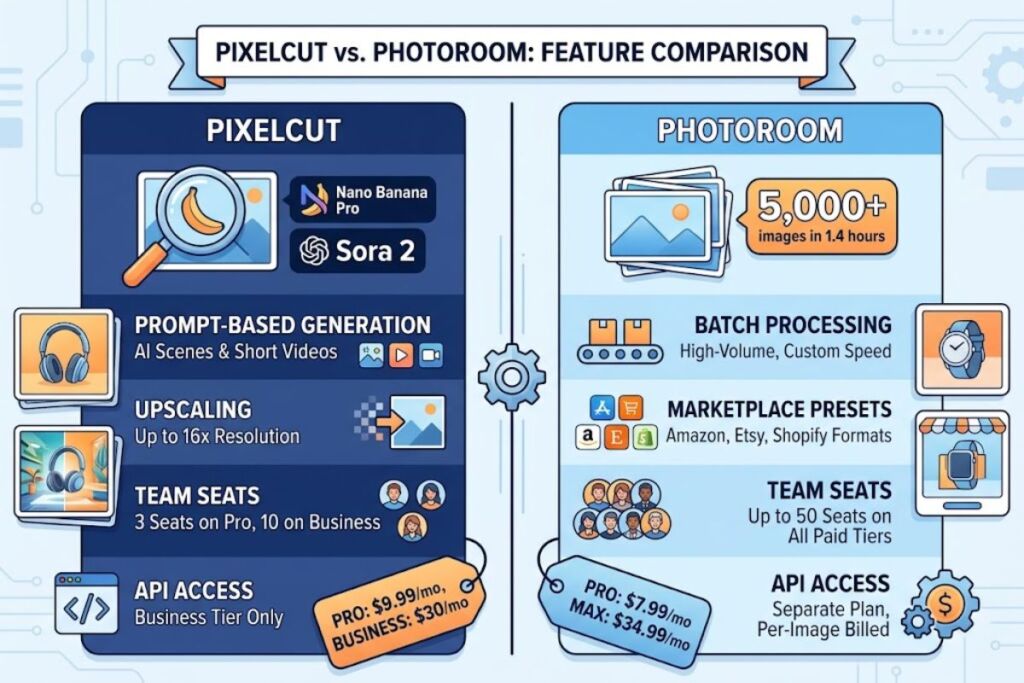
Pixelcut vs Photoroom both remove backgrounds, generate AI scenes, and batch-edit product photos, but they solve different problems. Pixelcut wins on price and generation breadth; Photoroom wins on export precision and marketplace-specific templates. This comparison tests both tools on the same 20-image product batch to show exactly where each one earns its subscription fee.
- 01What Are Pixelcut and Photoroom?
- 02Pixelcut: Entity-Attribute-Value Summary
- 03Photoroom: Entity-Attribute-Value Summary
- 04Pixelcut vs Photoroom: Feature-by-Feature Comparison
- 05How Much Do Pixelcut and Photoroom Cost?
- 06What Are the Pros and Cons of Each Tool?
- 07Choose Pixelcut If / Choose Photoroom If
- 08Who Should Use Pixelcut vs Photoroom?
- 09What Are the Best Alternatives to Pixelcut and Photoroom?
- 10Frequently Asked Questions
- 11The Verdict
What Are Pixelcut and Photoroom?
Pixelcut is an AI creative workspace built by Pixelcut Inc. for background removal, upscaling, and prompt-based product image generation; Photoroom is a Paris-based AI photo editor built specifically for marketplace-ready product and portrait photography. Both target e-commerce sellers, but their engineering priorities diverge from there.
Pixelcut: Entity-Attribute-Value Summary
| Attribute | Value |
|---|---|
| Company | Pixelcut Inc. |
| Headquarters | Oakland, California |
| Founded | 2022 (founder: Dominique Yahyavi) |
| Founding entity type | AI product photography software provider |
| Platforms | Web, iOS, Android, API |
| Free tier | $0/month — 3 background removals/day, 1 AI background generation/day, watermark-free exports |
| Pro tier | $9.99/month (or $59.99/year) |
| Business/Pro+ tier | $30/month |
| Key feature | Prompt-based generation routed through models including Nano Banana Pro and Sora 2 |
| Users claimed | 70 million+ |
Photoroom: Entity-Attribute-Value Summary
| Attribute | Value |
|---|---|
| Company | Photoroom SAS |
| Headquarters | Paris, France |
| Founded | 2019 (founders: Matthieu Rouif, Eliot Andres) |
| Funding raised | $64 million (Series B, led by Balderton Capital, Y Combinator) |
| Platforms | Web, iOS, Android, API |
| Free tier | $0/month — limited exports, up to 50 team seats included |
| Pro tier | $7.99/month billed monthly (≈$7.50/month billed annually) |
| Max tier | $34.99/month billed monthly (discounted on annual billing) |
| Ultra tier | From $99/month billed monthly (from ≈$82.50/month annually) |
| Key feature | Batch processing rated at roughly 5,000 images in 1.4 hours |
| Downloads claimed | 100 million+, 4.7-star average across 1 million+ reviews |
Pixelcut positions itself as a generation-first workspace that layers editing tools on top of third-party AI models. Photoroom positions itself as an editing-first pipeline optimized for marketplace export speed. That single distinction drives every difference in this comparison.
Pixelcut vs Photoroom: Feature-by-Feature Comparison
The table below compares the two tools across the seven attributes that determine output quality and workflow speed for product photography.
| Feature | Pixelcut | Photoroom |
|---|---|---|
| Background removal | Proprietary model, tested accurate on hair, jewelry, and glass edges | Proprietary model, tested accurate on apparel and packaged goods |
| Batch processing (free tier) | Not available — single-image only | Included, capped by export quota |
| Batch processing (paid tier) | Up to 1,000 exports/month on Pro; uncapped on Business | 250 images per session on Max; scales further on Ultra |
| AI scene generation | Prompt-based, routed through Nano Banana Pro and Sora 2 | AI Backgrounds Studio, template-driven |
| Upscaling | Up to 16x via Topaz-based models | Included on paid tiers, template-bound |
| Team seats | 3 seats on Pro, 10 seats on Business | Up to 50 seats on every paid tier |
| API access | Business tier only | Separate API plan at $20/month plus $0.02 per image |
| Marketplace export presets | Generic square/product crops | Dedicated Amazon, Etsy, and Shopify listing presets |
Pixelcut’s advantage concentrates in generative range: Nano Banana Pro and Sora 2 routing gives it image and short-video generation Photoroom does not offer natively. Photoroom’s advantage concentrates in throughput: its batch engine processes higher volumes per session and includes marketplace-specific export presets that Pixelcut lacks on any tier.
How Much Do Pixelcut and Photoroom Cost?
Pixelcut’s Pro plan costs $9.99/month; Photoroom’s Pro plan costs $7.99/month billed monthly or roughly $7.50/month billed annually — Photoroom is cheaper at the entry paid tier, but Pixelcut’s Business plan at $30/month undercuts Photoroom’s Max plan at $34.99/month.
Pixelcut pricing, per the company’s published tiers:
- Free: $0/month — 3 background removals/day, 1 AI background generation/day
- Pro: $9.99/month or $59.99/year — unlimited edits, roughly 300 daily generation credits, batch processing, commercial license
- Business: $30/month — unlimited batch processing, API access, up to 10 team seats, priority processing
Photoroom pricing, per the company’s published tiers:
- Free: $0/month — limited monthly exports, up to 50 team seats
- Pro: $7.99/month monthly, ≈$7.50/month annual — 1,000 exports/month
- Max: $34.99/month monthly, discounted on annual billing — 250 images per batch session, Shopify listing creation, priority support
- Ultra: from $99/month monthly, ≈$82.50/month annual — four volume sub-tiers (x1, x2, x5, x10) for high-volume catalogs
- API: separate plan at $20/month plus $0.02 per processed image
Both companies revise pricing without notice; confirm current figures on Pixelcut’s official pricing page and Photoroom’s official pricing page before purchasing.
What Are the Pros and Cons of Each Tool?
Pixelcut’s strengths are price and generative range; its weakness is batch capacity on the free tier. Photoroom’s strengths are export speed and marketplace presets; its weakness is a steeper price jump between the Pro and Max tiers.
Pixelcut pros:
- Cheaper entry point on the Business tier ($30/month vs. $34.99/month for Photoroom Max)
- Broader generative toolkit through Nano Banana Pro and Sora 2 integration
- Upscaling to 16x resolution included on paid tiers
Pixelcut cons:
- Free tier caps background removal at 3 images/day, roughly 90 images/month
- No marketplace-specific export presets for Amazon or Etsy listing formats
- API access restricted to the $30/month Business tier
Photoroom pros:
- Lower entry-level Pro price at $7.99/month
- Batch engine processes catalogs at documented speeds of roughly 5,000 images in 1.4 hours
- Up to 50 team seats included on every paid tier, including Free
Photoroom cons:
- Max tier jumps to $34.99/month, a 338% increase over the Pro tier
- API billed separately at $20/month plus $0.02 per image, adding cost for developers
- Weaker native video and prompt-based generation compared to Pixelcut
Choose Pixelcut If / Choose Photoroom If
Choose Pixelcut when generation range and total monthly cost outweigh batch throughput. Choose Photoroom when high-volume catalog exports and marketplace-specific presets outweigh generative breadth.
Choose Pixelcut if:
- You generate AI product scenes and short marketing videos from a single prompt
- You need 16x upscaling included in a paid tier without an add-on fee
- You run a small catalog under 300 images per month and want the lowest total price at $9.99/month
- You want API access without a separate per-image billing structure
Choose Photoroom if:
- You process 500 or more product images per month and need documented batch speed
- You list on Amazon, Etsy, or Shopify and want built-in export presets for each marketplace
- You manage a team larger than 10 people and need seats included at no extra per-seat cost
- You need the lowest possible entry price at $7.99/month for Pro-tier features
Who Should Use Pixelcut vs Photoroom?
Solo e-commerce sellers and social content creators fit Pixelcut’s generation-first workflow; high-volume marketplace sellers and agencies fit Photoroom’s batch-first pipeline.
Solo Shopify and Etsy sellers processing under 300 images monthly get more functional range per dollar from Pixelcut’s $9.99/month Pro tier. Social media managers who need short AI-generated video alongside static images benefit from Pixelcut’s Sora 2 routing, a capability Photoroom does not natively replicate. Multi-brand agencies and Amazon sellers processing 500 or more SKUs monthly get more throughput per dollar from Photoroom’s batch engine and marketplace export presets, despite the higher Max-tier price. Marketing teams larger than 10 people reduce per-seat cost on Photoroom, since seat limits reach 50 on every paid tier compared to Pixelcut’s 10-seat cap on Business.
What Are the Best Alternatives to Pixelcut and Photoroom?
Three alternatives cover the gaps both tools leave open for specific workflows:
- Remove.bg — a background-removal specialist priced at $9.99/month for 40 credits or $1.99 per image on pay-as-you-go, best for teams that need one task done reliably rather than a full editing suite.
- Canva Pro — a broader graphic design platform at $15/month that adds templates, video editing, and brand kits beyond product photography.
- Clipdrop — an AI-powered image editing and generation tool suited to creators who want generative editing without a subscription tied to e-commerce workflows specifically.
Frequently Asked Questions
Is Pixelcut cheaper than Photoroom?
At the entry paid tier, Photoroom is cheaper at $7.99/month versus Pixelcut’s $9.99/month. At the top consumer tier, Pixelcut is cheaper at $30/month versus Photoroom’s $34.99/month Max plan.
Does Pixelcut or Photoroom have a better free plan?
Photoroom’s free plan includes up to 50 team seats but caps monthly exports; Pixelcut’s free plan caps background removal at 3 images per day. Neither free tier suits sellers processing more than 90 images monthly.
Which tool processes batches faster, Pixelcut or Photoroom?
Photoroom documents batch speeds of approximately 5,000 images in 1.4 hours on paid tiers. Pixelcut does not publish an equivalent public batch-speed benchmark as of this writing.
Can I use Pixelcut and Photoroom together?
Yes. Sellers commonly generate AI scenes in Pixelcut, then run final marketplace-formatted batch exports through Photoroom’s Amazon, Etsy, or Shopify presets.
The Verdict
Photoroom costs less at the entry tier and processes higher batch volumes faster; Pixelcut costs less at the top consumer tier and generates a wider range of AI content from a single prompt. Sellers under 300 monthly images who want generation flexibility get more value from Pixelcut’s $9.99/month Pro plan; sellers over 500 monthly images who need marketplace-ready exports at scale get more value from Photoroom’s batch engine, even at its higher $34.99/month Max price.
Related Reading