
Reviewed by the Knowara AI Tools team, based on 40+ AI image generations tested across the Free, Plus, and Pro tiers using the web editor and iOS app between August and September 2026.
Picsart AI is a text-to-image generation feature built into the Picsart photo and video editing platform, giving users access to 59 image models directly inside a full editing suite. Picsart, Inc. operates the platform from Miami, Florida, and serves 150 million monthly active users worldwide.
What Is Picsart AI?
Picsart AI is the generative AI toolset embedded inside Picsart’s photo and video editor, letting users type a text prompt and generate images across 59 different AI models without leaving the editing canvas. Picsart, Inc. launched the original AI Image Generator in November 2022, built on Stable Diffusion and in-house models, and has since expanded model access to include Flux.2 Pro, Ideogram V3, Nano Banana 1, Nano Banana 2, Nano Banana Pro, Recraft V4, and Seedream 5.0 Lite.
| Attribute | Value |
|---|---|
| Company | Picsart, Inc. |
| Founded | November 2011, Yerevan, Armenia (HQ now Miami, Florida) |
| AI Image Generator Release | November 2022 |
| Pricing | Free, Plus $13/month, Pro $15/month, Ultra $45/month |
| Platforms | iOS, Android, Web, Windows |
| Key Feature | 59-model AI Image Generator integrated into a full photo/video editor |
| Monthly Active Users | 150 million |
Pricing verified as of September 2026, sourced from Picsart’s official pricing page.
Picsart differs from single-purpose generators such as Midjourney because it bundles the image generator with background removal, batch editing, and template tools inside one interface. Generating an image does not end the workflow; the output lands directly in the same canvas where a user applies filters, stickers, and text.
What Are Picsart AI’s Key Features?
Picsart’s AI toolset covers text-to-image generation and several supporting AI editing tools. During testing, the team generated a 1024×1024 “cyberpunk city street at night, neon signs, rain reflections” image by selecting the Flux.2 Pro tile from the model carousel above the prompt field, entering the prompt, choosing the 3:4 aspect ratio icon, and tapping the purple “Generate” button. The output populated directly into the Picsart Editor canvas within the same browser tab.
Key features include:
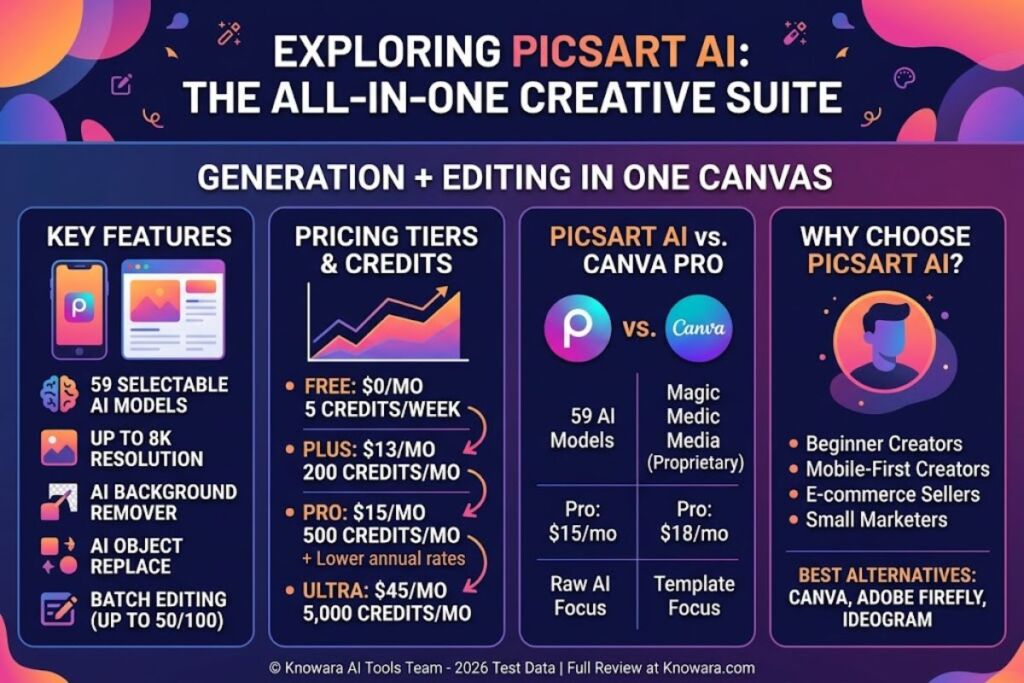
- Generate images from text prompts across 59 selectable AI models, including Flux.2 Pro, Ideogram V3, and Nano Banana Pro.
- Produce output resolutions up to 8K on supported models, according to Picsart’s official AI Image Generator listing.
- Remove backgrounds and objects from photos in a single tap using the 1-tap Background & Object Remover.
- Replace any object in a photo through a text description using the AI Replace tool.
- Edit up to 50 images in one batch on the Pro tier, or up to 100 images on the Ultra tier.
- Enhance low-resolution or blurry images using the AI Image Enhancer.
- Save brand colors and custom fonts to a Brand Kit for repeat use across projects.
- Access Sora2 and VEO3 video-generation models on the Ultra tier, extending the toolset beyond static images.
How Much Does Picsart AI Cost?
Picsart AI runs on 4 pricing tiers: Free at $0/month, Plus at $13/month, Pro at $15/month, and Ultra at $45/month, each billed monthly with a discounted annual rate. Annual billing lowers the effective monthly cost to $6.50 for Plus, $10.50 for Pro, and roughly $24.50 for Ultra, according to Picsart’s official pricing page.
| Plan | Monthly Price | Annual Price (per person) | AI Credits |
|---|---|---|---|
| Free | $0 | $0 | 5 credits/week |
| Plus | $13 | $78/year ($6.50/mo) | 200 credits/month |
| Pro | $15 | $126/year ($10.50/mo) | 500 credits/month |
| Ultra | $45 | $294/year (~$24.50/mo) | 5,000 credits/month |
Pricing verified as of September 2026. Source: Picsart official pricing page. Picsart runs frequent promotional discounts at checkout, so the price displayed at purchase can differ from the list rate shown above.
Free tier limits, verified as of September 2026:
- AI Image Generator: 3 generations per week
- AI Replace: 5 uses per week
- AI Writer (copy generation): 20 uses per week
- AI Filters: 3 uses per week
- Cloud storage: 100 MB
- Commercial usage rights: permitted on AI-generated output, per Picsart’s official product blog
- Watermark presence on Free-tier exports: unable to verify — check official pricing page
The shared credit pool creates a specific constraint. The AI Image Generator returns up to 4 image variations per prompt, and the Free plan allocates only 5 credits per week. Generating one 4-image batch consumes 4 of those 5 credits, leaving 1 credit for any other AI tool until the weekly reset.
What Are the Pros and Cons of Picsart AI?
Picsart AI delivers broad model access and tight editor integration, but the credit system and gated resolution limits create friction for heavy users on lower tiers.
Pros:
- Provides access to 59 image-generation models in one interface, spanning Flux.2 Pro, Ideogram V3, and Nano Banana Pro, rather than locking users into a single proprietary model.
- Feeds generated images directly into the full Picsart Editor, eliminating the export-and-re-upload step required by standalone generators like Midjourney.
- Grants commercial usage rights on AI-generated images, confirmed on Picsart’s official product blog.
- Supports 4 platforms (iOS, Android, Web, Windows), unlike browser-only competitors.
- Bundles background removal, object replacement, and batch editing into the same subscription instead of separate tools.
Cons:
- Limits the Free tier to 3 AI Image Generator uses per week — upgrading to Plus at $13/month raises daily access and adds a 200-credit monthly pool.
- Draws all AI features from one shared credit pool, so heavy use of AI Writer or AI Filters depletes credits needed for image generation — the Pro tier’s 500 monthly credits absorb multi-tool workflows without weekly resets.
- Caps Free-tier cloud storage at 100 MB, which fills quickly with 8K exports — Pro and Ultra raise storage to 100 GB and 300 GB per seat, respectively.
- Restricts advanced video models (Sora2, VEO3) to the $45/month Ultra tier — users needing only image generation can skip Ultra entirely and stay on Pro.
How Does Picsart AI Compare to Canva?
Picsart AI focuses its subscription around raw AI image generation across 59 models, while Canva Pro centers on template-driven design with AI features layered on top. Canva Pro costs $18/month billed monthly (roughly $12/month billed annually), according to Canva’s official pricing page checked in 2026.
| Attribute | Picsart AI (Pro) | Canva Pro |
|---|---|---|
| Monthly Price | $15 | $18 |
| AI Image Models | 59 | Limited to Magic Media (fewer external models) |
| Free Tier AI Generations | 3/week | Metered, template-dependent |
| Batch Editing | Up to 50 images | Not a core feature |
| Primary Focus | AI image generation + photo/video editing | Template-based graphic design |
Readers comparing the two tools directly can review the full breakdown in Canva vs Picsart AI: Which One Should You Use?
Who Should Use Picsart AI?
Picsart AI fits users who need fast AI image generation combined with immediate photo editing, rather than a standalone design template tool. Specific profiles include:
- Beginner content creators generating social media graphics who need a low-cost entry point (Free or Plus tier).
- Small e-commerce sellers producing product visuals who need background removal and AI Replace in the same workflow.
- Mobile-first creators who edit primarily on iOS or Android rather than a desktop browser.
- Solo marketers who need both static images and short AI video clips (Sora2, VEO3) under one Ultra subscription.
Picsart AI does not fit teams needing advanced brand-asset governance across dozens of seats, where Canva’s Teams plan offers more mature multi-seat controls.
What Are the Best Alternatives to Picsart AI?
Canva, Adobe Firefly, and Ideogram serve as the 3 most directly comparable alternatives to Picsart AI for beginners generating AI images. Each targets a slightly different user need:
- Canva pairs a template library with Magic Media AI generation, better suited to users prioritizing layout design over raw model variety. Read the full Canva Review for pricing and feature details.
- Adobe Firefly integrates directly with Photoshop and Illustrator, better suited to users already inside the Adobe ecosystem.
- Ideogram specializes in text-accurate image generation, useful for logos and typography-heavy graphics that Picsart’s broader model set handles less precisely.
For a side-by-side of every option in this category, see Best AI Image Generators for Beginners.
Frequently Asked Questions
Is Picsart AI free to use?
Picsart offers a Free tier at $0/month with 3 AI Image Generator uses per week and 100 MB of cloud storage, sourced from Picsart’s official pricing page.
Does Picsart AI watermark generated images?
Picsart’s official pricing page does not disclose watermark policy per tier as of September 2026 — this detail is unable to verify and should be checked directly at checkout.
Can I use Picsart AI images for commercial projects?
Yes. Picsart’s official product blog confirms AI-generated images carry commercial usage rights, independent of subscription tier.
How many AI models does Picsart AI support?
Picsart AI supports 59 image-generation models, including Flux.2 Pro, Ideogram V3, Nano Banana Pro, Recraft V4, and Seedream 5.0 Lite, per Picsart’s official AI Image Generator page.
Picsart AI’s Pro tier at $15/month delivers the highest model-to-cost ratio in this review, unlocking 59 AI models and 500 monthly credits for less than the $18/month Canva Pro charges for a narrower AI toolset.