
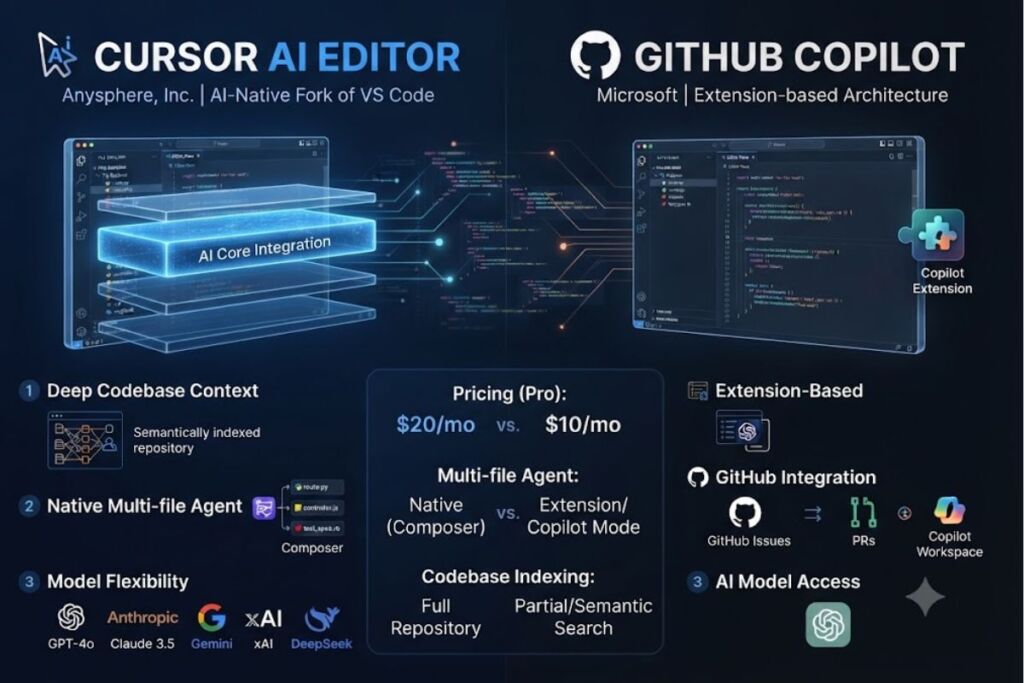
Cursor is an AI-native code editor built by Anysphere, Inc. as a fork of Visual Studio Code. It indexes an entire codebase, executes multi-file edits through its Composer agent, and connects to frontier models from OpenAI, Anthropic, Google, and xAI. Pricing runs from $0 on Hobby to $200 per month on Ultra, according to Cursor’s official pricing page.
What Is Cursor AI?
Cursor is a standalone, AI-native code editor that embeds large language models directly into the editing runtime instead of adding them as an extension. Anysphere, Inc. built Cursor as a fork of Visual Studio Code, so it retains VS Code’s interface, keybindings, and marketplace extension compatibility while adding a proprietary AI layer at the core.
Anysphere incorporated in 2022, founded by four MIT students: Michael Truell, Sualeh Asif, Arvid Lunnemark, and Aman Sanger. The company launched Cursor publicly in 2023 and is headquartered in San Francisco. By November 2025, Anysphere closed a $2.3 billion Series D round led by Accel and Coatue, reaching a $29.3 billion valuation, and Cursor’s annual recurring revenue surpassed $3 billion by early 2026. On June 16, 2026, SpaceX announced it will acquire Anysphere for $60 billion and place Cursor under its xAI subsidiary, with the deal expected to close in the third quarter of 2026.
| Attribute | Value |
|---|---|
| Company | Anysphere, Inc. |
| Founded | 2022 |
| Public Launch | 2023 |
| Headquarters | San Francisco, California |
| Base Editor | Visual Studio Code fork |
| Individual Pricing | $0 (Hobby) to $200/month (Ultra) |
| Team Pricing | $40/user/month (Teams Standard) |
| Proprietary Model | Composer 2.5 (released May 2026) |
| Key Differentiator | Repository-wide codebase indexing with autonomous multi-file agent edits |
| Ownership Status | Acquisition by SpaceX/xAI announced June 16, 2026 |
Anysphere acquired Supermaven in November 2024 to strengthen Cursor’s Tab autocomplete engine, and acquired the code-review startup Graphite in December 2025 to build Bugbot. Both acquisitions now operate as native Cursor features rather than standalone products.
What Are Cursor’s Key Features?
Cursor’s core features are Tab autocomplete, the Composer agent for multi-file edits, repository-wide codebase indexing, Background and Cloud Agents, and Bugbot for automated code review. Every feature runs inside the editor core rather than through a plugin layer.
- Autocompletes code inline through the Tab model, which predicts both the next line and the next edit location across a file.
- Executes multi-file edits through Composer 2.5, Cursor’s proprietary agentic coding model released in May 2026 and trained with reinforcement learning on real coding tasks.
- Indexes the entire codebase using semantic search, so chat and agent responses reference actual project files instead of generic code patterns.
- Runs Background Agents on remote virtual machines, completing assigned tasks like refactors or test generation while the developer keeps editing locally.
- Deploys Cloud Agents that clone a repository, work in an isolated sandbox, and open a pull request with the completed changes.
- Reviews pull requests automatically through Bugbot on GitHub and GitLab, flagging bugs before human review.
- Connects to Model Context Protocol (MCP) servers, skills, and hooks on Pro and higher plans, extending the agent’s access to external tools.
- Supports five model providers: OpenAI, Anthropic, Google, xAI, and DeepSeek, in addition to Cursor’s own Composer models.
- Enables Privacy Mode, which blocks Anysphere and its model providers from storing or training on submitted code, backed by SOC 2 Type II certification.
- Inherits VS Code’s extension ecosystem, carrying over existing themes, keybindings, and marketplace extensions on installation.
How Much Does Cursor Cost?
Cursor costs $0 on the Hobby plan, $20 per month on Pro, $60 per month on Pro+, $200 per month on Ultra, and $40 per user per month on Teams, according to Cursor’s official pricing page. Annual billing lowers the effective monthly rate on every paid tier.
Cursor moved from a fixed “fast request” model to usage-based, credit-denominated billing on June 16, 2025. Each paid plan now includes a dollar-value credit pool equal to the plan price, and that pool depletes only when a developer manually selects a specific frontier model rather than using Auto mode, which draws unlimited usage without consuming credits.
| Plan | Monthly Price | Annual Price (per month) | Included For |
|---|---|---|---|
| Hobby | $0 | $0 | Individuals evaluating Cursor |
| Pro | $20 | $16 | Daily individual developers |
| Pro+ | $60 | — | Daily agent users on frontier models |
| Ultra | $200 | — | Agent power users |
| Teams (Standard) | $40/user | $32/user | Collaborating teams |
| Enterprise | Custom | Custom | Organizations needing pooled billing, SCIM, and audit logs |
The Hobby plan requires no credit card and includes limited Agent requests and limited Tab completions. Pro adds extended Agent limits, access to frontier models, MCP support, and Cloud Agents. Teams adds centralized billing, SAML/OIDC single sign-on, a team marketplace for shared rules and skills, and organization-wide Privacy Mode. Enterprise adds pooled usage, invoice billing, SCIM seat management, and an AI code-tracking API for compliance teams.
What Are the Pros and Cons of Cursor?
Cursor’s advantages are deep codebase context, multi-model flexibility, and a mature parallel-agent workflow; its drawbacks are usage-based billing unpredictability and indexing overhead on very large repositories. Both sides trace directly to the same architectural choice: building AI into the editor core instead of bolting it on as an extension.
Pros:
- Reports more than 1 million daily active users and adoption at more than half of the Fortune 500, according to Anysphere’s public statements.
- Supports five external model providers plus Cursor’s own Composer 2.5, avoiding lock-in to a single AI vendor.
- Runs multiple agents in parallel through Cursor 2.0’s git-worktree support, released in October 2025.
- Includes full VS Code extension compatibility, so migrating an existing setup requires no workflow rebuild.
Cons:
- Bills usage by token consumption since June 16, 2025, which means a manually selected frontier model can exhaust a monthly credit pool inside a single agent session.
- Slows down on very large monorepos during initial codebase indexing, consuming significant CPU and RAM before suggestions become fully context-aware.
- Costs double GitHub Copilot’s entry-level price: Cursor Pro is $20 per month against Copilot Pro’s $10 per month.
- Carries acquisition uncertainty following SpaceX’s June 16, 2026 announcement that it will bring Anysphere under its xAI subsidiary.
How Does Cursor Compare to GitHub Copilot?
Cursor costs more than GitHub Copilot at every tier but adds full codebase indexing and native multi-file agent editing that Copilot’s extension-based architecture does not match. Copilot wins on price and native GitHub integration; Cursor wins on depth of AI integration.
| Attribute | Cursor | GitHub Copilot |
|---|---|---|
| Architecture | Standalone VS Code fork | Extension inside existing editors |
| Entry-level individual price | $20/month (Pro) | $10/month (Pro) |
| Business/Team price | $40/user/month | $19/user/month (Business) |
| Codebase indexing | Full repository, native | Partial, deeper on Enterprise tier |
| Multi-file agent editing | Native via Composer | Added via Agent Mode |
| Billing model | Usage-based credits (since June 2025) | Usage-based AI Credits (since June 1, 2026) |
| Proprietary model | Composer 2.5 | None; relies on OpenAI/Microsoft models |
GitHub Copilot also moved to usage-based billing, replacing Premium Request Units with GitHub AI Credits on June 1, 2026, according to GitHub’s official blog. Plan prices held steady through that transition, but agent-heavy sessions now draw from a token-metered pool rather than a fixed request count, mirroring the volatility developers already reported with Cursor’s credit system. For a full feature-by-feature breakdown, see our Cursor vs. GitHub Copilot comparison.
Who Should Use Cursor?
Cursor fits professional developers running agentic, multi-file workflows daily, and it fits engineering teams that need centralized billing and SSO across a shared codebase. It does not fit developers who only need lightweight autocomplete inside an existing editor.
- Solo indie developers building full applications benefit from Composer’s ability to coordinate edits across routes, controllers, and tests in one pass.
- Enterprise engineering teams on regulated codebases benefit from Teams-tier SAML/OIDC SSO, organization-wide Privacy Mode, and SOC 2 Type II compliance.
- Freelance contractors working across multiple client codebases benefit from instant VS Code extension compatibility and per-project codebase indexing.
- Budget-conscious hobbyists coding fewer than 10 hours per week get sufficient value from the free Hobby plan without hitting a paywall.
Developers who only need inline completions inside an editor they already use should evaluate GitHub Copilot first, since it costs half of Cursor’s entry price and requires no editor migration.
What Are the Best Alternatives to Cursor?
The strongest alternatives to Cursor are GitHub Copilot, Windsurf, and Claude Code, each targeting a different point on the price-to-integration spectrum. All three compete directly with Cursor for agentic coding workflows.
- GitHub Copilot costs $10 per month for individuals and integrates natively into GitHub, VS Code, JetBrains IDEs, and Neovim without requiring a separate editor. Read our full GitHub Copilot Review.
- Windsurf costs roughly $15 per month for individuals and offers a comparable agentic workflow called Cascade, built by Cognition after its 2025 acquisition of the Windsurf product.
- Claude Code runs as a terminal-based coding agent rather than a full IDE, giving developers agentic file editing and codebase context without switching editors at all.
For a broader ranked list, see our pillar guide, Best AI Coding Tools in 2026, and our Best Free AI Coding Tools roundup if budget is the primary constraint.
Frequently Asked Questions
Is Cursor free to use?
Yes. The Hobby plan is free indefinitely, requires no credit card, and includes limited Tab completions and limited Agent requests, plus a one-week trial of Pro features for new accounts.
Is Cursor built on top of VS Code?
Yes. Cursor is a direct fork of Visual Studio Code’s open-source codebase, which is why it retains VS Code’s interface, keybindings, and marketplace extension compatibility.
Does Cursor support languages other than Python and JavaScript?
Yes. Cursor inherits VS Code’s language support, covering Python, TypeScript, JavaScript, Go, Rust, Java, C/C++, C#, Ruby, PHP, Swift, and Kotlin, among others.
Will the SpaceX acquisition change Cursor’s pricing or features?
Anysphere and SpaceX have not published integration details as of this article’s writing. The deal was announced June 16, 2026, and is expected to close in the third quarter of 2026.
Final Verdict
Cursor Pro costs $20 per month against GitHub Copilot’s $10 per month, and that price gap buys native multi-file agent editing, full codebase indexing, and access to five external model providers that an extension-based tool cannot replicate. For developers running agentic workflows daily, the premium pays for itself in the first week; for developers who only need inline autocomplete, GitHub Copilot delivers the same core value at half the price.