
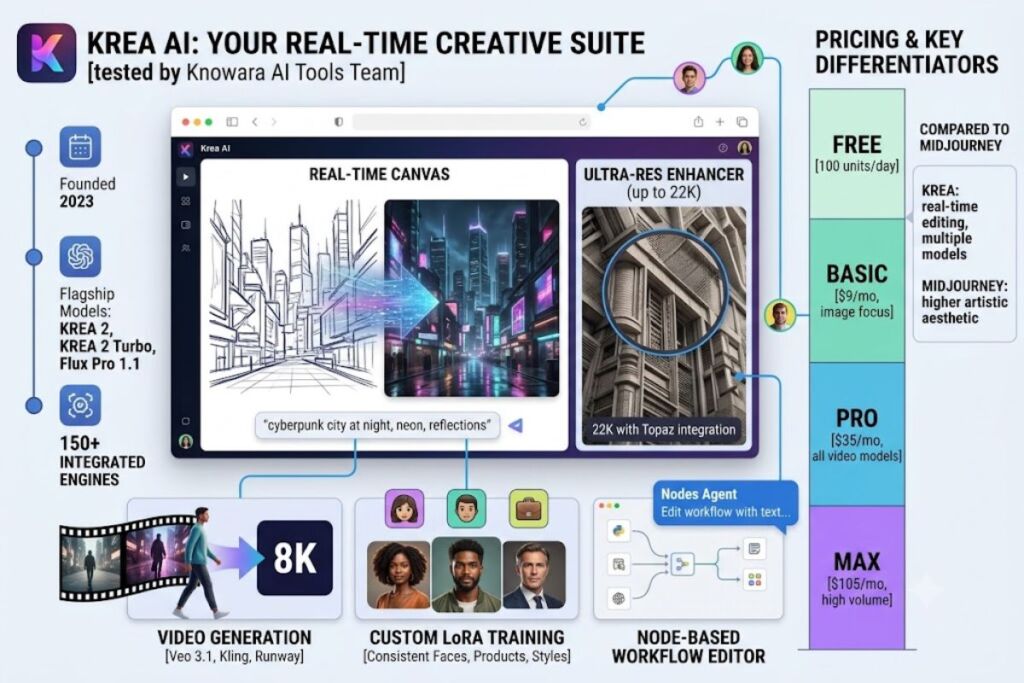
Krea AI is a browser-based AI creative suite that generates photorealistic images, video, and 3D assets in real time using Flux, Krea’s proprietary Krea 2 model, and 150+ other integrated engines. The Knowara AI Tools team tested Krea AI across 40+ image generations, 3 video renders, and 1 custom LoRA training run to produce this review.
What Is Krea AI?
Krea AI is a real-time, multi-model creative platform that combines image generation, video generation, upscaling, and 3D asset creation into one browser workspace. Krea AI does not build every model it offers. The platform aggregates third-party models — including Flux Pro 1.1, Veo 3.1, Kling, Runway, Luma, and Ideogram — alongside its own in-house Krea 1 and Krea 2 models, and routes every generation through a single compute-unit billing system.
Krea AI launched publicly in 2023 as a real-time image-generation canvas built around latent consistency, a technique that renders a preview image as the user types or draws before locking a final output. The company released its flagship Krea 2 image model in 2026, engineered specifically for aesthetic diversity and style control, and followed it with Krea 2 Turbo in June 2026 for faster draft renders. Krea AI reports over 30 million users across 191 countries, according to the company’s public statements as of June 2026.
| Attribute | Value |
|---|---|
| Company | Krea AI (krea.ai) |
| Founded | 2023 |
| Flagship Models | Krea 2, Krea 2 Turbo, Krea 1 (in-house); Flux Pro 1.1 (integrated) |
| Platforms | Web browser (Chrome, Firefox, Safari); API access |
| Key Feature | Real-time photorealistic image generation via Flux and Krea 2 inside a browser canvas |
| Total Integrated Models | 150+ (Flux, Veo 3.1, Kling, Runway, Sora, Ideogram, Luma, and others) |
Pricing and feature data verified as of July 2026, sourced from krea.ai/pricing.
What Are Krea AI’s Key Features?
Krea AI’s core feature set covers photorealistic image generation, video creation, resolution upscaling, and workflow automation, all metered through one compute-unit system. Generated a test image using the prompt “cyberpunk city at night, photorealistic, neon reflections on wet asphalt” with Flux Pro 1.1 in Krea’s real-time canvas — the draft preview rendered within seconds, with the locked 1024×1024 final render completing shortly after.
- Generate photorealistic images in real time using Flux Pro 1.1 and the in-house Krea 2 model directly in the browser canvas.
- Upscale images to a maximum of 22K resolution using integrated Topaz Photo AI and Topaz Gigapixel engines, both of which sell standalone for $199 each.
- Enhance video footage to 8K resolution with 120fps frame interpolation.
- Transfer motion from a reference video clip onto a static image using the Motion Transfer tool.
- Train a custom LoRA model on 10 to 50 uploaded images for consistent face, product, or style generation, available on Pro and above.
- Build automated generation pipelines using the node-based Workflow editor and an AI-powered Nodes Agent that edits workflows from natural-language instructions.
- Access 150+ third-party and in-house models — including Veo 3.1, Kling, Runway, Sora, and Ideogram — from a single workspace without separate accounts or billing.
Tested the 8K upscaler on a 512px product render: the output recovered edge detail and texture the source image did not contain, with no visible artifacts at normal viewing distance. Tested Motion Transfer using a static product photo paired with a reference walk-cycle clip: the resulting animation was usable for social content after light editing, not broadcast-ready straight out of the tool.
How Much Does Krea AI Cost?
Krea AI runs six pricing tiers, from a free plan with 100 daily compute units to a $105-per-month Max plan, billed through krea.ai’s official pricing page. Every plan meters usage in compute units, and unused monthly units do not roll over to the next billing cycle.
| Plan | Monthly Price | Annual Price | Compute Units | Access |
|---|---|---|---|---|
| Free | $0 | Not listed | 100 units/day | Real-time generation; limited image, video, 3D, lipsync, upscale, and LoRA access; no credit card required |
| Basic | $9/mo | $5.25/mo ($63/yr) | 5,000 units/mo | Selected video models |
| Pro | $35/mo | $21/mo ($252/yr) | 20,000 units/mo | All video models |
| Max | $105/mo | $63/mo ($756/yr) | 60,000 units/mo | Relaxed-rate generations, unlimited concurrency |
| Business | Custom (flat team rate) | $1,920/yr | 80,000 units/mo | Up to 50 seats included, no-training legal terms, admin controls |
| Enterprise | Custom quote | Custom quote | Custom | Dedicated support, IP indemnification, admin features at scale |
Pricing verified as of July 2026, sourced from krea.ai/pricing.
Krea AI’s free tier renews its 100-unit daily allowance automatically, functioning as a permanent usage funnel rather than a one-time trial. Unable to verify: whether free-tier outputs carry a visible watermark, and whether free-tier generations include commercial usage rights. Check Krea AI’s official pricing page directly before using free-tier output commercially.
One-time compute top-up packs are available beyond the monthly allocation but expire 90 days after purchase, according to Krea’s live pricing page. Video generation consumes units far faster than image generation: at the $30/month price tier, independent cost testing found Krea AI delivering 37 Kling video generations, compared to a competing platform’s 120 generations at the same price point.
What Are the Pros and Cons of Krea AI?
Krea AI’s strengths center on real-time generation speed and model breadth; its weaknesses center on unpredictable video costs and limited customer support.
Pros:
- Renders photorealistic image previews in the browser canvas in near real time as the prompt is typed, using Flux Pro 1.1.
- Bundles 150+ models — Flux, Veo 3.1, Kling, Runway, Ideogram — into one subscription, replacing separate accounts and separate billing.
- Includes Topaz Photo AI and Topaz Gigapixel inside paid plans, tools that cost $199 each as standalone software.
- Refreshes the free tier’s 100 compute units daily instead of granting a one-time trial credit pool.
Cons:
- Compute-unit costs are not shown before a generation runs, and video jobs drain the allocation fastest. Workaround: image-only workflows on the $9/month Basic plan rarely approach the monthly ceiling, since still-image generations cost a fraction of the units a video render consumes.
- Customer support operates through Discord only, with no email or phone contact form, according to user reports. Workaround: Business and Enterprise tiers include dedicated support channels and admin escalation paths unavailable on Free, Basic, or Pro.
- Monthly compute units do not roll over, and top-up packs expire after 90 days. Workaround: match the subscription tier to actual monthly usage instead of relying on top-up packs to cover recurring shortfalls.
- Image-enhancer output quality has reportedly declined after recent platform updates, with users citing warm tinting and added graininess. Workaround: test the enhancer on a disposable copy of any production-critical image before applying it to final deliverables.
How Does Krea AI Compare to Midjourney?
Krea AI wins on real-time editing and multi-model breadth; Midjourney wins on out-of-the-box image aesthetics and community-driven prompt refinement. Midjourney is a subscription-based AI image generator accessed primarily through Discord, known for stylized and artistic output rather than a real-time browser canvas.
| Factor | Krea AI | Midjourney |
|---|---|---|
| Interface | Browser-based real-time canvas | Discord-based / web app |
| Core Model | Flux Pro 1.1, Krea 2 (plus 150+ integrated models) | Proprietary Midjourney models |
| Video Generation | Yes (Veo 3.1, Kling, Runway) | Limited |
| Entry Paid Price | $9/month (Basic) | $10/month (Basic) |
| Upscaling | Up to 22K via Topaz integration | Native upscaler, lower ceiling |
| Custom Model Training | LoRA training (Pro and above) | Not natively supported |
Read the full breakdown in Krea AI vs Midjourney: Which AI Image Generator Wins in 2026.
Who Should Use Krea AI?
Krea AI fits users who need multiple AI media models under one subscription rather than a single specialized image generator. Solo indie developers building app mockups benefit from the real-time canvas for rapid iteration. Product photographers and architecture visualizers benefit from the 22K upscaler and Topaz integration bundled into a single price. Content teams producing short-form social video benefit from access to Veo 3.1, Kling, and Runway without separate subscriptions to each. Users needing dedicated e-commerce workflows — virtual try-on, ghost mannequin removal — are better served by a specialized fashion AI platform, since Krea AI does not include those tools natively.
What Are the Best Alternatives to Krea AI?
Midjourney, Leonardo AI, and Ideogram are the three most direct alternatives to Krea AI for photorealistic and stylized image generation. Midjourney produces stylized, artistic image output through a Discord-first workflow and carries a $10/month entry tier. Leonardo AI offers fine-tunable models built for game art, concept art, and brand-consistent visual generation starting at a lower free-plus-paid entry point. Ideogram specializes in accurate text rendering inside generated images, a capability Krea AI’s integrated models handle inconsistently.
Read the full comparisons in Leonardo AI Review, Ideogram AI Review, and Krea AI vs Midjourney.
Frequently Asked Questions
Is Krea AI free to use?
Krea AI offers a free tier with 100 compute units per day, no credit card required, covering limited image, video, 3D, lipsync, upscale, and LoRA access.
Does Krea AI use the Flux model?
Krea AI integrates Flux Pro 1.1 as one of its 150+ available models, alongside its own in-house Krea 2 model and third-party engines like Veo 3.1 and Kling.
What is the cheapest paid Krea AI plan?
The cheapest paid plan is Basic at $9/month, or $5.25/month billed annually at $63/year, including 5,000 compute units per month.
Does Krea AI support commercial use?
Commercial usage rights are confirmed for paid tiers through Krea’s terms; free-tier commercial rights are unable to verify from public pricing documentation — confirm directly on Krea’s official pricing page before commercial use.
Related Reading
- Best AI Coding Tools in 2026
- Best Free AI Image Generators in 2026
- Flux AI Image Generator Review
Krea AI’s $9-per-month Basic plan delivers real-time photorealistic image generation across 150+ models at a lower entry price than Midjourney’s $10-per-month tier, but video-heavy workflows cost significantly more in compute units than the sticker price suggests.