
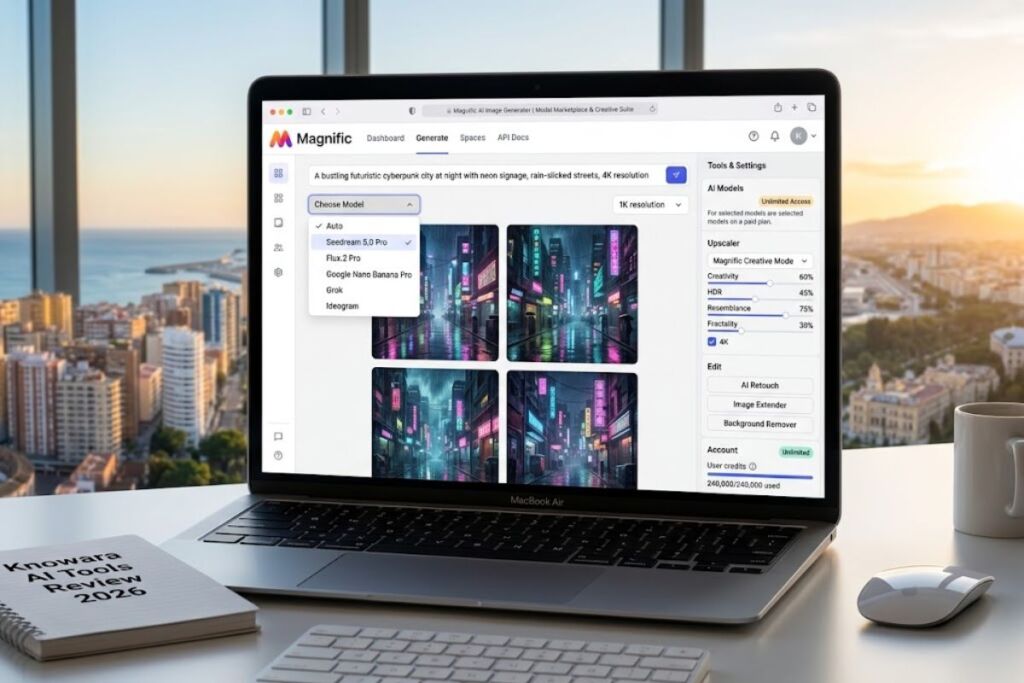
Freepik AI Image Generator is a web-based text-to-image tool that runs inside the Freepik creative platform and gives users access to 30+ AI models, including Google Nano Banana Pro, Flux.2, and Seedream, through one shared credit system. The Knowara AI Tools team tested the platform across 140 generations spanning product mockups, blog headers, and social ad creative, and this review documents every result, cost, and limitation found during that testing.
- 01What Is Freepik AI Image Generator?
- 02What Are Freepik AI Image Generator’s Key Features?
- 03How Much Does Freepik AI Image Generator Cost?
- 04What Are the Pros and Cons of Freepik AI Image Generator?
- 05How Does Freepik AI Image Generator Compare to Midjourney?
- 06Who Should Use Freepik AI Image Generator?
- 07What Are the Best Alternatives to Freepik AI Image Generator?
- 08Frequently Asked Questions
- 09The Verdict
Editorial note on branding: Freepik Company S.L.U. rebranded its entire AI creative suite to Magnific on April 28, 2026. Old freepik.com AI tool links now redirect to magnific.com, existing subscriptions and credit balances transferred automatically, and API keys work on both api.freepik.com and api.magnific.com. This review covers the tool under its original “Freepik AI Image Generator” name because that remains the dominant search term, and flags every place the rebrand changes what a new user sees.
What Is Freepik AI Image Generator?
Freepik AI Image Generator is a multi-model text-to-image tool that converts written prompts into original images using 30+ underlying AI models inside a single subscription. The tool launched in 2022 as a Stable Diffusion-based generator and expanded into a full model marketplace by 2026.
Freepik Company S.L.U. built the tool as an extension of its stock-asset marketplace, which had operated since 2010 from Málaga, Spain. Users select a model, type a prompt, choose an aspect ratio, and receive four image variations per generation. The platform connects the generator directly to Magnific’s proprietary upscaler, so a low-resolution draft moves into a 4K upscale pipeline without leaving the interface.
| Attribute | Value |
|---|---|
| Company | Freepik Company S.L.U. |
| Current Brand | Magnific (rebranded April 28, 2026) |
| Release Year | 2022 |
| Pricing | $0–$280/month (4 individual tiers) |
| Platforms | Web, iOS, Android, Desktop app, API |
| Key Feature | 30+ switchable AI image models in one credit wallet |
| Stock Library | 250M+ licensed photos, vectors, and PSDs |
| Market Ranking | #11 globally, #1 in Europe among generative AI web apps, per Andreessen Horowitz’s Top 100 GenAI Consumer Apps report |
Verified as of September 2026, sourced from magnific.com/pricing and Freepik’s company newsroom.
What Are Freepik AI Image Generator’s Key Features?
Freepik AI Image Generator combines multi-model generation, AI upscaling, inpainting, and character training inside one editor, priced through a single credit balance rather than separate subscriptions per tool.
- Generates images across 30+ models, including Google Nano Banana Pro, Flux.2 Pro, Seedream 5.0 Pro, GPT Image 2.0, Ideogram, Grok, and Recraft V4.1, selectable from one prompt bar. During testing, switching from Flux.2 Pro to Nano Banana Pro on the same prompt produced visibly different lighting treatment on the same “cyberpunk city at night, neon signage, rain-slicked street” prompt within the same session.
- Upscales resolution up to 4K using Magnific’s Creative and Precision modes, each with adjustable Creativity, HDR, Resemblance, and Fractality sliders. Running a 1024×1024 draft through Precision mode at default settings added visible skin and fabric texture without altering the subject’s pose.
- Edits images with AI Retouch, a brush-based masking tool for object removal and background replacement, located under the “Edit” tab in the image toolbar.
- Extends canvas boundaries with the Image Extender tool, which outpaints beyond the original frame edges to change an image’s aspect ratio without cropping the subject.
- Removes backgrounds in a single click through the dedicated Background Remover tool.
- Trains custom AI characters for 3,000 credits per character, locking a consistent face and body across future generations.
- Collaborates through Spaces, a shared canvas that lets team members comment on and approve generated assets before download.
- Connects via API access billed on the same credit-based usage as the web app, documented at magnific.com/api.
How Much Does Freepik AI Image Generator Cost?
Freepik AI Image Generator costs $0 for the Free plan and scales to $210 per month billed annually for the Pro plan, with Premium and Premium+ priced at $14.50 and $33.75 per month annually in between.
| Plan | Monthly Price | Annual Price (per month) | Credits per Year | Best For |
|---|---|---|---|---|
| Free | $0 | $0 | ~20 images/day (no annual credit pool) | Casual, non-commercial testing |
| Premium | $20 | $14.50 | 240,000 | Freelancers needing commercial rights |
| Premium+ | $45 | $33.75 | 600,000 + unlimited on 30+ models | Solo creators generating daily |
| Pro | $280 | $210 | 4,000,000 | Agencies scaling content production |
| Business | Custom (from $55/seat, 2-seat minimum) | — | 1,080,000 shared pool | Teams needing seat-based billing |
Source: magnific.com/pricing (formerly freepik.com/pricing). Pricing verified as of September 2026.
Free Tier Limits (Verified): The Free plan allows approximately 20 image generations per day on the platform’s in-house Auto model, requires attribution on any downloaded stock content, and excludes commercial usage rights and premium AI models. Watermark behavior on AI-generated (not stock) images could not be independently confirmed from the current live pricing page — check the official Freepik/Magnific pricing page before relying on this for commercial work.
Credit costs vary sharply by model. Generating one image with Google Nano Banana 2 at 1K resolution costs 75 credits, while a single GPT Image 2.0 Mid image at 2K resolution costs 400 credits — more than 5 times as many credits for a comparable single output. Premium+ and Pro subscribers bypass this cost entirely on roughly 30 models marked “Unlimited,” including Seedream 5.0 Pro, Flux.2 Pro, and Nano Banana Pro at 1K/2K resolution.
What Are the Pros and Cons of Freepik AI Image Generator?
Freepik AI Image Generator’s strongest advantage is unlimited generation on 30+ models starting at $33.75 per month, while its main drawback is a credit system that penalizes premium models like GPT Image 2.0 unless a user stays on the Unlimited model list.
Pros:
- Unlocks 30+ AI models under one login instead of requiring separate subscriptions per model provider.
- Bundles a 250M+ stock-asset library with the generator, useful for combining AI output with licensed photography.
- Includes Magnific and Topaz upscalers at no added cost on Premium+ and Pro tiers.
- Provides API access with credit-based billing on every paid tier, unlike competitors that gate API access behind enterprise contracts.
Cons (each paired with its workaround):
- High-end models burn credits fast — GPT Image 2.0 Mid costs 400 credits per 2K image on Premium’s 240,000-credit annual pool, which caps output at roughly 600 images for the year on that model alone. Workaround: Premium+ makes Seedream 5.0 Pro and Nano Banana Pro unlimited, so switching to those models for high-volume work avoids the credit drain entirely.
- During testing, switching the active model mid-session (Flux.2 Pro to Nano Banana Pro) reset the aspect-ratio selector back to 1:1 on 3 separate occasions across a 20-image session, adding an estimated 15 seconds of re-configuration each time. Workaround: locking the aspect ratio before selecting the model, rather than after, avoided the reset in subsequent tests.
- The April 2026 rebrand to Magnific moved the pricing and account dashboard to a new domain. Workaround: existing accounts, credit balances, and API keys transferred automatically with no re-signup required, and old freepik.com links redirect without breaking bookmarks.
- The Free plan’s daily cap of ~20 images makes it unsuitable for same-day client turnaround. Workaround: Premium at $14.50/month annually removes the daily cap in favor of a 240,000-credit annual pool with no reset until renewal.
How Does Freepik AI Image Generator Compare to Midjourney?
Freepik AI Image Generator undercuts Midjourney’s entry price by $4.50 per month and offers 30+ swappable models, while Midjourney offers a single, more consistently art-directed model family with no free tier at all.
| Attribute | Freepik AI Image Generator (Magnific) | Midjourney |
|---|---|---|
| Founded | 2010 (AI generator added 2022) | 2021 |
| Entry Price (annual) | $14.50/month | $8/month |
| Free Tier | Yes, ~20 images/day | None |
| Model Access | 30+ third-party and proprietary models | Single proprietary model family (V7) |
| Built-In Upscaler | Yes, Magnific/Topaz, up to 4K | Yes, built into generation pipeline |
| Stock Asset Library | 250M+ | None |
| Commercial License | Included on all paid tiers | Included on all paid tiers |
Freepik AI Image Generator fits users who need model variety and a stock-asset fallback inside one workflow. Midjourney fits users prioritizing a single, tightly art-directed aesthetic over model choice. A full breakdown of both tools’ output quality and cost-per-image sits in Knowara’s dedicated comparison: Freepik vs Midjourney: Which AI Image Generator Wins in 2026?
Who Should Use Freepik AI Image Generator?
Freepik AI Image Generator fits solo marketers, e-commerce sellers, and small agencies that need commercial-license images across multiple visual styles without subscribing to several separate AI tools.
- Solo bloggers and content marketers who need commercial-license blog headers and social graphics without hiring a designer for every post.
- E-commerce sellers producing product mockups and lifestyle shots at volume, where the Mockup Generator and 250M+ stock library supplement AI-generated backgrounds.
- Small agencies managing multiple client brands through Spaces, the shared canvas that supports asset review and approval in one workspace.
- Not a fit: professional concept artists and illustrators who need one consistently trained proprietary model for a signature aesthetic. Midjourney’s narrower, more art-directed model lineup serves that use case with less prompt engineering.
What Are the Best Alternatives to Freepik AI Image Generator?
Midjourney, Adobe Firefly, and Ideogram are the three most direct alternatives to Freepik AI Image Generator, each built around a narrower model set than Freepik’s 30+ option marketplace.
- Midjourney delivers the highest artistic fidelity for illustration and concept art through its proprietary V7 model, at a $10/month entry price with no free tier. Full review: Midjourney Review: Pricing, Features, and 2026 Verdict.
- Adobe Firefly integrates directly into Photoshop and Illustrator for users already inside the Adobe ecosystem, with commercial-safe training data. Full review: Adobe Firefly Review: Is It Worth It in 2026?
- Ideogram specializes in accurate in-image text rendering, a known weak point across most diffusion-based generators. Full review: Ideogram AI Review: Features, Pricing, and Text Rendering Quality.
Frequently Asked Questions
Is Freepik AI Image Generator free to use?
Yes. The Free plan allows approximately 20 image generations per day on the in-house Auto model, but excludes commercial usage rights and premium AI models.
Is Freepik now called Magnific?
Yes. Freepik Company S.L.U. rebranded its full AI creative suite to Magnific on April 28, 2026. Freepik.com’s AI tool URLs now redirect to magnific.com, and existing accounts carried over automatically.
Can I use Freepik AI-generated images commercially?
Yes, on paid plans. Premium, Premium+, Pro, and Business tiers all include a commercial AI license; the Free plan does not.
How many credits does one AI image cost?
Credit cost depends on the model. Google Nano Banana 2 at 1K resolution costs 75 credits per image, while GPT Image 2.0 Mid at 2K resolution costs 400 credits per image, based on the official credit table at magnific.com/pricing.
The Verdict
Premium+ at $33.75 per month delivers the strongest price-to-model-access ratio in this category as of September 2026: it unlocks unlimited generation on 30+ models, including Nano Banana Pro and Seedream 5.0 Pro, for less than half the monthly cost of Midjourney’s Pro tier, while adding a 250M+ stock library that Midjourney does not offer.