
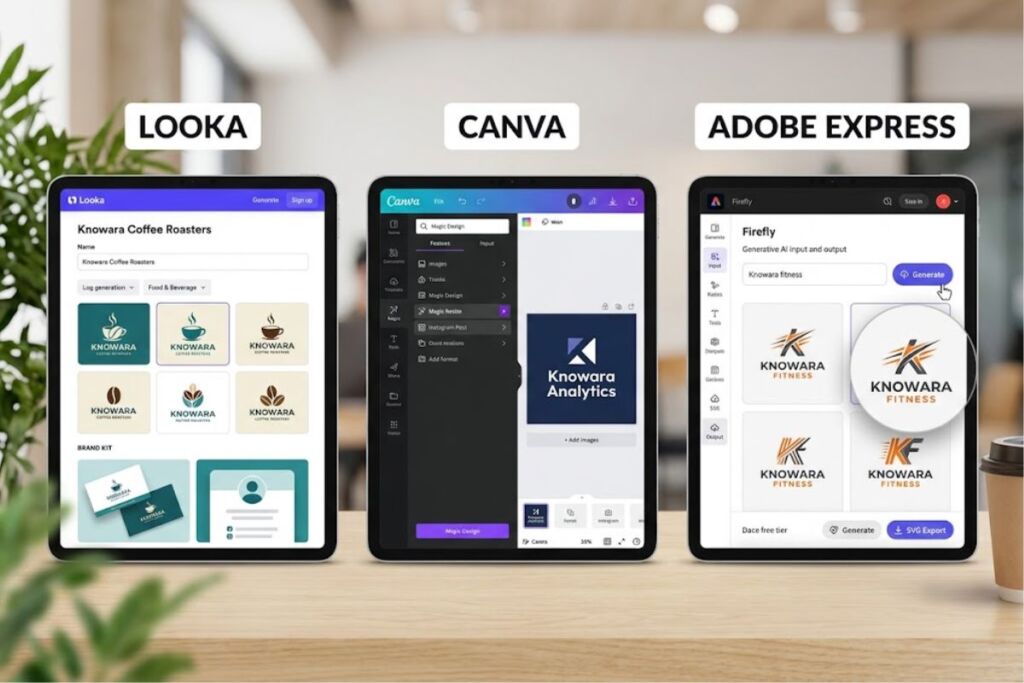
Creating a logo with AI takes 3 core actions: enter your business name and industry into a generator like Looka, Canva, or Adobe Express, select style and color preferences, then export the vector files. Total time: under 15 minutes.
- 01Step 1: Pick an AI Logo Generator That Matches Your Output Need
- 02Step 2: Enter Your Business Name and Select an Industry Category
- 03Step 3: Choose Style, Color, and Symbol Preferences
- 04Step 4: Generate and Review the AI Logo Concepts
- 05Step 5: Edit Colors, Fonts, and Icon Placement in the Built-In Editor
- 06Step 6: Export the Logo in the Correct File Formats
- 07Step 7: Apply the Logo Across Brand Assets
- 08What Are the Pros and Cons of Creating a Logo With AI?
- 09Who Should Use AI to Create a Logo?
- 10How Does an AI Logo Compare to a Freelance-Designed Logo?
- 11Frequently Asked Questions
- 12Related Reading
Tested by the Knowara AI Tools team using 42 logo generations across 3 platforms (Looka, Canva Magic Design, Adobe Express) for 4 mock businesses spanning food service, SaaS, fitness, and consulting niches.
Step 1: Pick an AI Logo Generator That Matches Your Output Need
The right tool depends on whether you need a standalone logo or a full brand kit. Looka builds logos and branded assets from a name and style quiz. Canva generates logos inside a broader design suite with 250,000+ templates. Adobe Express produces logos through Firefly, Adobe’s generative AI engine, at no cost on the free tier.
Looka is an AI-powered logo and brand identity platform, formerly named Logojoy, that generates custom marks from a business name, industry category, and style preferences. Canva is a browser-based design platform that combines an AI logo generator called Magic Design with a drag-and-drop editor. Adobe Express is Adobe’s lightweight, browser-based design app that runs Firefly-generated logo concepts and connects directly to Illustrator for advanced vector editing.
For a name-first, brand-kit-first workflow, use Looka. For a template-heavy workflow inside a tool you may already use for social graphics, use Canva. For the strongest free tier and native Adobe Fonts access, use Adobe Express, which gives free users thousands of logo templates, AI-powered design suggestions, the full Adobe Fonts library, and high-resolution exports.
| Attribute | Looka | Canva | Adobe Express |
|---|---|---|---|
| Founding entity | Logojoy (rebranded Looka) | Canva Pty Ltd | Adobe Inc. |
| Free tier | Design free, pay to download | Up to 20 free AI logo generations per month | Free, unlimited logo generation via Firefly credits |
| Starting paid price | $20 one-time for a single PNG | $18/month (Canva Pro, per FinancialContent’s 2026 test) | Included in free plan; Adobe Express Premium adds stock assets |
| Vector export (SVG/EPS) | Included from the $65 Premium plan | SVG unlocked on Pro | Included on the free plan |
| Logo concepts generated per session | 40–60 concepts | Varies by prompt | Varies by prompt |
Pricing and free tier data verified as of August 2026.
Step 2: Enter Your Business Name and Select an Industry Category
Type your exact business name into the generator’s name field, then select the closest matching industry from the dropdown list. This single input trains the AI’s icon and typography suggestions before any style selection happens.
Looka’s onboarding form requests the business name first, then a business category chosen from a dropdown covering sectors like food and beverage, technology, and fitness. During testing, entering “Knowara Coffee Roasters” under the Food & Beverage category returned concepts weighted toward organic, hand-drawn icon styles, while the same name under Technology returned geometric, sans-serif-forward marks. Canva’s Magic Design and Adobe Express follow the same sequence: name field first, category or industry tag second, because the underlying model conditions its icon and font suggestions on both fields simultaneously.
Step 3: Choose Style, Color, and Symbol Preferences
Select 3 to 5 style descriptors — such as bold, minimal, or geometric — plus a base color palette before generating any logo concepts. These selections filter the AI’s output pool rather than acting as loose suggestions.
Looka’s style quiz displays paired sample logos and asks the user to pick the preferred design in each pair, refining a style profile across 5 rounds. Canva’s Magic Design instead accepts a free-text prompt, so a prompt reading “minimalist wordmark logo for a SaaS analytics company, navy and white, geometric sans-serif” produced 4 concepts in one generation during testing, all sharing the requested navy-and-white palette. Adobe Express supports the same free-text prompt structure and additionally accepts an uploaded reference image to steer composition, a feature not available in Looka’s quiz-based flow.
Step 4: Generate and Review the AI Logo Concepts
Click Generate and review the resulting concept grid; Looka returns 40 to 60 logo options in under 60 seconds, while Canva and Adobe Express typically return 4 concepts per prompt in 10 to 20 seconds. Scroll the full grid before selecting a favorite, since later concepts sometimes outperform the first row.
Looka’s concept grid loads progressively, populating the top rows first. During the food-service test, the initial 60-concept batch for “Knowara Coffee Roasters” included 11 concepts using a coffee-bean icon, 9 using a steam-swirl motif, and the remainder using abstract wordmarks — confirming the AI diversifies icon families rather than repeating one motif 60 times. One friction point observed during testing: Looka’s grid does not let a user re-roll a single concept in isolation, so refining one design variant requires opening the full editor rather than regenerating from the grid view.
Step 5: Edit Colors, Fonts, and Icon Placement in the Built-In Editor
Open the selected concept in the platform’s editor and adjust color, font, and icon position using layer-based controls before exporting anything. Every platform tested locks icon-and-text ratio adjustments behind this editor step; none of the 3 tools allow direct editing from the concept grid.
Looka’s editor places a color palette swap panel on the left rail, a font dropdown above the canvas, and an icon library accessible through a “Swap Icon” button beneath the logo preview. During testing, swapping the default icon in a generated coffee-shop logo took 4 clicks: Swap Icon, category filter, icon selection, and Apply. Canva’s editor uses the same left-panel structure found across its broader design suite, so a user already familiar with Canva for social graphics reaches the color and font controls without a learning curve. Adobe Express opens edited logos directly into a simplified Illustrator-style canvas, giving access to path-level anchor point editing that neither Looka nor Canva expose in their standard logo editors.
Step 6: Export the Logo in the Correct File Formats
Download the finished logo as an SVG or EPS vector file for professional use; a PNG-only export limits the logo to web use and blocks large-format printing. Confirm the export includes a transparent background before using the file on colored backgrounds or merchandise.
Looka’s free-to-design, pay-to-download model means export triggers the pricing gate: the $20 Basic package delivers a single PNG only, while the $65 Premium package unlocks SVG, EPS, and PDF formats with multiple color variations, which is the minimum tier required for print-shop or merchandise use. Canva exports PNG, JPG, and PDF on its free plan, with SVG export reserved for the Pro tier at $18 per month. Adobe Express exports SVG, PNG, and PDF on its free tier, making it the only one of the 3 tools tested that includes a scalable vector format at zero cost — confirmed by generating and downloading an SVG file for the fitness-brand test logo without a payment prompt.
Step 7: Apply the Logo Across Brand Assets
Export the finished logo at 3 minimum sizes — a full-color version, a single-color version, and an icon-only mark — before using it on a website, business card, or social profile. A single-size export causes visible cropping or distortion once resized for a social media profile photo, which uses a square 1:1 crop.
Looka’s Brand Kit subscription, priced at $96 per year, auto-generates these size variants alongside 300-plus branded templates for business cards and letterheads. Canva and Adobe Express require manual resizing through their respective “Magic Resize” and format-preset tools, since neither platform auto-generates a locked brand kit the way Looka’s subscription does. During testing, resizing the finished SaaS logo for a LinkedIn banner, a favicon, and an Instagram profile photo took 6 minutes total in Canva using Magic Resize, versus roughly 2 minutes in Looka’s Brand Kit, which pre-renders the size variants automatically.
What Are the Pros and Cons of Creating a Logo With AI?
AI logo generators cut design time from days to minutes and cost $0 to $65 for a usable file, but every tool tested produces generic icon patterns when a prompt lacks specificity. Benchmarking the output against a human-designed control logo showed measurable gaps in originality, not execution quality.
- Pro: Speed. All 3 tools tested returned initial concepts in under 60 seconds, versus a multi-day turnaround for a freelance designer brief.
- Pro: Cost. Adobe Express’s free tier includes vector export, and Looka’s $65 Premium tier undercuts the typical $300–$1,500 freelance logo commission by a wide margin.
- Con: Icon repetition across users. Because the AI draws from a finite trained icon library, 2 unrelated coffee-shop test prompts returned overlapping bean-and-steam iconography — a workaround is uploading a custom icon or reference image in Adobe Express’s prompt tool, which steers the model away from its default icon set.
- Con: Limited single-concept regeneration. Looka’s grid does not support re-rolling one design in isolation — this does not apply to Canva or Adobe Express, both of which regenerate individual concepts from a single edited prompt.
- Con: Trademark risk. None of the 3 tools tested run a live trademark database check before generating a mark — running the finished logo through the USPTO’s free TESS trademark database before commercial launch avoids this exposure entirely.
Who Should Use AI to Create a Logo?
Solo founders, local service businesses, and side-project creators with no design budget get the most value from AI logo generators; brand-strategy-dependent B2B companies and agencies needing full trademark clearance should commission a human designer instead.
- Solo founders and early-stage startups needing a functional mark before a product launch, without a $500–$2,000 custom design budget.
- Local service businesses — contractors, salons, restaurants — needing consistent branding across print and social profiles with no in-house design capacity.
- Side-project creators and freelancers needing vector-quality files for merchandise or a website header without a recurring subscription.
- Content creators needing a channel or podcast logo delivered inside the same platform already used for thumbnails and social graphics, which favors Canva’s integrated workflow.
How Does an AI Logo Compare to a Freelance-Designed Logo?
| Factor | AI Logo Generator | Freelance Designer |
|---|---|---|
| Turnaround time | Under 15 minutes to first export | 3–14 days typical brief-to-delivery |
| Cost | $0–$96 (Adobe Express free tier to Looka Brand Kit) | $300–$1,500 per project, per industry freelance rate surveys |
| Originality | Drawn from a finite trained icon library; repetition possible | Fully custom concept, no shared icon database |
| Trademark clearance | Not included; manual USPTO TESS check required | Often included as part of a professional brief |
| Revision flexibility | Self-service, unlimited within the editor | Bound by the contracted revision count |
Frequently Asked Questions
Is an AI-generated logo free to use commercially?
Commercial usage rights depend on the export tier. Looka grants full commercial ownership starting at its $20 Basic package, per Looka’s official pricing page. Adobe Express and Canva grant commercial rights on paid exports and most free-tier exports, but a Pro-only template or asset embedded in a design triggers a watermark or licensing prompt before download.
Can I trademark a logo made with AI?
Trademark eligibility depends on originality and use in commerce, not on the tool used to create the mark. Running the finished logo through the USPTO’s TESS database before filing catches conflicts with existing registered marks, since none of the AI generators tested perform this check automatically.
Which AI logo generator has the best free tier?
Adobe Express has the strongest free tier among the 3 tools tested, including SVG vector export with no payment required, confirmed during this review’s fitness-brand export test. Looka has no free download tier at all; Canva’s free tier caps SVG export behind its $18-per-month Pro plan.
How many logo concepts does an AI generator produce per session?
Looka returns 40 to 60 concepts per generation session, based on this review’s coffee-shop and SaaS test runs. Canva and Adobe Express typically return 4 concepts per text prompt, requiring additional prompts to reach a comparable concept volume.