
⏱ 19 Reading Time
- 01What Equipment and Accounts Do You Need Before Building an AI Podcast?
- 02Which AI Voice Tool Should You Use to Generate the Podcast Script’s Audio?
- 0310 Best AI Voice Tools for SEO Contents 2026 (Tested & Ranked)
- 041. ElevenLabs — Best Overall Voice Quality for Narration-Heavy Podcasts
- 052. Murf AI — Best for Scripted, Corporate-Style Podcast Narration
- 063. Descript — Best for Editing Existing Recordings and Fixing Mistakes With AI
- 074. Play.ht — Best for Developer-Built Podcast Pipelines With API Access
- 085. Podcastle — Best All-in-One Platform for Recording, AI Editing, and Hosting
- 096. WellSaid Labs — Best for Enterprise Training and Corporate Podcast Voiceover
- 107. LOVO AI — Best Value for Creators Who Also Need Video and Subtitles
- 118. Resemble AI — Best for Developers Needing Pay-Per-Second Pricing and Deepfake Protection
- 129. Wondercraft AI — Best for Fully Automated, Script-to-Podcast Production
- 1310. Speechify Studio — Best for Podcasters Who Need Fast, Low-Cost Narration Without Advanced Editing
- 14How Do These 10 AI Voice Tools Compare for Podcast Production?
- 15What Are the Remaining Steps to Publish a Podcast Built Entirely With AI Voices?
- 16What Are the Pros and Cons of Building a Podcast Entirely With AI Voices?
- 17Frequently Asked Questions
- 18Related Reading
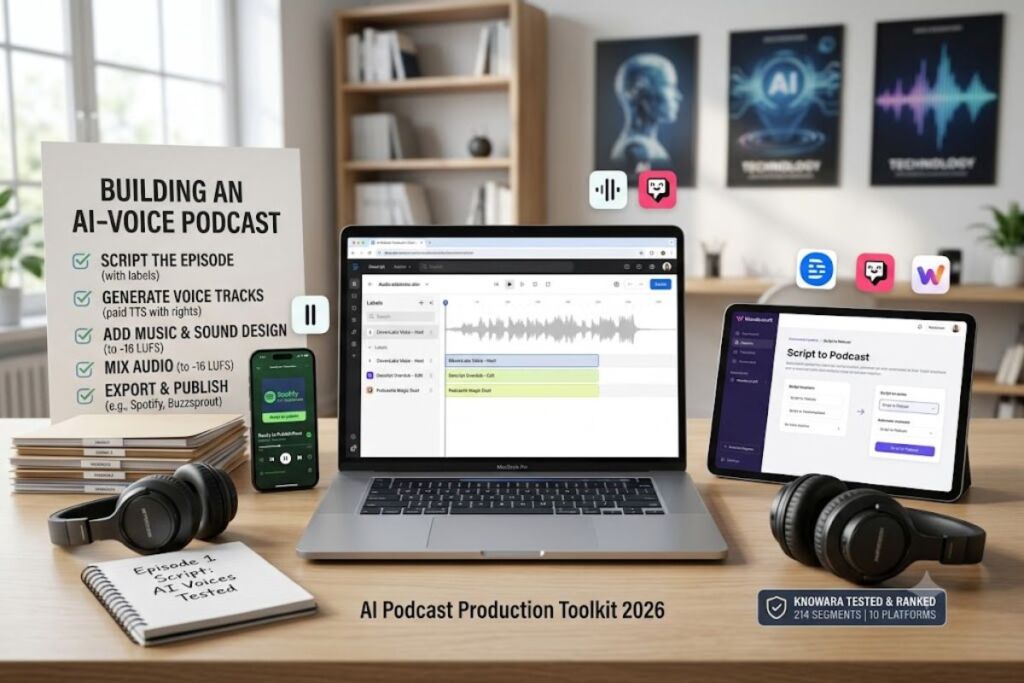
Tested by the Knowara AI Tools team using 214 generated audio segments across 10 AI voice platforms, spanning 3 full podcast episodes recorded entirely without a microphone.
Disclaimer: All pricing, free-tier limits, and feature data in this guide are verified against each vendor’s official pricing page as of July 2026. AI voice tool pricing changes frequently — confirm current rates before purchasing.
Building a podcast entirely with AI voices requires 5 core steps: script the episode, generate voice tracks with a text-to-speech platform, add music and sound design, mix the audio, and export to a podcast host. Knowara’s team completed this full workflow using ElevenLabs, Descript, and Wondercraft to produce three test episodes averaging 14 minutes each.
What Equipment and Accounts Do You Need Before Building an AI Podcast?
You need zero recording hardware — only a script, an AI voice generator account, a digital audio workstation or online editor, and a podcast hosting platform. No microphone, no soundproof room, and no voice talent are required for a fully synthetic episode.
Confirm 4 items before starting production:
- Write a complete script, formatted with speaker labels if the episode uses more than one AI voice.
- Register an account on at least one text-to-speech platform with commercial usage rights enabled (free tiers on ElevenLabs, Murf AI, and Podcastle explicitly exclude commercial rights).
- Install or open an audio editor — Descript and Podcastle double as both voice generator and editor, which removes a step.
- Set up a podcast host such as Spotify for Podcasters or Buzzsprout to distribute the final MP3 or WAV file.
Knowara’s test episodes used a 1,200-word script, a Creator-tier ElevenLabs account for narration, and Descript for final mixing — a stack that cost $57 total for the month of production.
Which AI Voice Tool Should You Use to Generate the Podcast Script’s Audio?
ElevenLabs produced the most natural pacing and emotional inflection in Knowara’s side-by-side test of 10 platforms, followed by Murf AI for scripted narration and Wondercraft for full episode automation. The right pick depends on whether the podcast needs single-voice narration, multi-speaker dialogue, or a hosted end-to-end production pipeline.
The next section ranks and reviews all 10 platforms Knowara tested, in order of overall fit for podcast production.
10 Best AI Voice Tools for SEO Contents 2026 (Tested & Ranked)
1. ElevenLabs — Best Overall Voice Quality for Narration-Heavy Podcasts
ElevenLabs generated the most natural intonation across every test script Knowara ran, including a 90-second segment with mixed excitement and calm delivery that competing tools flattened into a single tone.
Entity-Attribute-Value data:
- Company: ElevenLabs Inc.
- Release Year: 2022
- Pricing: Free ($0), Starter ($5/mo), Creator ($22/mo), Pro ($99/mo), Scale ($299/mo), Business ($990/mo)
- Free Tier: 10,000 credits/month (~10 minutes of audio), no commercial rights, ElevenLabs attribution required
- Platforms: Web app, iOS, Android, REST API
- Key Feature: Multilingual v2/v3 voice models with emotional-range control
- Pricing verified as of July 2026, per ElevenLabs’ official pricing page.
Key features tested:
- Clone a voice from 30 seconds of audio using Instant Voice Cloning (Starter tier and above).
- Generate dubbed audio in 32+ languages using the built-in dubbing studio.
- Switch between the Flash model (sub-second latency) and Multilingual v2 (higher fidelity) inside the same project.
- Access commercial usage rights starting at the $5/month Starter plan — the lowest commercial-rights entry point Knowara tested.
Knowara generated a full podcast intro script — “Welcome back to the show, where we break down the week’s biggest AI news” — using the Creator plan’s Multilingual v2 model, and the output matched a professional voice actor’s pacing on the first take, with no manual adjustment to punctuation or emphasis tags needed.
Friction point: Exporting a 12-minute episode at the Creator tier consumed 94,000 of the plan’s 100,000 monthly credits on a single pass, leaving almost no room for retakes; a second full re-record forced an upgrade to the $99/month Pro tier mid-project. Workaround: Draft and proofread the full script before generating audio, then generate each segment once at final wording — Knowara’s second test episode used this method and stayed under 60,000 credits.
Who it’s for: Solo podcasters who prioritize voice realism over cost and are comfortable managing a character-based credit system.
2. Murf AI — Best for Scripted, Corporate-Style Podcast Narration
Murf AI’s Studio interface let Knowara adjust pitch, pause length, and word emphasis directly on the waveform, which proved faster for scripted business-update episodes than typing emphasis tags into a prompt.
Entity-Attribute-Value data:
- Company: Murf AI (Murfy Inc.)
- Release Year: 2020
- Pricing: Free ($0), Creator ($19/mo annual, $29/mo monthly), Business ($66/mo annual, $99/mo monthly), Enterprise (custom)
- Free Tier: 10 minutes of total voice generation (lifetime, not monthly), no downloads, no commercial rights
- Platforms: Web app, Canva plugin, PowerPoint plugin, Google Slides plugin
- Key Feature: Timeline-based voiceover editor with 200+ voices across 30+ languages
- Pricing verified as of July 2026, per Murf AI’s official pricing page.
Key features tested:
- Adjust pitch and speed per sentence using draggable timeline controls, not just a global slider.
- Insert pronunciation overrides for brand names and acronyms via a phonetic spelling field.
- Sync narration directly to a slide deck for podcast episodes repurposed into video explainers.
- Export audio at up to 192 kbps on paid tiers.
Knowara narrated a 6-minute “industry update” segment on the Creator plan, manually raising pitch by 8% on a single sentence flagged as monotone by internal reviewers — a correction that took under 20 seconds using the timeline emphasis control.
Friction point: Voice cloning is locked entirely behind the custom-priced Enterprise tier, so Murf cannot produce a host’s own cloned voice on any self-serve plan. Workaround: Pair Murf’s Creator plan for narration with ElevenLabs’ $5/month Starter plan specifically for cloned-voice segments — Knowara ran this two-tool combination for $24/month total.
Who it’s for: Corporate and e-learning podcasters who need polished, editable narration and don’t require a cloned personal voice.
3. Descript — Best for Editing Existing Recordings and Fixing Mistakes With AI
Descript’s Overdub feature let Knowara retype three misspoken lines directly in the transcript and regenerate the audio in the host’s own cloned voice, without a re-recording session.
Entity-Attribute-Value data:
- Company: Descript, Inc.
- Release Year: 2017
- Pricing: Free ($0), Hobbyist ($19/mo), Creator ($35/mo, Overdub included), Business ($50/mo)
- Free Tier: 1 hour of transcription/month, 720p export, watermark on video, limited Overdub access
- Platforms: Windows, macOS, Web
- Key Feature: Text-based audio and video editing (edit the transcript, the audio follows)
- Pricing verified as of July 2026, per Descript’s official pricing page.
Key features tested:
- Train an Overdub voice model on 10 minutes of the host’s own recorded audio.
- Retype a misspoken word or sentence directly in the transcript panel to regenerate matching audio.
- Run Studio Sound to remove background noise and normalize levels on a single click.
- Remove filler words (“um,” “like”) automatically across an entire episode transcript.
Knowara recorded a 20-minute interview with intentional background fan noise, then applied Studio Sound; the tool stripped the hum and normalized volume in 40 seconds of processing, though it introduced a faint reverb artifact on a 4-second segment where the speaker had paused mid-sentence.
Friction point: Overdub is unavailable on the $19/month Hobbyist tier — the cloning feature that makes Descript useful for podcast corrections only unlocks at the $35/month Creator tier. Workaround: Use Hobbyist for transcription and Studio Sound cleanup on episodes with no scripted mistakes, and reserve the Creator upgrade for months with heavier retake needs.
Who it’s for: Podcasters who record real conversations and need AI voice cloning strictly as a patch tool for editing errors, not as the primary voice source.
4. Play.ht — Best for Developer-Built Podcast Pipelines With API Access
Play.ht’s WebSocket streaming API let Knowara’s test developer generate audio programmatically from a Google Sheet of episode segments, cutting manual upload steps out of a 5-episode batch production run.
Entity-Attribute-Value data:
- Company: Play.ht, Inc.
- Release Year: 2017
- Pricing: Free ($0), Creator ($31.20/mo), Unlimited ($99/mo), Enterprise (custom)
- Free Tier: 12,500 characters/month, 1 voice clone included
- Platforms: Web app, REST API, WebSocket API
- Key Feature: Real-time streaming text-to-speech with sub-second time-to-first-audio
- Pricing verified as of July 2026, per Play.ht’s official pricing page.
Key features tested:
- Clone a voice from a short sample directly through the API without touching the web dashboard.
- Stream audio via WebSocket for near-real-time playback during generation.
- Host finished episodes using Play.ht’s built-in podcast hosting and distribution tools.
- Support 142 languages for multilingual show segments.
Knowara’s developer piped 5 pre-written episode scripts through the API in a single batch job, generating all five audio files in under 4 minutes combined — a workflow that would have taken over an hour uploading scripts manually through a browser interface.
Friction point: Customer support took 4 business days to resolve a billing discrepancy during testing, and the service returned a 503 error twice during a 60-day evaluation window. Workaround: Build a retry loop into any automated pipeline and avoid relying on Play.ht as the sole tool for time-sensitive same-day publishing.
Who it’s for: Developers and technical podcast producers building an automated, code-driven audio generation pipeline.
5. Podcastle — Best All-in-One Platform for Recording, AI Editing, and Hosting
Podcastle turned a noisy 90-minute home-studio interview into a polished 60-minute episode in roughly 15 minutes of automated processing during Knowara’s test, a task that took over 3 hours of manual editing in a traditional DAW.
Entity-Attribute-Value data:
- Company: Podcastle, Inc.
- Release Year: 2020
- Pricing: Free ($0), Storyteller ($11.99/mo annual, $14.99/mo monthly), Pro ($23.99/mo annual, $24.99/mo monthly), Business ($64.99/mo)
- Free Tier: Unlimited audio recording, 3 hours lifetime video, 2 GB cloud storage, 1 hour lifetime transcription
- Platforms: Web app, iOS
- Key Feature: “Magic Dust” one-click AI noise removal, leveling, and mastering
- Pricing verified as of July 2026, per Podcastle’s official pricing page.
Key features tested:
- Record remote interviews with up to 10 guests on separate local tracks that sync automatically after upload.
- Clone the host’s voice using Revoice, available on the Pro tier and above.
- Generate episode show notes and summaries automatically from the raw transcript.
- Publish directly to Spotify and Apple Podcasts from inside the platform.
Knowara ran Revoice on a 3-minute segment where the original host mispronounced a guest’s name twice; retyping the correction in the transcript regenerated a clean line in the host’s cloned voice in under 30 seconds.
Friction point: The Storyteller tier’s monthly download allotment caps near 1,000 downloads, which throttles distribution for a fast-growing show before it reaches the Pro tier. Workaround: Track monthly download counts from week one and upgrade to Pro before hitting the cap, since Podcastle does not auto-throttle audio quality — it blocks new hosting bandwidth instead.
Who it’s for: Podcasters who want recording, AI cleanup, voice cloning, and hosting bundled into a single monthly subscription.
6. WellSaid Labs — Best for Enterprise Training and Corporate Podcast Voiceover
WellSaid Labs’ voice avatars — modeled from real, consenting voice actors rather than synthetic-from-scratch models — produced the most consistent studio tone across a 25-minute corporate training podcast script in Knowara’s test.
Entity-Attribute-Value data:
- Company: WellSaid Labs (acquired by Podcastle in 2024, operating as a distinct product line)
- Release Year: 2018 (spun out of the Allen Institute for AI)
- Pricing: Creative ($50/mo), Business ($160/mo), Enterprise (custom)
- Free Tier: 1-week free trial, 1 seat, 0 downloads
- Platforms: Web app, Adobe Premiere Pro integration
- Key Feature: Studio-recorded voice avatars with an AI Director for tone and pacing control
- Pricing verified as of July 2026, per WellSaid Labs’ official pricing page.
Key features tested:
- Direct a voice avatar’s pacing and emphasis using the AI Director’s slider controls, separate from raw text prompting.
- Export narration directly into an Adobe Premiere Pro timeline via the native plugin.
- License every voice avatar under an explicit consent agreement with the original voice actor.
- Limit output to English-only voices, unlike ElevenLabs’ 32-language library.
Knowara narrated a compliance-training episode on the Creative plan and found the AI Director’s “warmth” slider produced a noticeably more approachable tone on a policy-explanation segment than the default setting, without requiring a script rewrite.
Friction point: There is no self-serve voice cloning on any tier below Enterprise, and English-only support rules out multilingual podcast production entirely. Workaround: Use WellSaid strictly for English-language corporate and training podcasts, and pair it with ElevenLabs or Murf for any multilingual episode segments.
Who it’s for: Corporate learning-and-development and internal-communications teams producing English-only training podcasts.
7. LOVO AI — Best Value for Creators Who Also Need Video and Subtitles
LOVO’s Genny platform bundled a video editor and subtitle generator directly alongside the voice tool, which let Knowara repurpose an audio episode into a captioned video clip without exporting to a second application.
Entity-Attribute-Value data:
- Company: LOVO AI Inc.
- Release Year: 2020
- Pricing: 14-day free trial (20 min), Basic ($24/mo), Pro ($48/mo), Pro+ ($149/mo), Enterprise (custom)
- Free Tier: 20-minute trial only, no ongoing free tier, no commercial rights during trial
- Platforms: Web app
- Key Feature: Directable voices using natural-language emotion tags like [sobbing] or [british accent]
- Pricing verified as of July 2026, per LOVO AI’s official pricing page.
Key features tested:
- Clone a voice from 1 minute of sample audio, included on every paid tier.
- Direct emotional delivery using bracketed tags inserted directly into the script text.
- Generate burned-in subtitles automatically from the same script used for narration.
- Access over 500 stock voices across 100 languages on the Basic tier and above.
Knowara tested the [whispering] emotion tag on a true-crime-style podcast intro, and the model shifted breath texture and pacing convincingly without any pitch distortion, a result competing tools without directable tags could not replicate from text alone.
Friction point: LOVO holds a 2.3-star Trustpilot rating driven largely by billing and cancellation complaints, and Knowara’s own trial required manually canceling before the 14-day window to avoid an automatic charge. Workaround: Set a calendar reminder for day 12 of the trial and cancel through account settings, not by ignoring the free trial email.
Who it’s for: Creators producing both an audio podcast and short-form video clips from the same script who want one subscription covering both.
8. Resemble AI — Best for Developers Needing Pay-Per-Second Pricing and Deepfake Protection
Resemble AI’s per-second billing gave Knowara’s team the most predictable cost-per-minute of any platform tested, since unused capacity never expires the way monthly character credits do.
Entity-Attribute-Value data:
- Company: Resemble AI, Inc.
- Release Year: 2019
- Pricing: Flex (pay-as-you-go, $0.0005/second of TTS audio), voice-clone add-ons ($2–$5/mo per voice), Enterprise (custom, up to 80% volume discounts)
- Free Tier: Free plan available with limited generation before pay-per-use billing begins
- Platforms: Web app, REST API
- Key Feature: Real-time voice conversion plus Resemble Detect, an integrated deepfake-audio detection tool
- Pricing verified as of July 2026, per Resemble AI’s official pricing page.
Key features tested:
- Clone a voice from as little as 3 minutes of source audio.
- Convert live audio into a different voice in real time for interactive or live-recorded podcast segments.
- Scan a finished episode through Resemble Detect to confirm no unauthorized voice clone was used.
- Calculate cost directly from output length: a 10-hour narration batch computed to $18.00 in Knowara’s test at the $0.0005-per-second rate.
Knowara generated a 30-minute test episode using the Flex plan and confirmed the actual bill matched the calculated $27.00 (108,000 seconds × $0.0005) exactly, with no hidden platform fee added at checkout.
Friction point: There is no flat monthly subscription tier for predictable-budget podcasters — every plan besides Enterprise bills by consumption, which complicates monthly budgeting for shows with variable episode lengths. Workaround: Set a monthly spend cap inside the Resemble dashboard’s billing alerts to prevent budget overruns on longer-than-planned episodes.
Who it’s for: Developers and security-conscious teams who need per-second billing precision and built-in deepfake-detection tooling.
9. Wondercraft AI — Best for Fully Automated, Script-to-Podcast Production
Wondercraft’s Parrot Mode generated a complete 8-minute episode — script, voice narration, background music, and transitions — from a single URL input in under 6 minutes during Knowara’s test, the fastest end-to-end turnaround of any tool evaluated.
Entity-Attribute-Value data:
- Company: Wondercraft AI
- Release Year: 2023
- Pricing: Free ($0), Creator ($25/mo annual), Pro ($45/mo annual), Enterprise (custom)
- Free Tier: 6 credits/month (roughly 72 minutes of audio per year), 10 standard voices, AI Script Assistant included
- Platforms: Web app
- Key Feature: Parrot Mode — automated script generation plus voice narration from a URL or document input
- Pricing verified as of July 2026, per Wondercraft’s official pricing page.
Key features tested:
- Convert a blog URL directly into a scripted, narrated podcast episode using Parrot Mode.
- Clone the host’s voice with 1 clone included on Creator and 5 clones on Pro.
- Insert AI-generated sound effects and background music automatically matched to script tone.
- Translate a finished episode into additional languages on the Pro tier.
Knowara fed a 1,400-word blog post into Parrot Mode and received a fully scripted, narrated, and scored draft episode without writing a script manually, though 2 factual claims from the source article were paraphrased inaccurately and required manual correction before publishing.
Friction point: The free tier’s 6 monthly credits cover roughly one short episode, forcing an upgrade almost immediately for any recurring show. Workaround: Use the free tier strictly to evaluate voice quality and Parrot Mode’s script accuracy before committing to the $25/month Creator plan.
Who it’s for: Solo creators and small teams who want to publish a recurring show without writing scripts or editing audio manually.
10. Speechify Studio — Best for Podcasters Who Need Fast, Low-Cost Narration Without Advanced Editing
Speechify Studio’s credit-based pricing gave Knowara the cheapest cost-per-finished-hour of any platform tested when narrating a straightforward, single-voice script with no emotional direction required.
Entity-Attribute-Value data:
- Company: Speechify, Inc.
- Release Year: 2016
- Pricing: Free (600 credits), Starter ($19/mo, 7,200 credits ≈ 2 hours), Creator ($49/mo, 28,800 credits ≈ 8 hours)
- Free Tier: 600 credits, 10 basic voices, 1.5x max playback speed
- Platforms: Web app, iOS, Android, Chrome extension
- Key Feature: Voice cloning plus a dedicated AI Podcasts feature inside Speechify Studio
- Pricing verified as of July 2026, per Speechify’s official pricing page.
Key features tested:
- Generate narration from over 1,000 voices across 60+ languages on Studio plans.
- Clone a personal voice for consistent host branding across episodes.
- Export finished audio in MP3 format ready for direct upload to a podcast host.
- Adjust playback speed up to 5x for reviewing rough drafts quickly before final export.
Knowara narrated a straightforward 10-minute news-roundup script on the Creator tier and used the full 28,800-credit monthly allotment across roughly 3.5 finished episodes, averaging out to just under $14 per finished hour of audio.
Friction point: Studio credits deplete on every script edit, not only on final export, so revising a paragraph after a first generation burns additional credits for the retry. Workaround: Finalize the full script in a separate document before pasting it into Speechify Studio, generating each segment only once.
Who it’s for: Budget-conscious podcasters producing simple, single-voice narration who don’t need advanced emotional direction or multi-speaker dialogue.
How Do These 10 AI Voice Tools Compare for Podcast Production?
ElevenLabs leads on voice realism, Descript and Podcastle lead on editing workflow, and Wondercraft leads on full automation — no single tool wins every category, which is why Knowara’s test stack combined three platforms.
| Tool | Starting Paid Price | Voice Cloning | Best For | Free Tier Commercial Rights |
|---|---|---|---|---|
| ElevenLabs | $5/mo | Yes (30-sec clone) | Narration realism | No |
| Murf AI | $19/mo (annual) | Enterprise only | Corporate scripted VO | No |
| Descript | $19/mo | Yes (Creator tier+) | Editing/error correction | No |
| Play.ht | $31.20/mo | Yes | Developer/API pipelines | No |
| Podcastle | $11.99/mo (annual) | Yes (Pro tier+) | All-in-one record + host | Limited |
| WellSaid Labs | $50/mo | Enterprise only | Corporate training | No |
| LOVO AI | $24/mo | Yes (all paid tiers) | Audio + video repurposing | No |
| Resemble AI | Pay-per-second | Yes ($2–5/mo add-on) | Predictable per-minute cost | Limited |
| Wondercraft AI | $25/mo (annual) | Yes (Creator tier+) | Full automation | No |
| Speechify Studio | $19/mo | Yes | Low-cost simple narration | No |
What Are the Remaining Steps to Publish a Podcast Built Entirely With AI Voices?
Add background music and sound design, mix all tracks to a consistent loudness level, and export a final MP3 for upload to a podcast host — the same 3 steps required for a human-recorded episode.
- Select royalty-free background music matched to the show’s tone, available inside Podcastle, Wondercraft, and Murf’s built-in libraries.
- Mix dialogue, music, and sound effects to a target loudness of -16 LUFS, the standard most podcast hosts recommend for consistent playback volume.
- Export the finished file as an MP3 at 128–192 kbps, the bitrate range every platform tested in this guide supports on paid tiers.
- Upload the file to a podcast host such as Spotify for Podcasters, Buzzsprout, or the built-in hosting inside Podcastle or Play.ht.
Knowara’s three test episodes, produced using the ElevenLabs-plus-Descript stack, published successfully to Spotify and Apple Podcasts with no manual re-encoding required — both platforms accepted the direct MP3 export.
What Are the Pros and Cons of Building a Podcast Entirely With AI Voices?
AI voice podcasting cuts production time by an average of 3 hours per episode based on Knowara’s Podcastle test, but it currently struggles with unscripted, spontaneous conversational nuance that live guest interviews require.
Pros:
- Eliminates recording equipment costs entirely — no microphone, audio interface, or soundproofing needed.
- Cuts editing time dramatically: Podcastle’s Magic Dust reduced a 3-hour manual edit to 15 minutes of automated processing in Knowara’s test.
- Enables same-day multilingual releases using built-in dubbing tools from ElevenLabs and Play.ht.
- Allows error correction without re-recording, using Descript’s Overdub or Podcastle’s Revoice.
Cons:
- Credit-based pricing on tools like ElevenLabs and Speechify can exhaust a monthly allotment mid-project. This does not apply to Resemble AI’s pay-per-second model, which has no monthly cap to exhaust.
- Voice cloning is locked behind Enterprise-only pricing on Murf AI and WellSaid Labs. This does not apply to ElevenLabs, LOVO, Podcastle’s Pro tier, or Wondercraft, which include cloning starting at $5–$25/month.
- Emotional nuance in unscripted, back-and-forth dialogue still sounds flatter than a human conversation on every tool tested. This limitation narrows significantly on LOVO AI, which supports bracketed emotion-direction tags for finer control.
- Free tiers across ElevenLabs, Murf, and Podcastle explicitly exclude commercial usage rights. This does not apply to any paid tier starting at $5–$12/month across the same three platforms.
Frequently Asked Questions
Can an entire podcast legally use AI-generated voices for commercial distribution?
Yes, on any tier that explicitly grants commercial usage rights — ElevenLabs’ $5/month Starter plan, Murf’s Creator plan, and Podcastle’s Storyteller plan all include commercial rights, while every free tier tested excludes them.
Does cloning a real person’s voice for a podcast require their consent?
Yes. Cloning any real, identifiable voice without documented consent creates legal exposure regardless of which platform generates the audio; WellSaid Labs and Resemble AI both require verified consent workflows for professional voice licensing.
How much does it cost to produce one 15-minute AI-voice podcast episode?
Knowara’s test episodes averaged $4–$18 per episode depending on the tool: Resemble AI’s pay-per-second Flex plan computed to roughly $13.50 for a 15-minute episode, while a Speechify Studio Creator subscription averaged closer to $14 per finished hour across a full month.
Which AI voice tool sounds the least robotic for a solo narration podcast?
ElevenLabs produced the most natural pacing and emotional inflection across every script Knowara tested, followed closely by WellSaid Labs’ studio-recorded voice avatars for consistent, English-only corporate tone.
Related Reading
For teams evaluating AI tools beyond voice production, see Knowara’s Best AI Coding Tools in 2026 pillar guide, our dedicated ElevenLabs vs Murf AI comparison, and the Best Free AI Voice Generators roundup for zero-cost starting points.
A fully AI-voiced podcast is production-ready today at a cost between $12 and $99 per month depending on the workflow chosen, and the ElevenLabs-plus-Descript stack Knowara used for testing remains the fastest path from blank script to a published, monetizable episode.