
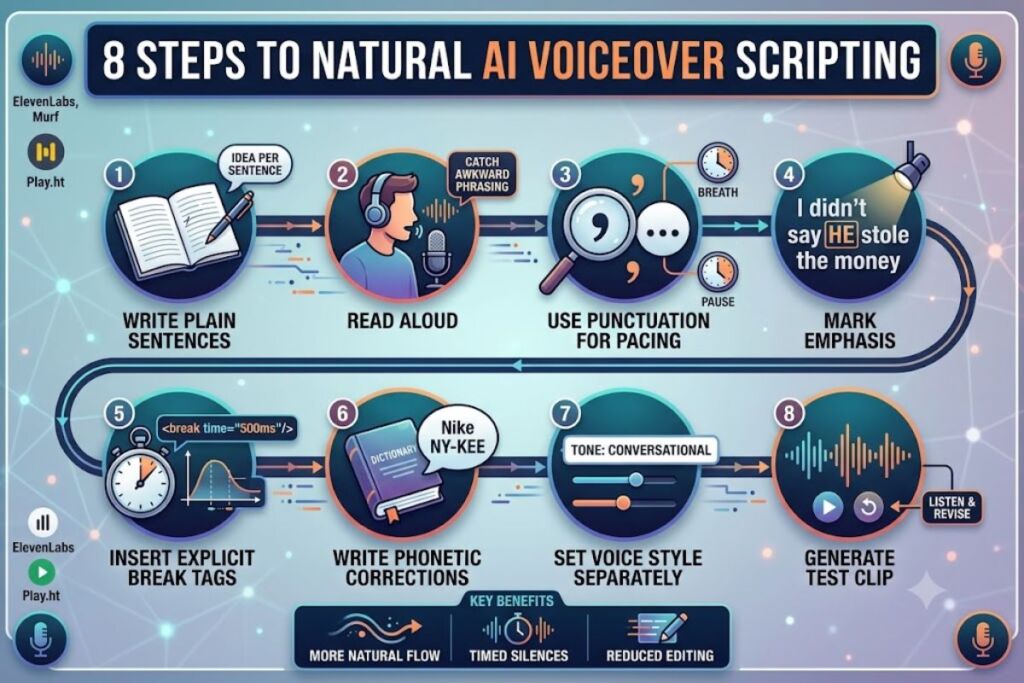
⏱ 7 Reading Time
- 01Step 1: Write the Script in Plain Sentences First
- 02Step 2: Read the Draft Aloud to Locate Unnatural Phrasing
- 03Step 3: Add Punctuation as Explicit Pacing Control
- 04Step 4: Mark Emphasis with Capitalization or Platform-Specific Tags
- 05Step 5: Insert Explicit Pause Tags for Timed Silence
- 06Step 6: Write Phonetic Corrections for Mispronounced Words
- 07Step 7: Set the Voice Style Instruction Separately From the Script Body
- 08Step 8: Generate a Test Clip and Revise Based on the Output
- 09Frequently Asked Questions
- 10The Bottom Line
Writing a script for AI voiceover means formatting text with explicit pacing, emphasis, and phonetic cues so a text-to-speech model produces natural-sounding audio instead of flat, robotic narration. This guide breaks the process into 8 steps, from raw draft to final prompt, using techniques tested across AI voice generators like ElevenLabs, Murf, and Play.ht.
Step 1: Write the Script in Plain Sentences First
Draft the full script in short, plain sentences before adding any voice-direction markup. Separating content from delivery prevents formatting tags from disrupting sentence logic and makes later edits faster.
Write one idea per sentence. Avoid nested clauses longer than 15 words, since most text-to-speech (TTS) engines — the AI systems that convert written text into spoken audio — insert unnatural pauses inside long, comma-heavy sentences. A script line such as “Our new dashboard, which took six months to build and includes twelve new widgets, launches today” forces the model to compress three ideas into one breath. Splitting it into “Our new dashboard launches today. It took six months to build. It includes twelve new widgets.” gives the model three clean breath points instead of one cluttered one.
Step 2: Read the Draft Aloud to Locate Unnatural Phrasing
Reading the script aloud exposes phrasing that looks fine on the page but sounds unnatural when spoken. Written language and spoken language follow different rhythms, and AI voice models mirror whatever rhythm the text implies.
Flag any sentence that makes you pause mid-read to catch your breath — that’s the same point where a TTS engine will insert an awkward gap. Replace contractions selectively: “we’re” reads more naturally in a conversational voiceover than “we are,” while “we are” fits a formal, corporate-narration voice. Match contraction density to the target voice style before moving to the next step.
Step 3: Add Punctuation as Explicit Pacing Control
Punctuation functions as the primary pacing instruction for AI voice models, since most engines map punctuation directly to pause length. A period typically produces a longer pause than a comma, and an ellipsis produces a longer pause than a period.
Use a comma for a 200–300 millisecond breath. Use a period for a full stop between ideas. Use an em dash to signal an abrupt interruption in tone — useful in conversational or dramatic scripts. Insert an ellipsis (“…”) when the script needs a deliberate, extended pause, such as before a reveal or a call-to-action line. Test each punctuation choice by generating a short clip and confirming the pause length matches the intended emotional beat.
Step 4: Mark Emphasis with Capitalization or Platform-Specific Tags
Emphasis markup tells the AI voice model which word in a sentence should carry stress, changing meaning without changing wording. The sentence “I didn’t say he stole the money” changes meaning depending on which word receives stress.
Capitalize the single word that needs stress: “I didn’t say HE stole the money” signals the model to raise pitch and volume on “HE.” Platforms that support Speech Synthesis Markup Language (SSML) — a markup standard for controlling pitch, rate, and emphasis in synthesized speech — accept an explicit <emphasis> tag instead of capitalization. Check your specific voice generator’s documentation before submitting a script, since not every platform parses SSML tags identically; some ignore unsupported tags silently rather than returning an error.
Step 5: Insert Explicit Pause Tags for Timed Silence
Explicit pause tags give frame-accurate silence control that punctuation alone cannot guarantee, which matters for scripts synced to video cuts or music beats. Punctuation-based pausing varies by model version, while an explicit tag locks the duration.
Use SSML’s <break time="500ms"/> tag (or the platform’s equivalent syntax, such as ElevenLabs’ bracketed pause notation) to force a fixed silence length. Insert a 700ms break before a product name reveal in an ad script to build anticipation. Insert a 1.5-second break between a question and its answer in an explainer script to mimic natural conversational timing. Confirm the exact tag syntax in your chosen platform’s prompt documentation, since bracket notation, XML tags, and plain-text pause markers are not interchangeable across tools.
Step 6: Write Phonetic Corrections for Mispronounced Words
Phonetic respelling or SSML phoneme tags correct words that AI voice models consistently mispronounce, such as brand names, acronyms, and technical terms. A model unfamiliar with a brand name defaults to its nearest phonetic guess, which is frequently wrong.
Respell the word using simple phonetic text when the platform lacks phoneme tag support: write “Nike” as “NY-kee” only if the brand requires that pronunciation, or leave standard pronunciations untouched. Use the SSML <phoneme alphabet="ipa" ph="..."> tag on platforms that support the International Phonetic Alphabet (IPA) — a standardized system of phonetic notation — for precise control over vowel and consonant sounds. Test acronyms individually: some models read “NASA” as a word, while others spell out each letter unless the script forces word-mode with a phonetic hint.
Step 7: Set the Voice Style Instruction Separately From the Script Body
A separate style instruction — tone, pace, and emotional register — tells the model how to deliver the entire script, distinct from the line-by-line pacing markup inside the text. Mixing style commands into the script body confuses word-level and delivery-level instructions.
State the style instruction as a short, standalone line before the script: “Deliver in an upbeat, conversational tone at a moderate pace, similar to a product-launch video narrator.” Keep this instruction under 20 words, since longer style prompts dilute the model’s attention across too many competing descriptors. Adjust pace instructions numerically where the platform allows it — a speed multiplier of 0.9x for a calmer explainer versus 1.1x for an energetic ad — rather than relying only on adjectives like “fast” or “slow.”
Step 8: Generate a Test Clip and Revise Based on the Output
Generating a short test clip from the first two or three sentences reveals pacing and pronunciation errors before you commit to rendering the full script. Full-script generation without a test clip wastes render time on scripts that need multiple revision passes.
Render a 15–20 second sample first. Listen for three specific failure points: dropped emphasis on capitalized words, pause tags that produce silence shorter or longer than specified, and mispronounced proper nouns. Revise the affected lines, regenerate the same sample, and confirm the fix before rendering the complete script. This test-then-scale workflow cuts wasted full-length renders, since a script-wide pronunciation error compounds across every instance of the mispronounced word.
Frequently Asked Questions
Does SSML work on every AI voiceover platform?
No. SSML support varies by platform and by voice model within the same platform. Confirm supported tags in the specific tool’s documentation before writing markup, since an unsupported tag is typically stripped or ignored rather than flagged as an error.
How long should a voiceover script be for a 60-second video?
A spoken pace of roughly 150 words per minute fits a 60-second video into approximately 130–150 words, accounting for pauses and emphasis breaks. Reading the draft aloud with a stopwatch gives a more accurate length estimate than a words-per-minute formula alone.
Can punctuation alone control pacing without SSML tags?
Yes, for scripts that don’t require frame-accurate timing. Punctuation-based pacing (commas, periods, em dashes, ellipses) works for most voiceover use cases; explicit break tags become necessary only when the voiceover must sync to a specific video cut or music beat.
Should the script include the speaker’s emotional state as a note?
Yes, on platforms that accept a standalone style instruction. Writing “tone: reassuring, calm” as a separate line before the script body — rather than inside the sentence text — gives the model a consistent emotional target without cluttering the spoken words themselves.
The Bottom Line
A voiceover script written with explicit punctuation pacing, capitalized emphasis, phonetic corrections, and a separate style instruction produces measurably more natural AI narration than a plain paragraph submitted without formatting — and testing a short clip before full generation remains the single fastest way to catch pacing and pronunciation errors before they compound across an entire script.
Related reading:
Best AI Coding Tools in 2026 (Overall Ranking), Best Free AI Voice Generators,ElevenLabs Review: Is It the Best AI Voice Generator?,and Murf AI vs ElevenLabs: Which AI Voice Tool Wins?