
⏱ 7 Reading Time
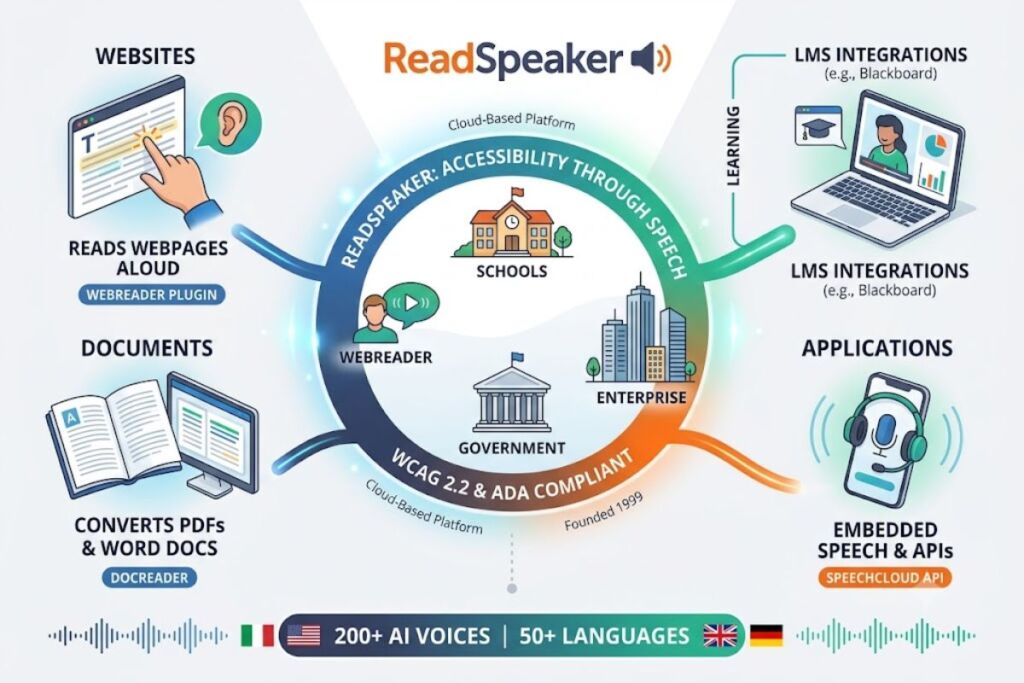
ReadSpeaker converts on-screen text into natural-sounding speech for websites, documents, and apps. ReadSpeaker delivers WCAG 2.2 and ADA-compliant text-to-speech through 200+ AI voices in 50+ languages, making it a top choice for schools, government agencies, and enterprises that need accessibility compliance rather than casual voiceover production.
What Is ReadSpeaker?
ReadSpeaker is a cloud-based text-to-speech (TTS) platform built by ReadSpeaker B.V., a subsidiary of HOYA Corporation, that speech-enables websites, documents, and applications for accessibility compliance. Founded in 1999, ReadSpeaker pioneered the first browser-based speech-enabling application and now powers text-to-speech for more than 10,000 applications across 65 countries.<cite index=”13-1″>ReadSpeaker gives a voice to businesses and organizations for online, embedded, server or desktop needs, apps, speech production, custom voices and more.</cite> ReadSpeaker’s product suite includes ReadSpeaker webReader for websites, ReadSpeaker docReader for PDFs, ReadSpeaker TextAid for individual learners, and ReadSpeaker speechCloud API for developers.
| Attribute | Value |
|---|---|
| Company | ReadSpeaker B.V. (subsidiary of HOYA Corporation) |
| Founded | 1999 |
| Headquarters | Driebergen-Rijsenburg, Netherlands |
| Pricing | TextAid Individual from $4.90/month; enterprise products require a custom quote |
| Platforms | Web (WordPress plugin), LMS integrations, iOS, Android, embedded SDK, API |
| Key Feature | WCAG 2.2 / ADA-compliant screen reading across 200+ voices in 50+ languages |
What Are ReadSpeaker’s Key Features?
ReadSpeaker’s accessibility feature set targets three groups: website visitors, students with learning differences, and developers embedding TTS into their own products.
- Reads any webpage aloud through the webReader plugin without requiring the visitor to install software.
- Highlights text in sync with narration so users with dyslexia and ADHD can follow along visually and audibly at once.
- Supports 50+ languages and 200+ digital voices for multilingual accessibility compliance.<cite index=”2-1″>ReadSpeaker offers 200+ expressive, humanlike digital voices in 50+ languages via plugins or SDKs for use in any application or device, embedded, on premise, or in the cloud.</cite>
- Converts PDFs, Word documents, and course materials into audio through docReader.
- Integrates with major learning management systems, including an extended Blackboard Learn Ultra partnership announced in 2026.<cite index=”11-1″>ReadSpeaker announced an extended partnership with Anthology, making its text-to-speech solutions available for Blackboard Learn Ultra.</cite>
- Deploys through SaaS, on-premise licensing, or embedded SDKs for offline and device-level use cases.
- Provides dictionary lookup and word-prediction tools inside TextAid for literacy support.
How Much Does ReadSpeaker Cost?
ReadSpeaker prices its individual literacy product on a monthly subscription and quotes enterprise accessibility products individually based on usage and user count. ReadSpeaker TextAid Individual starts at $4.90 per month, while webReader, docReader, and enterprise API access require a custom quote from ReadSpeaker sales.
- TextAid Individual: $4.90/month, includes text-to-speech, highlighting, and dictionary tools for one user.<cite index=”6-1″>TextAid includes text highlighting, document reading, word prediction, and dictionary features. It starts at $4.90/month for individuals.</cite>
- webReader and docReader (Enterprise): Custom pricing based on page views, document volume, and number of languages.<cite index=”1-1″>ReadSpeaker has a custom pricing model for everyone. Contact them to get a custom quote.</cite>
- Free trial: 14 days for TextAid; a free demo is available for enterprise products.<cite index=”1-1″>Free trial: Yes — 14-day free trial for TextAid, free demo for enterprise products.</cite>
No published flat-rate plan exists for webReader or the speechCloud API. Organizations budgeting for site-wide accessibility compliance should request an itemized quote before committing.
What Are the Pros and Cons of ReadSpeaker?
ReadSpeaker’s strengths center on compliance and language breadth; its weaknesses center on pricing transparency and voice customization depth.
Pros:
- Delivers WCAG 2.2 and ADA-compliant accessibility out of the box for schools, universities, and government sites.<cite index=”5-1″>ReadSpeaker supports 50+ languages with 200+ voices and helps you comply with WCAG 2.2 and ADA standards.</cite>
- Covers 50+ languages, exceeding most consumer TTS tools built primarily for English.
- Supports offline and embedded deployment for organizations that cannot use cloud-only tools.
- Backs 20+ years of accessibility-specific engineering rather than general-purpose voiceover technology.
Cons:
- Publishes no public pricing for its core webReader and API products, forcing every enterprise buyer through a sales call.
- Limits pitch and speed customization compared to voice-cloning platforms like ElevenLabs.<cite index=”9-1″>ReadSpeaker does not offer extensive customization options for voice output, such as adjusting pitch or speed beyond basic settings.</cite>
- Ranks below consumer-tier subscription tools on affordability benchmarks due to its enterprise licensing structure.<cite index=”8-1″>FitGap’s affordability evaluation places ReadSpeaker 21 of 27 in the category.</cite>
- Fits accessibility compliance use cases poorly for solo creators who only need short-form voiceovers.
How Does ReadSpeaker Compare to ElevenLabs?
ReadSpeaker and ElevenLabs solve different problems: ReadSpeaker speech-enables existing content for compliance, while ElevenLabs generates new voiceover audio with the highest naturalness scores on the market.
| Category | ReadSpeaker | ElevenLabs |
|---|---|---|
| Primary use case | Accessibility compliance (WCAG 2.2, ADA) | Voiceover and content creation |
| Pricing model | Custom quote (enterprise); $4.90/mo (TextAid) | Published tiered subscription |
| Languages | 50+ | 30+ |
| Voice customization | Limited pitch/speed control | Full voice cloning and style control |
| Best for | Schools, government, enterprise sites | Content creators, podcasters, developers |
Readers comparing the two tools directly should read our full ReadSpeaker vs ElevenLabs breakdown for side-by-side testing results on voice quality and latency.
Who Should Use ReadSpeaker?
ReadSpeaker fits organizations with a legal or institutional obligation to make digital content accessible, not individual creators producing short audio clips.
- Higher-education institutions integrating text-to-speech into LMS platforms like Blackboard Learn Ultra for students with learning differences.
- K-12 school districts required to meet ADA and Section 508 compliance across web portals and course materials.
- Government agencies publishing multilingual public information that must meet WCAG 2.2 standards.
- Enterprise product teams embedding TTS into apps or devices through the speechCloud API or SDK.
- Users who are blind or low-vision and need full screen-reader-grade narration rather than casual playback.<cite index=”9-1″>Users who are totally blind and require full screen reader functionality.</cite>
Solo YouTubers, podcasters, and marketers producing short-form voiceovers on a tight budget find better value in consumer-tier TTS subscriptions instead.
What Are the Best Alternatives to ReadSpeaker?
Three tools cover the gaps ReadSpeaker leaves open — natural voice quality, free-tier access, and beginner simplicity.
- ElevenLabs — the most natural-sounding AI voice generator on the market, built for creators who need voice cloning rather than compliance features. Read our full ElevenLabs review.
- Speechify — offers a generous free tier for everyday reading support, making it the budget pick for individual accessibility needs. Read our full Speechify review.
- NaturalReader — provides the simplest interface for first-time users who need basic text-to-speech in under a minute. Read our full NaturalReader review.
Frequently Asked Questions
Is ReadSpeaker free?
ReadSpeaker offers a 14-day free trial for TextAid and a free demo for enterprise products, but no permanent free tier exists for webReader or the API.
Does ReadSpeaker meet ADA compliance requirements?
ReadSpeaker’s webReader and docReader products are built specifically to meet WCAG 2.2 and ADA accessibility standards for websites and documents.
How many languages does ReadSpeaker support?
ReadSpeaker supports 50+ languages through 200+ digital voices, covering markets from Arabic and Hindi to Korean and Swedish.
Can ReadSpeaker work offline?
ReadSpeaker offers on-premise and embedded SDK deployment options for organizations that require offline or device-level text-to-speech.
ReadSpeaker earns its place among the best AI voice generators for accessibility on compliance depth and language coverage, not on price transparency or voice customization — organizations mandated to meet WCAG 2.2 or ADA standards get the strongest return on ReadSpeaker’s enterprise pricing, while individual creators get better value elsewhere.