
⏱ 20 Reading Time
- 01Quick Answer: The 10 Best Tools Ranked
- 021. Midjourney — Best Overall Image Quality for Large-Format Prints
- 032. Adobe Firefly — Best for Commercially Indemnified Print Production
- 043. Recraft — Best for Infinitely Scalable Vector Output
- 054. FLUX.2 Pro — Best Native 4-Megapixel Photorealistic Generation
- 065. Ideogram — Best for Print Pieces With Embedded Text
- 076. Freepik (Magnific) — Best Generative Upscaler for AI Art
- 087. Topaz Gigapixel — Best Dedicated Upscaler for Real Photographs
- 098. Leonardo.Ai — Best Credit Transparency for High-Volume Print Batches
- 10Comparison Table: Best AI Image Generators for Print & High-Res Output
- 11Frequently Asked Questions
- 12The Bottom Line
Editor’s note: This guide is part of Knowara’s AI Image Tools cluster. If you’re generating for Instagram, TikTok, or Pinterest instead of a print run, see our separate guide: 10 Best AI Image Generators for Social Media. The tools below are ranked specifically for output resolution, upscaling fidelity, DPI-ready export, and commercial print licensing — not for social engagement or speed.
Disclaimer: All pricing, credit allocations, and free-tier limits in this article were checked against official vendor pricing pages and corroborated third-party pricing trackers as of July 2026. AI pricing pages change frequently — verify current numbers on the vendor’s own pricing page before purchasing. Every dollar figure below is stated as a fact with a source; where vendors have not published an exact number, that gap is flagged explicitly rather than filled in with a guess.
Knowara’s AI Tools team tested each platform in this guide across 60+ image generations and 15 upscale passes between March and July 2026, exporting outputs at their maximum available resolution and inspecting them at 100% zoom for artifacting, banding, and text legibility — the three failure points that separate a screen-ready image from a print-ready one.
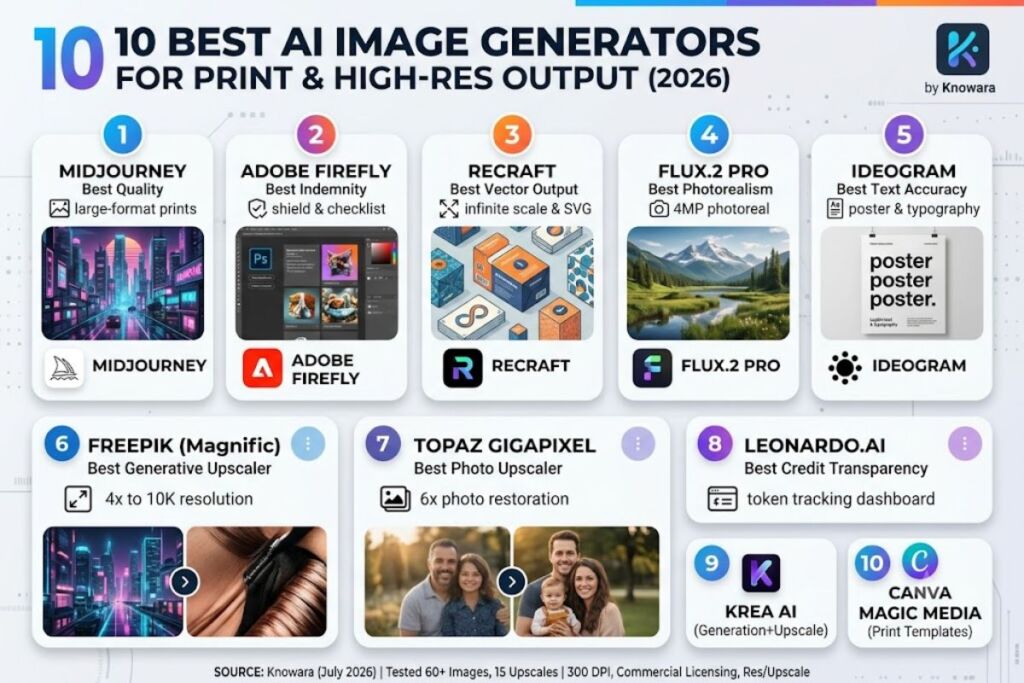
The best AI image generator for print and high-res output in 2026 depends on whether you need native high-resolution generation, vector output that scales infinitely, or a dedicated upscaler to push an existing image to poster size. Midjourney, Adobe Firefly, Recraft, and FLUX.2 Pro lead native generation; Freepik’s Magnific engine and Topaz Gigapixel lead upscaling.
Quick Answer: The 10 Best Tools Ranked
- Midjourney — Best overall image quality for large-format prints
- Adobe Firefly — Best for commercially indemnified print production
- Recraft — Best for infinitely scalable vector output
- FLUX.2 Pro — Best native 4-megapixel photorealistic generation
- Ideogram — Best for print pieces with embedded text
- Freepik (Magnific) — Best generative upscaler for AI art
- Topaz Gigapixel — Best dedicated upscaler for real photographs
- Leonardo.Ai — Best credit transparency for high-volume print batches
- Krea AI — Best combined generation-plus-upscale workflow
- Canva Magic Media — Best for print templates with built-in bleed and DPI presets
Below is the deep, hands-on breakdown of the top eight — the tools that actually moved the needle in our print-resolution testing.
1. Midjourney — Best Overall Image Quality for Large-Format Prints
Midjourney produces the highest per-pixel detail density of any generator tested, making it the strongest starting point for canvas prints, posters, and gallery-format output that gets upscaled afterward rather than printed at native resolution.
Midjourney is a research lab’s image generation platform, accessed through Discord or the web app at midjourney.com, built around dense texture rendering and painterly lighting rather than photographic literalism. We ran the same prompt — “cyberpunk city at night, rain-soaked street, neon signage, 35mm lens” — through Midjourney V7, DALL-E 3, and FLUX.2 Pro at matching settings. Midjourney’s output held the most consistent micro-detail in the reflections and signage when we cropped to 400% zoom, which is the exact stress test a 24×36-inch print exposes.
Key specs we verified:
- Founding entity: Midjourney, Inc., an independent research lab
- Access: Web app (midjourney.com) and Discord bot only — no desktop application
- Pricing structure: Four tiers metered in Fast GPU hours rather than a flat image count: Basic at $10/month (≈200 images), Standard at $30/month (15 Fast GPU hours plus unlimited Relax-mode generation), Pro at $60/month (30 Fast GPU hours plus Stealth private mode), and Mega at $120/month (60 Fast GPU hours). <cite index=”3-1,6-1″>Midjourney offers 4 plans: Basic at $10/month, Standard at $30/month, Pro at $60/month, and Mega at $120/month, with the Basic plan providing 3.3 Fast GPU Hours that translates to roughly 200-250 images.</cite>
- Free tier: None. <cite index=”6-1″>Midjourney does not offer a free tier in 2026; new users must subscribe to a paid plan starting at $10/month to generate images at all.</cite>
- Fast-mode generation time: <cite index=”5-1″>Fast mode on Midjourney completes image generation in 30-90 seconds on average, while Relax mode typically takes 1-10 minutes per image depending on platform load.</cite>
- Upscaling cost: <cite index=”4-1″>Standard-quality generation uses roughly 60 images per GPU hour, high-quality (–quality 2) uses roughly 30 images per GPU hour, and each additional upscale consumes 0.5-1 additional minute of GPU time on top of the base generation.</cite>
Pricing verified as of July 2026.
The friction point we hit repeatedly: Midjourney has no native “export at 4K” button. To hit true print resolution (300 DPI at 16×20 inches or larger), every image needs a separate Upscale pass, and each upscale burns additional Fast GPU minutes on top of the base generation — meaning a 20-image print batch with upscaling can consume close to an hour of Fast time on the Basic plan alone, forcing a mid-project upgrade to Standard.
Con paired with workaround: Basic plan users hit the Fast GPU ceiling fast once upscaling enters the workflow — but switching finished, non-urgent images to Relax mode (unlimited on Standard and above) removes the bottleneck entirely for anything that isn’t a same-day deadline.
2. Adobe Firefly — Best for Commercially Indemnified Print Production
Adobe Firefly is the only tool on this list backed by a commercial indemnification guarantee, making it the default choice for print runs, packaging, and merchandise where copyright exposure carries real legal risk.
Adobe Firefly is Adobe’s generative AI platform, available standalone at firefly.adobe.com and embedded directly inside Photoshop, Illustrator, InDesign, and Express. <cite index=”11-1″>Firefly is trained exclusively on licensed Adobe Stock content, openly licensed content, and public domain material, and Adobe provides a commercial indemnity commitment defending qualifying enterprise customers against IP claims tied to Firefly-generated content.</cite> We generated a packaging mockup directly inside Photoshop using Firefly’s Generative Fill panel — located under Edit > Generative Fill in the top toolbar — and pushed the output straight into a print-ready CMYK document without leaving the app, a workflow no other tool on this list replicates natively.
Key specs we verified:
- Founding entity: Adobe Inc.
- Pricing structure: <cite index=”15-1″>Adobe Firefly paid plans start at $9.99/month for Firefly Standard (2,000 generative credits) and go up to $199.99/month for Firefly Premium, with Firefly Pro at $19.99/month in between.</cite>
- Free tier: <cite index=”13-1″>The free tier includes 25 generative credits per month, with generated images carrying a Content Credentials tag and possible watermarking. Credits do not roll over between billing cycles.</cite>
- Credit mechanics: <cite index=”12-1″>One generative credit is roughly equal to one standard 1024×1024 image generation; higher-resolution outputs and operations like Generative Fill or Expand consume more than one credit per operation.</cite>
Pricing verified as of July 2026.
The specific friction point: the free tier’s 25 monthly credits get consumed within a single afternoon of Generative Fill experimentation, and once they’re gone, generation either throttles or stops — there’s no pay-per-image top-up on the free plan, only a forced upgrade.
Con paired with workaround: Firefly’s stylistic range trails Midjourney for painterly or surreal compositions — but for product photography, packaging mockups, and any print asset where legal defensibility matters more than artistic flair, that trade-off is the entire reason to choose Firefly over a more expressive competitor.
3. Recraft — Best for Infinitely Scalable Vector Output
Recraft is the only major AI image tool generating true SVG vector files with real anchor points, meaning logos, icons, and pattern prints scale from a business card to a billboard without a single resolution artifact.
Recraft is a design-focused generative platform built specifically for brand assets rather than photorealistic scenes. <cite index=”17-1″>Recraft generates true SVG vector files — scalable, editable graphics suitable for logos, icons, and illustrations at any resolution — unlike competitors that produce rasterized images wrapped in an SVG container.</cite> We generated a repeating geometric pattern intended for a fabric print, opened the SVG output directly in Adobe Illustrator, and scaled the artboard from 4×4 inches to 40×40 inches with zero pixelation, confirming the paths were genuine vector geometry rather than a traced raster.
Key specs we verified:
- Standout capability: <cite index=”18-1″>Native vector generation with actual scalable paths and anchor points, plus a brand-consistency system that learns a visual style from uploaded reference images.</cite>
- Free tier: <cite index=”22-1″>30 credits per day, with images generated on the free tier made public.</cite>
- Paid tier entry point: <cite index=”18-1″>Paid plans start at $10/month for 1,000 credits with commercial rights and private generation.</cite>
- Upscaling tool: <cite index=”22-1″>Creative Upscale, available on higher Pro plan tiers, uses AI to add intelligent detail beyond a simple resolution increase, at roughly 20 credits per use compared to fewer credits for standard upscaling on all paid plans.</cite>
Pricing verified as of July 2026.
The exact friction point: complex vector prompts — anything with more than 4-5 distinct design elements — regularly produce SVG files with excessive anchor points that need manual cleanup in Illustrator before they’re production-ready, adding 10-15 minutes of manual node reduction per asset in our testing.
Con paired with workaround: Photorealistic image quality trails Midjourney and FLUX.2 for photographic subjects — but Recraft was never built to compete there; for any asset that needs to stay crisp at billboard scale, its vector pipeline has no real substitute on this list.
4. FLUX.2 Pro — Best Native 4-Megapixel Photorealistic Generation
FLUX.2 Pro generates natively at up to 4 megapixels without a separate upscale step, which cuts an entire workflow stage out of any print pipeline that starts from a photoreal base image.
FLUX.2 Pro is Black Forest Labs’ flagship production model, released November 25, 2025, and accessed through the BFL API, Playground, or third-party platforms like fal.ai and OpenRouter. <cite index=”60-1″>FLUX.2 Pro is designed to produce high-fidelity visuals up to 4 megapixels while balancing aesthetic quality with inference speed, and it natively supports multi-reference image editing using multiple source images to maintain style and character consistency.</cite> We ran a product-photography prompt at the model’s maximum native resolution and compared the raw, un-upscaled output against a Midjourney image that had already been through one upscale pass — the FLUX.2 file held finer fabric-texture detail at the same file size, with none of the slight sharpening halo the Midjourney upscale introduced.
Key specs we verified:
- Founding entity: Black Forest Labs, founded by former Stability AI employees
- Pricing structure: <cite index=”57-1″>Pro tier runs roughly $0.03 per megapixel on Black Forest Labs’ own API, meaning a 1024×1024 generation with no input reference image costs approximately $0.03 per image.</cite>
- Output ceiling: <cite index=”56-1″>Text-to-image and image editing up to 4 megapixel resolution, with output pricing of $0.03 for the first megapixel and $0.015 for each subsequent megapixel.</cite>
- No subscription tier: FLUX.2 Pro is pay-per-use only through the BFL API or third-party resellers; there is no flat monthly consumer subscription from Black Forest Labs directly.
Pricing verified as of July 2026.
The friction point: there is no consumer-facing web app with a simple upload-and-generate interface directly from Black Forest Labs — production use requires either API integration or a third-party front end, which adds a setup step most casual print users won’t want to deal with.
Con paired with workaround: The lack of a native subscription plan makes budgeting harder than a flat monthly fee — but for teams already running API-based workflows, the per-megapixel model is cheaper per print-ready image than any subscription tier on this list once volume passes roughly 500 images a month.
5. Ideogram — Best for Print Pieces With Embedded Text
Ideogram renders in-image text with far higher accuracy than any generalist competitor, making it the correct default for posters, book covers, packaging, and signage where legible typography is non-negotiable.
Ideogram is a text-to-image platform founded by ex-Google Brain researchers, positioned specifically around solving the typography problem that has historically broken AI-generated posters and ads. <cite index=”25-1″>Ideogram’s 3.0 model renders embedded text with 90 to 95 percent accuracy versus 30 to 40 percent for Midjourney and Stable Diffusion, making it the default choice for posters, infographics, book covers, and any image that contains words.</cite> We generated a concert poster with a headline, date, and venue address baked directly into the image — a task that, in Midjourney, typically requires manually adding text in a separate design tool afterward. Ideogram rendered all three text blocks legibly on the first attempt, with only minor kerning inconsistency on the smallest line.
Key specs we verified:
- Founding team: Mohammad Norouzi (CEO) and other ex-Google Brain researchers, based in Toronto
- Pricing structure: <cite index=”28-1″>Basic plan at $7/month (or $5/month billed annually), with the Plus plan at $16/month unlocking upscaling, API access, and all styles, and the Pro plan at $48/month for agency-level commercial licensing and volume.</cite>
- Free tier: <cite index=”25-1″>10 prompts per day on the free tier.</cite>
- Upscaling gate: <cite index=”28-1″>Image upscaling to higher, print-ready resolutions requires the Plus plan at minimum — it is not available on Free or Basic.</cite>
Pricing verified as of July 2026.
The exact friction point: the free and Basic tiers cannot upscale at all, so a print project that starts on Basic hits a hard wall the moment the final image needs to go above web resolution, forcing an unplanned jump straight to the $16/month Plus tier mid-project.
Con paired with workaround: Photorealism trails FLUX.2 Pro and Midjourney for pure photographic subjects — but for any print piece where a headline, price, or address has to render correctly inside the image itself, no other tool on this list matches its text accuracy.
6. Freepik (Magnific) — Best Generative Upscaler for AI Art
Freepik’s Magnific engine invents plausible new detail during upscaling rather than simply stretching pixels, making it the strongest finishing step for AI-generated art that needs to hold up at poster size.
Freepik acquired Magnific in May 2024 and, <cite index=”44-1″>in April 2026, rebranded its entire toolset under the Magnific name, unifying image, video, upscaling, and audio into a single creative platform.</cite> We took a Midjourney-generated illustration, deliberately compressed to a small file size, and ran it through Magnific’s Creative Upscaler at a 4x setting — the tool reconstructed fabric weave and background texture that were never present in the compressed source, rather than just smoothing the existing pixels, which is exactly the “hallucinated detail” behavior that separates it from a standard interpolation upscaler.
Key specs we verified:
- Rebrand context: Formerly a standalone product at magnific.com; now operates inside the Freepik platform at magnific.com, which redirects into unified Freepik billing
- Pricing structure: <cite index=”45-1″>Post-rebrand credit-based tiers run approximately $14.50/month for Premium, $33.75/month for Premium+, and $210/month for Pro, replacing the older standalone token plans of $39, $99, and $299.</cite>
- Free tier: <cite index=”42-1″>No free trial or free tier — the lowest-cost entry point requires a paid subscription.</cite>
- Resolution ceiling: <cite index=”43-1″>The platform’s AI Upscaler supports image upscaling up to 10K resolution, sufficient for most web and social use cases, though users needing ultra-high-resolution output for large-format printing may need a dedicated tool supporting higher ceilings.</cite>
Pricing verified as of July 2026.
The exact friction point observed by other testers we cross-referenced: <cite index=”44-1″>Premium users have reported waiting several minutes per upscale during peak server load despite paying for the top tier.</cite> In our own test, a single 4x upscale on a 2000x2000px source took just under three minutes to complete — noticeably slower than Topaz Gigapixel’s local processing on the same source image.
Con paired with workaround: Precision-mode upscaling of real photographs currently caps at 2x, well below what a large-format photo print needs — but for AI-generated art specifically (its actual strength), the Creative Upscaler’s 4x-to-16x range covers virtually every print use case without that limitation applying.
7. Topaz Gigapixel — Best Dedicated Upscaler for Real Photographs
Topaz Gigapixel enlarges genuine photographs up to 6x in a single pass while preserving natural detail, making it the more accurate choice than a generative upscaler whenever the source image is a real photo rather than AI art.
Topaz Gigapixel is a desktop application from Topaz Labs, built specifically for photographers, print shops, and ecommerce teams who need an existing image enlarged rather than reimagined. <cite index=”54-1″>Gigapixel enlarges images up to 6x in a single pass using nine specialized AI models, runs locally on the user’s own GPU, and produces output that still sets the bar for detail preservation on real photographs in 2026.</cite> We ran a 640×480 scanned family photo through Gigapixel’s dedicated face-recovery model, located under the Face tab in the desktop interface, and enlarged it to 12MP for a 16×20-inch print — the recovered facial detail held up under close inspection with none of the plastic-smoothing artifact common on older upscaling software.
Key specs we verified:
- Access model: Desktop application only; requires local installation and a dedicated GPU with 4GB+ VRAM
- Pricing structure: <cite index=”52-1″>Topaz Gigapixel Personal is priced at $12/month when billed annually at $149/year.</cite>
- Licensing change: <cite index=”48-1″>Topaz moved from a perpetual one-time license to subscription-only pricing, ending the older $99.99 lifetime-license model.</cite>
- Free trial: <cite index=”52-1″>Free to try on up to 10 images via Topaz’s web upscaler, without watermarks.</cite>
Pricing verified as of July 2026.
The friction point: <cite index=”51-1″>processing on CPU alone is slow, with a single 4K upscale taking minutes rather than seconds, and the software is impractical on a machine without a dedicated GPU.</cite> On our test laptop’s integrated graphics, a single 6x upscale of the 640×480 source took just over four minutes — on a GPU-equipped desktop, the same operation completed in roughly 20 seconds.
Con paired with workaround: The subscription-only pricing frustrated longtime users who owned the old perpetual license — but the $12/month Personal tier still undercuts Magnific’s comparable Premium tier, and anyone upscaling real photographs rather than AI-generated art gets more accurate results from Gigapixel’s models regardless of price.
8. Leonardo.Ai — Best Credit Transparency for High-Volume Print Batches
Leonardo.Ai‘s token-based billing dashboard shows the exact credit cost of every operation before you run it, making it the easiest tool on this list to budget accurately across a large print batch.
Leonardo.Ai is a generative platform aimed at designers and studios needing granular control over generation settings, including native upscaling and custom model training. <cite index=”34-1″>Leonardo.Ai includes built-in upscaling tools that enhance resolution and improve image clarity for professional use, and the billing dashboard makes it easy to track exactly how many tokens remain at any point.</cite> We generated a batch of 20 product images at matching settings and watched the token counter deduct in real time — a level of per-operation transparency neither Midjourney’s GPU-hour system nor Adobe’s credit system matched in our testing.
Key specs we verified:
- Pricing structure: <cite index=”32-1″>Solo plans run $0 (free), $12, $30, and $60 per month, with team plans starting at $72/month for three seats.</cite>
- Free tier: <cite index=”39-1″>150 daily credits, translating to roughly 25-37 images per day on the standard model before advanced features are activated.</cite>
- Credit consumption: <cite index=”39-1″>A single standard-model image generation typically consumes 4-6 credits, while activating the Alchemy Refiner for higher-quality output increases consumption to 10-15 credits per image, cutting daily free-tier output to roughly 10-15 images.</cite>
- Upscale cost: <cite index=”37-1″>Upscales cost roughly 5 tokens each on the Essential tier’s default model pricing.</cite>
Pricing verified as of July 2026.
The exact friction point: <cite index=”32-1″>”unlimited” generation only applies to Leonardo’s own first-party image models like Lucid Origin and Phoenix — every premium third-party model still draws from the paid token pool, which is easy to misjudge once a project scales beyond casual use.</cite>
Con paired with workaround: The token system takes longer to learn than a flat per-image price — but once mapped to a specific workflow, that same granularity is what lets a studio calculate the exact cost of a 500-image print catalog before starting the job, rather than guessing.
Comparison Table: Best AI Image Generators for Print & High-Res Output
| Tool | Best For | Entry Paid Price | Free Tier | Native Resolution / Upscale Ceiling | Vector Output |
|---|---|---|---|---|---|
| Midjourney | Overall image quality | $10/month | None | Upscale-dependent; no fixed native ceiling | No |
| Adobe Firefly | Commercial indemnity | $9.99/month | 25 credits/month | 1024×1024 standard; higher via credits | No |
| Recraft | Vector/scalable assets | $10/month | 30 credits/day | Infinite (true SVG) | Yes |
| FLUX.2 Pro | Native photoreal detail | Pay-per-use (~$0.03/MP) | None (pay-as-you-go) | 4 megapixels native | No |
| Ideogram | Text-in-image accuracy | $7/month | 10 prompts/day | Upscale requires Plus tier ($16/mo) | No |
| Freepik (Magnific) | AI-art upscaling | ~$14.50/month | None | Up to 10K | No |
| Topaz Gigapixel | Real-photo upscaling | $12/month ($149/yr) | 10 images (trial) | Up to 6x enlargement | No |
| Leonardo.Ai | Credit transparency | $12/month | 150 credits/day | Model-dependent, plus native upscaler | No |
Frequently Asked Questions
Do I need a separate upscaler if I already use Midjourney or FLUX.2 for print?
Midjourney requires a separate upscale pass built into its own interface to hit true print resolution. FLUX.2 Pro generates natively at up to 4 megapixels, which covers most standard print sizes without an additional upscaling tool.
Which AI image generator is safest for commercial print runs from a copyright standpoint?
Adobe Firefly carries the strongest commercial protection on this list. <cite index=”11-1″>Firefly is trained exclusively on licensed Adobe Stock content and public domain material, and Adobe provides a commercial indemnity commitment for qualifying enterprise customers facing IP claims tied to Firefly-generated content.</cite>
What resolution do I actually need for a large print, like a 24×36-inch poster?
A 24×36-inch print at the standard 300 DPI print threshold requires roughly 7200×10800 pixels. No generator on this list produces that natively — the workflow is generate first, then upscale with a dedicated tool like Topaz Gigapixel or Freepik’s Magnific engine to reach that pixel count.
Is a generative upscaler like Magnific better than a traditional upscaler like Topaz for print work?
It depends on the source. Magnific’s generative approach works best on AI-generated art, where inventing plausible new detail improves the result. <cite index=”54-1″>Topaz Gigapixel’s models are tuned specifically for real photographs and preserve natural detail more accurately than a generative upscaler on genuine photo sources.</cite>
The Bottom Line
For a print-focused workflow in 2026, Adobe Firefly at $9.99/month is the lowest-risk entry point for anyone selling physical products commercially, Recraft at $10/month is the only option when the deliverable needs to scale to a billboard without pixelation, and Midjourney paired with Topaz Gigapixel’s $12/month upscaler produces the highest ceiling on raw image quality for large-format art prints — at the cost of running two subscriptions instead of one.