
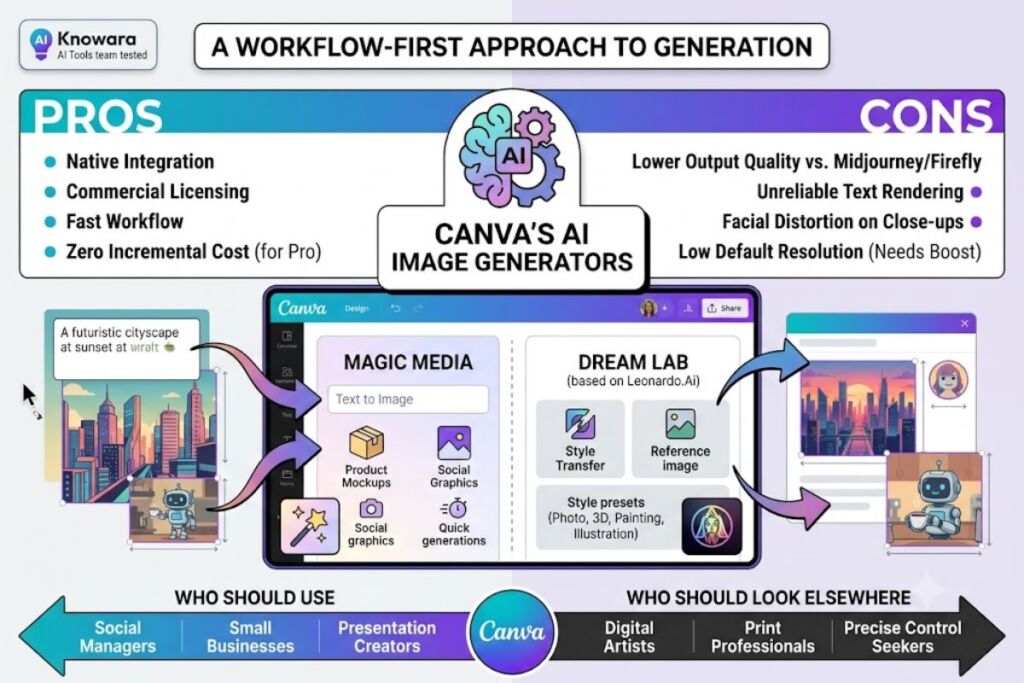
Tested by the Knowara AI Tools team using 60+ Magic Media and Dream Lab generations across social graphics, presentation art, and product-mockup use cases on both the Free and Pro tiers.
- 01What Is Canva’s AI Image Generator?
- 02What Are Canva’s AI Image Generator’s Key Features?
- 03How Much Does Canva’s AI Image Generator Cost?
- 04What Are the Pros and Cons of Canva’s AI Image Generator?
- 05How Does Canva’s AI Image Generator Compare to Midjourney?
- 06Who Should Use Canva’s AI Image Generator?
- 07What Are the Best Alternatives to Canva’s AI Image Generator?
- 08Frequently Asked Questions
- 09Final Verdict
Canva’s AI image generator combines two engines — Magic Media and Dream Lab — built directly into the Canva editor. It converts text prompts into images without leaving the design canvas, but output quality trails dedicated tools like Midjourney and Adobe Firefly.
What Is Canva’s AI Image Generator?
Canva’s AI image generator is a text-to-image feature suite inside the Canva design platform, made up of Magic Media (the original generator) and Dream Lab (a higher-quality engine built on Leonardo.Ai’s architecture). Both tools sit inside the same editor used for presentations, social posts, and marketing assets.
Canva Inc. released the original Magic Media tool in 2023 as part of its Magic Studio AI rollout. Dream Lab arrived after Canva’s 2024 acquisition of Leonardo.Ai and now handles most Pro-tier image generation requests. A prompt typed into either tool returns a set of image variations directly on the canvas, ready to drag, resize, or layer with text and templates.
| Attribute | Value |
|---|---|
| Developer | Canva Inc. |
| Underlying image models | Magic Media (Canva’s original model) + Dream Lab (built on Leonardo.Ai Phoenix architecture) |
| Release year | 2023 (Magic Media), 2024–2025 (Dream Lab rollout) |
| Platforms | Web, iOS, Android, Windows, macOS |
| Pricing model | Freemium — included in Canva Free, Pro, and Business plans |
| Free tier generations | Approximately 50 Magic Media generations included on the Free plan <cite index=”8-1″>, alongside 25 Magic Write prompts per month</cite> |
| Pro tier image allowance | Up to 500 Dream Lab image generations per month, drawn from a shared 2,000-Standard / 200-Premium / 20-Ultra AI credit pool <cite index=”5-1″>, with additional credits available through the AI Pass add-on at roughly $10/user/month</cite> |
| Default output resolution | Approximately 384×688 pixels on standard generation <cite index=”5-1″>, requiring a separate “Boost resolution” step for larger exports</cite> |
| Key differentiator | Generated images stay inside an editable Canva design — no export/re-import step |
Pricing and free-tier figures verified as of July 2026. Canva adjusts credit allocations periodically — confirm current numbers on Canva’s official pricing page before purchasing.
What Are Canva’s AI Image Generator’s Key Features?
Canva’s AI image generator ships six core capabilities that cover generation, editing, and export inside one workspace.
- Generate images from a text prompt using Magic Media or Dream Lab, returning 4 variations per request.
- Apply one of Dream Lab’s built-in style presets — Photo, 3D, Painting, and Illustration — before generating.
- Transfer a visual style from an uploaded reference image onto a new generation using Dream Lab’s Style Transfer function, added in the 2026 update <cite index=”1-1″>, letting users upload a reference image and generate new images matching its aesthetic, palette, and composition</cite>.
- Edit an existing image region with Magic Edit by selecting an area and describing the replacement content.
- Extend an image’s borders using Magic Expand’s AI outpainting, filling new canvas space with contextually matched content.
- Remove unwanted objects from any photo or generated image with Magic Eraser, without leaving the canvas.
We tested Style Transfer by uploading a flat-lay product photo and prompting Dream Lab to generate three variations matching its lighting and color palette. Two of the three outputs preserved the reference palette accurately; the third shifted the background from warm beige to cool gray, confirming the tool’s known inconsistency with color-matching on busy source images.
How Much Does Canva’s AI Image Generator Cost?
Canva’s AI image generator costs nothing on a limited Free plan, or comes bundled into Canva Pro at approximately $15/month (or $120/year), with Canva Business at $20/user/month for teams needing higher allowances.
| Plan | Price | AI Image Allowance | Source |
|---|---|---|---|
| Canva Free | $0 | ~50 Magic Media generations included in the free AI allowance | <cite index=”8-1″>Free plan includes 250,000+ templates, real-time collaboration, and basic AI tools, with limits on AI usage including roughly 50 Magic Media generations</cite> |
| Canva Pro | ~$15/month or $120/year | Up to 500 Dream Lab generations/month, drawn from a 2,000 Standard / 200 Premium / 20 Ultra shared credit pool | <cite index=”5-1″>Canva Pro includes up to 2,000 Standard AI uses, 200 Premium AI uses, or 20 Ultra AI uses per month, with additional credits via the AI Pass add-on at roughly $10/user/month</cite> |
| Canva Business | ~$20/user/month | Roughly 4x the Pro allowance (4,000 Standard / 400 Premium / 40 Ultra) | <cite index=”1-1″>The AI allowance doubles on Business relative to Pro, reaching 4,000 Standard, 400 Premium, and 40 Ultra credits per month</cite> |
Pricing verified as of July 2026. Source: aggregated third-party pricing trackers citing Canva’s official pricing page — confirm exact current figures at canva.com/pricing before subscribing, since Canva has adjusted Pro pricing at least once in the past year (from $12.99 to $15/month in 2025).
Standard, Premium, and Ultra AI tools draw from one shared monthly pool rather than separate quotas <cite index=”6-1″>, meaning Magic Write, background removal, image generation, translation, and video generation all consume the same allowance</cite>. Running a batch of Dream Lab generations alongside Magic Write copy and Background Remover edits in the same week depletes the Pro allowance faster than the “500 generations” headline number suggests.
What Are the Pros and Cons of Canva’s AI Image Generator?
Canva’s AI image generator wins on workflow speed and loses on raw output quality compared to dedicated text-to-image platforms.
Pros:
- Generates directly inside an editable design — no download-and-reimport step required, unlike standalone generators.
- Commercially licensed output — Dream Lab images carry commercial usage rights, with Canva Shield IP indemnification available on Enterprise plans.
- Style Transfer matches a reference image’s palette and composition in most single-subject test cases.
- Free tier requires no credit card, giving new users roughly 50 generations to test quality before paying.
Cons:
- Text rendering inside generated images is unreliable. Independent side-by-side testing scored Canva’s text rendering as effectively unusable for prompts requiring readable words <cite index=”2-1″>, with the tool producing only 1.8 usable images out of every 4 generations across mixed prompt types</cite>. Workaround: add text as a separate Canva text layer after generation instead of prompting the AI to render it directly.
- Default output resolution caps at roughly 384×688 pixels <cite index=”5-1″>, unsuitable for print without a manual “Boost resolution” step</cite>. Workaround: apply Boost Resolution before export, or upscale externally for print-quality work.
- No dedicated negative-prompt field. <cite index=”9-1″>Users must exclude unwanted elements through descriptive language inside the main prompt rather than a separate negative-prompt input, unlike Stable Diffusion or Midjourney.</cite> Workaround: front-load exclusions in the prompt itself (“no text, no watermark, no extra limbs”).
- Facial distortion on close-up portraits and hand rendering issues persist <cite index=”1-1″>in independent testing, alongside problems with small text inside generated images</cite>. Workaround: use Dream Lab for wide or medium shots and avoid close-up portrait prompts entirely.
- No a la carte credit top-ups. <cite index=”8-1″>Running out of AI credits mid-cycle forces either an upgrade to the next tier or a wait until the monthly reset — Canva offers no separate credit purchase option.</cite> Workaround: batch-generate early in the billing cycle for month-critical campaigns.
How Does Canva’s AI Image Generator Compare to Midjourney?
Canva’s AI image generator prioritizes speed and design integration; Midjourney prioritizes artistic image quality and stylistic control.
| Attribute | Canva (Dream Lab) | Midjourney |
|---|---|---|
| Free tier | ~50 generations included | None — subscription required <cite index=”2-1″>, with plans starting at $10/month</cite> |
| Output quality ranking | Rated above DALL-E 3, behind Midjourney v7 in independent testing <cite index=”1-1″></cite> | Rated above Dream Lab in the same comparison |
| Design integration | Generates directly inside an editable canvas | Requires export and manual import into a design tool |
| Negative prompts | Not supported as a dedicated field <cite index=”9-1″></cite> | Supported natively |
| Best for | Fast on-brand social and marketing graphics | High-fidelity artistic and stylized imagery |
Readers comparing the two tools head-to-head in more depth can review Knowara’s dedicated Midjourney vs Canva AI Image Generator comparison for prompt-by-prompt output samples.
Who Should Use Canva’s AI Image Generator?
Canva’s AI image generator suits non-designers who need fast, on-brand visuals inside an existing workflow, not professionals chasing print-grade image fidelity.
- Social media managers producing daily post graphics without switching between a generator and a design tool.
- Small business owners building marketing materials without a dedicated design budget.
- Presentation creators who need quick illustrative visuals for slide decks rather than photorealistic assets.
- Marketing teams already on Canva Pro or Business, where image generation adds zero incremental software cost.
Professional digital artists, teams requiring print-resolution output, and users needing precise prompt control should look to dedicated generators instead.
What Are the Best Alternatives to Canva’s AI Image Generator?
- Midjourney — delivers the highest artistic output quality among mainstream AI image tools, at $10/month with no free tier. Read Knowara’s full Midjourney review for pricing tiers and sample outputs.
- Adobe Firefly — integrates natively with Creative Cloud and offers commercially safe generation with stronger generative-fill precision than Dream Lab. See Knowara’s Adobe Firefly review for feature-by-feature testing.
- Ideogram 3.0 — outperforms every competitor on in-image text rendering, at $7/month with 10 free daily prompts. Check Knowara’s Best Free AI Image Generators roundup for how it stacks up against Canva’s free tier.
Frequently Asked Questions
Is Canva’s AI image generator free?
Yes. The Free plan includes roughly 50 Magic Media generations as part of a shared free AI allowance, with no credit card required to start.
Are Canva AI-generated images commercially safe to use?
Yes. Dream Lab outputs carry commercial licensing, and Canva Enterprise plans add Canva Shield IP indemnification for additional legal protection.
Does Canva’s AI image generator support 4K or print resolution?
Not by default. Standard generations output at approximately 384×688 pixels, requiring a manual “Boost Resolution” step before print-quality export.
How does Dream Lab differ from Magic Media?
Magic Media is Canva’s original text-to-image tool with simplified style presets. Dream Lab is the newer engine built on Leonardo.Ai’s Phoenix architecture, producing sharper detail and stronger prompt adherence.
Final Verdict
Canva’s AI image generator delivers acceptable image quality for social media and presentation graphics at zero incremental cost for existing Pro subscribers, but professional and print-focused users pay less for better output at Midjourney’s $10/month tier with no design-platform lock-in.
Pingback: Photoroom Review 2026: Pricing, Features & Alternatives
Pingback: Pixelcut Review 2026: AI Product Photography Tested
Pingback: Picsart AI Review 2026: Pricing, Features & Free Plan