
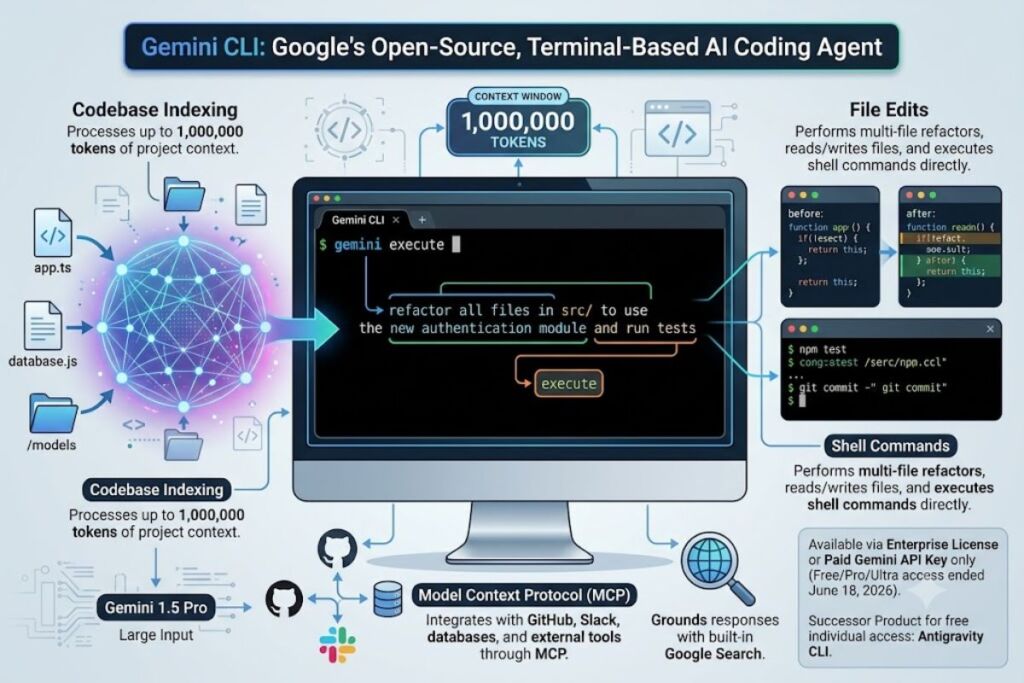
Gemini CLI is Google’s open-source, terminal-based AI coding agent, built by Google and launched in June 2025 with a 1-million-token context window. As of June 18, 2026, Google stopped serving free, Google AI Pro, and Google AI Ultra accounts through Gemini CLI, redirecting individual developers to a new closed-source replacement, Antigravity CLI.
What Is Gemini CLI?
Gemini CLI is a command-line AI agent that runs Gemini models directly inside a developer’s terminal, executing file edits, shell commands, and multi-file refactors through natural-language prompts. Google released it as an Apache 2.0 open-source project in June 2025.
Gemini CLI operates as a Node.js application, invoked with the gemini command after installation via npm or npx. The agent indexes a project’s codebase, reads and writes files, executes shell commands, and calls external tools through the Model Context Protocol (MCP). Google built Gemini CLI on the same underlying agent harness used inside Gemini Code Assist, its IDE extension for VS Code, JetBrains, and other editors.
| Attribute | Value |
|---|---|
| Company | |
| Release Year | 2025 (June) |
| License | Apache 2.0 (open source) |
| Current Pricing | Enterprise license or paid Gemini API key only (free/Pro/Ultra access ended June 18, 2026) |
| Platforms | macOS, Linux, Windows (Node.js 20+) |
| Context Window | 1,000,000 tokens |
| Key Feature | MCP server integration with Google Search grounding |
| Successor Product | Antigravity CLI (agy command) |
What Are Gemini CLI’s Key Features?
Gemini CLI indexes full codebases with a 1-million-token context window, executes shell commands directly, and connects to external tools through MCP servers. These features target multi-file refactors, debugging, and automated code review.
- Indexes the entire project directory into a 1,000,000-token context window, enough to hold most mid-sized codebases in a single session.
- Executes shell commands, file reads, and file writes directly from natural-language prompts, without leaving the terminal.
- Integrates MCP servers for GitHub, Slack, and custom databases, letting the agent query external systems mid-task.
- Grounds responses with built-in Google Search, reducing outdated library or API references.
- Reviews pull requests automatically through the Conductor extension, checking guideline enforcement, test validation, and security scanning.
- Delegates long-running tasks to Jules, Google’s asynchronous coding agent, for background execution outside the terminal session.
- Reads multimodal input, including screenshots and PDFs, for tasks like converting a UI mockup into code.
Gemini CLI’s own <cite index=”7-1″>documentation lists a free tier of 60 requests per minute and 1,000 requests per day with a personal Google account</cite> — a limit that applied before the June 18, 2026 cutoff described below.
How Much Does Gemini CLI Cost?
Gemini CLI no longer offers free access to individual developers as of June 18, 2026. According to Google’s official transition announcement, <cite index=”11-1″>on June 18, 2026, Gemini CLI and Gemini Code Assist IDE extensions stopped serving requests for Google AI Pro and Ultra tiers, as well as free-tier users</cite>.
Three payment paths remain active for Gemini CLI specifically:
- Enterprise access — Organizations with a Gemini Code Assist Standard or Enterprise license, or Gemini Code Assist for GitHub through Google Cloud, retain uninterrupted access. Google confirmed this carve-out in its official announcement: <cite index=”11-1″>Gemini CLI will remain accessible via paid Gemini and Gemini Enterprise Agent Platform API keys</cite>.
- Pay-as-you-go API key — Developers can authenticate with a paid Gemini API key and pay per token. Gemini 2.5 Pro costs $1.25 per 1 million input tokens (up to a 200K-token prompt) and $10.00 per 1 million output tokens, rising to $2.50 and $15.00 per 1 million tokens respectively once a prompt exceeds 200,000 tokens, per Google’s published API pricing.
- Vertex AI Express Mode — A limited free quota without enabling billing, intended for short-term experimentation rather than daily development work.
Personal Google accounts on the free tier, Google AI Pro, and Google AI Ultra plans can no longer authenticate Gemini CLI for standard use. Google redirects those users to Antigravity CLI, its closed-source Go-based replacement, invoked with the agy command.
What Are the Pros and Cons of Gemini CLI?
Gemini CLI’s largest advantage is its 1-million-token context window and deep MCP integration; its largest drawback is the loss of free and individual-tier access after June 18, 2026.
Pros:
- Processes a 1,000,000-token context window, larger than most competing terminal agents.
- Ships as Apache 2.0 open-source code, allowing developers to inspect and fork the codebase.
- Connects to MCP servers for GitHub, Slack, and custom databases without third-party plugins.
- Grounds code suggestions in live Google Search results, reducing outdated API references.
- Retains enterprise-grade support through Gemini Code Assist Standard and Enterprise licenses.
Cons:
- Stopped serving free, Google AI Pro, and Google AI Ultra personal accounts on June 18, 2026, with no announced grace period.
- Requires a paid Gemini API key or enterprise license for continued individual use, adding a direct cost that did not previously exist.
- No widely adopted, standardized benchmark compares Gemini CLI against other terminal coding agents head-to-head; SWE-bench Verified scores measure underlying Gemini models, not the CLI tool itself.
- Community reports describe inconsistent output quality and recurring HTTP 429 rate-limit errors even before the June 2026 access change.
- Google is steering long-term development toward Antigravity CLI, a closed-source product, raising continuity questions for teams standardizing on Gemini CLI today.
How Does Gemini CLI Compare to Claude Code?
Claude Code, Anthropic’s terminal coding agent, retains free-tier and subscription access for individual developers, while Gemini CLI now restricts individual access to paid API keys or enterprise licenses.
| Attribute | Gemini CLI | Claude Code |
|---|---|---|
| Company | Anthropic | |
| Individual Free Access | Discontinued June 18, 2026 | Available with subscription plans |
| Context Window | 1,000,000 tokens | 200,000 tokens (1,000,000 tokens in long-context mode) |
| License | Apache 2.0 (open source) | Proprietary |
| MCP Support | Yes | Yes |
| Primary Interface | Terminal (gemini command) |
Terminal (claude command) |
Knowara’s full breakdown of this matchup, Claude Code vs Gemini CLI: Which Terminal AI Agent Wins in 2026, covers benchmark comparisons and pricing tiers in more depth.
Who Should Use Gemini CLI?
Gemini CLI fits enterprise development teams already licensed under Gemini Code Assist Standard or Enterprise, and individual developers willing to pay per token through the Gemini API.
Enterprise engineering teams with an existing Google Cloud contract gain the most value, since their Gemini Code Assist Standard or Enterprise license keeps Gemini CLI running without the June 2026 access restrictions. Solo developers who already maintain a paid Gemini API key for other projects can continue using Gemini CLI’s open-source terminal interface at standard token rates. Teams building custom MCP integrations for internal tools benefit from Gemini CLI’s existing MCP server support and its Apache 2.0 codebase, which permits direct modification of the agent’s tool-calling logic.
Indie developers and hobbyists searching for a no-cost terminal agent no longer fit Gemini CLI’s current access model. Google’s official guidance directs this group to Antigravity CLI instead.
What Are the Best Alternatives to Gemini CLI?
Claude Code, Cursor, and Aider serve as the three most relevant alternatives to Gemini CLI, each targeting a different segment of individual and team-based development workflows.
- Claude Code — Anthropic’s terminal coding agent, covered in Knowara’s Claude Code Review, keeps subscription-based access open to individual developers without the enterprise-only restriction Gemini CLI now carries.
- Cursor — An AI-native code editor built on VS Code, reviewed in Knowara’s Cursor AI Review, offers autocomplete and multi-file editing inside a full IDE rather than a terminal-only interface.
- Aider — An open-source terminal coding agent that connects to multiple model providers, including Gemini, Claude, and GPT models, without requiring a single vendor’s enterprise license.
For a broader side-by-side of no-cost options, see Knowara’s Best Free AI Coding Tools listicle, which ranks tools by their current free-tier limits as of 2026.
Frequently Asked Questions
Is Gemini CLI still free?
No. Google ended free-tier access to Gemini CLI on June 18, 2026. Individual developers now need a paid Gemini API key or an enterprise Gemini Code Assist license to continue using it.
Is Gemini CLI still available in 2026?
Yes, but only for two groups: organizations with a Gemini Code Assist Standard or Enterprise license, and developers authenticating with a paid Gemini API key. Personal free, Pro, and Ultra accounts lost access on June 18, 2026.
What replaced Gemini CLI for individual developers?
Antigravity CLI, invoked with the agy command, replaced Gemini CLI for free, Google AI Pro, and Google AI Ultra personal accounts. Antigravity CLI is closed-source and built in Go, unlike the Apache 2.0 TypeScript codebase of Gemini CLI.
Can I still access Gemini CLI’s source code?
Yes. The Gemini CLI repository remains public under the Apache 2.0 license on GitHub. Running it against Google’s backend still requires a paid Gemini API key or enterprise license, since the free personal-account authentication path no longer works.
Final Verdict
Gemini CLI delivers a 1-million-token context window and native MCP integration, but Google’s June 18, 2026 policy change removed free and individual-subscription access, leaving enterprise Gemini Code Assist licenses and pay-as-you-go API billing as the only paths to continued use. Developers evaluating terminal AI agents for personal projects in mid-2026 get more predictable no-cost access from Claude Code or Aider than from Gemini CLI in its current, enterprise-restricted form.