
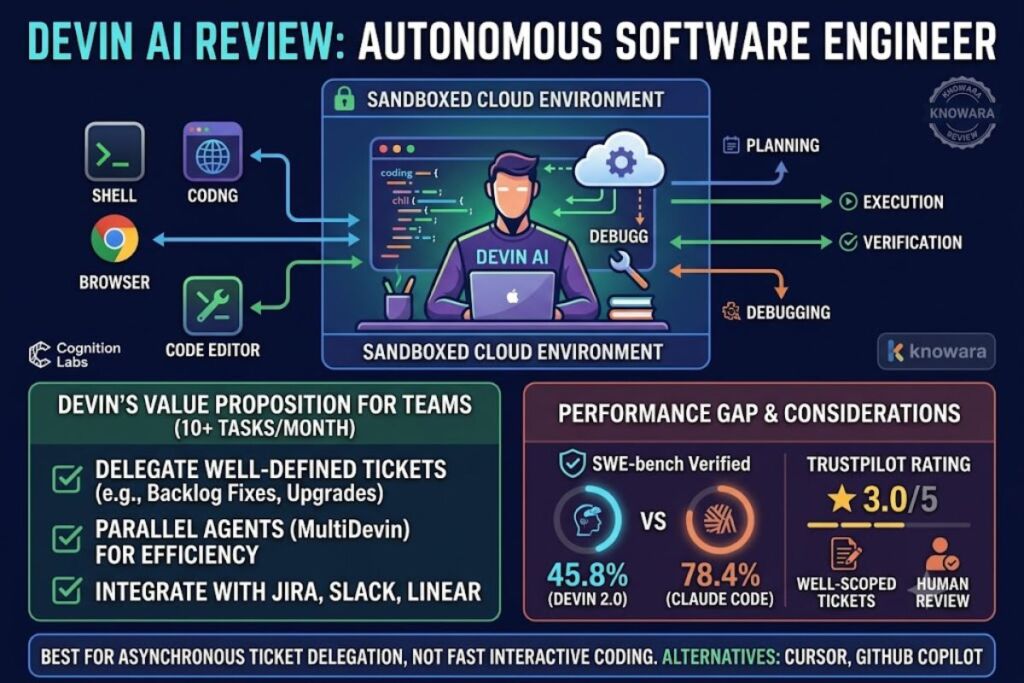
Devin AI resolves well-defined coding tickets without step-by-step supervision. Devin justifies its cost for teams delegating 10+ well-scoped tasks per month, but underperforms for solo developers who need fast, interactive coding help. This review tests Devin’s features, pricing, and benchmark data against Cursor and GitHub Copilot.
What Is Devin AI?
Devin is an autonomous AI software engineer built by Cognition Labs that plans, codes, tests, and debugs inside its own sandboxed environment. Devin executes multi-step engineering tickets end-to-end and reports back only when the work is done or blocked.
Cognition Labs launched Devin in March 2024, positioning it against interactive copilots like GitHub Copilot and Cursor. Devin operates inside a sandbox containing a shell, a code editor, and a browser, and it coordinates sub-agents to plan, execute, verify, and debug tasks without continuous prompting.
| Attribute | Value |
|---|---|
| Company | Cognition Labs |
| Release Year | 2024 (Devin 1.0), 2025 (Devin 2.0) |
| Starting Price | $0 (Free tier) |
| Paid Tiers | Pro $20/month, Max $200/month, Teams $80/month + $40/month per full seat |
| Platforms | Devin Desktop, Devin Cloud, web app, Slack, Linear, Jira integrations |
| Model Backends | OpenAI, Anthropic Claude, Google Gemini, Cognition’s own SWE-1.6 model |
| Key Feature | MultiDevin parallel agent execution across multiple files and repositories |
| SWE-bench Verified Score | 45.8% (standard single-agent evaluation, Devin 2.0, per Cognition’s published methodology) |
What Are Devin’s Key Features?
Devin’s core features center on autonomous execution rather than inline suggestion. Each feature below ships a specific capability that separates Devin from copilot-style tools.
- Plan engineering tickets automatically through Interactive Planning, which analyzes the codebase and proposes a task breakdown before writing code.
- Execute tasks inside Devin Cloud, an isolated sandbox with its own shell, browser, and code editor.
- Parallelize large-scale refactors through MultiDevin, running multiple agent instances on separate subtasks simultaneously.
- Index entire codebases through DeepWiki, generating architecture diagrams and source-linked documentation automatically.
- Integrate with Slack, Microsoft Teams, Linear, Jira, GitHub, GitLab, and Bitbucket to receive tickets and submit pull requests.
- Debug failing test suites by iterating on sub-agent feedback loops until tests pass or the agent flags a blocker.
- Deploy applications directly from the sandbox when a task requires shipping to a live environment.
- Query any indexed repository through Ask Devin, a natural-language interface for codebase questions with citations.
How Much Does Devin AI Cost?
Devin’s official pricing, listed on Cognition’s pricing page, runs from a $0 Free tier to a custom-quoted Enterprise plan. Devin’s Pro plan costs $20 per month, its Max plan costs $200 per month, and its Team plan costs $80 per month plus $40 per month per full developer seat.
According to Devin’s official pricing page, the five current tiers break down as follows:
| Tier | Price | Concurrent Sessions | Best For |
|---|---|---|---|
| Free | $0/month | Up to 10 | Testing Devin’s Tab completions and limited agent quota |
| Pro | $20/month | Up to 10 | Individual developers needing full model access (OpenAI, Claude, Gemini) |
| Max | $200/month | Unlimited | Power users running heavy agent workloads daily |
| Teams | $80/month + $40/month per seat | Unlimited | Engineering teams sharing centralized billing and admin controls |
| Enterprise | Custom quote | Unlimited | Organizations requiring VPC deployment and SAML/OIDC SSO |
Cognition restructured this pricing model in 2026, replacing the earlier Agent Compute Unit (ACU) system that charged $2.00–$2.25 per ACU on top of a base fee. Before the restructure, Devin’s entry-level Core plan cost $20 per month plus per-ACU consumption charges, and the original 2024 Team plan cost $500 per month, according to TechCrunch’s April 2025 reporting on Devin 2.0’s pricing shift. The current flat-tier model removes that consumption-based unpredictability for individual users.
What Are the Pros and Cons of Devin AI?
Devin delivers strong autonomous execution on well-scoped tickets but shows a documented gap between benchmark claims and independent real-world testing. Devin’s SWE-bench Verified score of 45.8% trails Claude Code’s 78.4% scaffolded score, according to AI Wiki’s 2026 benchmark tracking.
Pros:
- Executes multi-file refactors and migrations without continuous human prompting.
- Runs parallel agent sessions through MultiDevin, cutting sequential task time on bulk migrations.
- Generates architecture documentation automatically through DeepWiki as it indexes a codebase.
- Integrates directly with Slack, Linear, and Jira, letting teams delegate tickets from existing workflows.
- Supports frontier model backends (Claude, GPT, Gemini) rather than locking users to one model provider.
Cons:
- Scores 45.8% on SWE-bench Verified under standard evaluation, well below Claude Code’s 78.4% scaffolded result, per AI Wiki’s benchmark comparison.
- Struggles with vague or architecturally ambiguous tickets that require senior engineering judgment.
- Holds a 3.0/5 rating on Trustpilot as of March 2026, notably lower than GitHub Copilot’s 4.5/5 and Cursor’s 4.7/5 on G2.
- Requires well-specified tickets; poorly scoped tasks produce output that needs substantial human review.
- Long-running autonomous sessions can generate large diffs that take significant reviewer time to verify.
How Does Devin AI Compare to Cursor?
Devin and Cursor solve different problems: Devin delegates entire tickets autonomously, while Cursor assists a developer who stays in the editor. Choose Devin for asynchronous ticket delegation; choose Cursor for real-time, human-in-the-loop coding inside a familiar IDE.
| Factor | Devin AI | Cursor |
|---|---|---|
| Interaction model | Autonomous delegation | Human-in-the-loop, in-editor |
| Entry price | $0 Free / $20 Pro | $0 Hobby tier, paid tiers scale to $200/month |
| Sandbox execution | Yes, cloud sandbox with shell and browser | No, runs inside local VS Code fork |
| SWE-bench Verified | 45.8% (standard evaluation) | Not directly comparable; Cursor is not benchmarked as an autonomous agent |
| G2 rating | Not independently rated at Cursor’s volume | 4.7/5 |
For a full head-to-head breakdown, see Knowara’s dedicated comparison post, Devin AI vs Cursor: Which AI Coding Tool Wins in 2026.
Who Should Use Devin AI?
Devin fits teams that can supply well-defined tickets and dedicate review time to autonomous output. Engineering teams running 10 or more well-scoped tickets per month get the strongest return from Devin’s Teams or Max plans.
- Engineering teams with a ticket backlog of routine bug fixes, dependency upgrades, and test generation tasks that Devin can pick up from Linear or Jira directly.
- Enterprise migration teams handling large-scale codebase modernization, similar to Nubank’s ETL migration covering 6 million lines of code across more than 100,000 data class implementations.
- Engineering managers evaluating agent ROI who need parallel agent throughput on repetitive, well-scoped work rather than exploratory feature design.
Devin is not suited for solo developers on tight budgets who need fast, interactive feedback loops, or for teams whose tickets are consistently vague or under-specified — both scenarios reduce Devin’s completion rate and increase review overhead.
What Are the Best Alternatives to Devin AI?
Three tools cover the gap Devin leaves for interactive, in-editor coding assistance. Each alternative below fits a different budget or workflow than Devin’s autonomous delegation model.
- Cursor runs as an AI-first code editor forked from VS Code, offering multi-file Composer mode edits with direct human oversight during every change. Read Knowara’s full Cursor AI Review.
- GitHub Copilot provides inline code suggestions and a Workspace mode for generating pull requests, priced at $19 per user per month on the Business tier. Read Knowara’s full GitHub Copilot Review.
- Claude Code runs locally in the developer’s terminal rather than a cloud sandbox, scoring 78.4% on SWE-bench Verified with its published scaffold. Read Knowara’s full Claude Code Review.
Frequently Asked Questions
Is Devin AI free to use?
Devin offers a Free tier at $0 per month with a light usage quota, limited model availability, and unlimited Tab completions, according to Devin’s official pricing page.
What is Devin’s SWE-bench score?
Devin 2.0 scores 45.8% on SWE-bench Verified under Cognition’s standard single-agent evaluation, and 60.8% under a scaffolded evaluation, per AI Wiki’s 2026 benchmark tracking.
Does Devin AI replace human developers?
Devin executes well-defined, delegated tickets autonomously but requires human review for architectural decisions, ambiguous requirements, and final code approval before merging.
How much does the Devin Teams plan cost?
The Teams plan costs $80 per month as a base fee plus $40 per month for each full developer seat, with unlimited flex seats included, according to Devin’s official pricing page.
The Verdict
Devin’s Free and Pro tiers ($0 and $20/month) make testing autonomous delegation low-risk, but the tool’s value scales with ticket volume: teams delegating 10+ well-scoped tasks monthly on the $80+ Teams plan extract measurably more value per dollar than solo developers paying for interactive, moment-to-moment coding help better served by Cursor or Claude Code