
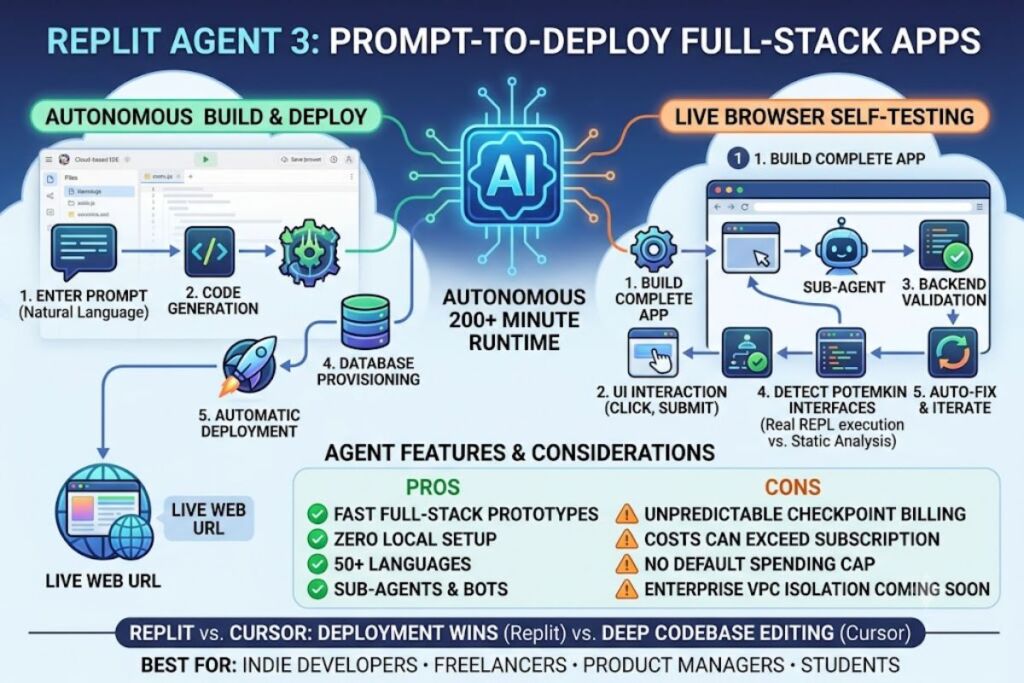
Replit Agent is an autonomous AI coding system inside the Replit cloud IDE that builds, tests, and deploys full-stack applications from natural-language prompts. Agent 3, the current version, runs for up to 200 minutes without supervision and self-tests every app it builds inside a live browser environment.
- 01What Is Replit Agent?
- 02What Are Replit Agent’s Key Features?
- 03How Much Does Replit Agent Cost?
- 04What Are the Pros and Cons of Replit Agent?
- 05How Does Replit Agent Compare to Cursor?
- 06Who Should Use Replit Agent?
- 07What Are the Best Alternatives to Replit Agent?
- 08Frequently Asked Questions
- 09Final Verdict
What Is Replit Agent?
Replit Agent is an AI-powered software development agent built into Replit’s browser-based IDE that converts natural-language prompts into deployed, working applications. It writes code, installs dependencies, provisions a database, and publishes the app without the user touching a terminal.
Replit is the cloud development platform that hosts the Agent, founded in 2016 by Amjad Masad, Haya Odeh, and Faris Masad. The company operates the IDE, the Agent, and the deployment infrastructure as one integrated product, so a prompt typed into the Agent chat becomes a live URL without leaving the browser tab.
| Attribute | Value |
|---|---|
| Company | Replit, Inc. |
| Founded | 2016 |
| Current Agent Version | Agent 3 (released September 10, 2025) |
| Pricing | Starter: $0/mo · Core: $25/mo ($20/mo annual) · Pro: $100/mo · Enterprise: custom |
| Platforms | Web browser (Chrome, Safari, Firefox, Edge); no local install required |
| Key Feature | Autonomous 200-minute build-test-fix loop with browser-based self-testing |
| Supported Languages | 50+, including Python, JavaScript, TypeScript, Java, Go, C++ |
Replit’s official pricing page confirms four active tiers as of February 2026: Starter, Core, Pro, and Enterprise, with Pro replacing the former Teams plan on February 20, 2026.
What Are Replit Agent’s Key Features?
Replit Agent 3 combines autonomous coding with self-verification and deployment in one workspace. The core features are extended autonomous runtime, browser-based self-testing, sub-agent generation, and one-click deployment.
- Run autonomously for 200+ minutes in Max Autonomy mode, handling multi-step builds without requiring input after the initial prompt.
- Test applications inside a live browser using a dedicated testing sub-agent that clicks through UI elements, submits forms, and validates backend responses before returning control to the user.
- Detect “Potemkin interfaces” — screens that render correctly but contain no working backend logic — through REPL-based verification that executes real code instead of static analysis.
- Generate sub-agents and automations, such as Slack bots, Telegram bots, and scheduled workflows, from a single natural-language instruction.
- Integrate third-party services including Notion, Stripe, and GitHub through a guided connection flow instead of manual API key entry.
- Deploy directly to production with Autoscale or Reserved VM hosting, custom domains, and a managed PostgreSQL database, all inside the same workspace.
- Switch between four Agent modes — Lite, Economy, Power, and Turbo — to balance build speed against cost per checkpoint.
Replit’s engineering blog reports that this self-testing loop runs at a median cost of $0.20 per verification session and executes three times faster than Computer Use-style testing models.
How Much Does Replit Agent Cost?
Replit Agent uses a subscription-plus-credits model, not a flat monthly fee. Core costs $25 per month ($20 billed annually) with $25 in monthly Agent credits included, while Pro costs $100 per month for up to 15 builders with pooled, rolling credits.
According to Replit’s official pricing page and billing documentation, the four tiers break down as follows:
| Plan | Monthly Price | Included Credits | Best For |
|---|---|---|---|
| Starter | $0 | Limited daily Agent credits | Learning, one public app |
| Core | $25 ($20 annual) | $25/month, no rollover | Solo developers, freelancers |
| Pro | $100 | Pooled credits, 1-month rollover | Small teams, up to 15 builders |
| Enterprise | Custom | Custom | SSO/SCIM, dedicated support |
Agent billing operates on a per-checkpoint, effort-based structure rather than per-token pricing. Replit’s documentation states that each completed Agent request generates one checkpoint, and every interaction is billable whether or not code changes result. Independent billing audits published in 2026 documented Agent checkpoints charged at $0.25 each and Assistant checkpoints at $0.05 each, with one recorded billing cycle totaling $206.25 across 632 Agent checkpoints and 965 Assistant checkpoints. Deployment costs, including Always-On Repls and Reserved VM instances, draw from the same credit pool and bill separately from the subscription fee.
What Are the Pros and Cons of Replit Agent?
Replit Agent delivers fast, functional full-stack builds but carries unpredictable usage costs. The strongest advantage is the 200-minute autonomous build-and-test loop; the biggest limitation is effort-based billing that can exceed the subscription price by 3 to 4 times for active users.
Pros:
- Builds a working full-stack app, including database and deployment, from a single prompt in approximately 10 minutes for an initial version, per Replit’s own Agent 3 release notes.
- Self-tests the application in a real browser before marking work complete, reducing manual QA cycles.
- Supports 50+ programming languages and frameworks inside one browser-based workspace with no local setup.
- Generates sub-agents and automations (Slack bots, scheduled jobs) without separate tooling.
Cons:
- Effort-based checkpoint billing means costs scale unpredictably with task complexity; documented cases show power users paying 3 to 4 times their base subscription in overages.
- Checkpoints are billed even when the Agent’s output fails or the task is incomplete, according to Replit’s own billing documentation.
- No default spending cap; users must manually configure usage alerts and hard limits to avoid overage charges.
- Enterprise-tier features such as VPC isolation remain listed as “coming soon,” limiting fit for regulated industries.
How Does Replit Agent Compare to Cursor?
Replit Agent and Cursor target different workflows: Replit builds and deploys full applications end-to-end inside a browser, while Cursor is an AI-native code editor focused on multi-file editing within an existing codebase. Replit wins on zero-setup app deployment; Cursor wins on deep codebase navigation for established projects.
| Feature | Replit Agent | Cursor |
|---|---|---|
| Environment | Browser-based cloud IDE | Local desktop editor (VS Code fork) |
| Primary use case | Prompt-to-deployed-app | Multi-file editing in existing codebases |
| Deployment | Built-in (Autoscale, Reserved VM) | Requires external hosting |
| Autonomous runtime | Up to 200 minutes (Agent 3) | Session-based, shorter agentic runs |
| Entry pricing | $25/month + usage credits | Subscription-based, separate tiers |
For a full feature-by-feature breakdown, see our dedicated Replit vs Cursor comparison.
Who Should Use Replit Agent?
Replit Agent fits developers who prioritize speed to a deployed app over granular control of an existing codebase. Solo indie developers prototyping MVPs, product managers turning specs into working demos, and coding students building first projects benefit most from Replit Agent.
- Solo indie developers and freelancers who need a deployed prototype without configuring hosting, a database, or CI/CD separately.
- Product managers and founders validating an idea with a functional demo before committing engineering resources.
- Students and coding bootcamp participants learning full-stack development without installing a local toolchain.
- Small agencies and teams under 15 people on the Pro plan who need pooled Agent credits across multiple builders.
Replit Agent fits less well for enterprise teams requiring VPC isolation or compliance certifications, since those controls remain unavailable on standard plans as of mid-2026.
What Are the Best Alternatives to Replit Agent?
Three platforms compete directly with Replit Agent in the prompt-to-app category, each with a different pricing and workflow trade-off.
- Cursor targets developers who need AI-assisted multi-file editing inside an existing local codebase rather than full-stack app generation. Read our full Cursor AI review.
- Lovable focuses on prompt-to-app building with Draw-to-Build and Claude MCP integration, competing directly with Replit on speed to a working frontend.
- GitHub Copilot operates as an in-editor autocomplete and chat assistant across VS Code, JetBrains, and Neovim rather than a standalone autonomous build agent.
For a ranked breakdown across all major options, see our pillar guide: Best AI Coding Tools in 2026.
Frequently Asked Questions
Does Replit Agent work on a free plan?
Yes. The Starter plan includes limited daily Agent credits and lets users build and test one public app, but it excludes private repos, persistent deployments, and database access.
Is Replit Agent billed per token or per task?
Replit Agent uses effort-based checkpoint billing. Each completed request generates one checkpoint priced according to task complexity, not raw token count.
Can Replit Agent deploy an app automatically?
Yes. Replit Agent connects to Autoscale or Reserved VM deployment inside the same workspace, including custom domain support on the Core plan and above.
What happened to the Replit Teams plan?
Replit retired the Teams plan on February 20, 2026, migrating existing subscribers automatically to the new Pro plan at $100 per month for up to 15 builders.
Final Verdict
Replit Agent 3 delivers the fastest path from a text prompt to a deployed, self-tested full-stack application on the market, backed by a 200-minute autonomous runtime and built-in browser testing that catches non-functional UI before the user sees it. The trade-off is billing predictability: effort-based checkpoint pricing, not the $25 or $100 sticker price, determines actual monthly cost for active builders.