
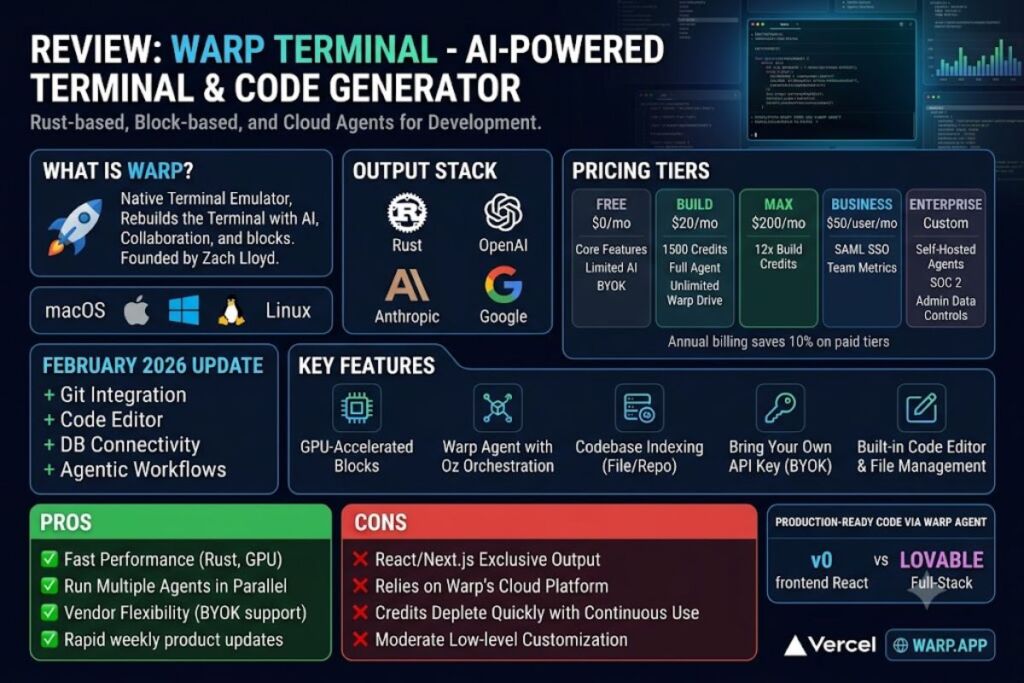
Warp Terminal is an AI-powered terminal application built in Rust that replaces the traditional character-buffer command line with a block-based interface and integrated coding agents. Warp costs $0 for the Free plan, $20/month for Build, $200/month for Max, and $50/user/month for Business, and it runs on macOS, Linux, and Windows.
What Is Warp?
Warp is a native terminal emulator that embeds AI agents, codebase indexing, and team collaboration directly into the command line. Zach Lloyd, a former Principal Engineer at Google, founded Warp in June 2020 to rebuild the 50-year-old terminal interface for AI-assisted development. Warp replaced the traditional scrolling text buffer with blocks — discrete, selectable units that pair each command with its output, enabling copy, share, and re-run actions on individual command results.
| Attribute | Value |
|---|---|
| Company | Warp (Denver Technologies, Inc.), New York City |
| Founder / CEO | Zach Lloyd |
| Release Year | 2022 (public launch), 2020 (founded) |
| Core Language | Rust |
| Platforms | macOS, Windows, Linux |
| Free Tier | $0/month, limited cloud agent access |
| Paid Tiers | Build ($20/mo), Max ($200/mo), Business ($50/user/mo), Enterprise (custom) |
| Key Feature | Warp Agent with cross-harness orchestration via Oz |
| Funding | $73 million raised across 3 rounds (Sequoia Capital, Google Ventures, Neo) |
What Are Warp’s Key Features?
Warp combines four functional layers: a rendering engine, an agent layer, a collaboration layer, and an orchestration layer.
- Renders terminal output through GPU-accelerated blocks instead of a raw character buffer.
- Runs Warp Agent, a coding agent with access to frontier models from OpenAI, Anthropic, and Google.
- Indexes the active codebase to give agents file-level and repository-level context before executing commands.
- Orchestrates multiple agents in parallel through Oz, Warp’s cloud agent platform, allowing simultaneous cloud and local agent runs.
- Stores reusable command sequences and runbooks in Warp Drive, with unlimited objects on the Build tier and above.
- Supports Bring Your Own API Key (BYOK) for OpenAI, Anthropic, and Google model access, effective May 21, 2026.
- Reviews agent-written code through a built-in file editor introduced with the Warp Code update, alongside WARP.md project-rule files comparable to AGENTS.md or CLAUDE.md.
- Certifies enterprise data handling under SOC 2, with admin-configurable data controls on Business and Enterprise plans.
How Much Does Warp Cost?
Warp’s official pricing page lists five tiers: Free ($0), Build ($20/month), Max ($200/month), Business ($50/user/month for up to 25 seats), and Enterprise (custom pricing). Annual billing cuts each paid tier by 10%, dropping Build to $18/month and Max to $180/month.
- Free includes core terminal features, limited cloud agent access, and bring-your-own AI inference.
- Build adds 1,500 monthly credits for cloud and local agents, full Warp Agent access, and unlimited Warp Drive storage.
- Max delivers 12 times the credit allocation of Build for $200/month.
- Business matches Build’s feature set at $50/user/month and adds SAML-based SSO plus team usage metrics.
- Enterprise removes seat limits and adds self-hosted cloud agents, custom codebase indexing, and a dedicated account manager.
Per Warp’s billing documentation, platform-credit consumption for cloud agent runs on self-serve plans begins July 1, 2026, following a preview period that started May 21, 2026.
What Are the Pros and Cons of Warp?
Warp’s Rust-based rendering delivers faster terminal performance than Electron-based competitors like Wave Terminal, according to comparative reviews citing Warp’s native GPU acceleration. Warp reports 700,000+ monthly professional developers and adoption by over 56% of Fortune 500 companies, based on Warp’s customer pages.
Pros:
- Runs multiple agents in parallel tabs, supporting long-running tasks that single-agent terminals cannot handle.
- Ships weekly product updates, according to Warp’s public changelog.
- Supports BYOK across three major model providers, reducing dependency on a single vendor.
Cons:
- Relies on Warp’s cloud platform for advanced agentic features rather than fully local execution.
- The 1,500 monthly Build credits run out quickly under continuous agent use, forcing Reload Credit purchases or BYOK setup.
- Offers less low-level customization than classic terminals such as iTerm2 or Alacritty.
How Does Warp Compare to iTerm2?
Warp trades deep customization for built-in AI agents and team collaboration, while iTerm2 keeps the traditional, highly configurable terminal model. iTerm2 has no native AI layer and requires third-party plugins for AI assistance.
| Feature | Warp | iTerm2 |
|---|---|---|
| Rendering | Rust, GPU-accelerated blocks | Traditional character buffer |
| AI Agents | Native (Warp Agent, Oz) | Plugin-based only |
| Collaboration | Warp Drive shared workflows | None built-in |
| Customization | Moderate | Extensive |
| Platforms | macOS, Windows, Linux | macOS only |
Read the full breakdown in Warp vs iTerm2: Which Terminal Wins for AI Coding.
Who Should Use Warp?
Warp fits developers and teams who work primarily inside the command line and want AI assistance without switching to a full IDE.
- Solo indie developers who need a fast, agent-assisted terminal for scripting and debugging on the Free or Build tier.
- DevOps teams managing infrastructure who use Warp Drive to standardize onboarding and deployment workflows.
- Enterprise engineering organizations requiring SSO, zero data retention, and self-hosted cloud agents on the Business or Enterprise tier.
- Students and CLI beginners who translate plain-English requests into shell commands through Warp Agent.
Warp does not replace a full IDE for teams that need deep multi-file refactoring inside a graphical editor; those teams should evaluate Cursor: AI Code Editor Review instead.
What Are the Best Alternatives to Warp?
- iTerm2 offers deeper terminal customization for macOS users who don’t need native AI agents.
- Cursor provides a full AI-powered IDE with multi-file editing, better suited to graphical code review than terminal-first workflows.
- Wave Terminal delivers an open-source, web-tech-based terminal with inline graphical widget rendering at the cost of higher resource usage.
Compare these options directly in Best AI Coding Tools in 2026.
Frequently Asked Questions
Is Warp Terminal free?
Warp’s Free plan costs $0/month and includes core terminal features, limited cloud agent access, and bring-your-own AI inference support.
Does Warp Terminal work on Windows?
Warp runs natively on Windows 10 and 11 (x64 and ARM64), installable via .exe download or the winget install Warp.Warp command.
What models power Warp Agent?
Warp Agent connects to frontier models from OpenAI, Anthropic, and Google, with BYOK support available on the Free plan as of May 21, 2026.
Is Warp open source?
Warp announced its shift to an open-source model in April 2026, per Fast Company reporting, opening its coding tools to community contribution.
Warp’s $20/month Build plan delivers full agent access and unlimited Warp Drive collaboration at a lower entry cost than comparable AI-IDE subscriptions, making it the most credit-efficient terminal-first option for individual developers as of July 2026.