
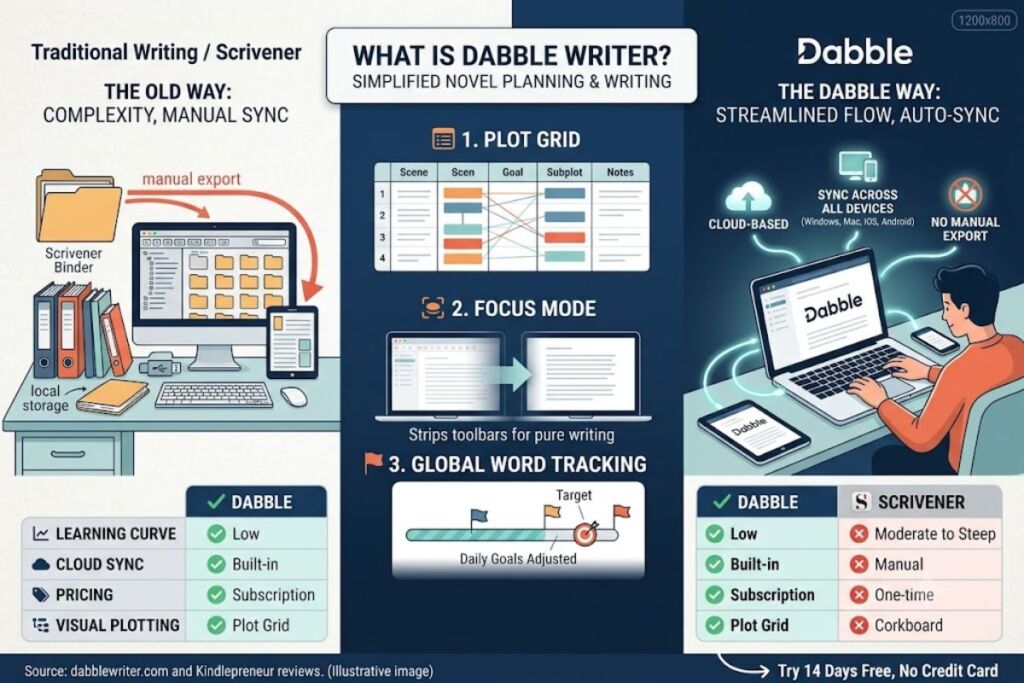
Dabble is a cloud-based novel writing application built around a Plot Grid, Story Notes, and a Focus Mode that strips away every toolbar except the manuscript. It costs $9 to $29 per month, syncs across Windows, Mac, Linux, iOS, and Android, and targets fiction writers who need structure without Scrivener’s learning curve.
What Is Dabble Writer?
Dabble is a subscription-based, cloud-synced novel writing platform that combines a distraction-free editor with visual plotting tools. Jacob Wright founded Dabble in 2017 to give novelists a Scrivener alternative that runs in a browser and syncs automatically across every device.
Dabble stores manuscripts, character notes, and plot outlines in one cloud workspace instead of a local file. A writer opens the same project on a laptop, then continues on a phone during a commute, and every change syncs without a manual export. This removes the file-transfer step that Scrivener’s local-storage model requires.
| Attribute | Value |
|---|---|
| Company / Founder | Dabble Writer, founded by Jacob Wright |
| Release Year | 2017 |
| Pricing | $9/month (Basic), $19/month (Standard), $29/month (Premium), $699 (Lifetime) |
| Platforms | Windows, Mac, Linux, iOS, Android, web browser |
| Key Feature | Plot Grid visual story structuring tool |
| Free Trial | 14 days, no credit card required |
Source: Dabble’s official pricing page (dabblewriter.com/pricing).
What Are Dabble’s Key Features?
Dabble’s core feature set centers on the Plot Grid, Story Notes, Focus Mode, and cross-device goal tracking, with grammar checking added on the Premium tier. Each feature targets a specific stage of the novel-writing process, from outlining to daily word-count discipline.
- Map story structure with the Plot Grid, a spreadsheet-style view that displays every scene, subplot, and character arc side by side with the manuscript.
- Organize character bios, world-building notes, and research links in Story Notes, positioned in a sidebar next to the active chapter.
- Activate Focus Mode to fade out every toolbar after roughly 10 words of continuous typing, leaving only the current paragraph visible.
- Track daily and project-level word-count goals, with the option to exclude specific days off and recalculate the required daily total automatically.
- Sync manuscripts in real time across unlimited devices through cloud backup, with autosave running continuously during a writing session.
- Collaborate with a co-author on the same manuscript simultaneously, available starting on the Premium plan.
- Check grammar and style through a built-in ProWritingAid integration, available on Standard and Premium tiers.
- Import and export manuscripts in formats compatible with Microsoft Word and standard ebook production pipelines.
Source: Dabble’s official features page (dabblewriter.com) and Kindlepreneur’s hands-on Dabble Writer review.
How Much Does Dabble Cost?
Dabble uses a four-tier subscription model: Basic at $9/month, Standard at $19/month, Premium at $29/month, and a Lifetime license at $699. Annual billing lowers the effective monthly cost, and Dabble applies a 20% discount for writers who pay yearly instead of monthly.
The Basic tier includes unlimited manuscripts, cloud backup, goal tracking, and dark mode, but excludes the Plot Grid. The Standard tier at $19/month adds the Plot Grid, Story Notes, Focus Mode, and comment/sticky-note markup. The Premium tier at $29/month adds ProWritingAid-based grammar and style checking, an in-context thesaurus, co-authoring, and access to DabbleU Academy courses valued separately at $39/month. Students and educators receive a 30% discount through a verified academic email. Dabble offers no permanent free tier; the only no-cost option is the 14-day trial, which requires no credit card.
Source: Dabble’s official pricing page, verified against third-party pricing trackers including SaasWorthy and TrustRadius.
What Are the Pros and Cons of Dabble?
Dabble’s strengths are cross-device sync, an approachable Plot Grid, and a distraction-free editor; its weaknesses are subscription-only pricing, limited book-formatting tools, and grammar checking that misses common typos. Reviewers on Capterra and Reedsy Studio confirm the same pattern across independent tests.
Pros:
- Autosave and cloud sync remove the risk of losing work between devices.
- The Plot Grid requires no prior outlining experience, unlike Scrivener’s corkboard-and-binder system.
- Focus Mode fades interface elements automatically, without a manual toggle.
- Goal tracking recalculates the daily word count needed to hit a deadline.
- A 14-day trial requires no credit card, lowering the barrier to testing the tool.
Cons:
- Dabble carries no one-time-purchase option below the $699 Lifetime tier, making it more expensive than Scrivener’s $59 flat fee over a multi-year period.
- Dabble lacks native interior book formatting for print or ebook production, requiring a separate tool such as Atticus or Vellum before publication.
- The built-in ProWritingAid check missed basic errors such as “teh” and “dosnt” during Reedsy Studio’s hands-on test.
- Capterra reviewers report chapter-order scrambling bugs with no built-in version history to revert changes.
Source: Capterra verified user reviews and Reedsy Studio’s hands-on Dabble Writer review.
How Does Dabble Compare to Scrivener?
Dabble trades Scrivener’s one-time $59 fee for a $9-to-$29 monthly subscription in exchange for built-in cloud sync and a shorter learning curve. Scrivener remains the stronger choice for writers who need advanced formatting and a permanent license; Dabble wins on cross-device accessibility.
| Feature | Dabble | Scrivener |
|---|---|---|
| Pricing model | Subscription, $9–$29/month | One-time purchase, ~$59 |
| Cloud sync | Built-in, automatic | Requires third-party sync (e.g., Dropbox) |
| Learning curve | Low | Moderate to steep |
| Interior book formatting | Not included | Limited, compiler-based |
| Visual plotting | Plot Grid | Corkboard and outliner |
Writers deciding between the two tools can review the full breakdown in our dedicated comparison, Scrivener vs Dabble Writer: Which Novel Writing Software Wins in 2026.
Who Should Use Dabble?
Dabble fits fiction writers who plot before drafting, write across multiple devices, and prioritize a clean interface over advanced formatting control. It suits three specific writer profiles based on workflow and budget.
- Series writers managing multiple interconnected manuscripts benefit from Dabble’s unlimited-project structure and consistent cross-book character notes.
- NaNoWriMo participants use the goal-tracking and daily word-count recalculation to stay on pace during a 30-day drafting sprint.
- First-time novelists who find Scrivener’s binder-and-compiler system intimidating get a shorter onboarding path through the Plot Grid.
Dabble does not fit writers who need interior print formatting, a permanent free tier, or offline-first storage without a subscription.
What Are the Best Alternatives to Dabble?
Scrivener, Atticus, and Novlr rank as the three most direct alternatives to Dabble, each trading a different combination of price and formatting depth. Writers choosing between these tools should weigh subscription cost against formatting requirements before committing.
- Scrivener charges a one-time fee near $59 and includes a compiler for advanced manuscript formatting, at the cost of a steeper learning curve. Read our full Scrivener Review.
- Atticus combines drafting and print/ebook formatting in one $147 lifetime license, positioning it as a Dabble alternative for self-publishing authors. Read our full Atticus Review.
- Novlr offers a limited free tier alongside paid plans, making it the closest free alternative to Dabble’s subscription model. Read our full Novlr Review.
For a broader comparison across the category, see Best Free Novel Writing Software in 2026.
Frequently Asked Questions
Does Dabble have a free plan?
No. Dabble offers a 14-day free trial with no credit card required, but it has no permanent free tier.
Can I use Dabble offline?
Dabble runs primarily as a cloud-synced, browser-based application. A desktop app exists for Windows, Mac, and Linux, but continuous cloud sync requires an internet connection for reliable backup.
Does Dabble replace book formatting software?
No. Dabble handles drafting, plotting, and organization only. Writers still need a separate tool, such as Atticus or Vellum, for interior print and ebook formatting.
Is Dabble better than Scrivener for beginners?
Dabble has a shorter learning curve than Scrivener due to its simplified Plot Grid interface. Scrivener remains the stronger option for writers who need a one-time purchase and advanced compiling.
The Bottom Line
Dabble’s $9-to-$29 monthly subscription buys cross-device sync and a low-friction Plot Grid that Scrivener’s $59 one-time license does not include natively, but the same subscription costs more than Scrivener over any period longer than roughly 12 months and still requires a separate formatting tool before publication.