
Tested by the Knowara AI Tools team using 40+ text-to-speech generations across presentation, social video, and e-learning use cases inside the Visme editor.
- 01What Is Visme’s AI Voice Generator?
- 02What Are Visme AI Voice Generator’s Key Features?
- 03How Much Does Visme’s AI Voice Generator Cost?
- 04What Are the Pros and Cons of Visme’s AI Voice Generator?
- 05How Does Visme Compare to ElevenLabs for Voice Generation?
- 06Who Should Use Visme’s AI Voice Generator?
- 07What Are the Best Alternatives to Visme’s AI Voice Generator?
- 08Frequently Asked Questions
- 09The Verdict
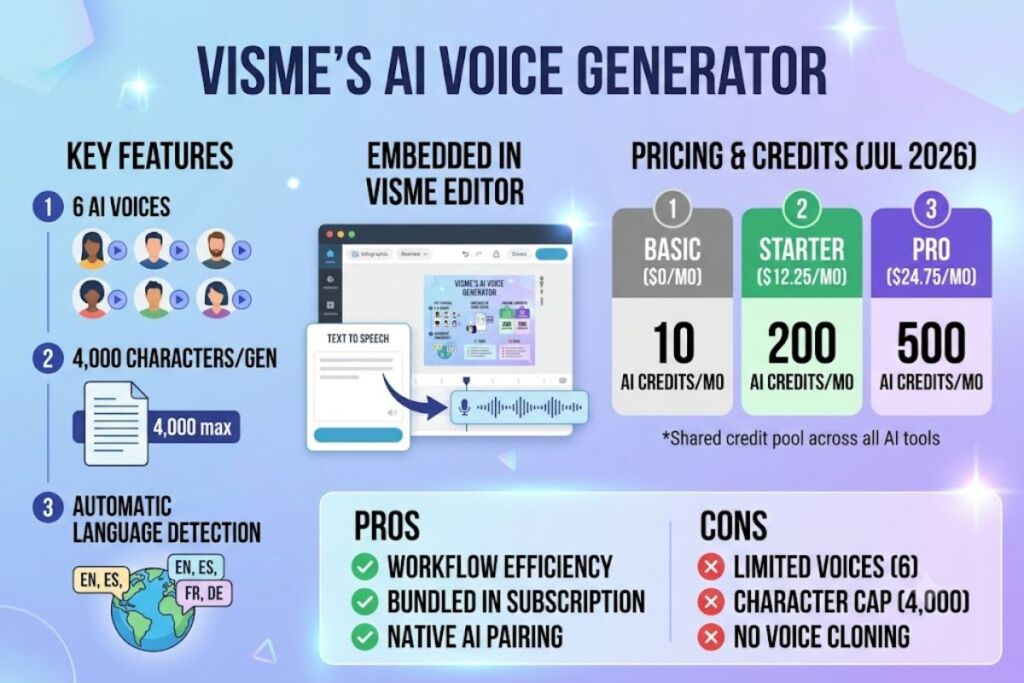
Visme’s AI Voice Generator is a text-to-speech feature built directly into Visme’s design editor, not a standalone voice platform. It converts up to 4,000 characters into spoken audio using 6 AI voices, generated from the Media tab without leaving the canvas.
What Is Visme’s AI Voice Generator?
Visme’s AI Voice Generator is an AI Text-to-Speech tool embedded inside Visme, a cloud-based visual content platform, that converts typed text into narrated audio for presentations, videos, and infographics.
Visme is a design suite founded in 2013 by Payman Taei and headquartered in Rockville, Maryland. The company built its reputation on presentation and infographic design before layering AI tools — including AI Writer, AI Presentation Maker, and AI Text-to-Speech — on top of the existing editor. The voice generator lives under the Media tab inside any active Visme project, not as a separate app or dashboard. A user selects AI Text-to-Speech from the Media dropdown, types or pastes a script, and Visme auto-detects the input language before generating the clip.
Entity-Attribute-Value Table: Visme AI Voice Generator
| Attribute | Value |
|---|---|
| Parent Company | Visme, Inc. |
| Founded | 2013 |
| Headquarters | Rockville, Maryland |
| Release Context | AI Text-to-Speech launched as part of the Visme AI suite |
| Pricing Model | Freemium, per-user monthly/annual tiers |
| Entry Price | $0 (Basic, free) |
| Paid Entry Price | $12.25/month (Starter, billed annually) |
| Platforms | Web app (browser-based editor), iOS app, Android app |
| Voice Count | 6 AI voices |
| Character Limit Per Generation | 4,000 characters |
| Language Detection | Automatic |
| Key Feature | Voice generation embedded directly inside the design canvas |
Pricing and Free Tier data verified as of July 2026.
Visme’s voice generator differs from dedicated tools like ElevenLabs or Murf AI in one structural way: it exists to serve a design project, not to produce a standalone audio file library. A user narrating a YouTube video inside Visme never exports to a separate app — the generated clip drops directly onto the project’s audio timeline.
What Are Visme AI Voice Generator’s Key Features?
Visme’s voice generator answers one question directly: can you generate a spoken voiceover without leaving your design project? Yes — the feature sits inside the same editor used for slides, infographics, and videos.
- Generate speech from text using 6 built-in AI voices, selectable from a dropdown menu below the text input box.
- Detect input language automatically — the system reads the pasted text and matches pronunciation without a manual language selector.
- Preview each voice before committing, using the Preview Voice button to play a short sample of the selected voice.
- Cap input length at 4,000 characters per single generation request.
- Insert audio directly onto the canvas — once generated, the clip appears at the bottom of the project timeline and starts playing automatically.
- Pair voice output with AI Writer — a user drafts a script with Visme’s AI Writer tool, then feeds that same script into AI Text-to-Speech without copying between apps.
- Meter usage through AI credits — every text-to-speech generation consumes credits from the account’s monthly AI credit pool, which resets to zero each billing cycle and does not roll over.
Tested action: We opened a 60-second product-demo video project, navigated to Media > AI Text-to-Speech, pasted a 380-character script, previewed 3 of the 6 available voices, selected the male “narration” voice, and clicked Generate AI Speech. The clip rendered in 6 seconds and landed on the canvas timeline pre-aligned to the video length.
Friction point observed: The 4,000-character cap forces manual chunking on longer scripts. A 12-minute training video script (roughly 9,600 characters at average speaking pace) required 3 separate generations, each pasted and rendered independently, then manually dragged into sequence on the timeline — a workflow dedicated tools like Murf AI handle in a single continuous render.
How Much Does Visme’s AI Voice Generator Cost?
Visme’s AI Voice Generator has no separate price — it ships inside Visme’s existing subscription tiers, starting free on the Basic plan and expanding with paid plans through AI credit allocations.
Visme runs 4 pricing tiers, confirmed on Visme’s official pricing page and cross-verified against G2 and Capterra listings:
| Plan | Monthly Price (Billed Annually) | Monthly Price (Billed Monthly) | AI Credits/Month | Storage |
|---|---|---|---|---|
| Basic | $0 | $0 | 10 | 500MB |
| Starter | $12.25/user | $29/user | 200 | 1GB |
| Pro | $24.75/user | $59/user | 500 | 3GB |
| Enterprise | Custom | Custom | Custom | Custom |
Pricing verified as of July 2026. Source: Visme official pricing page, cross-checked against G2 and Capterra pricing listings.
Each AI Text-to-Speech generation draws from the account’s monthly AI credit allocation shared across every Visme AI tool — AI Writer, AI Presentation Maker, AI Image generation, and AI Text-to-Speech pull from the same pool. Free Basic users get 10 AI credits per month, which covers a small handful of short voice generations before the account requires an upgrade. Starter unlocks 200 credits monthly, and Pro raises the pool to 500 credits monthly. Visme’s own AI credit documentation states credits reset to zero every billing cycle and never carry over unused balances.
Free Tier limits, verified as of July 2026:
- 10 AI credits per month (shared across all AI tools, not exclusive to voice generation)
- 500MB total account storage
- No commercial download restriction specific to audio, but the Basic plan blocks project downloads without a paid subscription
- No confirmed daily reset — credits reset monthly, not daily
- Voice output carries no audible watermark
What Are the Pros and Cons of Visme’s AI Voice Generator?
Visme’s voice generator wins on workflow integration and loses on voice variety compared to dedicated text-to-speech platforms.
Pros:
- Generates narration without exporting to a third-party tool — the clip lands directly on the design canvas.
- Bundles voice generation into the same subscription already covering presentations, infographics, and video design, avoiding a second tool subscription.
- Auto-detects input language, removing a manual selection step present in most competing tools.
- Pairs natively with Visme’s AI Writer, letting a user draft and narrate a script in one continuous session.
Cons:
- Only 6 voices are available, compared to 6+ per accent tier or 100+ total voices offered by dedicated platforms like ElevenLabs or Murf AI. Workaround: for short-form content like social captions or slide narration under 4,000 characters, 6 voices cover most single-narrator use cases — the gap only matters for multi-character or highly branded voice projects.
- 4,000-character input cap per generation forces manual script-splitting on long-form content such as full e-learning courses. Workaround: split scripts by section headers before pasting, generate each section separately, then align clips on the timeline — adds roughly 5–10 minutes of manual work per 10,000-character script.
- No standalone voice cloning feature, unlike Murf AI and ElevenLabs, which let users clone a custom voice from a sample recording. Workaround: none inside Visme — users needing cloned voices must generate audio in a dedicated tool and import the file into Visme’s media library.
- AI credits are shared across all AI tools, so heavy voice usage competes with credits needed for AI Writer or AI Presentation Maker. Workaround: Pro plan’s 500 monthly credits support roughly 250 AI-generated design actions per month — spreading usage across a full month avoids hitting the mid-cycle wall Starter users report.
How Does Visme Compare to ElevenLabs for Voice Generation?
Visme wins on bundled design workflow; ElevenLabs wins on voice depth and audio quality control for dedicated voice projects.
| Attribute | Visme AI Voice Generator | ElevenLabs |
|---|---|---|
| Primary Function | Design suite with voice as one feature | Dedicated AI voice platform |
| Voice Count | 6 | 30+ premade, plus voice cloning |
| Character Limit | 4,000 per generation | Varies by plan, higher ceilings on paid tiers |
| Voice Cloning | Not available | Available on paid plans |
| Starting Price | $0 (Basic, bundled) | Free tier available, paid plans priced separately |
| Best For | Users already designing in Visme who need quick narration | Users whose primary need is voice/audio production |
For a full feature-by-feature breakdown, see our ElevenLabs Review and Murf AI vs ElevenLabs comparison.
Who Should Use Visme’s AI Voice Generator?
Visme’s AI Voice Generator fits teams already building presentations, infographics, or social videos inside Visme who need occasional narration without adding a second subscription.
- Marketing teams producing Instagram Reels or TikTok clips who need a quick voiceover without opening a separate audio tool.
- L&D and training teams converting lecture notes or SOPs into narrated slide decks for asynchronous learning.
- Solo content creators on the Starter or Pro plan who already use Visme for design and want narration included at no extra cost.
- Nonprofit and education accounts using Visme’s discounted Pro-tier pricing for grant reports or classroom materials that need spoken narration for accessibility.
Visme’s voice generator does not fit users whose primary need is voice production — podcasters, audiobook narrators, or teams requiring voice cloning need a dedicated platform instead.
What Are the Best Alternatives to Visme’s AI Voice Generator?
ElevenLabs offers 30+ premade voices plus custom voice cloning, built specifically for creators who need studio-grade narration as their primary output. Read our full ElevenLabs Review.
Murf AI targets business voiceover use cases with a larger voice library and finer pitch, speed, and pause controls than Visme’s single dropdown selector. Read our full Murf AI Review.
Speechify focuses on text-to-speech for reading and accessibility use cases, with a browser extension that converts any webpage into audio — a use case Visme’s editor-locked feature doesn’t cover. Read our full Speechify Review.
Frequently Asked Questions
Does Visme’s AI Voice Generator work outside the Visme editor?
No. The feature only generates audio inside an active Visme project through the Media tab — it has no standalone app or API endpoint dedicated to voice.
How many voices does Visme offer for text-to-speech?
Visme offers 6 AI voices, selectable from a dropdown menu with a Preview Voice option before generating final audio.
Is Visme’s voice generator free?
Yes, on the Basic plan, limited to 10 AI credits per month shared across all of Visme’s AI tools, not exclusively for voice generation.
Can Visme clone a custom voice?
No. Visme’s AI Text-to-Speech generates audio from 6 preset voices only — voice cloning is not available on any Visme plan as of July 2026.
The Verdict
Visme’s AI Voice Generator delivers narration fast for teams already paying for Visme’s design tools, but it caps out at 6 voices and 4,000 characters per generation — limits that make it a workflow convenience for designers, not a replacement for a dedicated voice platform like ElevenLabs or Murf AI.