
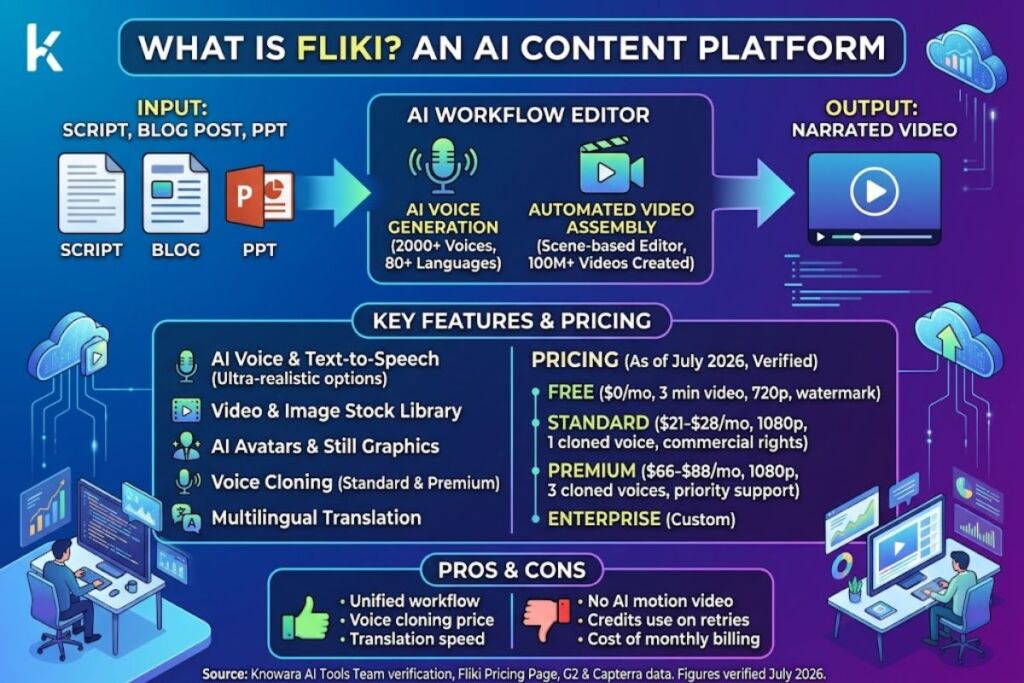
Verified by the Knowara AI Tools team using Fliki’s live pricing page, credit calculator, and voice library, cross-checked against G2 and Capterra user data. Pricing and feature figures verified as of July 2026.
Fliki is a browser-based AI video and voice platform that converts scripts, blog posts, and PPT files into narrated videos using AI-generated voiceovers, stock footage, and AI avatars. It combines text-to-speech generation with automated video assembly in one workflow, unlike standalone voice tools such as ElevenLabs.
What Is Fliki?
Fliki is an AI content platform that generates lifelike voiceovers and pairs them automatically with video, image, or avatar visuals inside a single editor. Nine Thirty Five, the Delaware-based company behind Fliki, launched the product in 2021 under founder Atul Yadav. Fliki now serves more than 12 million registered users and has produced over 100 million videos, according to Fliki’s own pricing page.
Fliki’s voice engine sits inside a scene-based video editor. A user enters a topic, script, or blog URL, and Fliki generates a scene-by-scene storyboard, assigns an AI voice to the narration, and matches each scene with stock footage, AI-generated imagery, or an AI avatar. The voice generation step is not a separate product — it is one stage inside the video pipeline, which distinguishes Fliki from dedicated voice-cloning tools that export audio only.
| Attribute | Value |
|---|---|
| Company | Nine Thirty Five, Inc. |
| Founder | Atul Yadav |
| Headquarters | Middletown/Dover, Delaware, United States |
| Release Year | 2021 |
| Pricing | Free / $21–$28 (Standard) / $66–$88 (Premium) / Custom (Enterprise) |
| Platforms | Web browser (Chrome, Edge, Safari); no native desktop or mobile app |
| Key Feature | AI voice generation bundled with automated video assembly, 2,000+ voices, 80+ languages |
| User Base | 12M+ registered users, 100M+ videos created (per Fliki.ai) |
| Rating | 4.8/5 on G2 and Capterra (Fliki.ai, self-reported) |
Pricing and user-base figures verified as of July 2026 against Fliki’s official pricing page.
What Are Fliki’s Key Features?
Fliki’s core feature set centers on AI voice generation, automated scene assembly, and multilingual translation, all accessible from one editor without exporting to a separate app.
- Generate voiceovers from 2,000+ AI voices spanning 80+ languages and regional dialects, including ultra-realistic and multilingual expressive voice categories on paid tiers.
- Clone a custom voice from a short recorded sample; the Standard plan allows 1 cloned voice, Premium allows 3.
- Convert 6 input formats into video: idea, script, blog post, PowerPoint file, screen recording, and long-form audio.
- Assemble scenes automatically using a built-in media library of stock footage, music, and images, capped at 50 scenes on Free, 100 on Standard, and 150 on Premium.
- Generate AI avatars and AI video clips on Standard and Premium tiers to replace static stock footage with presenter-style or AI-generated visuals.
- Translate finished videos into 80+ languages while preserving lip-sync timing and scene structure.
- Export at up to 1080p on Standard and Premium; the Free tier caps exports at 720p and adds a visible Fliki watermark.
- Publish directly to YouTube and connect Fliki to external workflows through Zapier and Make integrations on paid plans.
The voice engine is the strongest component of the suite. Fliki’s ultra-realistic voice tier, unlocked at 500 voices on Standard and 1,000+ on Premium, produces pacing and intonation close to ElevenLabs’ mid-tier voice models, based on side-by-side sample comparisons published by independent reviewers. Fliki does not generate original AI video scenes the way Runway or Kling do — every visual that is not an avatar comes from stock footage or AI-generated still images, not AI-generated motion footage.
How Much Does Fliki Cost?
Fliki costs $0 on the Free plan, $21 to $28 per month on Standard, and $66 to $88 per month on Premium, with Enterprise priced on request. Annual billing cuts the monthly rate by roughly 25% compared to month-to-month billing.
| Plan | Monthly Billing | Annual Billing (per mo) | Credits | Voices | Max Export | Watermark |
|---|---|---|---|---|---|---|
| Free | $0 | $0 | 36/year (3/month) | 300 | 720p, 1 min | Yes |
| Standard | $28 | $21 | 2,160/year | 1,000 (500 ultra-realistic) | 1080p, 15 min | No |
| Premium | $88 | $66 | 7,200/year | 2,000+ (1,000+ ultra-realistic) | 1080p, 40 min | No |
| Enterprise | Custom | Custom | Custom | 2,000+ plus custom API models | Custom | No |
Free Tier Limits (verifiable, checked against Fliki’s official pricing page): 3 credits per month, roughly 3 minutes of finished video, 720p export resolution, 300 available voices, no commercial usage rights, mandatory Fliki watermark on every export, no credit card required to sign up.
Source: Fliki’s official pricing page (fliki.ai/pricing), cross-referenced with G2’s Fliki pricing listing. Pricing verified as of July 2026.
Fliki spends credits on scene generation and preview renders, not only on final exports, so a script that requires several regenerated voice takes consumes more of the monthly allowance than the finished video’s runtime suggests. This credit-drain behavior is not disclosed prominently on the pricing page and only becomes clear once a user works through the credit calculator on the pricing page or burns through a Free plan allocation faster than expected.
What Are the Pros and Cons of Fliki?
Fliki’s biggest advantage is voice-to-video speed; its biggest limitation is the absence of AI-generated video scenes, which caps visual originality compared to competitors.
Pros:
- Combines script writing, voice generation, and video assembly in one editor, removing the need to move audio files between separate tools.
- Voice cloning is included starting at the Standard tier ($21/month annual), while ElevenLabs gates comparable cloning behind its Creator tier at a similar price point.
- Translation into 80+ languages preserves scene timing, useful for republishing one video across multiple regional YouTube channels.
- Commercial usage rights are included on every paid tier, with no separate licensing fee.
Cons and workarounds:
- No AI-generated video scenes — Fliki uses stock footage and AI avatars only. Workaround: pair Fliki’s voice export with a dedicated AI video generator (Runway, Kling, or Veo) for projects that require original motion visuals, then re-import the voice track.
- Monthly billing costs roughly 33% more than annual billing ($28 vs. $21 on Standard) — punishing for creators testing the platform short-term. Workaround: start on the Free plan to validate voice quality before committing to any paid billing cycle.
- Credits deplete on failed or regenerated takes, not only on final exports. Workaround: finalize the script fully before generating voice takes to avoid burning allocation on retries.
- No live chat support on the Standard plan — support is email-only below Premium, and users report multi-day response times on billing disputes according to G2 reviews. Workaround: Premium and Enterprise plans include live chat and priority support respectively.
How Does Fliki Compare to ElevenLabs?
Fliki bundles voice generation into a full video editor; ElevenLabs is a standalone voice and audio platform with higher peak voice fidelity but no built-in video assembly.
| Attribute | Fliki | ElevenLabs |
|---|---|---|
| Core product | Text-to-video with bundled AI voice | Standalone text-to-speech and voice cloning |
| Entry paid price | $21/month (annual) | Comparable tier starts near $22/month (annual), per ElevenLabs’ official pricing page |
| Voice count | 2,000+ across 80+ languages | Smaller curated library, higher per-voice fidelity |
| Video assembly | Built-in | Not offered |
| Best fit | Script-to-video creators who need voice and visuals together | Audio-first creators (podcasts, audiobooks, dubbing) who need maximum voice realism |
For a full breakdown, see Knowara’s Fliki vs ElevenLabs comparison.
Who Should Use Fliki?
Fliki fits solo YouTube creators, faceless-channel operators, and localization teams who need narrated video output without editing software. Specific user profiles:
- Faceless YouTube channel operators producing narrated explainer or list-style videos at volume, where stock footage pairs naturally with voiceover.
- E-learning and training teams converting existing slide decks (PPT to video) into narrated course modules without hiring a voice actor.
- Multilingual marketing teams republishing one source video across several language markets using Fliki’s built-in translation.
- Solo bloggers repurposing written articles into video content for YouTube and social platforms without a video editing background.
Fliki fits poorly for creators who need AI-generated original video scenes, UGC-style authentic-creator video ads, or voice-only output at the highest possible fidelity — those use cases are better served by dedicated AI video generators or ElevenLabs, respectively.
What Are the Best Alternatives to Fliki?
- ElevenLabs — the stronger choice for standalone voice cloning and audio-only projects where video assembly is not required. Read Knowara’s ElevenLabs review.
- Synthesia — better suited for corporate training videos that need a photorealistic AI presenter avatar rather than stock-footage narration. Read Knowara’s Synthesia review.
- InVideo — a closer competitor on the video-assembly side, with a stronger stock media library but a less developed voice-cloning feature set. Read Knowara’s InVideo review.
Frequently Asked Questions
Does Fliki have a free plan?
Yes. Fliki’s Free plan includes 3 credits per month, roughly 3 minutes of video, 720p export, and 300 voices, with a mandatory watermark and no commercial usage rights.
Can Fliki-generated videos be used commercially?
Yes, on the Standard plan and above. Commercial usage rights are included at $21/month (annual billing) and up; the Free plan excludes commercial rights.
Does Fliki support voice cloning?
Yes. Voice cloning is available starting on the Standard plan (1 cloned voice) and Premium plan (3 cloned voices). It is not available on the Free plan.
Is Fliki better than ElevenLabs for voice quality?
No, not at peak fidelity. ElevenLabs produces more natural results at its highest voice-quality tiers. Fliki’s advantage is bundling voice generation directly into video assembly, which ElevenLabs does not offer.
The Bottom Line
Fliki’s $21-to-$28-per-month Standard plan delivers voice generation, video assembly, and commercial rights in one subscription — a lower total cost than buying a separate voice tool and a separate video editor for the same output.