
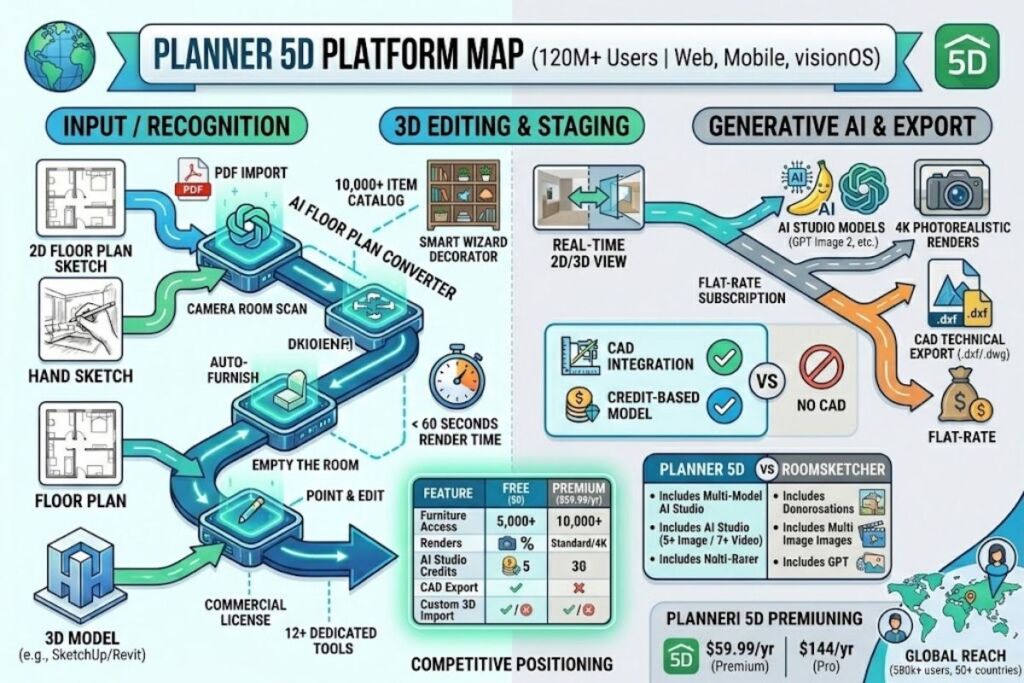
Planner 5D is a cross-platform 2D/3D home design tool that converts floor plans into furnished room layouts and photorealistic renders. It serves 120 million registered users through web, iOS, Android, Windows, macOS, and visionOS apps (source: Planner5D.com, company overview). This review covers every paid tier, the AI Studio image-generation stack, documented billing complaints, and three named alternatives, based on Planner 5D’s official pricing page verified on August 31, 2026, and cross-checked against independent software directories including G2, Capterra, and PitchBook.
What Is Planner 5D?
Planner 5D is a home and interior design platform that turns 2D floor plans into editable 3D models, furnished rooms, and AI-generated renders. Planner5D UAB, based in Vilnius, Lithuania, launched the product in 2011. Co-founders Alexey Sheremetyev and Sergey Nosyrev built the first version after struggling to visualize their own renovation projects without hiring an architect (source: Dealroom.co company profile).
Planner 5D operates on a freemium model. The Free tier grants unlimited projects and access to 50% of the furniture catalog with no time limit. Paid tiers unlock the full 10,000+ item catalog, AI floor plan recognition, photorealistic rendering, and CAD export. Andrey Ustyugov currently serves as CEO, overseeing a team of roughly 130 employees as of March 2026 (source: Tracxn company profile).
| Attribute | Value |
|---|---|
| Company | Planner5D UAB, Vilnius, Lithuania |
| Founded | 2011 |
| Founders | Alexey Sheremetyev, Sergey Nosyrev |
| CEO | Andrey Ustyugov |
| Pricing | Free $0; Premium $19.99/mo or $59.99/yr; Professional $49.99/mo or $399.99/yr; Enterprise custom |
| Platforms | Web, iOS, Android, Windows, macOS, visionOS |
| Key Feature | AI Studio (Nano Banana 2, GPT Image 2, Seedream 5 Lite) + AI Floor Plan Converter |
| Registered Users | 120 million+ |
Pricing verified as of August 2026, sourced directly from planner5d.com/pricing.
What Are Planner 5D’s Key Features?
Planner 5D’s core feature set spans AI floor plan conversion, automated furnishing, a multi-model AI image generator, and professional-grade rendering and export tools that scale by subscription tier.
- Convert an uploaded 2D floor plan sketch or PDF into an editable 3D project through the AI Floor Plan Converter (Premium and above).
- Furnish empty rooms automatically using the Automated Furniture Arrangement tool and Smart Wizard room generator.
- Generate interior design images inside AI Studio using five image models — Nano Banana 1, Nano Banana 2, GPT Image 1.5, GPT Image 2, and Seedream 5 Lite — plus seven video models including Kling 3.0, Veo 3.1, and Seedance 2.5 (source: planner5d.com/pricing, AI Studio FAQ section).
- Render projects in Standard quality on Premium or unlimited watermark-free 4K on Professional.
- Access a furniture library of 10,000+ items on Premium and Professional, versus 5,000 items (50% of the catalog) on Free.
- Export finished designs to CAD file formats for technical documentation, available exclusively on Professional.
- Import custom 3D models in .obj, .fbx, .blend, and .stl formats on Professional, or generate 3D models from photos on Premium.
- Walk through finished designs using 360° panoramas and walkthroughs, gated to Professional.
- Share any project with a client, contractor, or family member via link on every tier, including Free, with view or edit permission controls.
AI Studio credits run on a separate balance from AI Floor Plan recognition allowances. Premium includes 100 credits monthly or 1,200 annually; Professional includes 1,000 monthly or 12,000 annually. Planner 5D’s own guidance states 100 credits generate approximately 50 Nano Banana 2 images at 1K resolution or roughly 12 five-second AI video clips (source: planner5d.com/pricing).
How Much Does Planner 5D Cost?
Planner 5D runs four tiers: Free at $0, Premium at $19.99 monthly or $59.99 annually, Professional at $49.99 monthly or $399.99 annually, and custom-quoted Enterprise. Annual billing cuts the effective monthly Premium rate to $4.99 and the Professional rate to $33.33, a savings of roughly 75% against month-to-month billing (source: planner5d.com/pricing, verified August 2026).
| Tier | Monthly Price | Annual Price | Furniture Catalog | Renders | AI Studio Credits |
|---|---|---|---|---|---|
| Free | $0 | $0 | 50% (~5,000 items) | None | None |
| Premium | $19.99 | $59.99 ($4.99/mo effective) | 10,000+ items | Standard | 100/mo or 1,200/yr |
| Professional | $49.99 | $399.99 ($33.33/mo effective) | 10,000+ items | Unlimited 4K | 1,000/mo or 12,000/yr |
| Enterprise | Custom | Custom | Full + white-label catalog | Unlimited 4K | Custom allocation |
Verified as of August 2026. Prices reflect published US rates on planner5d.com/pricing; local currency and taxes vary.
Planner 5D publishes a trial option for both Premium and Professional, with eligibility and duration displayed at checkout before charge (source: Planner 5D Help Center trial guide). Verified teachers can apply for a free Education program license for classroom use, subject to verification.
What Are the Pros and Cons of Planner 5D?
Planner 5D’s Premium tier undercuts direct competitors on price while its Professional tier carries a steep 6.7x jump for CAD and 4K access, and documented billing disputes affect a subset of subscribers.
Pros:
- Premium costs $59.99 per year, undercutting RoomSketcher’s comparable Pro plan at $144 per year by 58% (source: G2 RoomSketcher pricing data).
- The Free tier includes unlimited projects with no time limit, a broader allowance than most competitors that cap free-tier project counts.
- AI Studio bundles five image models and seven video models into one credit balance, removing the need to subscribe to separate generative-AI tools for interior concepts.
- Cross-platform coverage extends to visionOS, a platform most floor-planning competitors do not support.
Cons, each paired with its workaround:
- 4K rendering sits behind the $399.99/year Professional tier, not Premium. Workaround: homeowners who only need presentation-quality (non-4K) images for personal use can stay on the $59.99/year Premium tier and skip the 6.7x price jump.
- Refund disputes appear across Trustpilot and the Apple App Store, with users reporting double charges after cancellation requests and inconsistent resolution between Planner 5D and the app store billing system (source: CheckThat.ai brand analysis, 2024–2025 review sample). Workaround: subscribing through the web version at planner5d.com routes billing directly through Planner 5D rather than through Apple’s or Google’s commission layer, removing the three-party dispute pattern.
- The Free tier locks 50% of the furniture catalog, leaving roughly 5,000 items inaccessible. Workaround: Planner 5D awards free Premium access as a prize for winning Design Battle contests run on the platform.
- CAD export and custom 3D model uploads require Professional, pricing out hobbyists who need just one technical export. Workaround: request a Professional free trial through the pricing page for the single billing cycle needed to complete a one-off export, then downgrade to Premium.
How Does Planner 5D Compare to RoomSketcher?
Planner 5D offers a lower entry price and built-in AI image generation; RoomSketcher offers a stronger professional floor-plan-ordering service for real estate listings.
| Attribute | Planner 5D | RoomSketcher |
|---|---|---|
| Founded | 2011, Vilnius, Lithuania | Founded in Norway |
| Entry Paid Tier | $59.99/year (Premium) | $144/year (Pro) |
| Free Tier Watermark | No watermark on free renders | Watermarked 3D outputs on Free |
| AI Image Generation | Yes, AI Studio with 5+ models | No native AI image generator |
| Furniture Catalog | 10,000+ items (paid) | Smaller branded catalog, credit-metered floor plan orders |
| Platforms | Web, iOS, Android, Windows, macOS, visionOS | Web, iOS, Android |
RoomSketcher runs a hybrid model that layers a $20–$35 per-floor professional redraw fee on top of its subscription, a structure Planner 5D does not use (source: CheckThat.ai RoomSketcher pricing breakdown). Homeowners comparing floor-plan-only tools against AI-driven design platforms can review the full breakdown in Knowara’s RoomSketcher vs Planner 5D: Which Floor Planner Wins in 2026? comparison.
Who Should Use Planner 5D?
Planner 5D fits homeowners, renters, design students, and small-scale real estate use cases better than large architecture firms that require full BIM-level CAD precision.
- Homeowners and renters planning a renovation who need to test furniture placement and color schemes before buying anything, using the Free tier’s unlimited-project allowance.
- Interior design students and hobbyists who want AI-assisted moodboards and floor-plan-to-3D conversion without committing to professional CAD software.
- Independent real estate agents who need quick 2D-to-3D staging visuals for listings, using Premium’s Standard renders.
- Solo interior designers billing clients directly who need CAD export, unlimited 4K renders, and a branded profile on the Professional tier.
- Enterprise architecture firms needing parametric BIM modeling are better served by Autodesk Revit or SketchUp Pro, since Planner 5D’s Enterprise tier targets white-label retail catalogs and product configurators, not structural engineering workflows (source: Planner5D.com Enterprise Solutions page).
What Are the Best Alternatives to Planner 5D?
RoomSketcher, Foyr Neo, and SketchUp Free cover the same core use case — turning a floor plan into a visualized 3D space — with different pricing and audience trade-offs.
- RoomSketcher starts its Pro plan at $144 per year and adds a per-floor professional redraw service, making it a stronger fit for real estate agents who order finished floor plans rather than design them from scratch. Read the full RoomSketcher vs Planner 5D comparison for a feature-by-feature breakdown.
- Foyr Neo targets small interior design studios with plans starting around $29 per month and no permanent free tier, prioritizing fast 4K client presentations over DIY homeowner use (source: SaaSworthy pricing data, August 2026).
- SketchUp Free provides browser-based 3D modeling with a steeper learning curve than Planner 5D’s drag-and-drop interface, appealing to users who need precise architectural modeling rather than AI-assisted furnishing.
Homeowners weighing free options across the category can check Knowara’s Best Free AI Interior Design Tools in 2026 roundup before committing to any paid tier.
Frequently Asked Questions
Is Planner 5D actually free to use?
Yes. The Free plan costs $0, includes unlimited projects, and requires no credit card, but it restricts furniture access to 50% of the 10,000+ item catalog (source: planner5d.com/pricing).
Does Planner 5D offer a trial for paid tiers?
Yes. Planner 5D publishes trial eligibility and duration at checkout for both Premium and Professional before any charge applies (source: Planner 5D Help Center).
What AI models power Planner 5D’s AI Studio?
AI Studio runs on Nano Banana 1, Nano Banana 2, GPT Image 1.5, GPT Image 2, and Seedream 5 Lite for images, plus Kling 3.0, Veo 3.1, Seedance 2.0/2.5, FLUX 3, Kling v2.1, and Luma Ray 2 for video (source: planner5d.com/pricing).
Can Planner 5D export files for a contractor’s CAD software?
Yes, but only on the Professional tier at $399.99 per year billed annually, which includes CAD export alongside unlimited 4K renders and a Specs & Docs Organizer.
The Verdict
Planner 5D’s $59.99-per-year Premium tier delivers the full 10,000+ furniture catalog and AI floor-plan conversion at 58% below RoomSketcher’s comparable $144-per-year entry price, making Premium the higher price-to-value tier for any user who does not require CAD export or unlimited 4K rendering.