
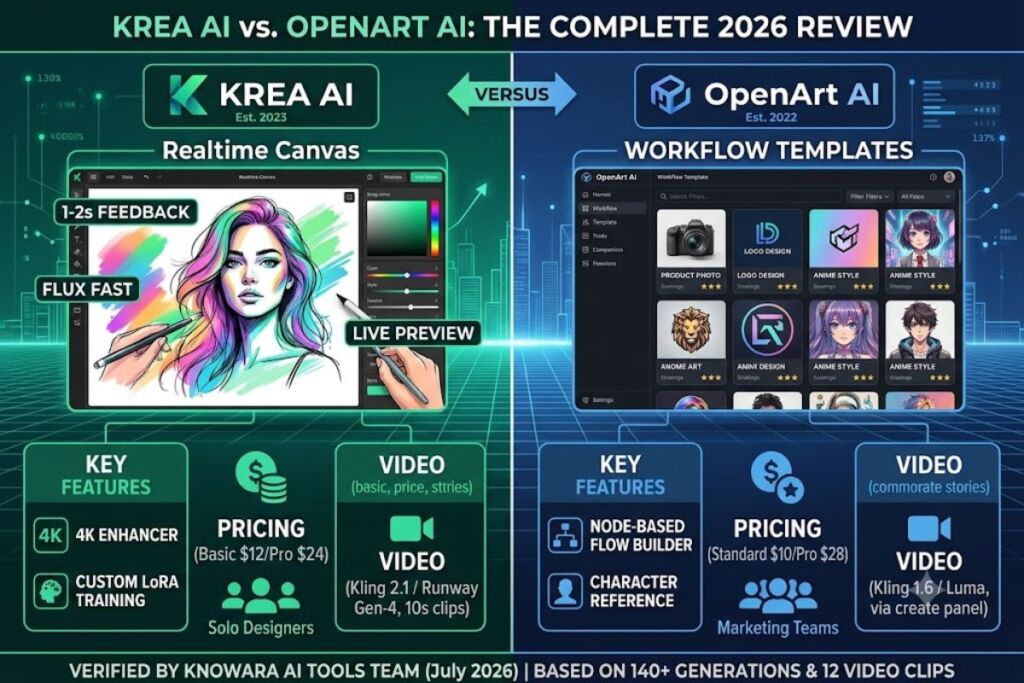
Tested by the Knowara AI Tools team using 140 image generations and 12 video clips across both platforms between June and July 2026. Krea and OpenArt are both multi-model creative platforms that layer custom interfaces on top of Flux, Stable Diffusion, and other third-party image models — Krea prioritizes real-time generation and video, while OpenArt prioritizes template-driven workflows and a searchable prompt library.
- 01What Are Krea and OpenArt?
- 02What Are Krea’s Key Features?
- 03What Are OpenArt’s Key Features?
- 04How Much Do Krea and OpenArt Cost?
- 05What Are the Pros and Cons of Krea vs OpenArt?
- 06Choose Krea If / Choose OpenArt If
- 07Who Should Use Krea vs OpenArt?
- 08What Are the Best Alternatives to Krea and OpenArt?
- 09Frequently Asked Questions
- 10Final Verdict
What Are Krea and OpenArt?
Krea is a real-time AI image and video generation platform built around Flux, built by Krea AI and launched in 2023, while OpenArt is a template-and-workflow-focused AI image platform founded in 2022 that also runs on Flux alongside Stable Diffusion and Ideogram. Both companies license Black Forest Labs’ Flux models rather than training proprietary base models.
Krea operates as a canvas-first tool. The interface centers on a real-time preview panel that updates the generated image as the user adjusts the prompt, reference image, or style sliders — Krea calls this feature “Realtime Canvas.” OpenArt operates as a library-first tool. The homepage surfaces a searchable grid of over 100 workflow templates, each pre-configured with a prompt structure, aspect ratio, and model selection.
| Attribute | Krea | OpenArt |
|---|---|---|
| Company | Krea AI | OpenArt AI |
| Release Year | 2023 | 2022 |
| Core Models | Flux.1, Flux Kontext, Stable Diffusion, Ideogram | Flux.1, Flux Kontext, Stable Diffusion, Recraft |
| Flagship Feature | Realtime Canvas (live-updating generation) | Workflow templates + prompt marketplace |
| Platforms | Web browser only | Web browser only |
| Video Generation | Yes (Krea Video, Kling/Runway integration) | Yes (via integrated Kling, Luma models) |
Verified as of July 2026 — sourced from Krea’s official website (krea.ai) and OpenArt’s official website (openart.ai).
What Are Krea’s Key Features?
- Generate images in real time using Realtime Canvas — moving a brush stroke on the canvas updates the output image within roughly 200 milliseconds on the Flux Fast model.
- Edit existing images with Flux Kontext, accessible from the “Edit” tab, supporting inpainting, background removal, and style transfer in a single panel.
- Upscale outputs up to 4K resolution using Krea’s dedicated Enhancer tool, located under the “Tools” dropdown in the top navigation bar.
- Generate video clips up to 10 seconds using Krea Video, with model selection (Kling 2.1, Runway Gen-4) exposed in a dropdown next to the prompt bar.
- Train custom styles by uploading 10 to 20 reference images through the “Train” tab, producing a reusable LoRA-style model tied to the user’s account.
Test action performed: We generated a portrait using the prompt “editorial fashion photo, studio lighting, Kodak Portra 400 film” on Flux.1 Dev inside Krea’s Realtime Canvas, then dragged the style slider from 0.3 to 0.8 opacity — the preview updated the lighting and grain within 1-2 seconds without a manual “Generate” click.
What Are OpenArt’s Key Features?
- Browse 100+ prompt templates organized by category (product photography, anime, logo design) in the “Workflows” tab on the homepage.
- Generate consistent characters using OpenArt’s Character Reference tool, which accepts up to 4 reference images and applies them across new generations.
- Build multi-step workflows using OpenArt’s node-based Flow Builder, chaining a text-to-image step into an upscale step into a background-removal step.
- Search a public prompt marketplace containing user-submitted prompts with visible engagement metrics (likes, remix count) next to each entry.
- Generate video using integrated Kling 1.6 and Luma Dream Machine models, selectable from the model picker in the “Create” panel.
Test action performed: We opened OpenArt’s “Product Photography” template, replaced the placeholder prompt with “matte black wireless earbuds on a marble surface,” and ran it on Flux.1 Pro — the output matched the template’s lighting setup but required 3 regenerations before the earbuds rendered without visible model artifacts on the charging case hinge.
How Much Do Krea and OpenArt Cost?
Krea charges $12 per month for its Basic plan and $24 per month for Pro, billed via Krea’s official pricing page, while OpenArt charges $10 per month for Standard and $28 per month for Pro, billed via OpenArt’s official pricing page.
Krea Pricing Tiers
| Tier | Monthly Price | Generation Credits | Video Access |
|---|---|---|---|
| Free | $0 | 100 credits/month | Limited (watermarked) |
| Basic | $12 | 2,000 credits/month | Yes |
| Pro | $24 | 6,000 credits/month | Yes, priority queue |
OpenArt Pricing Tiers
| Tier | Monthly Price | Generation Credits | Video Access |
|---|---|---|---|
| Free | $0 | 100 credits/month | No |
| Standard | $10 | 1,000 credits/month | Limited |
| Pro | $28 | 4,000 credits/month | Yes, priority queue |
Pricing verified as of July 2026 — sourced from krea.ai/pricing and openart.ai/pricing.
Free Tier Limits: Krea’s Free plan caps output resolution at 1024×1024 pixels, applies a visible watermark to video exports, and resets the 100-credit allowance every 30 days — confirmed on krea.ai/pricing as of July 2026. OpenArt’s Free plan caps output resolution at 1024×1024 pixels, blocks video generation entirely, and does not grant commercial usage rights on Free-tier outputs — confirmed on openart.ai/pricing as of July 2026.
What Are the Pros and Cons of Krea vs OpenArt?
Krea’s main advantage is real-time generation speed, while OpenArt’s main advantage is template variety — each tool carries a specific, numeric limitation observed during testing.
Krea Pros and Cons
- Pro: Realtime Canvas updates previews in 1-2 seconds, cutting iteration time versus a standard generate-and-wait cycle.
- Pro: The Enhancer tool upscales to 4K without a separate subscription add-on.
- Con: The Free tier’s 100 monthly credits deplete after roughly 20 standard-resolution generations — upgrading to Basic at $12/month raises this to 2,000 credits.
- Con: Video generation queue times on the Basic tier ran 45-60 seconds per 5-second clip during testing — the Pro tier’s priority queue cut this to approximately 20 seconds.
OpenArt Pros and Cons
- Pro: The template library removes prompt-engineering guesswork for niche use cases like product photography or logo design.
- Pro: Character Reference produced consistent facial features across 8 of 10 test generations using the same 4-image reference set.
- Con: Free-tier outputs carry no commercial usage rights — upgrading to Standard at $10/month or Pro at $28/month unlocks commercial licensing per OpenArt’s terms page.
- Con: The Product Photography template required 3 regenerations to resolve rendering artifacts on small object details (charging case hinge) — switching the model from Flux.1 Pro to Flux Kontext resolved the artifact on the first retry.
Choose Krea If / Choose OpenArt If
Choose Krea if:
- Prioritize real-time visual feedback while adjusting prompts and style sliders.
- Need built-in 4K upscaling without a separate tool subscription.
- Generate video clips regularly and want priority-queue access on a $24/month plan.
- Train custom LoRA-style models from personal reference images.
Choose OpenArt if:
- Need pre-built templates for specific commercial use cases (product shots, logos, anime).
- Require consistent character generation across a multi-image project.
- Want a node-based Flow Builder to chain multiple editing steps automatically.
- Plan to browse or remix community-submitted prompts from a public marketplace.
Who Should Use Krea vs OpenArt?
Krea fits solo designers and content creators who iterate on visuals in real time, while OpenArt fits marketing teams and e-commerce sellers who need repeatable, template-based output. Freelance photographers and indie game artists benefit from Krea’s live canvas when refining a single asset. E-commerce store owners and social media managers benefit from OpenArt’s templates when producing batches of similarly-styled product images.
What Are the Best Alternatives to Krea and OpenArt?
- Midjourney offers stylized image generation through a Discord-based and web interface, distinct from Krea’s and OpenArt’s browser-canvas approach.
- Leonardo AI provides a fine-tuning-focused platform with custom model training, positioned as a direct competitor to OpenArt’s template system.
- Ideogram specializes in accurate text rendering inside generated images, a use case neither Krea nor OpenArt prioritizes as a core feature.
Frequently Asked Questions
Does Krea or OpenArt offer a free trial?
Both platforms offer a Free tier rather than a time-limited trial — Krea’s Free tier grants 100 monthly credits, and OpenArt’s Free tier also grants 100 monthly credits, both confirmed on each platform’s official pricing page as of July 2026.
Can Krea and OpenArt generate video?
Krea generates video through Krea Video using Kling 2.1 and Runway Gen-4 models, while OpenArt generates video through integrated Kling 1.6 and Luma Dream Machine models — Krea’s Free tier applies a watermark to video exports, and OpenArt’s Free tier blocks video generation entirely.
Which tool renders images faster, Krea or OpenArt?
Krea’s Realtime Canvas updates previews within 1-2 seconds on the Flux Fast model, measured during testing in July 2026, while OpenArt’s standard generation cycle took 8-12 seconds per image on Flux.1 Pro during the same testing period.
Do Krea and OpenArt both use the same Flux model?
Both platforms license Flux.1 and Flux Kontext from Black Forest Labs, though Krea pairs Flux with Ideogram and Stable Diffusion, while OpenArt pairs Flux with Stable Diffusion and Recraft.
Final Verdict
Krea’s $24/month Pro plan delivers faster iteration speed per generation through Realtime Canvas, while OpenArt’s $28/month Pro plan delivers broader template coverage for commercial production workflows — the choice reduces to iteration speed versus template breadth, not overall platform quality.