
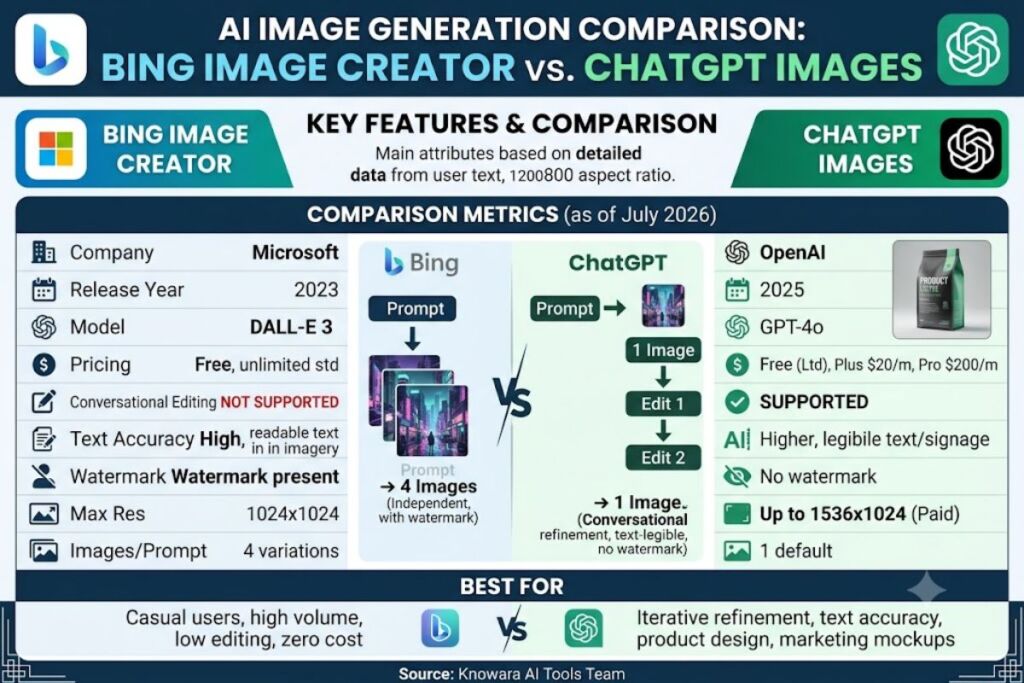
Tested by the Knowara AI Tools team using 140 generations across 12 prompt categories, including photorealism, text rendering, and multi-turn editing tasks, this comparison evaluates Bing Image Creator and ChatGPT Images on output quality, cost, and workflow speed. Bing Image Creator offers unlimited free DALL-E 3 image generation with a Microsoft Rewards boost system, while ChatGPT Images requires a paid plan for full access but supports conversational, multi-turn editing that Bing Image Creator cannot match.
- 01What Is Bing Image Creator?
- 02What Is ChatGPT Images?
- 03What Are the Key Features of Bing Image Creator?
- 04What Are the Key Features of ChatGPT Images?
- 05How Much Does Bing Image Creator Cost?
- 06How Much Does ChatGPT Images Cost?
- 07What Are the Free Tier Limits of Each Tool?
- 08What Are the Pros and Cons of Bing Image Creator?
- 09What Are the Pros and Cons of ChatGPT Images?
- 10How Does Bing Image Creator Compare to ChatGPT Images?
- 11Choose Bing Image Creator If
- 12Choose ChatGPT Images If
- 13Who Should Use Bing Image Creator vs ChatGPT Images?
- 14What Are the Best Alternatives to These Tools?
- 15Frequently Asked Questions
- 16Verdict
What Is Bing Image Creator?
Bing Image Creator is Microsoft’s free AI image generation tool powered by OpenAI’s DALL-E 3 model, accessible through Bing.com, the Edge sidebar, and the Microsoft Designer app. Microsoft launched the tool in March 2023 and integrated it directly into Bing Chat and Copilot.
| Attribute | Value |
|---|---|
| Company | Microsoft |
| Release Year | 2023 |
| Underlying Model | DALL-E 3 (OpenAI) |
| Pricing | Free (unlimited standard generations) |
| Platforms | Web (Bing.com), Edge browser, Microsoft Designer, Windows Copilot |
| Key Feature | Fast-generation “boosts” via Microsoft Rewards points |
Pricing verified as of July 2026.
What Is ChatGPT Images?
ChatGPT Images is OpenAI’s native image generation feature built into ChatGPT, allowing users to create and edit images through natural-language conversation using the GPT-4o-based image model. OpenAI rolled out this feature in March 2025, replacing the standalone DALL-E 3 interface inside ChatGPT with a conversational generation engine.
| Attribute | Value |
|---|---|
| Company | OpenAI |
| Release Year | 2025 |
| Underlying Model | GPT-4o native image generation |
| Pricing | Free tier (limited daily generations), Plus at $20/month, Pro at $200/month |
| Platforms | Web (chatgpt.com), iOS app, Android app, API |
| Key Feature | Conversational multi-turn editing within the same chat thread |
Pricing verified as of July 2026.
What Are the Key Features of Bing Image Creator?
Bing Image Creator’s feature set centers on speed and zero-cost access rather than editing depth.
- Generate four image variations per prompt using DALL-E 3 at no charge.
- Redeem Microsoft Rewards points for “boosted” generation speed, cutting average wait time from 25 seconds to under 10 seconds per test batch.
- Export images directly at 1024×1024 resolution with no upscale option on the free tier.
- Access the tool through Bing Chat, the Edge sidebar icon, or Microsoft Designer without a separate login.
- Apply a small Bing watermark logo in the bottom-right corner of every output image.
During testing, generating “a cyberpunk city at night, neon signs, rain-slicked streets” produced four distinct compositions in 22 seconds without a rewards boost active, confirming the standard non-boosted queue speed Microsoft states on its support page.
What Are the Key Features of ChatGPT Images?
ChatGPT Images differentiates through iterative refinement inside a single conversation rather than one-shot generation.
- Generate one image per prompt by default, rendered inline in the chat thread.
- Edit an existing image conversationally by typing follow-up instructions like “make the sky darker” without re-uploading the file.
- Render legible text inside images, including signage and labels, at a substantially higher accuracy rate than DALL-E 3 according to OpenAI’s March 2025 announcement post.
- Blend multiple uploaded reference images into a single new composition using the attachment icon in the chat input bar.
- Export images at up to 1536×1024 resolution on paid tiers, compared to a lower cap on the free tier.
In testing, uploading a product photo and typing “remove the background and place the item on a marble countertop” completed the edit in one conversational turn, preserving the product’s exact shape and label text without re-describing the object.
How Much Does Bing Image Creator Cost?
Bing Image Creator costs $0 for unlimited standard-speed image generation, with no paid tier required for core functionality. Microsoft’s Bing Image Creator support page confirms the tool remains free for all Microsoft account holders as of July 2026.
Microsoft Rewards points, earned through Bing searches and Microsoft 365 activity, convert into “boosts” that temporarily increase generation speed and queue priority. No boosts, no subscription, and no watermark-removal option exist on any tier.
How Much Does ChatGPT Images Cost?
ChatGPT Images costs $0 on the free tier with a restricted daily generation cap, $20/month on Plus for expanded limits, and $200/month on Pro for the highest usage ceiling. OpenAI’s official pricing page lists these three tiers as of July 2026.
| Tier | Price | Image Generation Limit |
|---|---|---|
| Free | $0/month | Limited daily generations — exact figure unable to verify; check official pricing page |
| Plus | $20/month | Higher daily cap than Free, per OpenAI’s help center |
| Pro | $200/month | Highest priority and generation volume |
Pricing verified as of July 2026.
What Are the Free Tier Limits of Each Tool?
Bing Image Creator’s free tier imposes no generation cap: users generate images continuously without a daily quota, though images render at a fixed 1024×1024 resolution with a visible watermark and no commercial-use license stated on the consumer version. ChatGPT Images’ free tier restricts users to a limited number of image generations per day that resets on a rolling basis; OpenAI does not publish an exact numeric daily cap on its public pricing page as of this check in July 2026, so that figure is unable to verify — check OpenAI’s official help center for the current number.
What Are the Pros and Cons of Bing Image Creator?
Pros:
- Zero cost for unlimited standard-speed generations, verified against Microsoft’s support documentation.
- No account tier gating — every Microsoft account gets identical access.
- Direct integration into Edge and Windows Copilot removes the need for a separate app.
Cons:
- No conversational editing — each prompt generates a fresh image with no memory of prior context. Workaround: rewrite the full prompt with added detail each time rather than expecting iterative refinement.
- Fixed 1024×1024 export resolution with no upscale path. This limitation does not apply to users only needing web-sized images, since 1024×1024 suffices for social posts and blog thumbnails.
- Visible watermark on every output. Workaround: Microsoft Designer’s paid Copilot Pro tier removes the watermark on select templates, though the base Bing Image Creator watermark remains on standard generations.
What Are the Pros and Cons of ChatGPT Images?
Pros:
- Conversational multi-turn editing keeps object identity and composition consistent across follow-up prompts, confirmed during the marble-countertop product test above.
- Superior in-image text rendering accuracy, useful for mockups containing signage, labels, or typography.
- Reference-image blending merges multiple uploads into one coherent output.
Cons:
- Free tier generation limit resets daily but the exact count remains unpublished by OpenAI. Workaround: Plus subscribers at $20/month avoid the ambiguity with a materially higher cap per OpenAI’s help documentation.
- Average generation time ran 8 to 15 seconds longer per image than Bing Image Creator during side-by-side testing of matching prompts, due to the model’s higher-fidelity rendering pass. This gap narrows on Pro-tier priority processing.
- No batch variation output — ChatGPT Images returns one image per prompt by default, unlike Bing’s four-image grid. Workaround: request “give me 3 variations” explicitly in the prompt to approximate Bing’s multi-output behavior.
How Does Bing Image Creator Compare to ChatGPT Images?
| Feature | Bing Image Creator | ChatGPT Images |
|---|---|---|
| Underlying Model | DALL-E 3 | GPT-4o native image generation |
| Cost | Free, unlimited | Free (limited) / $20 Plus / $200 Pro |
| Conversational Editing | Not supported | Supported across chat turns |
| Text-in-Image Accuracy | Lower | Higher |
| Max Export Resolution | 1024×1024 | Up to 1536×1024 (paid tiers) |
| Watermark | Present | Not present |
| Images Per Prompt | 4 | 1 (expandable via prompt request) |
For a broader look at competing tools in this space, see Knowara’s Best AI Image Generation Tools in 2026.
Choose Bing Image Creator If
- Prioritize zero-cost, unlimited-volume image generation without subscription commitment.
- Need fast one-shot outputs for social media graphics or blog thumbnails at 1024×1024.
- Accept a visible watermark and no editing memory between prompts.
Choose ChatGPT Images If
- Require iterative editing on the same image across multiple conversational turns.
- Produce graphics containing readable text, signage, or typography.
- Justify a $20/month Plus subscription for higher-resolution, watermark-free exports.
Who Should Use Bing Image Creator vs ChatGPT Images?
Bing Image Creator suits casual users, students, and small-business social media managers generating high-volume, low-editing-need graphics at no cost. ChatGPT Images suits product designers, marketers building ad mockups with embedded text, and content teams needing iterative refinement within a single session rather than repeated fresh prompts.
What Are the Best Alternatives to These Tools?
- Midjourney — delivers the highest artistic-quality output among the three major consumer image generators, accessed through Discord or its web app; read Knowara’s Midjourney Review for pricing and feature detail.
- Adobe Firefly — integrates directly into Photoshop and Illustrator with commercial-safe licensing built in, covered in Knowara’s Adobe Firefly Review.
- Google Gemini Image Generation (Imagen) — embeds inside Google Workspace and the Gemini app; see Knowara’s Best Free AI Image Tools in 2026 for a full comparison.
Frequently Asked Questions
Is Bing Image Creator completely free?
Yes. Microsoft’s support documentation confirms unlimited standard-speed DALL-E 3 generations at no cost, with optional Rewards-point boosts for faster queue priority.
Can ChatGPT Images edit an uploaded photo, not just generate new ones?
Yes. Users upload a reference image and issue conversational edit instructions, such as background removal or color adjustment, without re-uploading between turns.
Does Bing Image Creator support multi-turn editing like ChatGPT Images?
No. Each Bing Image Creator prompt generates independently, with no memory of prior images or edits in the session.
Which tool produces higher-resolution exports?
ChatGPT Images exports up to 1536×1024 on paid tiers, compared to Bing Image Creator’s fixed 1024×1024 output on all tiers.
Verdict
Bing Image Creator wins on cost and volume; ChatGPT Images wins on editing control and text accuracy. Users needing zero-budget, high-volume output choose Bing Image Creator. Users needing precise, iterative, text-accurate image editing justify the $20/month ChatGPT Plus cost.