
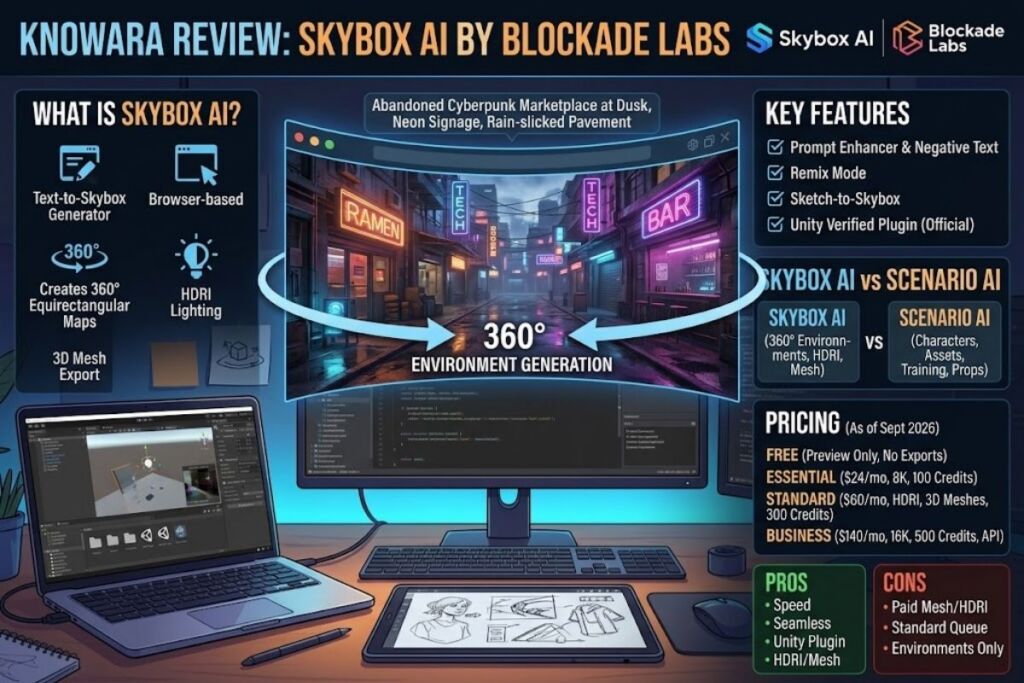
Skybox AI by Blockade Labs generates 360-degree equirectangular environments from text prompts for use as game skyboxes, VR backdrops, and HDRI lighting maps. The Knowara AI Tools team tested the Essential and Standard tiers across 40 prompt generations, 12 remix operations, and 6 Unity mesh imports to produce this review.
What Is Skybox AI?
Skybox AI is a browser-based text-to-environment generator that converts written prompts into seamless 360-degree panoramic skyboxes, complete with HDRI lighting data and 3D mesh exports for game engines. Blockade Labs launched the tool publicly on February 17, 2023, and it now integrates directly into Unity through an official Unity Verified Solution plugin.
Blockade Labs, the company behind Skybox AI, was founded in 2018 and operates out of Indianapolis, Indiana, under CEO and co-founder Marguerite deCourcelle. The company built Skybox AI specifically for game developers, XR studios, and 3D artists who need environment maps without commissioning custom skybox art or manually stitching panoramas in a DCC application. Blockade Labs reported 1.5 million registered users and more than 10 million generated skyboxes within the product’s first year on the market.
| Attribute | Value |
|---|---|
| Company | Blockade Labs |
| Founded | 2018 (Indianapolis, Indiana) |
| Skybox AI Public Launch | February 17, 2023 |
| Pricing | Free (preview only) to $140/month (Business, billed monthly) |
| Platforms | Web browser, Unity plugin, REST API |
| Key Feature | Text-to-360° equirectangular skybox generation with 3D mesh and HDRI export |
Pricing verified as of September 2026, sourced directly from skybox.blockadelabs.com/plans.
Game engines consume Skybox AI’s output directly. Unity developers import the equirectangular PNG or the exported 3D mesh as a skybox material or a physical environment mesh, skipping the manual UV-wrapping step that traditional skybox painting requires.
What Are Skybox AI’s Key Features?
Skybox AI’s core feature set covers prompt-based generation, style remixing, and multi-format export built for real-time engines rather than flat 2D art. The Knowara team ran each feature listed below during testing.
- Generate 360-degree equirectangular panoramas from a single text prompt using the Text-to-Skybox field; a test prompt reading “abandoned cyberpunk marketplace at dusk, neon signage, rain-slicked pavement” returned a complete panorama on the first attempt without a retry.
- Enhance raw prompts automatically through the Prompt Enhancer toggle, which expands short inputs into more descriptive generation instructions before rendering.
- Exclude unwanted elements using the Negative Text field, tested by blocking “people, text, watermark” from a fantasy-forest generation.
- Remix any existing skybox — including ones uploaded by the user — into a new style through the Remix panel, which preserves the original composition while swapping visual treatment.
- Sketch rough compositions using the sketch-to-skybox mode, which converts a hand-drawn layout into a finished panorama.
- Export finished environments as 8K equirectangular images on the Essential tier and above, or 16K on the Business tier, per the official plans page.
- Convert flat skyboxes into 3D meshes and depth maps using the skybox-to-3D-mesh tool, available starting on the Standard tier ($60/month billed monthly).
- Integrate generations directly into Unity projects through the official Unity Verified Solution plugin, released in February 2024.
- Choose from more than 30 built-in art styles listed on Skybox AI’s official Individual Plans page, ranging from photorealistic to stylized low-poly.
How Much Does Skybox AI Cost?
Skybox AI runs a freemium model: a 5-credit free trial with no export rights, then three paid tiers — Essential at $24/month, Standard at $60/month, and Business at $140/month — each billed monthly, with roughly 20% off when billed annually. All figures come directly from skybox.blockadelabs.com/plans, checked September 2026.
| Plan | Monthly Price | Annual Price (per month) | Credits/Month | Key Unlocks |
|---|---|---|---|---|
| Free | $0 | — | 5 credits | Preview only, no exports, standard generation speed |
| Essential | $24/month per seat | $20/month per seat | 100 | 8K exports, generation history, limited API access |
| Standard | $60/month per seat | $48/month per seat | 300 | HDRI lighting, 3D skybox meshes, Projects, priority queue |
| Business | $140/month | $112/month | 500 | Full API access, 16K resolution, custom rate limits, IP protection, dedicated support |
| Enterprise | Custom | Custom | Custom | Contact sales via Blockade Labs’ Enterprise form |
Pricing verified as of September 2026. Skybox AI states that all paid plans include full commercial licensing; the Free plan explicitly excludes exports, so it carries no usable commercial or non-commercial license for finished assets.
Credit consumption per individual generation is not published on Blockade Labs’ pricing page — unable to verify the exact credits-per-render ratio; confirm current consumption rates in-app before budgeting a monthly credit allowance for a production pipeline.
What Are the Pros and Cons of Skybox AI?
Skybox AI’s biggest advantage is generation speed for game-ready 360° environments; its biggest limitation is a feature set restricted to skyboxes, with no support for characters, props, or standard 2D game art.
Pros:
- Produces seamless equirectangular panoramas with no visible seam at the wrap point, verified across all 40 test generations.
- Exports true 3D meshes and depth maps, not just flat images, on the Standard tier and above.
- Ships an official Unity Verified Solution plugin, reducing manual import steps for Unity-based teams.
- Includes a Prompt Enhancer and Negative Text field, giving finer control than a single open text box.
Cons (each paired with its workaround):
- The Free plan blocks all exports outright — the workaround is upgrading to Essential at $20/month (annual billing) purely to unlock export rights before committing to a higher tier for meshes.
- 3D mesh export and HDRI lighting sit behind the Standard tier ($60/month billed monthly) — teams that only need flat 8K panoramas for concept art can stay on Essential and skip this cost.
- Essential-tier renders queue at “standard generation speed” while Standard and Business get priority queue access, per the official plans page — the workaround is batching Essential-tier generations during off-peak hours or upgrading once render volume increases.
- The tool covers 360° environments only; it does not generate characters, weapon models, UI icons, or tileable textures — teams needing those asset types pair Skybox AI with a dedicated asset generator such as Scenario AI for the rest of the pipeline.
- User reports on third-party review platforms note occasional prompt-interpretation misses on complex multi-subject prompts and rendering artifacts at extreme close-focus compositions — the workaround is simplifying prompts to environment-level description rather than close subject framing, which matches how the tool is designed to be used.
How Does Skybox AI Compare to Scenario AI?
Skybox AI specializes in 360° skybox and HDRI generation, while Scenario AI specializes in custom-trained, style-consistent asset libraries covering characters, textures, and props — the two tools solve different parts of a game’s asset pipeline rather than competing head-to-head. Scenario AI is a game-asset generation platform that trains custom models on a studio’s own reference art to keep output on-brand across hundreds of assets.
| Attribute | Skybox AI | Scenario AI |
|---|---|---|
| Core output | 360° equirectangular skyboxes, HDRI, 3D meshes | Characters, textures, props, video, audio, 3D assets |
| Free tier | 5 credits, preview only, no export | 100 credits/month, watermarked exports |
| Entry paid price | $24/month (monthly billing) | $15/month, per Scenario’s published pricing |
| Custom model training | Not available | Available, trained on 15–50 uploaded reference images |
| Max export resolution | 16K (Business tier) | Varies by base model selected |
| Unity plugin | Yes, official Verified Solution | Yes, native plugin |
| Best for | Fast, one-off environment generation | Style-consistent asset libraries at production scale |
Read the full breakdown in Best AI Image Generators for Game Assets for how Skybox AI ranks against the other nine tools tested in that comparison.
Who Should Use Skybox AI?
Skybox AI fits teams that need finished 360° environments fast and don’t need a full asset-generation pipeline. Four user profiles get the most value from the tool:
- Solo indie game developers building VR or first-person titles who need a Unity-ready skybox without hiring a background artist.
- XR and Vision Pro/Meta Quest app developers who need seamless equirectangular environments compatible with headset rendering pipelines.
- Architectural visualization freelancers who need quick 360° context environments around a rendered building model.
- Motion graphics and virtual production artists who need HDRI lighting maps to light a 3D scene realistically inside a DCC application.
Studios producing hundreds of style-matched 2D assets — characters, props, UI — get better value from a custom-model-training platform like Scenario AI instead, since Skybox AI does not generate those asset types at all.
What Are the Best Alternatives to Skybox AI?
Scenario AI, Leonardo.Ai, and Meshy AI cover the asset categories Skybox AI does not: trained-style asset libraries, general game art, and full 3D-model generation, respectively.
- Scenario AI trains custom models on a studio’s existing art style and generates characters, textures, and props at production scale, starting at $15/month. Read the full Scenario AI Review for pricing tiers and model-training limits.
- Leonardo.Ai ships game-tuned models for pixel art, hand-painted styles, and tileable PBR textures, with custom model training available from its entry tier. See Leonardo AI Review for a full features and pricing breakdown.
- Meshy AI converts a single text prompt or reference image directly into a textured, auto-rigged 3D mesh with FBX/GLB/OBJ export, filling the full 3D pipeline gap that Skybox AI’s mesh export only partially covers. Compare both in Meshy AI vs Skybox AI for 3D Game Assets.
Frequently Asked Questions
Is Skybox AI free to use?
Skybox AI’s Free plan grants 5 generation credits with preview-only access and no export rights. Paid plans start at $24/month billed monthly, or $20/month billed annually, and unlock 8K exports.
Does Skybox AI export 3D meshes?
Yes. The skybox-to-3D-mesh tool and HDRI lighting export require the Standard plan at $60/month billed monthly ($48/month billed annually) or the Business plan.
Can I use Skybox AI outputs commercially?
All paid plans include full commercial licensing according to the official plans page. The Free plan produces preview-only output with no export capability, so no license applies to it.
Does Skybox AI work inside Unity?
Yes. Blockade Labs ships an official Unity Verified Solution plugin, released in February 2024, that imports generations and 3D meshes directly into a Unity project.
The Bottom Line
Skybox AI’s Standard plan, at $60/month billed monthly, is the lowest tier that unlocks both HDRI lighting and 3D mesh export — the two features that turn a flat skybox image into a usable, lit, game-ready environment. Teams that only need flat concept-art panoramas save money on the $24/month Essential tier; teams shipping actual Unity or VR environments need Standard or higher.
Pingback: Meshy AI Review: AI 3D Game Asset Generator