
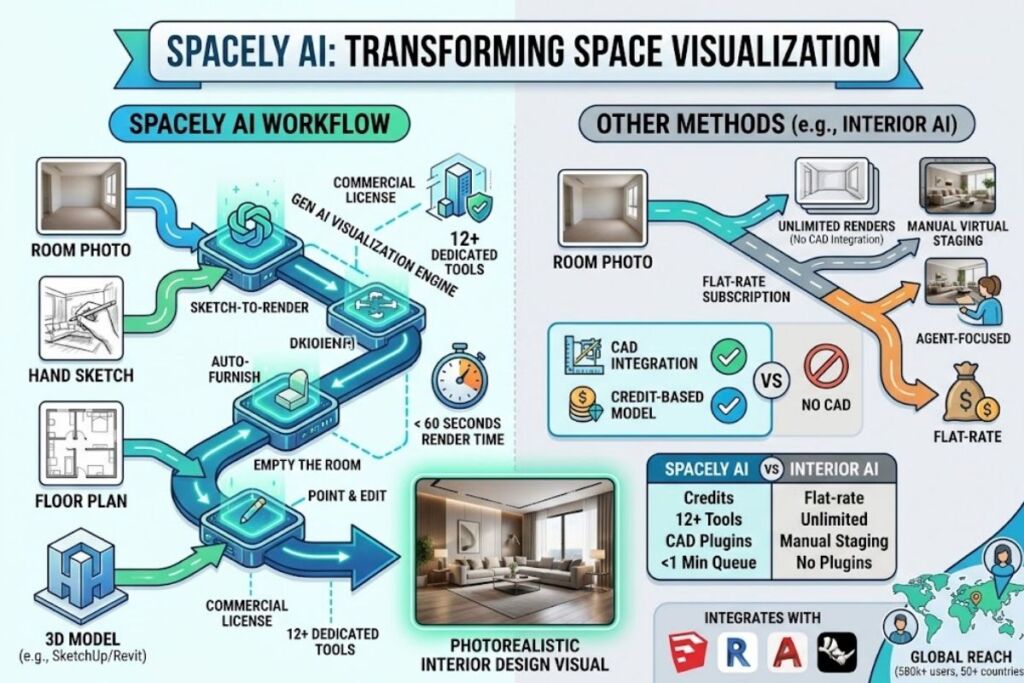
Spacely AI is a credit-based AI rendering platform that converts room photos, sketches, and 3D models into photorealistic interior design visuals in under 60 seconds. Founded in Bangkok in 2023, the platform serves 580,000+ architects, interior designers, and real estate teams across 50+ countries with SketchUp, Revit, AutoCAD, and Rhino integrations.
What Is Spacely AI?
Spacely AI is a generative AI visualization platform built for the Architecture, Engineering, and Construction (AEC) industry that turns uploaded photos, sketches, or 3D models into photorealistic interior and exterior renders. The platform runs entirely in the browser and connects directly to CAD software designers already use.
Spacely AI Company Limited launched in 2023 out of Bangkok, Thailand, and raised $1 million across two funding rounds from investors including SCB 10X and PropTech Farm. The company has generated more than 3 million renders and reports 580,000+ users spanning architects, interior designers, realtors, and property owners, with the largest concentration of activity in the United States and Europe. Spacely AI operates its own AI infrastructure across AWS and GCP rather than routing every request through a single third-party model provider, which the company states keeps render times consistent as usage scales.
| Attribute | Value |
|---|---|
| Company | Spacely AI Company Limited |
| Headquarters | Bangkok, Thailand |
| Founded | 2023 |
| Users | 580,000+ |
| Funding | $1M (SCB 10X, PropTech Farm) |
| Pricing | Free – $0; Personal – from $12.75/mo; Studio – from $38.25/mo; Agency – from $102/mo |
| Platforms | Web app; SketchUp, Revit, AutoCAD, Rhino plugins |
| Key Feature | Realistic Render — photo, sketch, or 3D model to photorealistic image in under 60 seconds |
Source: Spacely AI official pricing and About Us pages.
What Are Spacely AI’s Key Features?
Spacely AI packages 12+ distinct rendering tools inside one credit pool. Each feature targets a specific stage of the design-to-presentation workflow rather than a single generic “redesign” button.
- Render photorealistic interiors from a phone photo, hand sketch, or exported 3D model using Realistic Render.
- Furnish empty rooms automatically with Auto Furnish, which places furniture, lighting, and decor matched to a selected style.
- Edit specific regions of a render without regenerating the whole image using Point and Edit.
- Preserve wall materials, flooring, and fixtures across style variations with Material Settings.
- Extend a cropped or partial photo into a wider camera view using View Extender.
- Transfer lighting conditions from a reference image onto a render with Lighting Transfer.
- Convert floor plan sketches into clean architectural line art with Image to Lineart.
- Generate multiple camera angles of the same room in one job using Multiple Angles.
- Empty a furnished room digitally with Empty the Room, useful for real estate staging resets.
- Integrate directly with SketchUp, Revit, AutoCAD, and Rhino so 3D models render without manual export steps.
Render speed scales by plan tier: Standard queue delivers results in 5 minutes on the Personal plan, Priority queue delivers under 3 minutes on Studio, and Lightning queue delivers under 1 minute on Agency, according to Spacely AI’s pricing page.
How Much Does Spacely AI Cost?
Spacely AI runs a freemium, credit-based model: the Free plan costs $0 with 40 trial credits, and paid plans range from $12.75 to $102 per month on yearly billing, with Agency (5 seats) as the top subscription tier. Every plan, including Free, ships watermark-free with a commercial license.
According to Spacely AI’s official pricing page, the tier structure breaks down as follows:
| Plan | Yearly-billed price | Monthly-billed price | Seats | Queue speed |
|---|---|---|---|---|
| Free | $0 forever | $0 | 1 | Standard |
| Personal | $12.75/mo | $20/mo | 1 | Standard (5 min) |
| Studio | $38.25/mo | $45/mo | Up to 2 | Priority (under 3 min) |
| Agency | $102/mo | $99/mo | Up to 5 | Lightning (under 1 min) |
| Education | $30/mo | — | 1 | Included in Studio tier |
The Free plan grants 40 trial credits, high-resolution download, private mode, and access to all features before any paywall appears. The Education plan applies automatically to verified academic emails and delivers 1,500 credits per month plus every Studio-tier feature for $30 per month. Users who exhaust their monthly credit allowance can buy top-up packs: 200 credits for $9 (~100 renders), 1,000 credits for $35 (~500 renders), or 5,000 credits for $150 (~2,500 renders). Top-up credits carry no expiration date and stack on top of the monthly allowance. Most individual renders consume 2 to 8 credits depending on resolution and feature selected.
What Are the Pros and Cons of Spacely AI?
Spacely AI’s advantages and limitations trace directly to its credit-based, CAD-integrated design.
Pros:
- Free tier delivers watermark-free, commercially licensed output — most competing tools restrict free renders with watermarks.
- Native plugins for SketchUp, Revit, AutoCAD, and Rhino remove manual file export/import steps for professional 3D workflows.
- Agency-tier renders complete in under 1 minute via the Lightning queue.
- Top-up credits never expire, so unused capacity carries forward indefinitely.
- 12+ dedicated tools cover sketch-to-render, style transfer, material ID mapping, and virtual staging in one credit pool.
Cons:
- Every action — generation, regeneration, and upscaling — consumes credits individually, so active users burn through monthly allowances faster than flat-rate subscription tools, according to a 2026 alternatives comparison from Remodel AI.
- Maximum team size tops out at 5 seats on the Agency plan, below the 10-user cap on Interior AI’s comparable Pro for Teams plan.
- The platform covers interior redesign and sketch-to-render only; it does not generate AI video, product photography, or general social ad creative.
- Real-time collaboration and centralized administration are locked to the Studio and Agency tiers, unavailable on Personal.
How Does Spacely AI Compare to Interior AI?
Spacely AI wins on CAD integration and free-tier value; Interior AI wins on unlimited-render simplicity for real estate staging. Interior AI, a competing AI rendering platform, converts room photos into staged or restyled interiors through a browser-only workflow with no CAD plugin support.
| Attribute | Spacely AI | Interior AI |
|---|---|---|
| Entry price | Free (40 credits) | No free trial; preview renders only |
| Paid entry tier | $12.75/mo (yearly) | $29/mo or $249/yr (Pro) |
| Top tier | $102/mo, 5 seats | $299/mo or $1,999/yr, 10 users |
| Billing model | Credit-based | Unlimited renders on paid plans |
| CAD integrations | SketchUp, Revit, AutoCAD, Rhino | None |
| Best for | Designers rendering from 3D models or sketches | Real estate agents staging listings |
Interior AI’s Pro plan offers unlimited renders for a flat $29 per month, which suits agents generating high volumes of staged listing photos without tracking credit consumption. Spacely AI’s credit system fits studios that need sketch-to-render and material-accurate output tied directly into an existing CAD pipeline. For a deeper breakdown, read our full comparison: Interior AI vs Spacely AI: Which AI Rendering Tool Wins in 2026?
Who Should Use Spacely AI?
Spacely AI fits four specific user profiles based on its feature set and CAD integrations:
- Architecture and interior design studios that already model in SketchUp, Revit, AutoCAD, or Rhino and need one-click rendering without exporting files.
- Freelance interior designers who need watermark-free, commercially licensed client presentations on a single-seat budget.
- Real estate teams staging empty listings using Empty the Room and Auto Furnish before photography.
- Small design agencies of up to 5 people who need shared canvases, centralized administration, and API access on the Agency plan.
Spacely AI is not built for solo homeowners running one or two lifetime renders — the 40 free trial credits cover that need without any subscription.
What Are the Best Alternatives to Spacely AI?
- Interior AI offers unlimited renders on a flat $29/month Pro plan and specializes in real estate virtual staging without CAD plugin dependency. Read our full Interior AI Review.
- RoomGPT uses a pay-per-credit model starting at $9 for 30 credits, with brand recognition and a no-signup single free render. See RoomGPT Pricing and Review.
- Collov AI runs on an annual subscription starting at $228/year with a limited monthly credit allowance, positioned for e-commerce and product-visualization use cases. See Best Free AI Interior Design Tools 2026 for how it stacks up against Spacely AI’s free tier.
Frequently Asked Questions
Is Spacely AI free to use?
Spacely AI’s Free plan costs $0 forever and includes 40 trial credits, watermark-free downloads, high-resolution export, and a commercial license, with no credit card required at signup.
Does Spacely AI integrate with SketchUp?
Spacely AI provides a native SketchUp plugin on the Personal, Studio, and Agency plans, alongside Revit, AutoCAD, and Rhino integrations, letting users render directly from 3D models.
How long does a Spacely AI render take?
Render time depends on plan tier: 5 minutes on the Personal plan’s Standard queue, under 3 minutes on Studio’s Priority queue, and under 1 minute on Agency’s Lightning queue.
Does Spacely AI offer a student discount?
Spacely AI’s Education plan costs $30 per month for verified academic email holders and includes every Studio-tier feature plus 1,500 credits per month.
The Bottom Line
Spacely AI’s free tier delivers watermark-free, commercially licensed renders that competing platforms charge $27 to $49 per month to unlock, making it the highest-value entry point among CAD-integrated AI rendering tools reviewed on Knowara in 2026.