
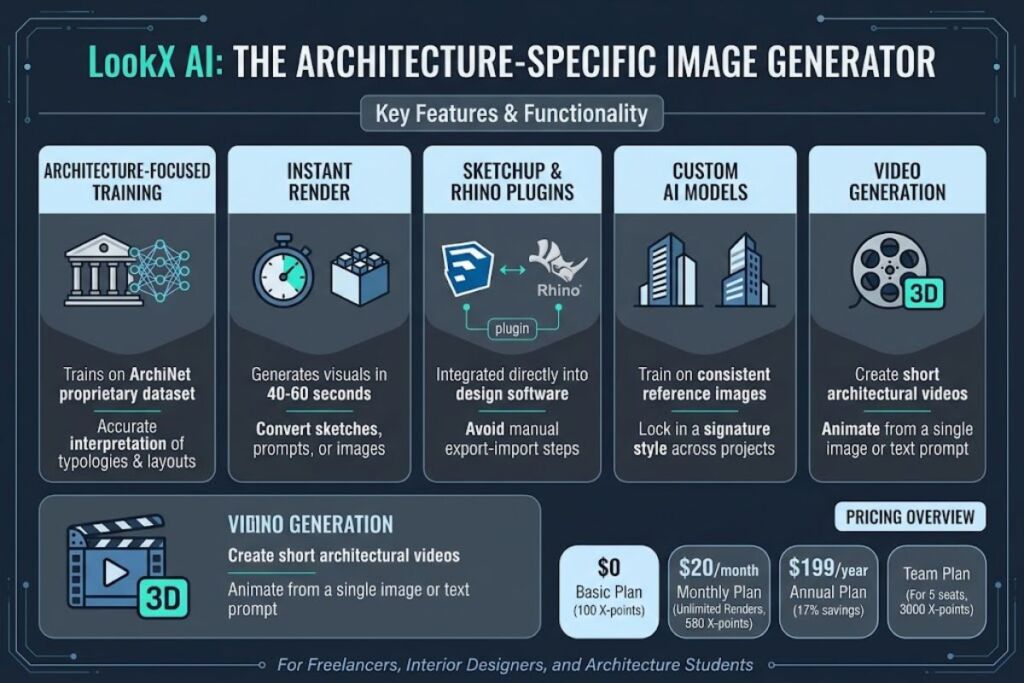
LookX AI is a browser-based AI image generator built specifically for architecture, interior, and landscape visualization. It converts sketches, text prompts, and reference images into rendered visuals and short videos, and it plugs directly into SketchUp and Rhino. The Basic plan costs $0. Paid plans start at $20 per month.
What Is LookX AI?
LookX AI is a generative AI platform that turns architectural sketches, photos, and text descriptions into renders, 3D-style visuals, and videos. The platform runs on ArchiNet, a proprietary architecture-specific training dataset, which is why its outputs interpret building typologies, facade styles, and interior layouts more accurately than general-purpose image generators.
LookX AI was founded in Los Angeles in 2023 by a team of architects, AI scientists, and computer engineers. The English-language platform operates as a sister company to Xkool Technology, an architecture-AI firm founded in Shenzhen in 2016 by architect Wanyu He. Zaha Hadid Architects designer Tim Fu is among the early adopters credited with popularizing the tool through building-form experiments shared on parametric-design channels.
| Attribute | Value |
|---|---|
| Company | LookX AI (sister company of Xkool Technology) |
| Release Year | 2023 |
| Headquarters | Los Angeles, USA |
| Pricing | Free / $20 per month / $199 per year / $269 per month (Team) |
| Platforms | Web app, SketchUp plugin, Rhino plugin |
| Key Feature | Real-time sketch-to-render with custom model training on ArchiNet |
| Free Tier | 100 X-points, no credit card required |
Source: LookX AI official pricing page (lookx.ai/price.html) and LookX AI About page.
A studio sketching a mixed-use residential block in SketchUp uses LookX AI’s plugin to generate a photorealistic facade render without exporting the model to a separate rendering engine.
What Are LookX AI’s Key Features?
LookX AI packages nine core tools inside one workspace. Each tool targets a specific stage of the visualization workflow, from concept sketch to finished video.
- Generate renders instantly from text or sketches using the RealTime tool, with outputs completing in roughly 40 to 60 seconds per image, according to LookX AI’s own product documentation.
- Produce short videos from a single image or text prompt using the Video Generation tool, supporting three animation types.
- Train custom AI models by uploading a set of style-consistent reference images, then reuse that trained model across future projects.
- Integrate LookX directly into SketchUp and Rhino through native plugins, avoiding manual export-import steps.
- Match a target aesthetic with the Style Adapter by uploading one reference image instead of writing a style description.
- Upscale any generated image through the HD editing tool to correct artifacts and sharpen detail.
- Duplicate any image from the Creations Plaza community feed with one click to reproduce a similar effect on a new design.
- Reference LookX’s built-in architectural vocabulary library to write prompts using industry-accurate terminology.
- Expand short prompts automatically into detailed paragraphs using the Prompt Assistant before generation.
How Much Does LookX AI Cost?
LookX AI runs on a freemium model with a $20-per-month Individual plan, a $199-per-year annual option, and a $269-per-month Team plan for 5 seats. Two additional tiers cover education and enterprise use.
| Plan | Price | Included |
|---|---|---|
| Basic | Free | 100 X-points, normal-speed generation lane, no card required |
| Monthly (Individual) | $20/month | Unlimited image generations, 580 X-points/month, Lightning Lane priority, 7-day free trial |
| Annual (Individual) | $199/year (17% savings) | Same benefits as Monthly, billed yearly, 7-day free trial |
| Team | $269/month | 5 seats, 3,000 shared X-points/month, unlimited generations, Super Lightning Lane, shared cloud drive, exclusive model library |
| Education | Contact sales | Educational discounts, faculty/student access, coursework integration |
| Custom Solutions | Contact sales | Custom credit volume, private cloud, API access, enterprise support |
X-points are LookX AI’s internal credit unit, consumed for model training and image upscaling. Image generation itself is unlimited and free of X-point charges on every paid tier.
Source: LookX AI official pricing page, lookx.ai/price.html, accessed 2026.
What Are the Pros and Cons of LookX AI?
LookX AI’s biggest advantage is its architecture-specific training data; its biggest limitation is the absence of a Revit plugin. The platform trades broad BIM compatibility for deep specialization in a smaller set of workflows.
Pros:
- Trains on ArchiNet, an architecture-specific dataset, producing more building-accurate outputs than general image generators like Midjourney.
- Ships native plugins for both SketchUp and Rhino, keeping the render step inside the modeling environment.
- Offers unlimited image generations on the $20 Monthly plan with no per-render X-point deduction.
- Supports custom model training, letting a firm lock in a consistent rendering style across every project.
- Includes video generation from a single image, a feature absent from most sketch-to-render competitors.
Cons:
- Provides no native plugin for Revit, Archicad, or Vectorworks, limiting BIM-native studios to manual image export.
- Gates model training and upscaling behind X-point balances even on the paid Monthly tier.
- Restricts API access to the Custom Solutions enterprise tier, blocking programmatic batch rendering on lower plans.
- Limits the free Basic plan to 100 X-points total, with no ongoing monthly refresh.
How Does LookX AI Compare to Veras?
LookX AI specializes in architecture-trained image generation with SketchUp and Rhino plugins, while Veras by EvolveLAB renders directly from live BIM geometry inside Revit, SketchUp, Rhino, Archicad, Vectorworks, and Forma. Veras suits BIM-heavy teams; LookX AI suits sketch-first and concept-stage workflows.
| Attribute | LookX AI | Veras |
|---|---|---|
| Developer | LookX AI (LA, founded 2023) | EvolveLAB |
| Native plugins | SketchUp, Rhino | Revit, SketchUp, Rhino, Archicad, Vectorworks, Forma |
| Entry paid price | $20/month | ~$29/month (billed annually) |
| Video generation | Yes | No |
| Custom model training | Yes | No |
| Community sharing feed | Yes (Creations Plaza) | No |
For a full breakdown of Veras’s Revit-native workflow, read our dedicated Veras AI Review.
Who Should Use LookX AI?
LookX AI fits solo architects, small design studios, and interior or landscape designers who work primarily in SketchUp or Rhino and need fast concept renders. It also serves architecture students, e-commerce visualization teams, and firms that want a trainable house style baked into every render.
- Solo architects and freelancers: The $20 Monthly plan delivers unlimited renders for client presentations without a rendering-farm subscription.
- Interior and landscape design studios: Style Adapter and custom model training keep renders consistent across a portfolio.
- Architecture students and educators: The free Basic plan and dedicated Education tier support coursework without upfront cost.
- E-commerce and product visualization teams: The platform’s image and video generation tools extend beyond buildings into product staging.
Firms standardized on Revit without SketchUp or Rhino in the pipeline should evaluate Veras or a BIM-native renderer instead, since LookX AI has no Revit plugin.
What Are the Best Alternatives to LookX AI?
Veras, Vizcom, and D5 Render are the three closest alternatives to LookX AI for architecture visualization, each with a different plugin footprint and pricing floor.
- Veras: An EvolveLAB rendering add-in for Revit, SketchUp, Rhino, Archicad, Vectorworks, and Forma, priced from roughly $29/month, built for teams that render directly from live model geometry.
- Vizcom: A browser-based sketch-to-render tool with a free Starter tier (800 credits) and a $49/month Professional plan, suited to early-stage concept sketches without BIM integration.
- D5 Render: A real-time ray-tracing engine that syncs live with SketchUp, Revit, and Rhino, aimed at studios that need production-grade final renders rather than concept-stage AI generation.
Read the full comparison in our Best AI Architecture Visualization Tools in 2026 roundup.
Frequently Asked Questions
Does LookX AI have a free plan?
Yes. The Basic plan is free permanently, includes 100 X-points, and requires no credit card. It does not include unlimited image generation, which starts on the $20 Monthly plan.
Which design software does LookX AI integrate with?
LookX AI ships native plugins for SketchUp and Rhino. It does not currently offer a Revit, Archicad, or Vectorworks plugin.
How much does the LookX AI Team plan cost?
The Team plan costs $269 per month for 5 seats, 3,000 shared X-points per month, and a shared cloud drive for project files.
Is LookX AI suitable for final client-delivery renders?
LookX AI generates concept and presentation-stage visuals from sketches and prompts. Studios needing production-grade, ray-traced final renders typically pair it with a dedicated render engine like D5 Render or Enscape.
The Bottom Line
LookX AI’s $20-per-month Individual plan delivers unlimited architecture-trained image generation plus SketchUp and Rhino plugin integration, making it one of the lowest-cost entry points into AI architectural visualization compared to Veras’s $29-per-month floor and Vizcom’s $49-per-month Professional tier.
Related Reading: