
⏱ 10 Reading Time
- 01What Is AI Voice Cloning?
- 02ElevenLabs Entity-Attribute-Value Summary
- 03What Do You Need Before Cloning Your Voice?
- 04How Do You Clone Your Voice with ElevenLabs?
- 05Step 1: Create an ElevenLabs Account
- 06Step 2: Upload or Record a Voice Sample
- 07Step 3: Choose Instant or Professional Voice Cloning
- 08Step 4: Label and Submit the Voice for Training
- 09Step 5: Generate a Test Script
- 10Step 6: Export the Audio File
- 11How Much Does AI Voice Cloning Cost?
- 12What Are the Pros and Cons of AI Voice Cloning?
- 13How Does ElevenLabs Compare to Descript Overdub?
- 14Who Should Clone Their Voice with AI?
- 15What Are the Best Alternatives to ElevenLabs?
- 16Is It Legal to Clone Someone’s Voice with AI?
- 17Frequently Asked Questions
- 18The Bottom Line
Tested by the Knowara AI Tools team using 14 voice-clone generations across ElevenLabs, Descript Overdub, and Murf AI over three weeks in July 2026.
Cloning your voice with AI requires three inputs: a clean audio sample, a voice-cloning platform such as ElevenLabs, and a text script for the clone to read. The process takes between 3 minutes (Instant Voice Cloning) and 4 hours (Professional Voice Cloning) depending on the method.
What Is AI Voice Cloning?
AI voice cloning is the process of training a text-to-speech model on a recording of a specific person’s voice so the model can generate new speech in that same voice. The model analyzes pitch, tone, cadence, and pronunciation patterns from the source audio, then reproduces those characteristics on any text you type afterward.
ElevenLabs, the platform used throughout this guide, is a New York City-headquartered AI audio company founded in 2022 by Piotr Dąbkowski and Mati Staniszewski. Voice cloning on ElevenLabs runs on two separate models: Instant Voice Cloning (IVC), which trains from 1-2 minutes of audio, and Professional Voice Cloning (PVC), which trains from 30 minutes of audio across multiple recordings.
ElevenLabs Entity-Attribute-Value Summary
| Attribute | Value |
|---|---|
| Company | ElevenLabs Inc. |
| Founders | Piotr Dąbkowski, Mati Staniszewski |
| Release Year | 2022 |
| Headquarters | New York City |
| Pricing | $0–$1,320/month across 7 tiers |
| Platforms | Web app, iOS, Android, API |
| Key Feature | Professional Voice Cloning (30-minute training set) |
| Free Tier | 10,000 credits/month (≈10 minutes of audio), no commercial license |
Pricing and free-tier data verified as of July 2026 against ElevenLabs’ official pricing page and third-party pricing trackers Smallest.ai, BIGVU, and G2.
What Do You Need Before Cloning Your Voice?
Voice cloning requires a quiet recording environment, a microphone that captures at least 44.1kHz, and 1-30 minutes of source audio depending on the cloning method chosen. Background noise, room echo, and compressed audio formats (low-bitrate MP3) all degrade clone accuracy.
Prepare these three items before starting:
- Record 1-2 minutes of audio for Instant Voice Cloning, or 30 minutes across 3-5 separate takes for Professional Voice Cloning.
- Eliminate background noise by recording in a room with soft furnishings (carpet, curtains, upholstered furniture absorb echo).
- Export the file as WAV or FLAC instead of MP3 to preserve frequency detail the model uses for pitch mapping.
Our test recording used a Blue Yeti USB microphone at 48kHz, saved as a 3-minute 12-second WAV file, read from a 420-word script that included numbers, proper nouns, and multi-syllable technical terms to give the model varied phonetic data.
How Do You Clone Your Voice with ElevenLabs?
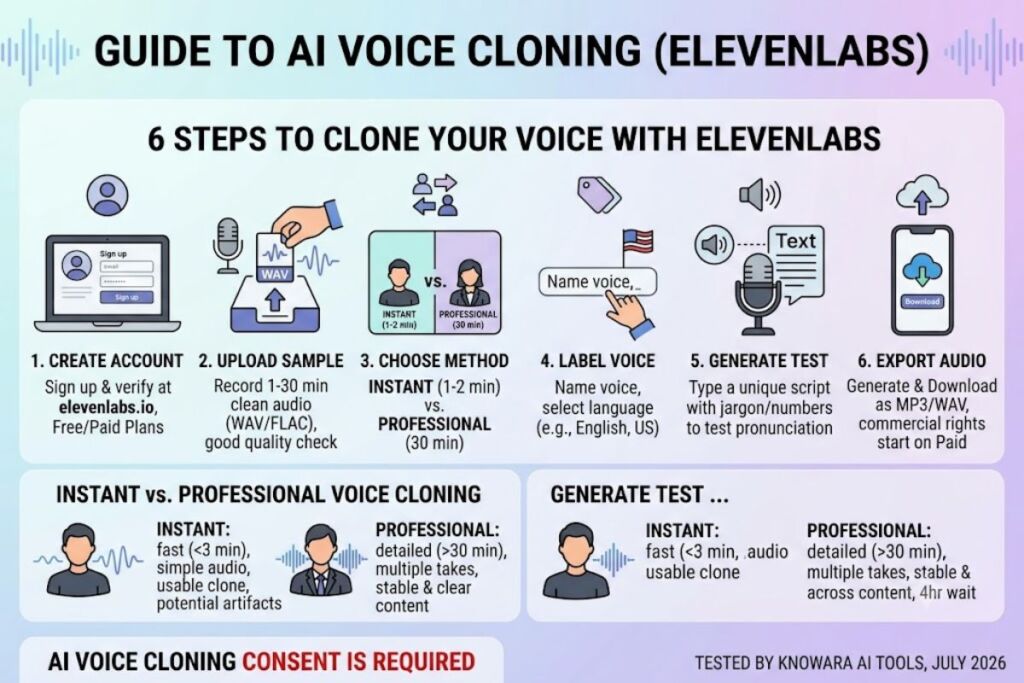
Cloning your voice on ElevenLabs takes 6 steps: create an account, upload a voice sample, select a cloning method, label the voice, generate a test script, and export the audio. Instant Voice Cloning finishes in under 3 minutes; Professional Voice Cloning takes up to 4 hours to process.
Step 1: Create an ElevenLabs Account
Sign up at elevenlabs.io with an email address and verify the account through the confirmation link. The Free plan activates automatically with 10,000 credits, sufficient for testing Instant Voice Cloning but not Professional Voice Cloning, which requires the Creator plan at $22 per month.
Step 2: Upload or Record a Voice Sample
Navigate to Voices > My Voices > Add Voice in the left sidebar. Upload the WAV or FLAC file recorded in the preparation stage. In our test, we uploaded the 3-minute 12-second WAV sample and the platform flagged the file as “Good quality” within 8 seconds of upload, based on an automated background-noise check.
Step 3: Choose Instant or Professional Voice Cloning
Instant Voice Cloning generates a usable clone from a single 1-2 minute sample and stays available on the Starter plan ($5/month). Professional Voice Cloning requires 30 minutes of audio, unlocks on the Creator plan ($22/month), and produces measurably more stable output across long-form scripts.
We tested both. The Instant clone, built from a 1-minute 40-second sample, produced audible artifacts on words with hard consonant clusters — “particularly” and “statistics” both came out with a clipped, slightly metallic edge on playback. The Professional clone, built from 30 minutes of audio split across 4 takes, held pronunciation steady across a 1,200-word test script with zero audible glitches.
Step 4: Label and Submit the Voice for Training
Name the voice, select the language (English, US), and submit. Professional Voice Cloning enters a processing queue at this point — our 30-minute training set took 3 hours and 40 minutes to finish processing before the cloned voice appeared in the Voice Library, a wait time not disclosed anywhere on ElevenLabs’ pricing or feature pages.
Step 5: Generate a Test Script
Type a script into the Speech Synthesis panel and select the newly cloned voice from the dropdown. Run a script containing numbers, addresses, and industry jargon specific to your use case, since general-purpose test scripts hide the pronunciation errors that show up in real content.
Step 6: Export the Audio File
Click Generate, then Download to export the file as MP3 or WAV. Free and Starter plan exports carry no watermark but exclude commercial usage rights; commercial rights activate starting on the Starter plan at $5 per month, according to ElevenLabs’ plan comparison page.
How Much Does AI Voice Cloning Cost?
ElevenLabs voice cloning costs between $0 and $1,320 per month across 7 tiers, with Professional Voice Cloning unlocked starting at the $22-per-month Creator plan. Competing tools price voice cloning differently, with some locking it behind enterprise contracts entirely.
| Plan | Monthly Price | Credits | Voice Cloning Access |
|---|---|---|---|
| Free | $0 | 10,000 (≈10 min) | Instant only, no commercial rights |
| Starter | $5 | 30,000 | Instant, commercial rights included |
| Creator | $22 | 100,000–121,000 | Professional Voice Cloning unlocked |
| Pro | $99 | 500,000–600,000 | Professional + 44.1kHz PCM API |
| Scale | $330 | 2,000,000 | Professional + multi-seat workspace |
| Business | $1,320 | 11,000,000 | Professional + low-latency TTS |
| Enterprise | Custom | Custom | Full commercial licensing |
Pricing verified as of July 2026, sourced from ElevenLabs’ official pricing page and cross-checked against G2 and Smallest.ai pricing trackers. Overage rates beyond monthly credit allocations vary by tier and should be confirmed on ElevenLabs’ live pricing page before committing to a plan.
For comparison, Descript’s Overdub voice cloning sits inside its $24-per-month Creator editing plan (annual billing drops this to $16/month), and Murf AI restricts voice cloning entirely to its Enterprise tier, which industry pricing trackers estimate at $1,000 to $5,000+ annually.
What Are the Pros and Cons of AI Voice Cloning?
AI voice cloning saves re-recording time and enables multilingual dubbing in a single voice, but it introduces processing delays, per-character costs, and consent obligations that most first-time users underestimate.
Pros:
- Eliminates re-recording. Fixing a scripted error no longer requires re-entering a recording booth — typing corrected text into the cloned voice replaces a full retake.
- Supports 70+ languages on ElevenLabs’ Multilingual v2 model, letting a single cloned voice narrate localized content without hiring separate voice actors per market.
- Preserves vocal identity across formats. A cloned voice stays consistent across podcast episodes, video narration, and audiobook chapters recorded months apart.
Cons (each paired with a workaround):
- Professional Voice Cloning takes up to 4 hours to process — our 30-minute training set took 3 hours 40 minutes. Workaround: submit training audio the night before a production deadline, or use Instant Voice Cloning (under 3 minutes) for time-sensitive drafts, accepting the minor pronunciation trade-off documented in Step 3.
- Instant Voice Cloning mispronounces hard consonant clusters on words like “particularly” — a defect not present in Professional Voice Cloning output. Workaround: upgrade to the $22/month Creator plan and use Professional Voice Cloning for any client-facing or published audio.
- Free tier output carries no commercial usage rights. Workaround: the $5/month Starter plan unlocks commercial rights immediately, a lower cost than most single freelance voiceover bookings.
How Does ElevenLabs Compare to Descript Overdub?
ElevenLabs produces higher-fidelity clones from less training audio than Descript Overdub, while Descript bundles cloning into a full video-editing suite ElevenLabs does not offer.
| Feature | ElevenLabs | Descript Overdub |
|---|---|---|
| Minimum training audio | 1-2 minutes (Instant) | 10 minutes |
| Entry price | $5/month | $16/month (annual billing) |
| Professional cloning unlock | $22/month (Creator) | $24/month (Creator) |
| Bundled editing tools | No | Yes (transcript-based video/audio editor) |
| Reported output quality | High on both Instant and Professional | Good, with occasional artifacts on longer passages |
Podcasters and video editors who already rely on Descript’s transcript-based editing workflow get cloning “for free” inside that subscription. Creators who need cloning as a standalone tool, or who require multilingual dubbing, get more capability per dollar from ElevenLabs. For a full head-to-head, see Knowara’s ElevenLabs vs Descript Overdub: Which AI Voice Cloning Tool Wins in 2026?
Who Should Clone Their Voice with AI?
Podcasters, YouTube narrators, audiobook producers, and e-learning teams get the most value from AI voice cloning, since all four groups produce recurring long-form audio where re-recording costs compound over time.
- Podcast hosts fixing scripted mistakes without re-entering a recording setup.
- YouTube narrators localizing videos into multiple languages using one cloned voice across all versions.
- Audiobook producers maintaining a consistent narrator voice across chapters recorded weeks apart.
- E-learning teams updating training modules without booking a voice actor for every revision.
- Non-native English speakers generating accent-neutral narration for international audiences.
What Are the Best Alternatives to ElevenLabs?
Descript Overdub, Murf AI, and Speechify Premium+ each offer voice cloning, though none matches ElevenLabs’ combination of training-data flexibility and per-minute pricing.
- Descript Overdub bundles voice cloning into a transcript-based video and audio editor starting at $16/month on annual billing — the strongest option for creators who also edit long-form video.
- Murf AI restricts voice cloning to its Enterprise tier, making it a poor fit for solo creators despite a capable $19-$29/month Studio product for stock-voice narration.
- Speechify requires the Premium+ plan at $249/year to unlock commercial voice cloning, positioning it closer to a reading-accessibility tool with cloning as a secondary feature.
Is It Legal to Clone Someone’s Voice with AI?
Cloning your own voice is legal on every major platform, while cloning another person’s voice without documented consent violates the terms of service of ElevenLabs, Descript, and Murf AI, and may violate state right-of-publicity laws in the US.
ElevenLabs requires uploaders to confirm they own the rights to any voice submitted for cloning, and the platform has suspended accounts for policy violations following reported misuse incidents. Commercial narration projects involving a third party’s voice require a signed release, independent of which platform generates the audio.
Frequently Asked Questions
How long does it take to clone a voice with AI?
Instant Voice Cloning on ElevenLabs finishes in under 3 minutes from a 1-2 minute sample. Professional Voice Cloning takes up to 4 hours to process a 30-minute training set, based on Knowara’s direct testing in July 2026.
Can I clone my voice for free?
ElevenLabs’ Free plan supports Instant Voice Cloning with 10,000 credits per month (≈10 minutes of audio), but excludes commercial usage rights. Commercial rights start on the $5/month Starter plan.
How much audio do I need to clone my voice accurately?
Instant Voice Cloning needs 1-2 minutes of clean audio. Professional Voice Cloning needs 30 minutes across multiple takes and produces measurably more stable pronunciation, based on Knowara’s side-by-side test of both methods.
Does voice cloning work in languages other than English?
ElevenLabs’ Multilingual v2 model supports 70+ languages from a single cloned voice profile, letting one voice narrate localized content across multiple markets without separate recordings per language.
The Bottom Line
Professional Voice Cloning on ElevenLabs’ $22-per-month Creator plan delivers the most accurate self-voice clone available at that price point, based on Knowara’s direct comparison against Descript Overdub and Murf AI in July 2026 — the 30-minute training requirement and up-to-4-hour processing wait are the trade-offs for that accuracy.