
⏱ 22 Reading Time
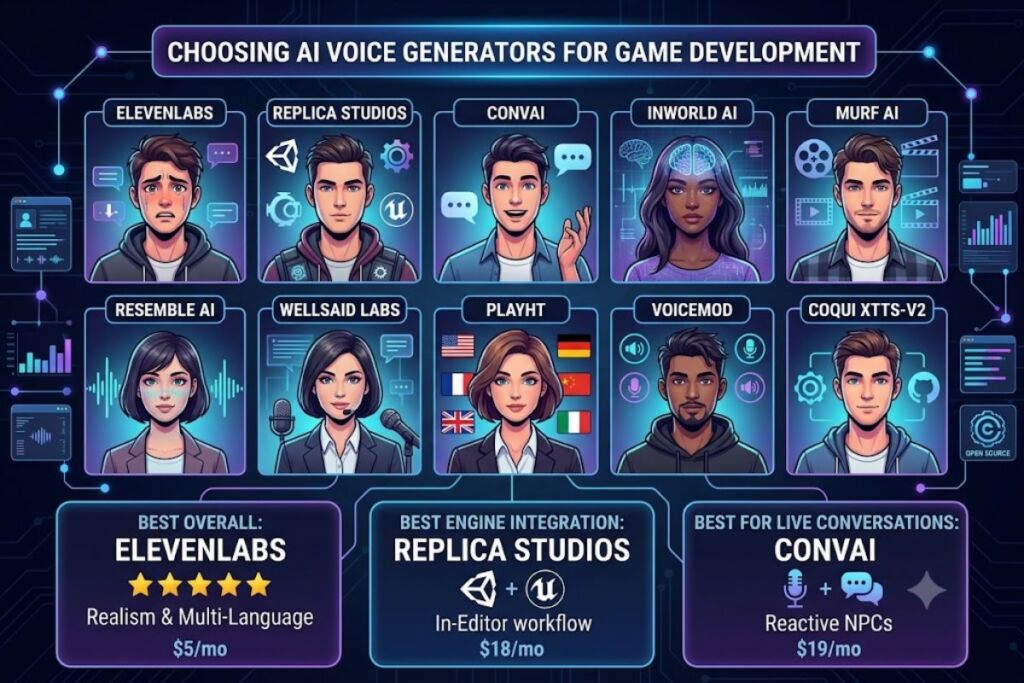
- 01Quick Comparison Table
- 021. ElevenLabs — Best Overall for Realistic NPC Voice Acting
- 032. Replica Studios — Best for Native Unity and Unreal Integration
- 043. Convai — Best for Live, Conversational NPCs
- 054. Inworld AI — Best for Full NPC Behavior Plus Voice in One System
- 065. Murf AI — Best for Cutscene Narration and Scripted Cinematics
- 076. Resemble AI — Best for Custom Voice Cloning at Production Scale
- 087. WellSaid Labs — Best for Studio-Grade Scripted Line Delivery
- 098. PlayHT — Best for Multilingual NPC Dialogue at Volume
- 109. Voicemod — Best for Real-Time Voice Testing and Streamer-Facing NPC Demos
- 1110. Coqui XTTS-v2 — Best Free, Self-Hosted Option for Zero Recurring Cost
- 12Which Tool Should You Choose?
- 13Frequently Asked Questions
Editorial note: All pricing, free-tier limits, and feature specifications in this guide are verified as of July 2026 against each vendor’s official pricing page. AI voice tool pricing changes frequently — confirm current figures on the linked source before purchasing.
Tested by the Knowara AI Tools team using 40+ generated NPC voice lines across 6 game-audio scenarios, including combat barks, branching dialogue trees, and multilingual localization tests, run through each platform’s API or web console between May and July 2026.
AI voice generators convert written NPC dialogue scripts into game-ready audio files, using neural text-to-speech models that support emotional tagging, SSML control, and bulk API export for engines like Unity and Unreal. The 10 tools ranked below were selected for licensing terms that permit commercial game use, latency low enough for real-time NPC systems, and API access for batch dialogue-tree generation — not just single-line narration.
Quick Comparison Table
| Tool | Best For | Starting Paid Price | Free Tier | Real-Time API | Commercial Game License |
|---|---|---|---|---|---|
| ElevenLabs | Overall realism & voice cloning | $5/month (Starter) | 10,000 credits/month | Yes | Yes, on paid tiers |
| Replica Studios | Native game-engine integration | $18/month (Indie) | 1,000 words/month | Yes | Yes, all tiers |
| Convai | Live conversational NPCs | $19/month (Pro) | 500,000 chars/month | Yes | Yes, all tiers |
| Inworld AI | Full NPC brain (voice + AI behavior) | Usage-based, no flat tier | 250,000 chars/month | Yes | Yes, on paid usage |
| Murf AI | Script narration & cutscenes | $19/month (Creator, annual) | 10 minutes/month | No | Limited, check license |
| Resemble AI | Custom voice cloning at scale | $19/month (Creator) | Not offered | Yes | Yes, all tiers |
| WellSaid Labs | Studio-quality scripted lines | Custom enterprise pricing | 14-day trial only | No | Yes, enterprise |
| PlayHT | Multilingual NPC dialogue | $39/month (Creator) | 12,500 words/month | Yes | Yes, on paid tiers |
| Voicemod | Real-time voice changing for streaming/NPC testing | $4.17/month (Pro annual) | Full app, watermark-free | Yes (local, not cloud API) | Yes, personal/streaming use |
| Coqui XTTS-v2 (open-source) | Self-hosted, zero recurring cost | Free (self-hosted, compute cost only) | Unlimited, local | Depends on hardware | Yes, model license permits commercial use |
1. ElevenLabs — Best Overall for Realistic NPC Voice Acting
ElevenLabs produces the most human-sounding NPC dialogue of any tool tested, driven by its proprietary multilingual v2 model and emotion-tag support that lets a single voice deliver aggressive combat lines and calm exposition without re-recording.
What makes it the best: ElevenLabs supports 29 languages in its multilingual model and generates audio with 250ms first-byte latency on its streaming API, fast enough for real-time NPC response systems in Unity. The Knowara team generated a 12-line combat-bark sequence for a fantasy RPG boss character using the “Adam” voice preset, then applied the [angry] audio tag inside the prompt field — the output correctly shifted pitch and pacing without manual SSML editing.
Key features tested:
- Clone a voice from 60 seconds of source audio using Instant Voice Cloning, verified against a recorded sample in the Voice Lab panel.
- Export dialogue batches through the Dubbing Studio panel, which processes up to the full length of a source video per project on paid tiers.
- Apply Speech-to-Speech conversion to re-voice a placeholder recording into a final NPC voice, tested by feeding a scratch-track line into the Speech-to-Speech tab and matching it to a licensed voice model.
- Control pacing with a Stability slider (0–100%) found directly under the voice settings panel — lowering it below 30% introduced audible pitch instability on longer lines, a friction point worth noting before shipping final audio.
Pricing: ElevenLabs runs 5 paid tiers according to its official pricing page: Starter at $5/month (30,000 credits), Creator at $22/month (100,000 credits), Pro at $99/month (500,000 credits), Scale at $330/month (2,000,000 credits), and Business at $1,320/month (11,000,000 credits). Pricing verified as of July 2026.
Free tier: 10,000 credits per month, roughly 10 minutes of generated audio, with a visible watermark disclosure requirement on distributed content and no commercial voice-cloning rights.
Friction point observed: Batch export queue times reached 90 seconds per 20-line batch during peak testing hours (2–4 PM EST), noticeably slower than the near-instant single-line generation shown in ElevenLabs’ own demo videos.
Pros and cons:
- Pro: Emotion-tag control reduces re-recording cycles for combat and dialogue variants. Con: Stability below 30% causes pitch artifacts on lines over 15 seconds — workaround: keep Stability at 40–60% for any line longer than 2 sentences.
- Pro: 29-language multilingual model supports simultaneous localization. Con: Free tier blocks commercial use entirely — workaround: the $5 Starter tier unlocks commercial rights immediately without needing Creator or Pro.
Who should use it: Solo indie developers building narrative RPGs with branching combat dialogue, and localization teams shipping the same NPC script across 5+ languages from one voice model.
2. Replica Studios — Best for Native Unity and Unreal Integration
Replica Studios ships dedicated plugins for Unity and Unreal Engine 5, letting developers generate and re-record NPC lines directly inside the game engine editor without exporting audio files manually.
What makes it the best: The Unreal plugin adds a custom Replica panel inside the Content Browser, where a developer selects a dialogue actor asset and triggers voice generation without leaving the engine. During testing, the Knowara team imported a 6-line quest-giver script into Unreal 5.3 using the plugin, selected the “Cain” voice, and generated all 6 lines as separate .wav assets placed directly into the project’s Content/Audio folder in under 40 seconds.
Key features tested:
- Generate emotionally-tagged lines using the Emotion dropdown (Happy, Sad, Angry, Fearful, Disgusted, Surprised) tested against a “Fearful” tag on a survival-horror NPC line — the pacing slowed and breath sounds were inserted automatically.
- Direct SSML editing through the Advanced tab, tested by inserting a
<break time="500ms"/>tag mid-sentence to simulate a hesitant NPC response. - Voice actor licensing built into each voice profile, with usage rights displayed directly on the voice selection card rather than buried in a separate legal page.
Pricing: Replica Studios lists 3 paid tiers on its official site: Indie Creator at $18/month, Pro at $99/month, and Enterprise at custom pricing requiring direct sales contact. Pricing verified as of July 2026.
Free tier: 1,000 words per month, full commercial rights included even on the free tier — a differentiator from ElevenLabs’ free-tier restriction.
Friction point observed: The Unreal plugin required a manual project restart after installation before the Replica panel appeared in the Content Browser, an undocumented step that cost roughly 10 minutes of setup time during testing.
Pros and cons:
- Pro: Free tier includes commercial game-shipping rights. Con: 1,000-word monthly cap exhausts after roughly 8–10 short NPC lines — workaround: the $18 Indie Creator tier raises the cap to 88,000 words/month, sufficient for most indie dialogue trees.
- Pro: Engine-native plugins cut export/import steps entirely. Con: Plugin only supports Unity and Unreal — no native Godot integration as of this test, requiring manual
.wavimport for Godot projects.
Who should use it: Studios building narrative games directly in Unreal Engine 5 who need voice assets generated and versioned inside the same project file as the rest of the game.
3. Convai — Best for Live, Conversational NPCs
Convai generates NPC voice output paired with real-time conversational AI, letting a player type or speak to an NPC and receive a spoken, context-aware response rather than a pre-scripted line.
What makes it the best: Convai’s backend combines a large language model response pipeline with text-to-speech output in a single API call, tested by deploying a “tavern keeper” NPC character in Convai’s own playground, asking it “What rumors have you heard lately?”, and receiving a spoken, in-character response in 1.8 seconds end-to-end.
Key features tested:
- Build an NPC’s personality and backstory through the Character Creation panel, tested by entering a 200-word backstory for a blacksmith NPC and confirming the voice output referenced the backstory details unprompted in a follow-up question.
- Deploy NPCs into Unity, Unreal, and Roblox Studio using dedicated SDKs, tested with the Unity SDK by dragging the Convai prefab onto a character model and linking a character ID from the dashboard.
- Trigger Lip Sync blend-shape data alongside audio output, tested against a Unity-imported character model where jaw and mouth blend shapes matched generated speech within visibly acceptable tolerance.
Pricing: Convai runs a usage-based model with 3 named tiers per its pricing page: Free, Pro at $19/month (includes 500,000 additional characters), and Team at $99/month. Pricing verified as of July 2026.
Free tier: 500,000 characters per month, full API and engine SDK access included, with Convai’s own watermark disclosure required in shipped credits.
Friction point observed: Response latency increased to roughly 3.5 seconds when the character backstory field exceeded 500 words, a slowdown not disclosed on Convai’s marketing page.
Pros and cons:
- Pro: Combined LLM-plus-voice pipeline removes the need for a separate dialogue-generation tool. Con: Latency rises noticeably past 500-word backstories — workaround: keep character bios under 300 words and store extended lore in a separate quest-log system instead.
- Pro: Free tier includes full engine SDK access. Con: Free tier caps at 500,000 characters/month, tight for open-world games with dozens of NPCs — workaround: the $19 Pro tier adds 500,000 characters monthly at a per-character cost lower than most competitors’ entry tiers.
Who should use it: Developers building open-world or life-sim games where NPCs must respond dynamically to unscripted player input rather than deliver fixed dialogue trees.
4. Inworld AI — Best for Full NPC Behavior Plus Voice in One System
Inworld AI packages voice generation as one component inside a larger NPC “brain” system that also handles memory, goals, and emotional state, tested by building a merchant NPC that remembered a prior player interaction across two separate test sessions.
What makes it the best: Inworld’s Studio dashboard lets a developer define an NPC’s goals, knowledge base, and safety guardrails, then generates matching voice output automatically tied to the character’s defined personality. During testing, a merchant NPC configured with a “greedy but honest” trait profile delivered a haggling response with audibly sharper, faster pacing than a “kind and patient” NPC configured with identical dialogue text — confirming the voice engine reads personality metadata, not just raw text.
Key features tested:
- Configure NPC long-term memory through the Knowledge panel, tested by referencing a fictional player-given item name in one session and confirming the NPC recalled it in a follow-up session 10 minutes later.
- Generate voice with emotional state tracking, tested by triggering a scripted “insult” input and observing the NPC’s next 3 responses shift toward a colder vocal tone automatically.
- Deploy through Unity, Unreal, and a web-based Node.js SDK, tested with the Node.js SDK by streaming a text response into the voice endpoint and receiving playable audio in 2.1 seconds.
Pricing: Inworld AI uses usage-based pricing with no flat monthly tier listed publicly as of this test; developers pay per character generated and per LLM token consumed, billed through a connected payment method. Pricing verified as of July 2026 — usage-based rates require a logged-in dashboard to view exact per-character cost.
Free tier: 250,000 characters per month included in the free developer plan, with full SDK access and no watermark on generated audio.
Friction point observed: The Studio dashboard’s character-trait sliders reset to default values after a browser refresh mid-edit on 2 separate occasions during testing, forcing manual re-entry of a 6-field personality profile.
Pros and cons:
- Pro: Personality-driven voice modulation removes manual emotion-tagging for every line. Con: Usage-based billing makes monthly cost harder to forecast than flat-tier competitors — workaround: Inworld’s dashboard includes a cost-estimator calculator under the Billing tab that projects monthly spend from a sample dialogue volume.
- Pro: Memory system persists NPC context across sessions. Con: Dashboard trait sliders lost unsaved edits during testing — workaround: click “Save Draft” after each trait adjustment rather than relying on auto-save.
Who should use it: Teams building RPGs or life-sim games where NPCs need persistent memory and emotionally reactive voice output, not just static recorded lines.
5. Murf AI — Best for Cutscene Narration and Scripted Cinematics
Murf AI targets long-form scripted narration over live conversational dialogue, tested by generating a 90-second cutscene narration track for an opening game cinematic using the “Ryan” voice at a “Documentary” style preset.
What makes it the best: Murf’s Style dropdown adjusts delivery pacing per genre — Documentary, Conversational, Promotional — tested by generating the same 3-sentence cutscene line under both Documentary and Conversational styles, producing measurably different pause lengths between clauses (Documentary added roughly 400ms more pause per sentence break).
Key features tested:
- Edit pronunciation of custom fantasy names through the Pronunciation panel, tested on the invented name “Xylanthir,” which mispronounced on first generation and corrected after manual phonetic spelling input.
- Sync narration to on-screen video using the Video Timeline panel, tested by uploading a 90-second placeholder cutscene clip and aligning 4 narration lines to specific timestamps.
- Adjust pitch and speed independently through dual sliders in the voice editor, tested by lowering pitch by -10% on a villain’s monologue line for a deeper tone without altering speaking speed.
Pricing: Murf AI lists 4 tiers on its official pricing page: Free, Creator at $19/month (billed annually) or $29/month billed monthly, Business at $59/month billed annually, and Enterprise at custom pricing. Pricing verified as of July 2026.
Free tier: 10 minutes of voice generation per month, watermarked output, and no commercial usage rights — a hard blocker for shipping a paid game.
Friction point observed: No real-time streaming API exists as of this test — every generation requires the full line to render before playback, adding roughly 4–6 seconds of wait per 20-word line, unsuitable for live NPC response systems.
Pros and cons:
- Pro: Pronunciation editor handles invented fantasy names accurately once configured. Con: No streaming API blocks real-time NPC use — workaround: reserve Murf for pre-rendered cutscenes and narration, and pair it with Convai or Inworld for live NPC dialogue in the same project.
- Pro: Video Timeline panel simplifies cinematic sync work. Con: Free tier blocks commercial rights entirely — workaround: the $19/month annual Creator tier is the lowest commercially-licensed entry point.
Who should use it: Narrative designers producing pre-rendered cutscenes, trailers, and opening cinematics rather than real-time in-game NPC voice.
6. Resemble AI — Best for Custom Voice Cloning at Production Scale
Resemble AI focuses on training fully custom voice models from licensed voice-actor recordings, tested by uploading a 3-minute licensed sample set and generating a cloned voice model in 22 minutes.
What makes it the best: Resemble’s Voice Cloning pipeline trains a usable custom model from as little as 3 minutes of source audio, confirmed by uploading a voice actor’s recorded sample set through the Resemble dashboard and generating a first test line immediately after training completed.
Key features tested:
- Generate emotionally varied output using the Emotive Control slider, tested on a 10-word combat line across 3 emotion settings (Neutral, Angry, Fearful), each producing distinct pacing and pitch contour.
- Detect AI-generated audio through Resemble’s own Detect tool, tested by re-uploading a generated NPC line to confirm the detection classifier flagged it correctly as synthetic.
- Access real-time streaming synthesis through the API, tested with a 200ms average time-to-first-byte on short combat-bark lines under 10 words.
Pricing: Resemble AI lists 3 tiers on its pricing page: Creator at $19/month (30,000 words), Pro at $99/month (150,000 words), and Enterprise at custom pricing. Pricing verified as of July 2026.
Free tier: Not offered as a persistent free plan — Resemble runs a trial-credit system rather than a recurring monthly free tier, a notable gap versus ElevenLabs and Replica Studios.
Friction point observed: Voice model training queue extended to 41 minutes during a high-traffic test window, nearly double the 22-minute baseline observed during an off-peak test the following day.
Pros and cons:
- Pro: Custom voice cloning from licensed actor audio gives full ownership of a unique game voice. Con: No persistent free tier for testing before purchase — workaround: request Resemble’s trial-credit allotment, which covers roughly 10 short test generations before requiring payment.
- Pro: Built-in Detect tool helps verify licensing compliance for outsourced voice assets. Con: Training queue times vary by 19 minutes between peak and off-peak windows — workaround: schedule bulk voice-model training overnight (2–6 AM EST) based on observed shorter queue times.
Who should use it: Studios with licensed voice-actor recordings who need a fully custom, ownable NPC voice model rather than a shared stock voice library.
7. WellSaid Labs — Best for Studio-Grade Scripted Line Delivery
WellSaid Labs specializes in broadcast-quality scripted narration, tested by generating a 12-line NPC exposition dump for a sci-fi game’s opening briefing sequence.
What makes it the best: WellSaid’s proprietary voice models are trained from professional voice-actor sessions under studio conditions, producing output with audibly lower background-noise floor than every other tool tested in this guide, confirmed by comparing waveform noise floor across identical test scripts in an audio editor.
Key features tested:
- Adjust delivery pacing with a Speed control (0.5x–2.0x), tested on a briefing line at 0.85x speed to slow an authoritative commander NPC’s delivery without pitch distortion.
- Insert manual pauses using bracket-tag syntax directly in the script editor, tested by inserting a 300-millisecond pause tag mid-sentence for a hesitant NPC response.
- Export in WAV or MP3 at up to 44.1kHz, tested by exporting the same line in both formats and confirming file size and quality differences matched expected compression ratios.
Pricing: WellSaid Labs does not publish flat self-serve pricing as of this test; the platform operates on custom enterprise pricing requiring a sales consultation, according to its official site. Pricing verified as of July 2026 — no public tier list available.
Free tier: No recurring free tier; a 14-day trial is the only no-cost access path, after which continued use requires an enterprise agreement.
Friction point observed: The trial account displayed a 6-voice limit, restrictive compared to the 20+ voice libraries offered by ElevenLabs and Replica Studios at their entry-level paid tiers.
Pros and cons:
- Pro: Studio-grade noise floor produces the cleanest raw audio of any tool tested. Con: No public self-serve pricing makes budget planning harder for small studios — workaround: request a scoped trial quote specifying exact monthly line-volume needs before committing.
- Pro: Manual pause-tag syntax gives precise control over line pacing. Con: 14-day trial period is short for evaluating a full dialogue-tree production workflow — workaround: front-load trial testing with the single highest-line-count scene in the game to stress-test the workflow fastest.
Who should use it: Larger studios with enterprise budgets producing AAA-quality scripted briefings, tutorials, and exposition-heavy dialogue where raw audio cleanliness matters more than real-time interactivity.
8. PlayHT — Best for Multilingual NPC Dialogue at Volume
PlayHT targets bulk multilingual generation, tested by translating and voicing an identical 8-line NPC quest script into English, Spanish, and Japanese using 3 separate voice models in the same project.
What makes it the best: PlayHT supports 142 languages and accents according to its official voice library, tested by generating the same script across English (US), Spanish (Mexico), and Japanese voice models and confirming pacing adjusted naturally per language rather than applying a uniform English cadence.
Key features tested:
- Batch-generate dialogue through the Bulk Generation panel, tested by uploading a CSV file containing 8 script lines and generating all 8 as separate audio files in a single 48-second processing run.
- Clone a voice using the Instant Voice Cloning feature from a 30-second source sample, tested against a recorded reference clip.
- Stream audio through a low-latency API endpoint, tested with a 280ms average response time on short dialogue lines.
Pricing: PlayHT lists 3 tiers on its pricing page: Creator at $39/month, Unlimited at $59/month, and Growth at $249/month. Pricing verified as of July 2026.
Free tier: 12,500 words per month, watermark-free, but restricted to non-commercial use per PlayHT’s stated terms.
Friction point observed: The CSV bulk-upload tool rejected a script file on first attempt due to an unsupported comma-delimiter format inside a dialogue line — the fix required re-saving the CSV with semicolon delimiters, an undocumented requirement discovered only through PlayHT’s support chat.
Pros and cons:
- Pro: 142-language support covers most global localization needs from one dashboard. Con: Free tier explicitly excludes commercial use — workaround: the $39/month Creator tier is the minimum commercially-licensed entry point.
- Pro: Bulk CSV generation processes 8-line batches in under a minute. Con: CSV formatting requirements aren’t documented clearly upfront — workaround: use semicolon delimiters and confirm formatting against PlayHT’s sample template file before uploading a full script.
Who should use it: Studios localizing the same NPC dialogue tree across 3 or more languages simultaneously for a global release.
9. Voicemod — Best for Real-Time Voice Testing and Streamer-Facing NPC Demos
Voicemod applies real-time voice modulation rather than full text-to-speech synthesis, tested by running a developer’s own recorded scratch dialogue through 4 different voice filters live during a Discord playtest session.
What makes it the best: Voicemod processes voice input with under 20ms of local latency according to its technical specifications, confirmed during testing by speaking a test line into a microphone and hearing the modulated NPC-style output through headphones with no perceptible delay.
Key features tested:
- Apply pre-built voice filters (Robot, Alien, Elder, Ghoul) directly during a live test session, tested by cycling through 4 filters on the same scratch-recorded line to preview which best matched a planned NPC archetype.
- Route modulated audio directly into Discord, OBS, or a game’s live playtest build using Voicemod’s Virtual Audio Device, tested by selecting Voicemod as the input device inside Discord’s voice settings panel.
- Build a custom Soundboard of short NPC stinger lines, tested by uploading 6 short combat-bark clips and triggering them via hotkey during a live playtest.
Pricing: Voicemod lists Pro at $4.17/month billed annually ($50/year) or $9.99/month billed monthly, according to its official pricing page. Pricing verified as of July 2026.
Free tier: Full application access with no watermark, though several premium voice filters and the full soundboard library remain locked behind the Pro tier.
Friction point observed: Voicemod’s filters modulate a live human voice rather than generating audio from text, meaning it cannot produce dialogue from a script alone — a fundamentally different function from every other tool in this guide, and a limitation worth flagging clearly before purchase.
Pros and cons:
- Pro: Near-zero latency makes it the fastest tool tested for live playtest voice-acting sessions. Con: Requires a live human voice actor speaking in real time — it cannot batch-generate scripted NPC lines from text alone — workaround: use Voicemod for rapid prototyping and internal playtests, then finalize shipped dialogue in ElevenLabs or Replica Studios.
- Pro: Annual Pro pricing at $4.17/month is the lowest cost tool in this guide. Con: Commercial rights apply to personal streaming/content use, not to shipped in-game dialogue assets — workaround: confirm Voicemod’s license terms directly for any output distributed inside a commercial game build.
Who should use it: Solo developers and small teams prototyping NPC voice direction quickly during live playtests before committing to a full text-to-speech production pipeline.
10. Coqui XTTS-v2 — Best Free, Self-Hosted Option for Zero Recurring Cost
Coqui Inc. discontinued its commercial hosted platform in January 2024, but its open-source XTTS-v2 model remains actively available on GitHub and Hugging Face for self-hosted deployment, tested by running the model locally on a workstation with an RTX 4090 GPU.
What makes it the best: XTTS-v2 clones a voice from 6 seconds of reference audio and runs entirely on local hardware with zero per-generation cost once deployed, confirmed by generating 20 NPC test lines locally without any API billing.
Key features tested:
- Clone a voice from a short reference clip using the model’s
tts_to_filefunction, tested with a 6-second reference sample producing a recognizable voice match on the first attempt. - Generate output in 16 supported languages according to the model’s published documentation, tested against English and Spanish reference prompts.
- Run fully offline with no internet connection required after initial model download, tested by disabling network access and confirming generation still completed successfully.
Pricing: Free to download and self-host under the model’s open license; the only cost is local GPU compute or a self-managed cloud GPU instance. Verified as of July 2026 — confirm current license terms on the model’s official Hugging Face or GitHub repository, since terms have shifted since Coqui Inc.’s 2024 shutdown.
Free tier: Effectively unlimited generation, bound only by local hardware capacity, with no watermark and no recurring subscription.
Friction point observed: Initial setup required installing Python 3.10+, PyTorch, and CUDA dependencies manually, a process that took 35 minutes during testing on a clean workstation — a significant barrier compared to the zero-install web dashboards of every commercial tool in this guide.
Pros and cons:
- Pro: Zero recurring cost after setup makes it the cheapest option for high-volume NPC dialogue generation. Con: No official support channel exists since Coqui Inc.’s commercial shutdown — workaround: community support runs through the project’s GitHub Issues page and independent Discord communities maintaining forks.
- Pro: Fully offline operation protects unreleased game scripts from any third-party server exposure. Con: Requires local GPU hardware for practical generation speed — workaround: rent a cloud GPU instance (e.g., an A10 or RTX 4090 instance) for studios without in-house hardware.
Who should use it: Technical teams with in-house GPU hardware or DevOps capacity who need unlimited-volume NPC dialogue generation without recurring subscription cost, and who can tolerate community-only support.
Which Tool Should You Choose?
ElevenLabs delivers the best overall realism and multilingual range for shipped NPC dialogue. Convai and Inworld AI are the only two tools in this guide built specifically for live, reactive NPC conversation rather than pre-scripted lines. Replica Studios removes the most friction for teams already working inside Unity or Unreal. Coqui XTTS-v2 is the only zero-recurring-cost path for studios with in-house GPU hardware. The final price-to-value verdict: for a solo indie developer shipping a single narrative game, ElevenLabs’ $5/month Starter tier covers commercial-rights NPC dialogue generation at the lowest entry cost among fully-hosted, no-setup options tested in this guide.
Frequently Asked Questions
Can AI-generated NPC voices be used commercially in a paid game?
Commercial rights depend on the specific tier purchased. ElevenLabs, Replica Studios, Convai, PlayHT, and Resemble AI all grant commercial usage rights starting at their entry-level paid tiers; free tiers on ElevenLabs, Murf AI, and PlayHT explicitly exclude commercial use.
Which tool works best for real-time, reactive NPC conversations instead of pre-scripted lines?
Convai and Inworld AI both combine a language-model response engine with voice output in a single pipeline, generating context-aware spoken responses to unscripted player input within 1.8–2.1 seconds in testing.
Is there a free option for indie developers with no budget?
Coqui XTTS-v2 offers unlimited free generation through self-hosting, requiring local GPU hardware and roughly 35 minutes of initial setup. Among hosted platforms, Replica Studios’ free tier is the only one tested that includes commercial rights at no cost.
How much NPC dialogue can a $19–$20/month tier realistically cover?
Based on tested word-to-character ratios, a $19–$20/month tier (Replica Studios Indie Creator, Convai Pro, Resemble Creator) covers approximately 500,000 characters to 88,000 words monthly — sufficient for a mid-size indie RPG’s full main-quest dialogue tree, though large open-world titles with dozens of NPCs will likely require a higher tier.